The fastest way to remove your PublicRecordsNow profile is to open the site’s opt-out page, submit the removal form for your exact listing, and confirm the verification email that follows. Do this today. It suppresses the commercial profile that shows up in searches, but it will not erase the underlying government public records behind it.
TL;DR:
- Most opt-out requests are processed within a few business days, but some data broker programs may take up to 45 days under state rules.
- Providing your full legal name, birth date, and current or former addresses is essential for accurate matching, while ID upload is only needed if explicitly requested.
- Suppression removes your profile from public searches but does not delete underlying government records such as court filings or property deeds.
- Reappearing profiles after re-adding or changing government records are common, requiring re-submission of opt-out requests; reappearance does not indicate failure.
- Continual monitoring is recommended every three months, with longer intervals for low-profile individuals and monthly checks if facing harassment or high visibility.
Table of Contents
- Quick facts: processing time, ID rules, and what suppression really means
- Step-by-step walkthrough to opt out of a PublicRecordsNow profile
- After you submit: what happens next and how to confirm it worked
- What opt-outs can’t do and what official guidance says
- Simple monitoring plan: how often to check and what to document
- What our testing taught us about opting out safely
- Where to learn more if you want to go further
- Sources
- FAQ
Quick facts: processing time, ID rules, and what suppression really means
Here’s what you need to know before you start:
- Most opt-out requests process within a few business days, though some data broker programs allow up to 45 days under state deletion rules.
- Forms typically ask for your full legal name, date of birth, and a current or former address, sometimes with an email verification step you must click to activate the request.
- A photo ID is only needed if the form explicitly asks for one. Redact your ID number if you upload it.
- Suppression hides your commercial profile from public search. It does not delete court filings, property deeds, or other government records that feed these sites.
California residents: the Delete Request and Opt-out Platform (DROP) reaches over 500 registered data brokers with one request, and registered brokers must process pending deletions within 45 days. It’s a strong first move, but it won’t reach every site, so keep going with individual opt-outs too.
Step-by-step walkthrough to opt out of a PublicRecordsNow profile
Follow these steps in order. Don’t skip the screenshot step, it matters more than people think.
- Find your profile first. Search your name and city on PublicRecordsNow, open the exact listing, and copy the profile URL.
- Take a screenshot before you touch anything. This is your proof the profile existed and what it contained.
- Go to the PublicRecordsNow opt-out page. Search for your record again from there and select the correct listing.
- Fill out the form carefully. Include name variations (maiden name, nicknames), your date of birth, and current and former addresses so the system matches your record accurately.
- Upload ID only if the form requires it. Redact your ID number and any field the form doesn’t ask for, per standard opt-out guidance.
- Submit the form.
- Check your inbox for a verification email. The request isn’t active until you click that link.
- No email after 15 to 20 minutes? Check spam and promotions folders first. Still nothing? Resend the request from the opt-out page or contact PublicRecordsNow support directly.
- Record the date and any confirmation number in a simple tracking sheet or note. Add the screenshot and the confirmation email as attachments.
- If the site asks for payment or refuses removal, stop and document everything. Save the messages, then escalate to site support and reference FTC guidance on people-search opt-outs if the response is inadequate.
Pro Tip: Submit opt-outs from a browser in private or incognito mode so cached logins or autofill don’t attach old address data to your new request.
For a template you can reuse across other data broker sites, TechStackToday’s personal data deletion action plan has ready-made language for these forms.
After you submit: what happens next and how to confirm it worked
Most requests process within a few business days. Some state-driven programs allow up to 45 days, so give it time before assuming something failed.
- Your confirmation email is your receipt. Keep it.
- Search engines may still show a cached version of the old listing for a while even after PublicRecordsNow suppresses it.
- To check if it worked, revisit the exact profile URL you saved. If it returns no results or a “not found” message, the suppression is active.
- Cached search results need a separate fix: Google’s “remove results about you” tool can request removal of the cached listing, but only after the source page is actually gone.
- If the profile reappears weeks or months later, resubmit the opt-out and note the new date. Reappearance is common and doesn’t mean you did something wrong the first time.
What opt-outs can’t do and what official guidance says
Opt-outs control distribution. They don’t erase the public record.
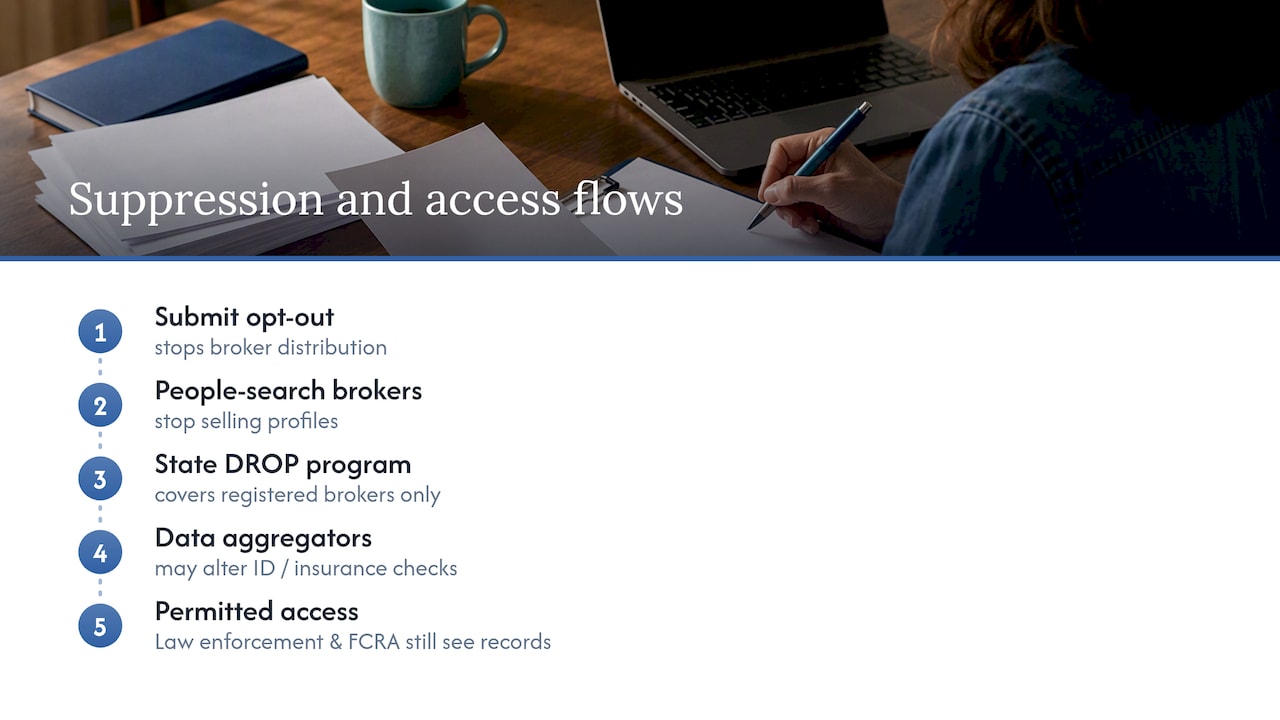
Opt-outs stop people-search sites from selling your existing information, but they do not delete the underlying government public records, and profiles can reappear when those records change; for more details, see this digital footprint guide for businesses and marketers.
That’s the FTC’s core warning about people-search sites, and it applies directly to PublicRecordsNow. Court filings, property deeds, and voter records stay public no matter how many opt-out forms you submit. A relative’s report or a new filing can re-trigger a matching profile later.
California’s DROP program reaches over 500 registered brokers at once, which saves time, but it only covers brokers registered with the state. Unregistered sites still need individual opt-outs.
One more caveat worth knowing: suppression requests filed with data aggregators like LexisNexis can affect identity or insurance verification processes that rely on that data, since suppression doesn’t remove records used by law enforcement or FCRA-regulated products.
Simple monitoring plan: how often to check and what to document
Set a recurring reminder. Opt-outs aren’t a one-time task.
- Save the profile URL, a screenshot, and the confirmation email together in one folder before and after you submit.
- Recheck your listing every 3 months. If you work in a high-visibility role or have faced harassment, check monthly instead.
- Use Google’s “remove results about you” tool for any cached search hits that linger after the source page is suppressed.
- Consider a paid removal or monitoring service only if you’re managing this across many sites. Ask what it covers, whether it provides proof of removal, and how often it rescans.
What our testing taught us about opting out safely
Manual opt-outs are usually the safest route when you’re dealing with one or two sites, since you control exactly what information you submit and can verify each step yourself. When a form asks for photo ID, redact the ID number and give only the fields requested, nothing more. Our process boils down to three moves every time: save the URL and screenshot, submit the form, then confirm the email and record the date.
— TechStackTeam
Where to learn more if you want to go further
If PublicRecordsNow is one of several profiles you’re trying to clean up, working through them one by one gets tedious fast. TechStackToday’s guide on how to remove yourself from the internet walks through the broader process, and our evaluation of paid data removal services breaks down when hiring one actually saves you time versus doing it yourself.

A paid service makes sense when you’re facing a dozen or more listings across different sites and don’t have hours to spend on forms and follow-ups. Before paying anyone, check their site coverage list, ask for proof of removal, and confirm how often they rescan for reappearances.
- Compare removal services side by side on TechStackToday’s service evaluations.
- Read the full internet removal guide for a broader cleanup strategy.
Visit a privacy-focused review site to compare your options and decide what fits your situation.
Sources
- What To Know About People Search Sites That Sell Your Information | Consumer Advice
- How to Opt Out of Public Records and Data Broker Sites – LegalClarity
- Data broker opt-out and state law summary (RecordingLaw)
- PublicRecordsNow opt-out page
FAQ
How do I stop PublicRecordsNow from charging me?
PublicRecordsNow’s opt-out form itself is free to submit. If you’re seeing charges, check whether you signed up for a separate background check or report subscription during a search, since those are billed differently from the opt-out process.
Why did a public records site charge me $20?
Charges usually come from purchasing a detailed background report or report subscription, not from the opt-out request. Review your account or email confirmations to find which service billed you, then contact that company’s support line to cancel and request a refund if appropriate.
How do I cancel my subscription to a public record report service?
Look for a “manage subscription” or “billing” link in your account settings or in the confirmation email you received at signup. If you can’t find it, contact the company’s customer support directly and ask them to cancel and confirm in writing.
Is PublicRecordsNow a legitimate company?
PublicRecordsNow operates an opt-out process consistent with other people-search sites, and it maintains a public opt-out page as required by data broker practices. Legitimacy in this industry mainly comes down to whether a site honors removal requests promptly, which you can verify by checking your profile URL after submitting.
Does opting out of PublicRecordsNow delete my public records completely?
No, opting out only suppresses your commercial profile from that site’s search results. The FTC notes that underlying government records, like court filings and deeds, remain public and can cause your profile to reappear later.