You can remove your BeenVerified People Search record for free by using BeenVerified’s opt-out page or by emailing privacy@beenverified.com. You’ll need to verify the request through an email link, and once you do, BeenVerified typically suppresses that record within 24 to 72 hours. This only clears the specific listing you opted out of. Other name variations, duplicate entries, or sister sites like PeopleLooker still need their own separate requests.
TL;DR:
- Only your specific BeenVerified listing is removed; other variations or related sites like PeopleLooker require separate requests.
- The opt-out process involves a verification email that must be clicked within 24 to 72 hours to complete removal.
- Adding filters such as age, city, or state helps locate the correct record, especially with common names or multiple entries.
- Suppression does not delete underlying public records, which remain accessible and may cause the listing to reappear after updates.
- If technical issues or repeated reappearances occur, emailing privacy@beenverified.com with detailed info offers a more reliable fallback.
Table of Contents
- Quick Steps to Opt Out of BeenVerified Right Now
- How Does the BeenVerified Opt-Out Process Actually Work?
- What to Do When the Opt-Out Form Won’t Cooperate
- What Opting Out Actually Removes (and What It Doesn’t)
- What to Send When the Opt-Out Tool Fails
- What Actually Happens After You Opt Out
- Want to Go Beyond BeenVerified?
- Where to Verify These Steps Yourself
- Sources
Quick Steps to Opt Out of BeenVerified Right Now
Don’t overthink this. It’s a five-minute task if your listing is easy to find. Here’s the fastest path:
- Go to BeenVerified’s opt-out search tool and enter your name.
- Scan the results and click into the record that matches you, including city, state, or age.
- Click “Proceed to Opt Out,” enter an email address you can check right away, complete the CAPTCHA, and hit send.
- Open your inbox, find the verification email, and click the confirmation link.
- Wait 24 to 72 hours, then search your name again to confirm the listing is gone.
If you have a middle name, nickname, or maiden name floating around, repeat the search for each variation. BeenVerified indexes records separately, so “Robert Smith” and “Bob Smith” might be two different listings.
How Does the BeenVerified Opt-Out Process Actually Work?
Here’s what happens screen by screen, so nothing catches you off guard.
1. Find the opt-out form. BeenVerified buries the link in its site footer under “Do Not Sell or Share My Personal Information”, or you can go straight to the opt-out search page. Bookmark it. You may need it again later.
2. Get past the Cloudflare check. BeenVerified and its sister brand PeopleLooker both gate their opt-out forms behind a Cloudflare human-verification challenge. If the page hangs on “Verifying you are human,” it’s usually a browser extension, VPN, or ad blocker interfering. Try a clean browser window or a different device before assuming the site is broken.
3. Search smart. Don’t just type your name and stop there. Add filters for age range, city, or state to narrow down the right record faster. Multiple listings with your name are common if you’ve moved or if relatives share your name.
4. Start the opt-out. Click “Proceed to Opt Out” on the correct listing. Enter an email inbox you check regularly, complete the CAPTCHA again, and click “Send Verification Email.”
5. Confirm through email. The verification message usually lands within a few minutes and comes from a BeenVerified domain. Open it and click the confirmation link. This step is mandatory. Skipping it means the opt-out never actually processes, no matter how far you got on the website.
6. Recheck after 24 to 72 hours. BeenVerified’s support page states opt-outs commonly reflect within 24 hours, though independent testing puts the realistic window closer to 72 hours. Clear your browser cache before rechecking. Cached search results can make a removed listing look like it’s still live.
Pro Tip: Use Gmail or Outlook for the verification email. Some smaller or work email providers filter automated messages into spam, and you might never see the confirmation link land.
What to Do When the Opt-Out Form Won’t Cooperate
Most failures come down to a handful of predictable problems, and fixing spam filters, switching browsers, and resubmitting solves the majority of them.
- No verification email arrives: Check spam and promotions folders first, wait a few minutes, then resubmit using a different email provider like Gmail.
- The page won’t load past the Cloudflare check: Switch browsers, disable privacy extensions temporarily, or try from your phone instead of a laptop with heavy ad-blocking installed.
- You find multiple records under your name: Opt each one out separately. The online tool only processes one listing per session, so repeat the full process for every duplicate.
- Nothing works after two or three tries: Email privacy@beenverified.com directly and describe exactly what’s failing.
If you’ve got five or more scattered listings across name variations, this stops being a quick task. That’s the point where a broader data broker removal strategy starts making more sense than fighting the form one record at a time.
What Opting Out Actually Removes (and What It Doesn’t)
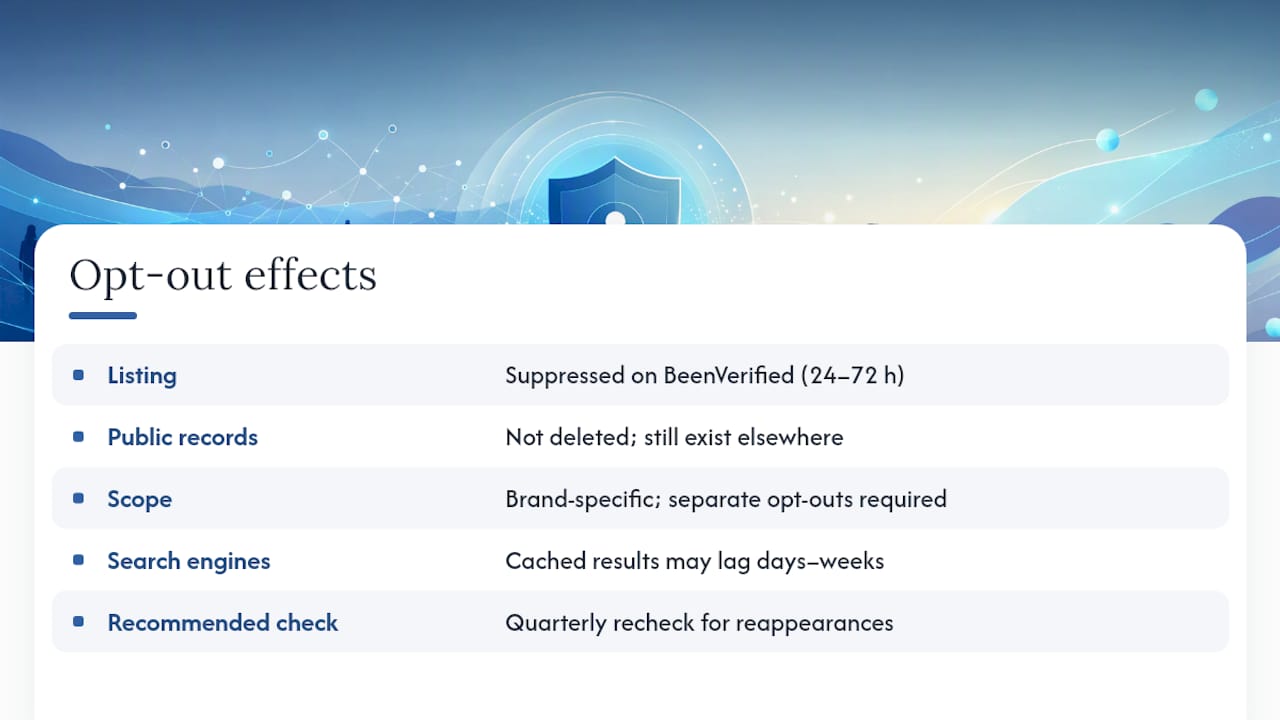
Opting out suppresses BeenVerified’s People Search listing. It does not delete the public records feeding that listing, since court filings, property records, and voter rolls still exist elsewhere and BeenVerified can pull from them again during a future data refresh.
Suppression is also brand-specific. Clearing your BeenVerified listing does nothing to PeopleLooker, since both platforms require separate opt-out submissions despite sharing a parent company. Expect the BeenVerified change itself within 24 to 72 hours. Google and other search engines that cached your old listing page may lag behind by days or weeks. A quarterly recheck catches most reappearances before they spread. Suppression differs from permanent deletion in exactly this way, which is why a “one and done” mindset backfires here.
What to Send When the Opt-Out Tool Fails
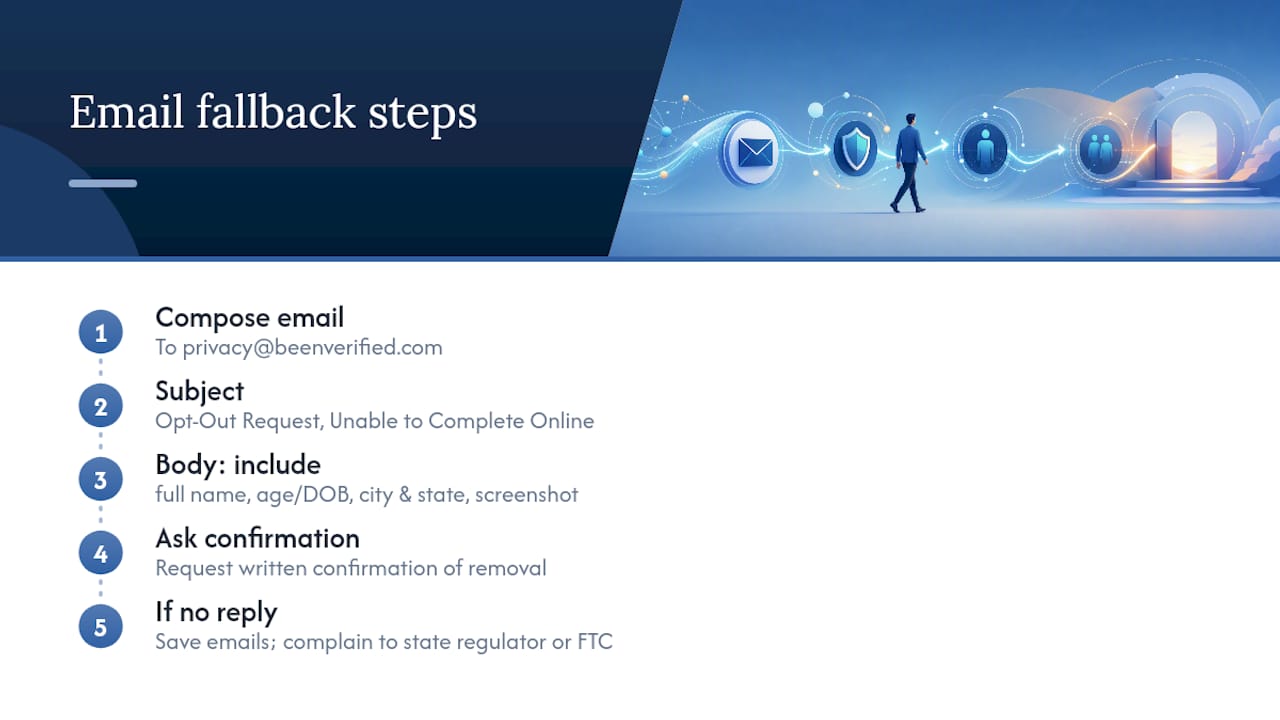
When the web form stalls or a listing keeps coming back, a direct email works better than repeated form attempts. Recording Law’s testing confirms that a clear, detailed email to privacy@beenverified.com is the most reliable fallback when the Cloudflare gate blocks access.
Send this to privacy@beenverified.com:
Subject: Opt-Out Request, Unable to Complete Online
Hello, I attempted to opt out of my BeenVerified listing through your website but ran into [describe the issue]. Please remove the record for [full name], approximate age or date of birth, and [city, state]. I’ve attached a screenshot of the listing for reference. Please confirm in writing once the removal is complete.
Include enough identifying detail (name, age, location) to make the request verifiable, since vague requests slow things down. If BeenVerified doesn’t respond or the listing reappears repeatedly within days, keep every email in one folder and consider a complaint to your state privacy regulator or the FTC.
What Actually Happens After You Opt Out
Most opt-out requests succeed on the first try. Some don’t, and that’s normal, not a sign you did something wrong. If you’re only dealing with one or two listings, doing this yourself takes less time than reading this article. If you’re staring down a dozen scattered records across BeenVerified, PeopleLooker, and half a dozen other brokers, a dedicated removal service starts paying for itself in saved hours. Either way, put a reminder on your calendar for three months out. Data brokers refresh their sources constantly, and the listing you cleared today can quietly reappear.
— TechStackTeam
Want to Go Beyond BeenVerified?
BeenVerified is one broker among dozens, and clearing your listing there does nothing for the other people-search sites quietly running the same public records through their own databases. Some sites test and rank data removal services using hands-on evaluation rather than paid placement, which matters when you’re deciding whether doing this manually across many sites is worth it.

If you’ve got more than a handful of listings to chase down, start with a breakdown of whether a data removal service is worth it for your specific situation. Prefer the full DIY route? A complete guide to removing yourself from the internet walks through every major broker, not just BeenVerified. Either path gets you the same result. One just takes a lot more Saturday afternoons.
Where to Verify These Steps Yourself
For direct confirmation, check BeenVerified’s official opt-out support page and its FAQ page. Independent testing from Recording Law confirms the Cloudflare gate and separate sister-brand requirements. For broader context, see our guide on what broker removal does to search results.
Sources
- How do I remove my name from BeenVerified’s people search results? – Customer Support
- How to Opt Out of BeenVerified (2026) | Recording Law
- BeenVerified Opt Out & Remove Your Info
- Looking To Opt-Out of Our People Search? – BeenVerified