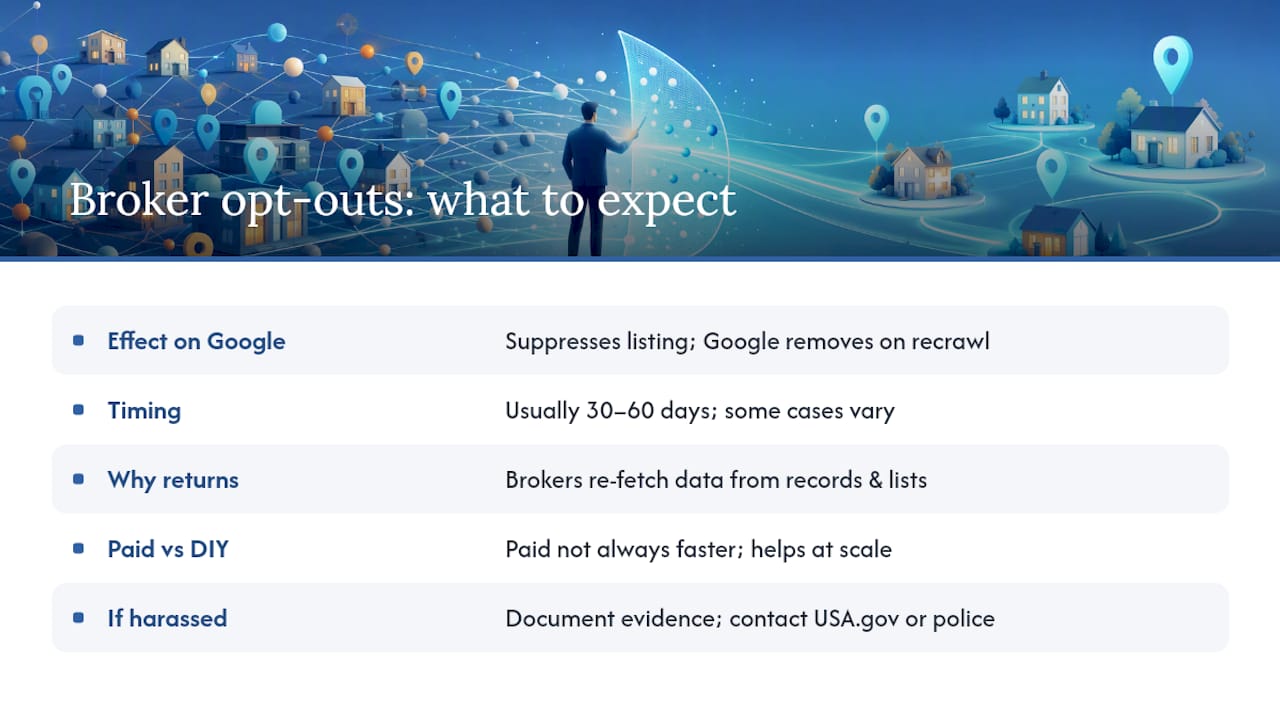
Broker removal suppresses the consumer-facing listings that show up when someone searches your name. It does not delete the original public records or the B2B data feeds that created those listings in the first place. When an opt-out goes through, you’ll typically see:
- The people-search profile page disappears from that broker’s site
- The related search result eventually drops from Google or Bing, once they re-crawl
- The underlying public record (court filing, property deed, voter registration) stays exactly where it was
Think suppression, not erasure. Plan on checking back, because these listings have a way of resurfacing.
Key Takeaways
Broker removal suppresses consumer-facing search listings but leaves source records untouched, which means ongoing rechecking beats a one-time opt-out effort.
| Point | Details |
|---|---|
| Suppression, not deletion | Opt-outs remove broker listings from search results but never touch original public records. |
| Expect search lag | Google and Bing can take weeks to re-crawl and drop a suppressed listing from results. |
| Re-listing is common | New data pulls and public record updates can bring a removed profile back within months. |
| DIY can outperform paid tools | Consumer Reports found manual opt-outs sometimes beat subscription services on speed and completeness. |
| Techstacktoday helps you compare options | Our hands-on reviews rank removal and monitoring services by coverage, speed, and re-list protection. |
Table of Contents
- How Broker Removal Affects Search Results, Step by Step
- What Data Broker Removal Cannot Touch
- How Long Does Broker Removal Take, and Will Listings Come Back?
- DIY Opt-Outs vs. Paid Removal Services: What Actually Differs
- Does Data Broker Removal Actually Work? What the Evidence Shows
- A Practical Checklist to Audit and Reduce Your Search Exposure
- How Often Should You Recheck Your Search Results?
- Where Techstacktoday Fits Into Your Removal Plan
- Frequently Asked Questions
- Sources
How Broker Removal Affects Search Results, Step by Step
Search engines don’t control what people-search sites publish. They just crawl and index it. So when a broker removes your profile, nothing changes in Google or Bing immediately. The search engine has to revisit that URL, notice it’s gone (usually a 404 or redirect), and drop it from the index. That process can take anywhere from a few days to several weeks.
Three outcomes are common:
- The broker page is suppressed and the search result vanishes within one to three crawl cycles
- The broker page is suppressed, but a cached snippet or preview lingers briefly in search results
- The original source site (a court records portal, a marketing database) still hosts the data, so a new listing gets indexed later even though the first one is gone
Verify what’s actually happening rather than assuming. Run a site: search for the broker’s domain plus your name, and separately search your name in quotes to see what’s ranking. This dual check catches both suppression success and the suppressed data categories that tend to slip back in.
Pro Tip: If a cached snippet still shows old information, use Google’s “Remove outdated content” tool to request a manual refresh instead of waiting on the natural re-crawl schedule.
What Data Broker Removal Cannot Touch
Opt-outs work on the broker’s consumer-facing product. They don’t reach the sources that fed that product in the first place. Here’s what stays put no matter how many removal requests you file:
- Court records, property deeds, marriage and voter records maintained by government agencies
- Wholesale data layers that brokers sell to each other or to marketers, separate from the public-facing website
- Old listings cached by third-party archives or screenshots taken before your request
The FTC’s research on data broker practices documents just how many independent pipelines feed these directories. That’s precisely why a single opt-out rarely holds for good.
Suppression is not deletion. If you’re dealing with a stalking risk, harassment, or active identity theft, an opt-out confirmation email is not the same as confirmation that your information is inaccessible.
New address records, updated public filings, and freshly purchased marketing lists can all repopulate a profile you already cleared. That’s the mechanism, not a glitch.
How Long Does Broker Removal Take, and Will Listings Come Back?
Most brokers quote processing windows of a few days to several weeks, though some can take longer. A “processed” confirmation email means your request entered their system, not that Google has caught up yet.
Realistic timeline:
- 0 to 2 weeks: The broker suppresses the profile on their end. Search results usually haven’t updated yet.
- 30 to 60 days: Re-check search results directly. This is when most re-crawls have happened and you can confirm whether the listing actually dropped.
- 3 to 12 months: Monitor for re-listing. New data pulls, especially from brokers that refresh their databases quarterly, can bring your profile right back.
Investigative testing has repeatedly found that a meaningful share of “removed” profiles reappear within months, largely because brokers pull from public records and purchased lists on their own schedule, independent of your opt-out. Budget for a recheck, not a one-and-done fix.
DIY Opt-Outs vs. Paid Removal Services: What Actually Differs
The choice usually comes down to three categories, and each behaves differently once you look past the marketing copy.
Manual DIY opt-outs cost nothing but your time. You fill out each broker’s form yourself, verify your identity when asked, and track submissions in a spreadsheet. Coverage depends entirely on how many sites you’re willing to chase, and effort scales with how exposed you are.
- Pro: full control, zero subscription cost, works well if you’re only dealing with a handful of sites
- Con: time-intensive, easy to lose track of dozens of submissions and their re-check dates
Subscription-based removal services (like Optery, DeleteMe, EasyOptOuts, or Incogni-style tools) automate submissions across a broader list of sites and re-submit periodically.
- Pro: covers more sites than most people would tackle alone, includes monitoring for re-listing
- Con: yearly cost, and coverage still misses smaller or newer broker sites; you’re trusting a third party with your personal data to process opt-outs
Concierge or white-glove services like BlackCloak or PrivacyBee combine automated removal with a human team handling harder cases, often bundled with broader digital-executive-protection features.
- Pro: best fit for high-visibility individuals (executives, public figures) facing repeated exposure
- Con: priced well above standard subscriptions, often overkill for average risk levels
Consumer Reports’ own evaluation of people-search removal services found that many paid tools don’t deliver full or lasting removal, and manual opt-outs sometimes outperformed them on speed. If your exposure is low and you have time, DIY holds up fine. If you’re managing dozens of listings or have safety concerns, a subscription service buys back your time, even with imperfect coverage.
Does Data Broker Removal Actually Work? What the Evidence Shows
Consumer Reports tested a batch of people-search removal services against manual opt-outs and found the paid tools frequently underperformed. Manual requests, submitted directly by testers, often removed listings faster and more completely than the automated services claimed to.
Independent academic work backs this up. A technical evaluation measuring PII removal accuracy found inconsistent results across services, with some failing to remove the correct records at all or leaving partial matches behind.
Key limitations worth knowing before you trust any removal claim:
- Most published tests measure coverage and initial removal speed, not long-term re-listing rates
- “Removed” often means suppressed at test time, not permanently gone
- Sample sizes in independent studies tend to be small, so treat findings as directional rather than exhaustive
The consistent theme across both Consumer Reports and academic testing: expect partial, temporary results, not a guarantee.
A Practical Checklist to Audit and Reduce Your Search Exposure
Work through these steps in order, and keep records as you go:
- Inventory your exposure. Search your full name in quotes, check the first two result pages, and run a
site:search against major people-search domains. - Collect direct URLs and screenshots of every profile you find, before you submit anything.
- Submit opt-outs individually, following each broker’s verification process. Some require an email confirmation; a few still ask for ID.
- Track every submission with the site name and date in a single spreadsheet, then follow up at the 30 to 60 day mark to confirm removal.
- Recheck periodically and resubmit to any broker where your listing reappeared.
A short opt-out template covers most brokers: state your full name and any aliases, the exact URL of your profile, a request for removal under their published privacy policy, and a note that you’ll follow up if the listing isn’t suppressed within their stated window.
Pro Tip: Use a dedicated email address for opt-out forms so confirmation replies don’t get buried, and keep one tracking spreadsheet instead of scattering notes across browser bookmarks.
If you’re facing harassment, doxxing, or signs of identity theft rather than routine exposure, treat it as urgent. Usa and local law enforcement are the right next stop, not another opt-out form.
How Often Should You Recheck Your Search Results?
Removal isn’t a task you finish. It’s a cadence you maintain. A workable schedule looks like this:
- 30 to 60 days after your first round of opt-outs: confirm which listings actually dropped from search results
- Quarterly for the first year: rerun your name searches and resubmit to any broker that relisted you
- Every 3 to 6 months after that: a lighter check is usually enough for typical exposure levels
If you’re in a high-visibility role, have faced repeated harassment, or work in a field where your address or contact details carry real risk, ongoing digital footprint monitoring and reputation management or a paid subscription starts to make more sense than periodic manual checks. Document repeat re-listings with dates and screenshots. That record matters if you ever need to escalate to a platform’s takedown process or to law enforcement.
Editorial perspective from our hands-on testing experience
In our own testing, the pattern held: broker suppression usually happened within days, but search engines lagged behind, and listings we thought were gone resurfaced within a few months more often than any service admitted upfront. Our stance: treat removal as ongoing maintenance, not a fix you complete once and forget.

Where Techstacktoday Fits Into Your Removal Plan
Running your own opt-out checklist gets you real results, but chasing dozens of broker sites by hand eats hours you probably don’t have. Techstacktoday tests removal and monitoring services the same way we approach every privacy tool: hands-on, with no paid placements skewing the rankings.

Our comparison guides break down coverage, speed, and monitoring quality across the services covered in this article, so you can see which ones actually hold up against Consumer Reports’ own findings rather than taking a marketing page at its word. If you’re weighing whether a subscription is worth it given what you now know about suppression versus deletion, our breakdown of when a data removal service pays off walks through the math for your specific exposure level. Start there before you commit to a year-long plan.
Frequently Asked Questions
Does removing my data from brokers delete it from Google entirely?
No. It suppresses the broker’s listing, and Google drops the result once it re-crawls that page. The original public record behind the listing stays intact elsewhere.
How long until search results reflect a broker opt-out?
Expect 30 to 60 days for most cases, though some re-crawls happen faster and stubborn listings can take longer, especially if cached snippets linger.
Why did my information reappear after I removed it?
Brokers refresh their databases from public records, purchased lists, and other sources on their own schedule, independent of your opt-out request.
Is a paid removal service better than doing it myself?
Not necessarily. Consumer Reports found manual opt-outs sometimes worked faster than paid services, though subscriptions save time if you’re managing many listings.
What should I do if broker-exposed data leads to harassment?
Document everything with dates and screenshots, then contact USA.gov’s identity theft resources or local law enforcement rather than relying on another opt-out request.
Sources
For evidence on effectiveness, start with Consumer Reports’ evaluation. For regulatory context, see the FTC’s data broker study. For practical opt-out steps, Safety Net Project’s guidance covers the how-to.
- Consumer Reports evaluation of people-search site removal services finds that they are largely ineffective
- FTC study on the data broker industry’s collection and use of consumer data