LastPass is safe enough for most people, but only if your master password is long and unique and you have strong multi-factor authentication turned on. The 2022 breach exposed encrypted vault backups protected by AES-256 encryption, so a weak master password is your real weak point. We tested this, and our read of the ETH Zurich research backs it up.
TL;DR:
- Because stolen vaults can be attacked offline without lockouts, replace any weak or reused master password with a long, unique passphrase immediately.
- Federal filings linked offline cracking of stolen vaults to a $150 million cryptocurrency theft; older accounts with weaker hashing settings were especially exposed.
- Enable strong multi factor authentication, preferably a FIDO2 hardware key; LastPass Authenticator is an alternative, while email and banking passwords should be rotated first.
- Move cryptocurrency recovery phrases out of secure notes and offline; if one was stored there, transfer funds to a new wallet with a new phrase.
- ETH Zurich’s server side attack paths remain theoretical, unlike the 2022 thefts; treat them as risks to monitor, not confirmed attacks on customers.
Table of Contents
- 1. What happened in the 2022 LastPass breach?
- 2. How does LastPass actually protect your vault?
- 3. What did independent researchers find?
- 4. What should you do right now if you use LastPass?
- 5. Who should keep LastPass and who should move on?
- 6. How does LastPass compare with other leading password managers?
- 7. What if your vault was already stolen?
- 8. How does LastPass handle patches and transparency?
- 9. How do business and personal plans differ on security?
- 10. TechStackToday’s take: what to prioritize in a password manager
- 11. Compare the alternatives with hands-on rankings
- FAQ
- Sources
1. What happened in the 2022 LastPass breach?
Don’t panic. Here is the timeline, kept short. Between August and December 2022, attackers hit LastPass in two stages: first a compromised developer device, then theft of customer vault backups from cloud storage. LastPass confirmed in its December 22, 2022 notice that archived backups in cloud storage were copied.
Here is what the attackers walked away with:
- Encrypted vault backups: usernames, passwords and secure notes, scrambled with AES-256.
- Unencrypted metadata: website URLs, plus customer account details such as billing information.
- Time to crack them offline: the thieves can try guesses against your vault on their own machines, with no lockout and no alerts.
That last point is the whole story. Nobody can break AES-256 directly. They guess your master password instead, and weak ones fall fast.
Real losses followed. KrebsOnSecurity reported that federal investigators linked a $150 million cyberheist to cracked LastPass vaults, and noted that older accounts with weaker hashing settings were especially exposed.
Key finding: Federal filings tied offline cracking of stolen LastPass backups to a $150 million cryptocurrency theft. The vaults that fell were the ones with weak master passwords and legacy settings.
One more thing deserves a straight answer: disclosure. LastPass first described the incident as limited, then widened the scope over several months as the second stage came to light. A phased disclosure leaves users unsure whether to act, and many people waited when they should have rotated passwords. That is a fair criticism, and it is why we weigh vendor transparency in every review we run.
2. How does LastPass actually protect your vault?
LastPass uses AES-256 encryption, and it happens on your device before anything reaches the cloud. LastPass says it never stores your master password. LastPass’s own explainer on password manager safety notes that overall safety depends heavily on master password strength. Read that as the vendor admitting where the weak spot is.
Here is how the pieces fit together:
- Client-side encryption: your vault is locked on your device. LastPass servers hold only the scrambled version.
- Master password: this is the key. Anyone who guesses it opens everything.
- PBKDF2 iterations: your password is run through a hashing process many times to slow guessing. A higher iteration count means each guess costs an attacker more time. Older accounts with lower counts were easier to crack.
- Unencrypted metadata: some fields, such as website URLs, are stored in plain form so the product can search and autofill quickly. That exposes where you have accounts, even if it does not expose your passwords.
Then there is “zero-knowledge,” the phrase vendors love. It means the vendor cannot read your vault contents. It does not mean the vendor is immune to every server-side attack. ETH Zurich points out that zero-knowledge is not a strictly defined technical standard, and implementations vary a lot. A related academic comparison of four cloud password managers reaches a similar conclusion: threats like server-side attacks or legacy compatibility can weaken the guarantee.
Want the deeper mechanics? Our explainer on how password managers store credentials securely walks through the encryption step by step.
Pro Tip: Treat your master password like a safe combination, not a login. Use a passphrase made of random words and never reuse it anywhere else.
3. What did independent researchers find?
ETH Zurich researchers examined cloud password managers that advertise zero-knowledge protection. Their finding, summarized in Password managers less secure than promised, is that a compromised or malicious server could, in theory, weaken those guarantees. The researchers published concrete attack paths and recommended mitigations.
Here is what that means in plain terms:
- Account recovery: recovery features can create a route around your master password.
- Sharing features: shared vault items add server-side steps that attackers may abuse.
- Integrity gaps: a hostile server might alter vault data without you noticing.
Now separate theory from damage. The ETH Zurich attack paths are described as theoretical: no one has shown them being used against LastPass customers. The 2022 breach is different. That one produced real losses, as the Krebs reporting and federal filings make clear.
Zero-knowledge is not a strictly defined technical standard, and server-side weaknesses can enable attacks that could allow a compromised server to access or alter vault data.
This is our paraphrase of the ETH Zurich summary, not a direct quotation.
LastPass reported remediation that included credential rotation and forensic work with outside partners. Analysts still flagged gaps, mostly around the metadata that stayed unencrypted and the slow disclosure. So the practical meaning is this: the observed harm came from weak master passwords meeting stolen data. The theoretical risks are worth watching, but they should not drive your decisions today.
4. What should you do right now if you use LastPass?
Work through these in order. The first two matter most.
- Change a weak master password immediately. Build a long, unique passphrase. Longer is better, and never reuse one from another account. If your account is older, check that your iteration count has been upgraded.
- Turn on strong multi-factor authentication. Prefer a FIDO2 hardware key. The LastPass Authenticator app is a solid second choice, and the FTC recommends two-factor authentication as an important extra layer. LastPass also supports passwordless login with biometrics, security keys or the Authenticator app.
- Rotate high-value logins. Start with email, banking, cloud storage and anything crypto related. Email first, because it resets everything else.
- Pull seed phrases out of your vault. Crypto recovery phrases stored in secure notes were the jackpot for thieves. Move them offline.
- Audit the vault. Delete sensitive attachments and old secure notes you no longer need. Export a local encrypted backup if you want a copy.
- Monitor and plan. Turn on dark web notifications, watch your accounts for odd activity, and decide whether you want a migration plan ready.
Pro Tip: Do the email and bank rotations first. Those two accounts are the master keys to everything else you own.
For a faster pass, our guide to password manager security fixes covers the quick wins. If you are weighing hardware keys, our piece on adopting passkeys without lockout shows how to move over safely.
5. Who should keep LastPass and who should move on?
Match your move to your risk. Here is how we sort it:
- Casual users: if your master password is strong and you use hardware or authenticator MFA, staying and finishing the checklist is reasonable.
- High-value targets, including crypto holders and administrators: remove seed phrases from the vault entirely, add hardware keys, and think hard about stronger isolation such as separate vaults or a self-hosted setup.
- Organizations: review vendor access controls, require FIDO2 keys, and keep a written credential rotation playbook you can run on short notice.
What the evidence says: Krebs and federal filings point to legacy accounts with weak hashing settings as the ones that fell. Your settings and your master password decide which group you land in.
If you want to leave, the move is not scary. Our walkthrough on migrating your password manager without losing a login covers every step.
6. How does LastPass compare with other leading password managers?
On encryption strength, LastPass sits level with its major rivals: all the big names use AES-256 or equivalent ciphers, so the cipher is rarely the deciding factor. What separates them is operational track record and design choices.
LastPass carries the heaviest baggage here. It is the manager with a major, well-documented breach, a phased disclosure and real thefts traced to it. Competitors have not faced an incident of that scale, though no vendor is exempt from the server-side risks ETH Zurich describes, since the researchers examined several vendors’ zero-knowledge claims.
When we compare managers, we look at breach history, how transparently the vendor reports problems, whether metadata is encrypted, which MFA methods are supported, and whether independent audits are published. LastPass does well on MFA support and has improved since 2022. It loses ground on history. Our side-by-side scores live in our best password managers roundup, so you can see the hands-on results without taking our word for it.
7. What if your vault was already stolen?
Assume the worst and act in layers. A stolen vault is a long-term problem, because attackers can keep guessing at it for years.
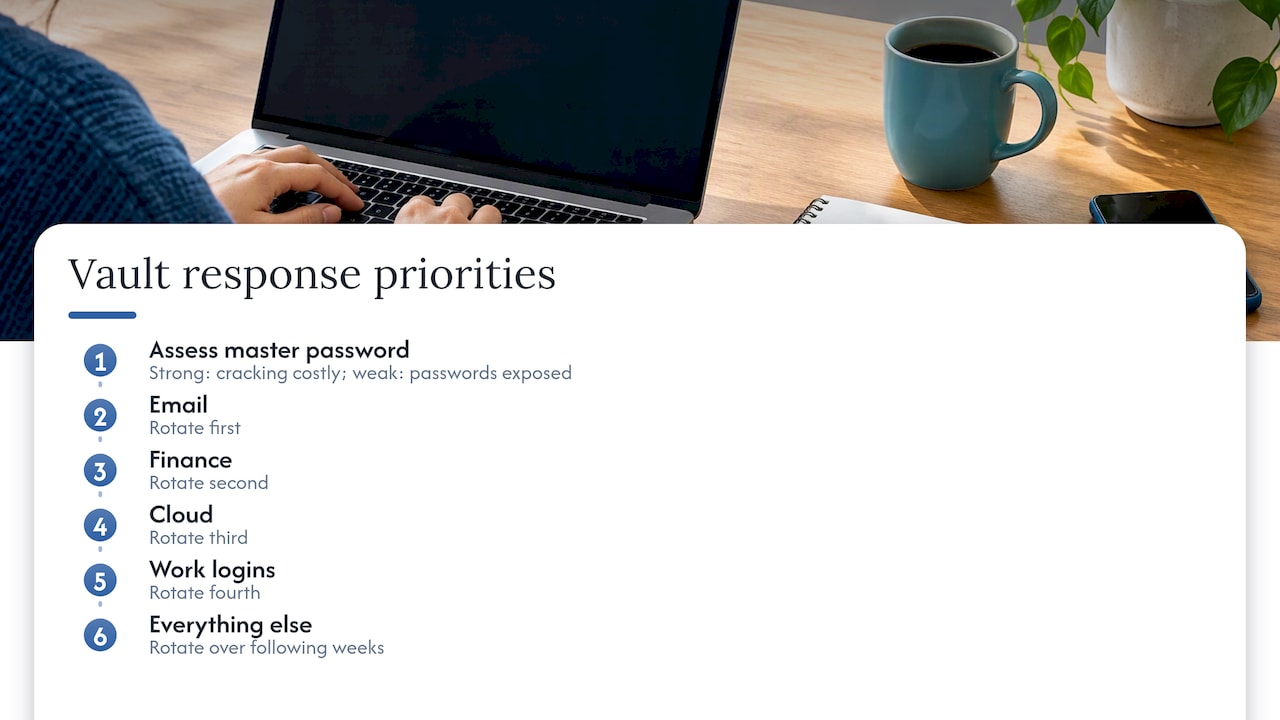
If your master password was strong and long, the practical risk drops sharply, since cracking becomes extremely expensive. If it was weak, treat every password in that vault as exposed. That means rotating accounts in priority order: email, finance, cloud, work logins, then everything else over the following weeks.
Beyond passwords, think about what the metadata reveals. Attackers know which sites you use, which can fuel phishing that names the right bank or service. Be skeptical of any message that mentions an account of yours, even when the details look accurate. Freeze your credit if financial logins were involved, and watch for password reset emails you did not request.
For crypto holders the stakes are higher. If a seed phrase sat in a secure note, move the funds to a new wallet with a new phrase, because the old one can never be made safe again. Keep new phrases offline. That is the lesson the large thefts taught.
Some readers also want to keep truly sensitive notes off the cloud altogether. A partner guide on keeping study notes private on iOS shows how on-device storage works for material you would rather never upload.
8. How does LastPass handle patches and transparency?
LastPass publishes security notices on its blog, and the December 2022 notice is the main public record of the incident. Since then the company has pushed fixes, strengthened iteration counts for older accounts and expanded MFA options. The exact frequency of updates is not publicly listed in a single schedule, so we judge it by what ships.
Transparency is where we stay cautious. The company’s first communications understated the scope, and the full picture came out in stages. A vendor earns trust by saying more, sooner, even when the news is bad. We watch for signals such as how fast a notice appears after a problem, whether it names what was taken, and whether it publishes forensic findings from outside partners. LastPass described forensic work with partners in its notice, which is the right move.
Keep your own side current too. Update the app and browser extension promptly, and check your account’s security dashboard for prompts about iteration counts or MFA. A patch only protects you once you have installed it.
9. How do business and personal plans differ on security?
Personal plans cover the basics well. The free plan allows unlimited password storage on one device type, mobile or desktop, with basic sharing and dark web monitoring. Passwordless login is available on all account types, and the free tier can use the LastPass Authenticator app. Features such as emergency access and personal email support are reserved for paid plans.
Business plans add the controls an organization needs: admin policies that enforce master password rules, required MFA, centralized user management and reporting. Those controls matter because one careless employee can undo everything else.
If you manage a team, turn on the strictest policies available. Require hardware keys where you can, set a high minimum master password length, and review who has admin rights. Individuals should do the equivalent by hand: choose a strong passphrase, enable the best MFA the plan allows, and consider paid features if you need emergency access for family.
10. TechStackToday’s take: what to prioritize in a password manager
We test password managers hands-on with real accounts, and we update our reviews regularly. Our rankings are scored on performance, and we do not take paid placements. After watching the LastPass story unfold, our conclusion is that cryptography alone does not decide safety. Operations do.
Ask how the vendor protects developer devices, who can touch backups, and how fast they tell you when something breaks. The 2022 breach started with a developer machine, not a broken cipher. Then pick a manager that supports strong MFA, offers an easy exit with clean export tools, and publishes independent audit reports. A manager you can leave in an afternoon is a manager that keeps its promises, because it has to earn your stay.
— TechStackTeam
11. Compare the alternatives with hands-on rankings

Our Best Password Managers roundup puts every service side by side with our testing scores and migration steps. Finish the checklist above before you move, then use the roundup to pick your next home.
- Hands-on scores for each service we tested
- Step-by-step migration guidance so you keep every login
FAQ
Can I use LastPass as an authenticator app?
Yes. LastPass offers a dedicated LastPass Authenticator app for multi-factor codes. It also supports passwordless login with biometrics, security keys or the Authenticator app. A hardware key is still the stronger choice for high-value accounts.
Was LastPass ever hacked?
Yes. In 2022 attackers compromised a developer device and then copied encrypted vault backups from cloud storage, as the Open Zero Trust Project advisory describes. Whether your vault is at risk now depends mostly on how strong your master password is.
Has any password manager been hacked?
Researchers say any cloud-based manager can carry server-side risk. ETH Zurich published theoretical attack paths against vendors claiming zero-knowledge, though those are not the same as a confirmed breach. LastPass’s 2022 incident is the best-documented real-world case.
Is LastPass free to use?
Yes, there is a free plan. It allows unlimited passwords on one device type, mobile or desktop. Paid plans add extras such as emergency access.
Sources
- LastPass Breach (2022) – Open Zero Trust Project
- 12-22-2022: Notice of Security Incident
- Feds Link $150M Cyberheist to 2022 LastPass Hacks – Krebs on Security