Password managers store credentials in encrypted vaults where the encryption key is derived directly from your master password, never from anything the provider holds. This means that even if a server is breached, attackers retrieve only ciphertext they cannot read. Tools like KeePass, Dashlane, and 1Password each implement this architecture differently, but the core principle is the same: client-side encryption prevents servers from ever seeing your plaintext passwords. Understanding how password managers store credentials is not just a technical curiosity. It is the foundation of every security decision you make about which tool to trust.
How password managers store credentials using encryption
The technical term for what password managers do is authenticated encryption with key derivation. Here is how it works, step by step.
- You enter your master password. The app never sends this to a server. It stays on your device.
- A key derivation function (KDF) processes your master password. KDFs like Argon2 or PBKDF2 are deliberately slow and memory-intensive. They transform your password into a cryptographic key. This slowness is intentional. It makes brute-force guessing extremely expensive for attackers.
- The derived key encrypts your vault. Algorithms like AES-256 or ChaCha20 encrypt every username, password, and URL inside the vault. The result is ciphertext: scrambled data that is meaningless without the key.
- Integrity protection is applied. Methods like HMAC-SHA-256 or AEAD (Authenticated Encryption with Associated Data) generate a cryptographic signature over the vault. If anyone tampers with the stored data, decryption fails. This is how authenticated encryption detects tampering before you ever see corrupted credentials.
- Only the encrypted vault is stored or synced. Whether saved locally or uploaded to a cloud server, the file contains ciphertext only. Your master password never travels with it.
One detail most users miss: the password you use to log into your password manager’s website is separate from the key that decrypts your vault. Atlassian, for example, stores login passwords as salted PBKDF2 hashes with 10,000 iterations. That authentication layer and the vault decryption layer are two distinct systems. An attacker who steals your login token still cannot open your vault without the master password.
Pro Tip: Choose a master password that is at least 16 characters and uses a passphrase format, such as four random words strung together. This directly raises the cost of any offline cracking attempt against your vault.

Local vaults vs. cloud storage: what actually differs
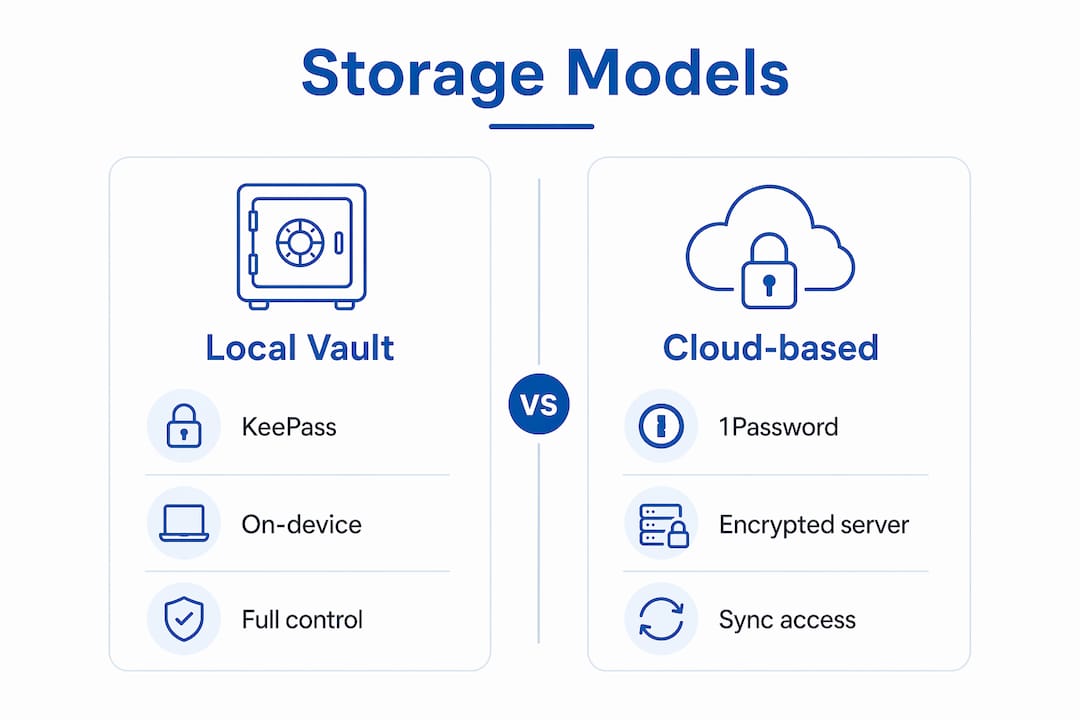
Not all password managers handle secure credential management the same way. The architecture splits into two main models.
| Feature | Local vault (e.g., KeePass) | Cloud-based (e.g., Dashlane, 1Password) |
|---|---|---|
| Where vault is stored | On your device only | Encrypted on provider servers |
| Sync across devices | Manual or self-hosted | Automatic, end-to-end encrypted |
| Account recovery option | None by default | Sometimes available, may weaken encryption |
| Offline access | Always available | Depends on cached copy |
| Audit transparency | Open-source, fully inspectable | Varies by provider |
KeePass uses the .kdbx file format. The file has an unencrypted header that stores decryption parameters and salts, followed by a fully encrypted payload containing all credential data. KDBX 4.x uses two separate derived keys: one for encryption and one for the HMAC integrity check. This separation means a flaw in one cryptographic operation does not automatically compromise the other.
Cloud-based managers like Dashlane and 1Password store only ciphertext on their servers. The master password is never transmitted. Vault syncing uses end-to-end encryption, meaning the provider cannot read what they store. This is the correct model. The trade-off is that cloud providers often add features like account recovery or emergency access, and those features require the provider to hold some additional key material. That is where the architecture gets complicated.
If you want to understand whether a specific tool fits your needs, Techstacktoday’s password manager reviews break down each product’s encryption architecture based on hands-on testing, not marketing copy.
What are the real security risks in password manager storage?
Understanding how password storage works is only half the picture. You also need to know where it can fail.
- Zero-knowledge is a goal, not a guarantee. Research from ETH Zurich found that server-driven attacks can view or modify passwords in some cloud managers despite zero-knowledge promises. Features like account recovery require the provider to hold recovery key material, which creates a server-side attack surface.
- Vault theft does not equal vault access. In a 2026 Dashlane breach, attackers downloaded encrypted vaults but could not read them without the master password. Strong KDFs like Argon2 made offline cracking impractical. This is the system working as designed.
- The header in local vault files aids attackers. KeePass .kdbx files store encryption parameters in the unencrypted header. This helps legitimate users decrypt their vault, but it also gives an offline attacker the exact parameters needed to run a targeted brute-force attack. A weak master password is the single biggest vulnerability in this model.
- Vendor definitions of zero-knowledge vary widely. Ars Technica’s 2026 analysis found that some providers use the term loosely, and subtle server-side flows can expose vault data in specific scenarios.
“Zero-knowledge promises by providers are engineering goals, not absolute guarantees, especially where account recovery or sharing features are present.” — ETH Zurich, 2026
The practical takeaway: the cryptography in reputable password managers is sound. The risks come from implementation choices around convenience features, not from the core encryption itself. A strong master password combined with a well-audited tool covers the vast majority of real-world threats.
How to choose a password manager with secure credential storage
Knowing the architecture helps you ask the right questions before you commit to a tool. Here is what to check.
- Confirm client-side key derivation. The master password must never leave your device. If a provider cannot clearly explain that vault decryption happens locally, treat that as a red flag.
- Check which KDF is used. Argon2 is the current gold standard. PBKDF2 is acceptable but older. Avoid any tool that does not publish its KDF parameters.
- Read independent security audits. Reputable managers publish third-party audit results. Look for audits from firms like Cure53 or NCC Group. Marketing claims are not a substitute.
- Understand the sync model. End-to-end encrypted syncing means only ciphertext crosses the network. Confirm this is the case, not just server-side encryption where the provider holds the key.
- Be cautious with sharing and recovery features. Password sharing and account recovery are useful, but they require additional key material. Read how these features work before enabling them. Techstacktoday’s guide on sharing passwords safely covers the security implications in detail.
- Enable multi-factor authentication (MFA). MFA protects your account login, which is the first barrier before an attacker can even attempt to access your vault.
Pro Tip: If you are evaluating whether you need a password manager at all, Techstacktoday’s breakdown of why password managers beat memory gives you a clear, no-hype answer based on real security data.
Key takeaways
Password managers protect your credentials through client-side encryption using a master password-derived key, ensuring that only ciphertext ever reaches a server or sync provider.
| Point | Details |
|---|---|
| Client-side encryption is the core | Your master password derives the encryption key locally; plaintext never leaves your device. |
| KDFs slow down attackers | Argon2 and PBKDF2 make brute-force cracking expensive, protecting stolen vaults. |
| Local vs. cloud trade-offs | KeePass gives full control; cloud managers add convenience but may introduce recovery-related risks. |
| Zero-knowledge has limits | ETH Zurich research confirms that account recovery and sharing features can weaken zero-knowledge guarantees. |
| Master password strength is critical | The entire encryption chain depends on a strong, unique master password combined with MFA. |
Why I think most people misread password manager security
— TechStackTeam
After testing over 50 privacy tools at Techstacktoday, the pattern I see most often is this: people either trust password managers completely or distrust them entirely after reading a breach headline. Both reactions miss the point.
The 2026 Dashlane vault download is a perfect example. Attackers got the ciphertext. They got nothing usable. That is the system working correctly. The real risk is not the encryption. It is the master password you chose in 2019 and never changed, or the account recovery option you enabled without reading how it works.
What I watch closely in 2026 is the growing tension between usability features and cryptographic purity. Providers are adding emergency access, family sharing, and biometric unlock. Each feature is genuinely useful. Each one also introduces a new key management question. The best tools publish detailed security whitepapers explaining exactly how these features interact with vault encryption. If a provider cannot answer that question clearly, that tells you something important.
The future I expect: more tools will adopt memory-hard KDFs like Argon2id as a baseline, and hardware security key integration will become standard rather than optional. That is a good direction. For now, the gap between the best and worst implementations is still wide enough to matter when you are choosing a tool.
— TechStackTeam
Find the right password manager for your security needs
You now understand the architecture behind secure credential management. The next step is finding a tool that actually implements it well. Techstacktoday has tested and ranked the best password managers in 2026 based on encryption architecture, audit history, and real-world performance. No paid rankings. No sponsored placements.
Password managers are one layer of a broader privacy setup. A trusted VPN service protects your network traffic while your password manager protects your credentials. Together, they cover two of the most common attack surfaces for everyday users. Techstacktoday reviews both categories with the same hands-on, performance-first approach, so you can build a privacy stack you actually trust.
FAQ
How does a password manager encrypt stored credentials?
A password manager derives an encryption key from your master password using a KDF like Argon2 or PBKDF2, then uses that key to encrypt your vault with AES-256 or ChaCha20. Only the encrypted result is stored or synced.
Can a password manager provider see my passwords?
No, if the tool uses client-side encryption correctly. The master password never leaves your device, so the provider stores only ciphertext they cannot decrypt. However, features like account recovery can introduce exceptions to this rule.
What happens if a password manager is breached?
Attackers obtain encrypted vault data, not plaintext passwords. As demonstrated in the 2026 Dashlane breach, the ciphertext is unreadable without the master password, and strong KDFs make offline cracking impractical.
What is the difference between local and cloud password managers?
Local managers like KeePass store the encrypted vault only on your device, giving you full control. Cloud managers like Dashlane sync encrypted vaults across devices automatically, trading some control for convenience.
Why does master password strength matter so much?
The entire encryption chain depends on the master password. A weak password makes brute-force attacks against a stolen vault feasible, regardless of how strong the underlying encryption algorithm is.