Go to PeopleConnect’s Suppression Center and run the free suppression tool. That’s your fastest path to a TruthFinder opt out. Have your legal name, date of birth, and a working email ready, since the process needs all three to verify you’re really the person on the record. Once confirmed, your name-based background report gets marked “suppressed” across PeopleConnect’s people-search sites, including TruthFinder.
TL;DR:
- Suppression requests require verifying your identity with your legal name, date of birth, and current email, which must be accurate for successful removal.
- Removing your listing from TruthFinder only affects data broker sites owned by PeopleConnect and does not delete the underlying public records or affect other brokers.
- Verification codes sent to outdated contact details can cause delays, making manual support contact essential if the automated process fails.
- Suppression typically takes about 48 hours, but old listings may linger in search engine caches for longer until Google removes outdated content.
- Canceling a TruthFinder membership stops billing but does not remove your public profile from search results or data brokers.
Table of Contents
- How Do You Opt Out of TruthFinder Step by Step?
- What Does TruthFinder Suppression Actually Remove?
- What If Verification Fails? Contact Support Directly
- Fixing the Most Common TruthFinder Opt-Out Problems
- How Do You Confirm the Removal Actually Worked?
- What We Confirmed When Testing This Process
- Suppression Is a Start, Not a Finish Line
- Where to Go Next After Suppressing TruthFinder
- Sources
- FAQ
How Do You Opt Out of TruthFinder Step by Step?
Typing truthfinder.com/opt-out into your browser doesn’t take you to a TruthFinder page at all. It redirects straight to PeopleConnect’s Suppression Center, the shared tool that handles suppression requests for TruthFinder and its sister sites. That’s not a bug. TruthFinder, Instant Checkmate, Intelius, and USSearch are all owned by the same parent company, so one request can pull your listing from all of them.
Here’s the actual flow, in order:
- Go to the Suppression Center. Use suppression.peopleconnect.us directly, or start at truthfinder.com/opt-out and let it redirect you.
- Enter your email and verify it fast. The confirmation link tends to expire after a short time, so check your inbox right after submitting. If you wait too long, you’ll need to resend it.
- Enter your date of birth and full legal name. This is what pulls up potential record matches. Use the name variation most likely to match public records (maiden names and middle initials sometimes surface different listings).
- Pick the correct record from the results. If more than one listing looks close to yours, choose the one with the most accurate current details.
- Request a verification code. It gets sent to an email or phone number already on file for that record, not necessarily the one you just typed in.
- Enter the code and set your status to “Suppressed.” Save the confirmation and take a screenshot for your own records before closing the tab.
Pro Tip: Screenshot the confirmation page the moment it loads. If the listing ever reappears, that timestamped image is the fastest way to prove you already completed the opt-out when you contact support.
What Does TruthFinder Suppression Actually Remove?
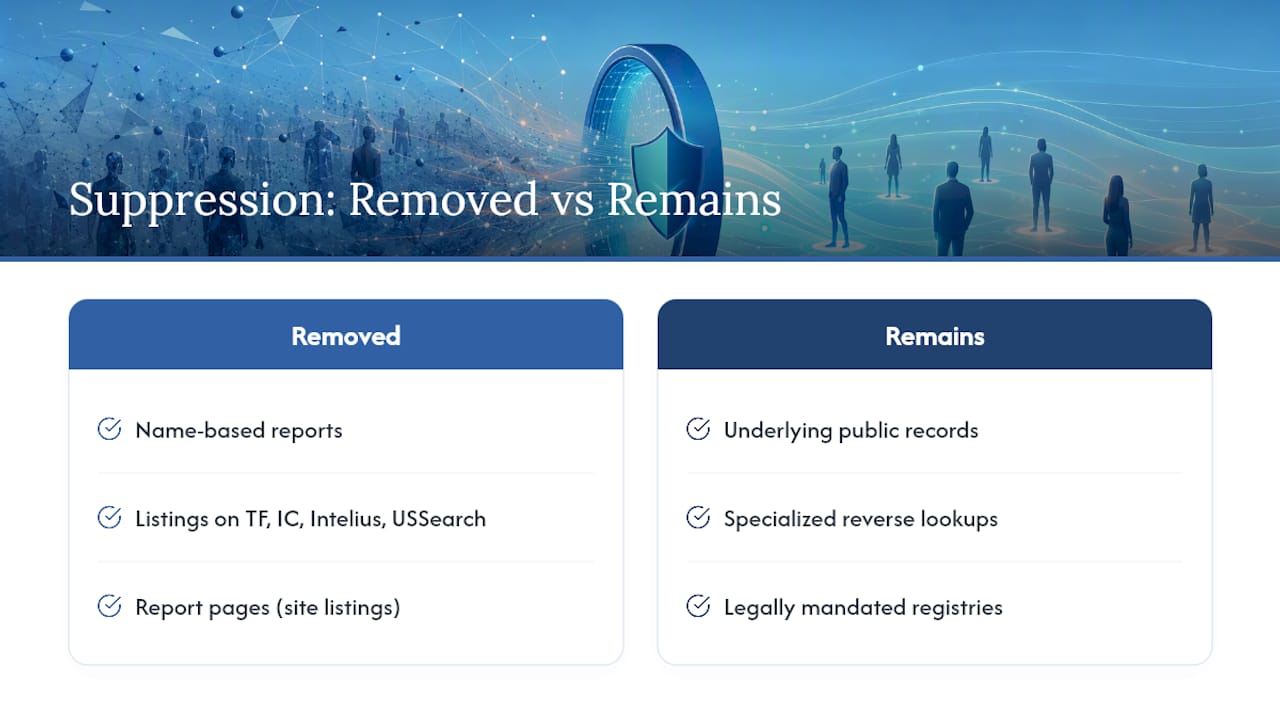
Suppression hides your name-based Background Report on TruthFinder, Instant Checkmate, Intelius, and USSearch. It doesn’t touch the public records those reports are built from. County court filings, property deeds, and voter rolls stay exactly where they are, and other data brokers can still scrape them independently.
Suppression also has narrower scope than most people expect. Specialized lookups like phone number or address reverse searches sometimes sit outside the standard suppression, and legally mandated public registries, sex offender lists included, stay visible no matter what. Processing usually takes about 48 hours. Even after that, your old listing might linger in Google’s search index for a while longer, since de-indexing a page is a separate process from removing it at the source.
What If Verification Fails? Contact Support Directly
The online form breaks down when your listed contact info is outdated, which happens more often than you’d think. If the verification code goes to an email you closed in 2019, the automated flow hits a dead end. That’s when you go around it.
- Email PeopleConnect support with your full legal name, date of birth, current and past addresses, and a screenshot of the listing you want removed.
- Look for the official support contact listed on TruthFinder’s help center before emailing anything, so your request lands with the right team.
- If phone support is available for your case, have the same identifying details on hand: dates, addresses, and something that proves who you are.
- Ask directly for manual suppression if the automated tool keeps failing. Support teams can process these requests without the code system.
- Judges, law enforcement officers, and other legally protected individuals have a separate documented channel that typically requires proof of status.
Fixing the Most Common TruthFinder Opt-Out Problems
Most stalled opt-outs trace back to one of four issues, and each has a specific fix.
- No verification email or code arrives. Check your spam folder first. If it’s still not there, use a personal inbox instead of a work one (corporate spam filters are notoriously aggressive), and restart the request from the beginning.
- All the listed contact info is old. Skip the automated tool and go straight to manual support with your addresses and a screenshot attached.
- No matching record shows up. Try searching with name variations, nicknames, maiden names, middle initials, before assuming there’s nothing to suppress. If nothing surfaces, ask support to search manually on their end.
- The listing comes back weeks later. Data brokers re-scrape public records constantly, so this happens. Re-run the suppression request, and consider pairing it with broader data broker removal work if it keeps recurring.
One more thing worth knowing: canceling a paid TruthFinder membership stops the billing. It does nothing to your public listing. Those are two completely separate actions, and mixing them up is the single most common reason people think they’ve opted out when they actually haven’t.
How Do You Confirm the Removal Actually Worked?
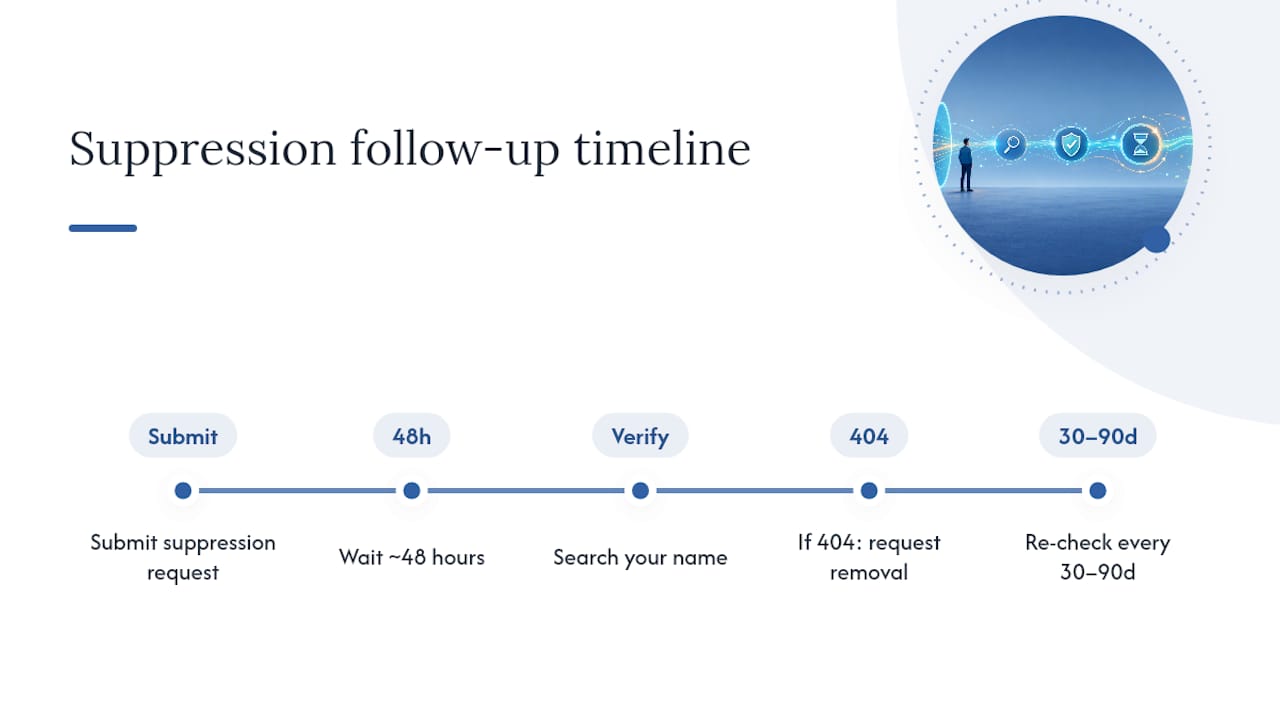
Search your name on TruthFinder and the other PeopleConnect sites a day or two after submitting the request. A successful suppression shows no report, or a page confirming the listing is suppressed. Keep that dated screenshot as proof.
If the old page still shows up in Google after it returns a 404 error, use Google’s Remove Outdated Content tool to speed up de-indexing. Then set a calendar reminder to re-check every 30 to 90 days, since brokers re-aggregate records on their own schedule, not yours.
What We Confirmed When Testing This Process
A walkthrough of the truthfinder.com/opt-out redirect shows it lands on PeopleConnect’s Suppression Center every time, with suppression applying across linked sites in a single request. Processing time for confirmed suppression is around 48 hours, consistent with other hands-on guides. The biggest friction point wasn’t the form itself. It was verification codes going to email addresses or phone numbers we’d stopped using years ago. Save your confirmation screenshot, and don’t hesitate to re-run the process if a listing resurfaces.
Suppression Is a Start, Not a Finish Line
Suppressing your TruthFinder listing takes care of one broker, but it doesn’t erase the public records feeding dozens of others. That’s the part people miss. A clean TruthFinder search result can sit right next to a fresh listing on a broker you’ve never heard of, built from the exact same court filing.
Treat this as maintenance, not a one-time task. Pair your opt-outs with strong password hygiene, account alerts, and a habit of re-checking your name every few months. Our broader removal checklist covers the other brokers worth tackling next.
— TechStackTeam
Where to Go Next After Suppressing TruthFinder
Suppressing one listing rarely feels like enough once you realize how many other broker sites pull from the same public records. Techstacktoday’s editorial team has spent years testing privacy tools hands on, and our step-by-step internet removal guide walks through the other major brokers worth opting out of next.

This isn’t a paid removal service, it’s editorial groundwork: comparisons, checklists, and guides built from real testing, not vendor talking points. If you’d rather not chase down every broker manually, our review of data removal services breaks down when paying someone else to handle it makes sense versus doing it yourself. And since data brokers often profile you through leaked or scraped browsing activity, pairing your opt-outs with a reviewed VPN cuts off one more data source at the root. Start with the checklist, then decide how hands-on you want the rest of your cleanup to be.
Sources
Use PeopleConnect’s Suppression Center to submit your request, TruthFinder’s help page for policy details, and Google’s removal tool for lingering search results. Residents in certain states may have added rights under laws covered in this CCPA compliance overview.
- PeopleConnect – Suppression Center
- How to Opt Out of TruthFinder (Recording Law)
- Google support: Remove content from Google
- ESET blog: Remove personal info from internet
- How to Exercise Your Data Privacy Rights on TruthFinder
FAQ
How do I unsubscribe from TruthFinder?
Canceling a paid membership stops billing through your account settings or by contacting support, but it’s separate from removing your public listing. To stop your report from appearing in searches, submit a suppression request at suppression.peopleconnect.us.
How did my information get on TruthFinder?
TruthFinder compiles its reports from public records like court filings, property records, and voter registrations, the same sources most people-search sites pull from. That’s why suppressing one broker rarely stops your data from showing up on others.
How do I get TruthFinder to stop popping up in search results?
Suppress your listing through PeopleConnect’s Suppression Center first, then use Google’s Remove Outdated Content tool once the page returns a 404 error to speed up de-indexing. Give the cached version time to clear, since search engines don’t update instantly.
Why is TruthFinder charging me?
You’re likely enrolled in a recurring membership tied to report access, which is separate from your listing status. Canceling that subscription through your account settings stops the charges, but you’ll still need to run a suppression request separately to remove your public report.