A VPN, or Virtual Private Network, is defined as a service that encrypts your internet traffic and routes it through a remote server, hiding your activity from ISPs, local networks, and certain surveillance actors. Understanding how VPNs protect against surveillance means knowing both what they block and what they cannot. Your ISP sees an encrypted connection to a VPN server, not your browsing history. Government agencies and local network attackers face the same wall. But platforms like Google and Facebook still track you through login sessions and cookies. This article breaks down the mechanics, the real limits, and the practical steps you need to take.
How does VPN encryption stop surveillance?
A VPN creates an encrypted tunnel between your device and a VPN server. Everything inside that tunnel is unreadable to anyone watching the connection from outside, including your ISP, your router, and anyone on the same Wi-Fi network as you.
Here is what that means in practice:
- Your ISP sees only that you are connected to a VPN server. It cannot read your traffic or log the specific sites you visit.
- Local network attackers on public Wi-Fi cannot intercept your data or see which domains you are visiting. VPNs reduce local eavesdropping risk by encrypting both traffic and DNS lookups.
- Websites you visit see the VPN server’s IP address, not yours. This breaks the direct link between your real location and your online behavior.
- Government surveillance at the network level faces the same encrypted barrier your ISP does.
Modern VPN protocols like WireGuard use state-of-the-art cryptography to make this tunnel extremely difficult to crack. WireGuard is faster and leaner than older protocols like OpenVPN, which matters for everyday use. The protocol you choose affects both speed and security, so picking a provider that supports current standards is not optional.
VPNs disrupt data collection granularity by masking IP addresses and encrypting traffic. They reduce surveillance detail rather than eliminating all monitoring. That distinction is critical. You become harder to profile, not invisible.

Pro Tip: Always confirm your VPN uses a modern protocol like WireGuard or OpenVPN. Avoid providers that still default to PPTP, which is considered broken by current security standards.
What surveillance can and cannot a VPN stop?
VPNs solve specific problems. They do not solve all of them. Knowing the difference saves you from a false sense of security.
Surveillance threats a VPN addresses:
- ISP logging. Your ISP cannot view content or specific destinations when a VPN is active. It only sees encrypted traffic going to the VPN server.
- Local network eavesdropping. On public Wi-Fi at a coffee shop or airport, a VPN blocks other users on the same network from reading your traffic.
- IP-based tracking. Websites and ad networks use your IP address to build location profiles. A VPN replaces your real IP with the server’s IP, breaking that link.
- Geo-restrictions. A VPN lets you appear to be in a different country, bypassing regional content blocks and censorship in restrictive regimes.
Surveillance threats a VPN does not address:
A VPN only encrypts the segment between your device and the VPN server. Once traffic exits the VPN server and reaches its destination, it is no longer under VPN protection. More importantly, if you are logged into Google, Facebook, or any other platform, those services track you through your account, not your IP. Cookies, browser fingerprinting, and login sessions all bypass VPN protection entirely.
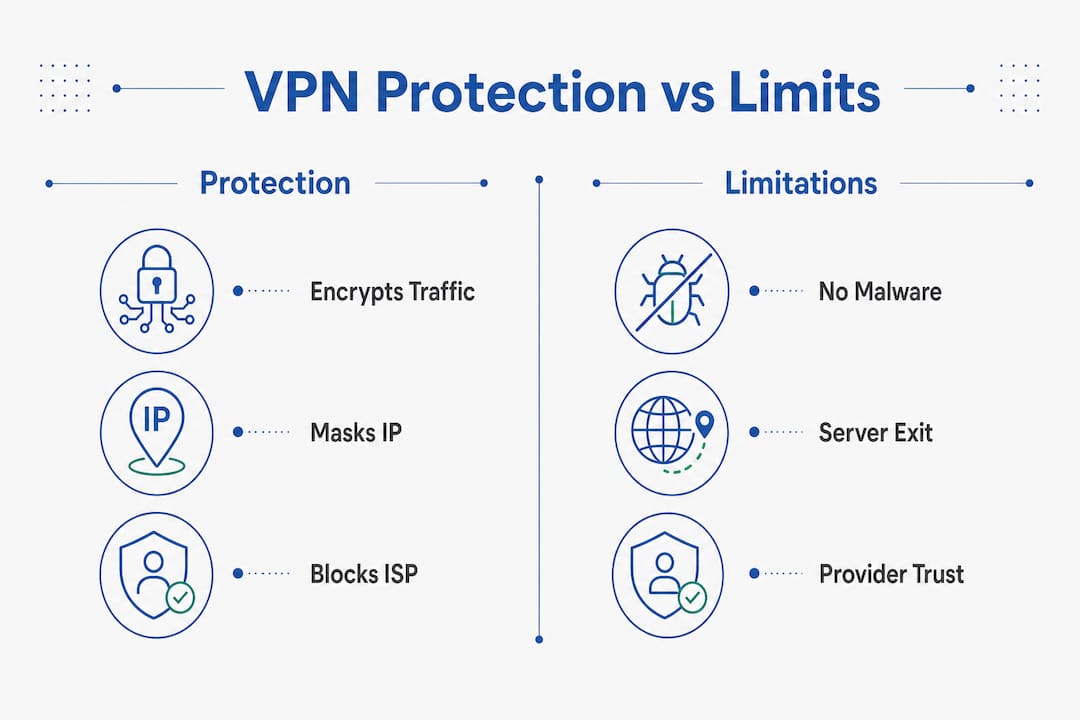
VPNs also do not protect against malware or phishing. They encrypt traffic but do not scan downloads or verify whether a site is legitimate. You still need antivirus software and a reliable password manager for complete protection.
Using a VPN also shifts your trust from your ISP to your VPN provider. Your provider can see your traffic if it chooses to log it. That is not a reason to avoid VPNs. It is a reason to choose your provider carefully.
Pro Tip: Use your browser’s private or incognito mode alongside your VPN to reduce cookie-based tracking. Neither tool alone is enough, but together they cut your exposure significantly.
What are the biggest risks in VPN usage?
Not all VPN risks come from hackers. Many come from the VPN provider itself, or from how you set up and use the service.
Technical risks to watch for:
- Weak passwords and no MFA. VPN gateway vulnerabilities linked to weak passwords and lack of MFA are top initial attack vectors for ransomware. Enforcing multi-factor authentication reduces credential-stuffing risk by more than 90%.
- DNS and WebRTC leaks. Even with a VPN active, your real IP address can leak through DNS queries or WebRTC connections in your browser. These leaks expose your real IP and browsing domains without any warning.
- Unpatched software. Outdated VPN clients contain known vulnerabilities. Always keep your VPN app updated.
Structural risks that matter more than you think:
| Risk Type | What It Means | What to Look For |
|---|---|---|
| Opaque ownership | Provider may be controlled by entities with conflicting interests | Publicly named leadership and ownership |
| Unverifiable logging | “No-logs” claims without proof are marketing, not guarantees | Independent third-party audits |
| Jurisdiction exposure | Providers in certain countries can be legally compelled to log data | Providers based in privacy-friendly jurisdictions |
| RAM-only infrastructure | Standard disk storage can retain logs even after deletion | Providers using RAM-only servers for stronger guarantees |
Opaque ownership and unverifiable logging policies pose structural risks that can exceed technical flaws. A VPN with perfect encryption but a provider that logs your data under legal pressure offers you very little real protection. Some providers claim no-log policies but retain connection or bandwidth usage data that can still identify you. Audited RAM-only infrastructures offer stronger guarantees because no data persists after a reboot.
When and how should you use a VPN for best results?
A VPN delivers the most value in specific situations. Using it everywhere is fine, but knowing where it matters most helps you prioritize.
Use a VPN in these situations:
- Public Wi-Fi. Any time you connect at an airport, hotel, or café, a VPN is your first line of defense against local attackers.
- ISP surveillance. If you do not want your ISP building a profile of your browsing habits, keep your VPN on at home.
- Restrictive networks. In countries or workplaces that block certain content, a VPN provides access while hiding what you are accessing.
- Sensitive research. Journalists, activists, and anyone researching sensitive topics benefit from the IP masking and traffic encryption a VPN provides.
Build a layered security approach:
A VPN alone is not enough. Pair it with antivirus software to catch malware, a multi-layer privacy approach to protect your identity, and a password manager to prevent credential theft. Each tool covers a gap the others leave open.
Before you subscribe to any VPN provider, check these criteria:
- Does the provider publish independent audit results for its no-logs policy?
- Does it support WireGuard or another modern protocol?
- Is the ownership structure publicly disclosed?
- Does it offer a kill switch that cuts your internet if the VPN drops?
After setup, test for DNS and WebRTC leaks using free tools like ipleak.net or dnsleaktest.com. A VPN that leaks your real IP is not protecting you, regardless of what the marketing says.
Pro Tip: Always enable your VPN’s kill switch. If the VPN connection drops unexpectedly, the kill switch cuts your internet connection entirely, preventing your real IP from being exposed even for a few seconds.
Key Takeaways
VPNs protect against surveillance by encrypting traffic and masking IP addresses, but they shift trust to the provider and cannot stop account-level tracking, malware, or phishing.
| Point | Details |
|---|---|
| Encryption blocks ISP and local surveillance | A VPN hides your traffic from ISPs and local network attackers by creating an encrypted tunnel. |
| VPNs do not stop account-level tracking | Cookies, login sessions, and browser fingerprinting bypass VPN protection entirely. |
| Provider trust is the biggest structural risk | Opaque ownership and unaudited logging policies can expose you more than technical flaws. |
| DNS and WebRTC leaks undermine protection | Test your VPN after setup to confirm your real IP is not leaking through browser or DNS channels. |
| Layered security is required | Pair your VPN with antivirus software and a password manager for complete privacy coverage. |
VPNs are a shield, not a cloak: my honest assessment
After reviewing dozens of VPN services at Techstacktoday, the pattern is consistent. Most users overestimate what a VPN does and underestimate the risk of choosing the wrong provider.
The biggest misconception is that a VPN makes you anonymous. It does not. It makes you harder to profile at the network level. That is genuinely valuable, especially on public Wi-Fi or under ISP surveillance. But the moment you log into any account, your identity is visible to that platform regardless of what server your traffic routes through.
What concerns me more is the structural risk that most reviews gloss over. A VPN with no independent audit of its logging policy is a promise, not a guarantee. Jurisdiction matters. Ownership matters. A provider registered in a country with mandatory data retention laws can be compelled to hand over your data, no matter what its website claims.
The right way to think about a VPN is as one layer in a stack. It handles transport-level privacy. You still need to manage your browser behavior, your accounts, and your endpoint security separately. The VPN category page at Techstacktoday covers what to look for beyond the marketing claims, including protocol support, audit history, and ownership transparency.
VPNs are worth using. Just use them with clear eyes about what they actually do.
— TechStackTeam
Find a VPN you can actually trust
Choosing a VPN based on marketing alone is how you end up with a provider that logs everything and calls it “no-logs.”
Techstacktoday tests VPN services in real-world conditions, checking encryption protocols, leak behavior, kill switch reliability, and audit transparency. No paid rankings. No sponsored placements. Just performance-based assessments you can rely on. Browse the full VPN reviews and deals to find providers that match your actual threat model. If you are still deciding between free and paid options, the free vs. paid VPN guide breaks down exactly what you give up and what you gain at each tier.
FAQ
Does a VPN hide my activity from my ISP?
Yes. A VPN encrypts your traffic so your ISP sees only a connection to a VPN server, not the specific sites you visit or content you access.
Can a VPN make me completely anonymous online?
No. A VPN masks your IP address but cannot hide your identity when you are logged into accounts, tracked by cookies, or identified through browser fingerprinting.
What is a DNS leak and why does it matter?
A DNS leak occurs when your device sends DNS queries outside the VPN tunnel, exposing the domains you visit to your ISP or local network observers even while your VPN is active.
Are free VPNs safe for privacy?
Free VPNs frequently lack independent audits, use weaker protocols, and may log and sell user data to cover operating costs. A paid provider with a verified no-logs policy offers significantly stronger privacy guarantees.
What should I look for in a VPN provider?
Prioritize providers with independently audited no-logs policies, modern protocols like WireGuard, publicly disclosed ownership, and a kill switch feature to prevent IP exposure if the connection drops.