A strong password for teens is defined as a unique, 16-plus-character credential that combines length, randomness, and a password manager to stay secure across every account. Most parents assume their teens know the basics. They don’t. A 2026 field study of 1,000 students found that 85% failed real-time password creation tests despite claiming awareness. That gap between knowing and doing is exactly where you need to step in. Teaching your teen to create strong passwords for teens is not a one-time talk. It’s a set of habits built with the right tools, clear examples, and your active involvement.
What makes a strong password for teens?
Length beats complexity every time. NIST guidelines recommend 16-plus characters for users aged 13 and up, with a focus on length and randomness rather than forced symbols or capital letters. A password like “Tr0ub4dor&3” looks complex but is actually easier for automated tools to crack than a long, random phrase. That’s the counterintuitive truth most teens never hear.
Here’s what a genuinely strong password includes:
- Length: 16 characters minimum, ideally 20 or more
- Randomness: No dictionary words, names, birthdays, or pet names
- Uniqueness: One password per account, never reused
- No personal info: Avoid anything tied to your teen’s identity online
Weak password habits teens fall into most often include using their name plus a birth year (“Jordan2009”), repeating the same password across Instagram, school portals, and email, and making tiny changes like swapping a letter for a number (“P@ssw0rd”). These patterns are the first ones attackers test.
Pro Tip: Teach your teen the passphrase method. Pick four to six completely random words, like “cloud-bench-river-lamp-toast,” and string them together. Passphrases of four to six random words carry roughly 64–77 bits of entropy, making them both memorable and genuinely hard to crack.
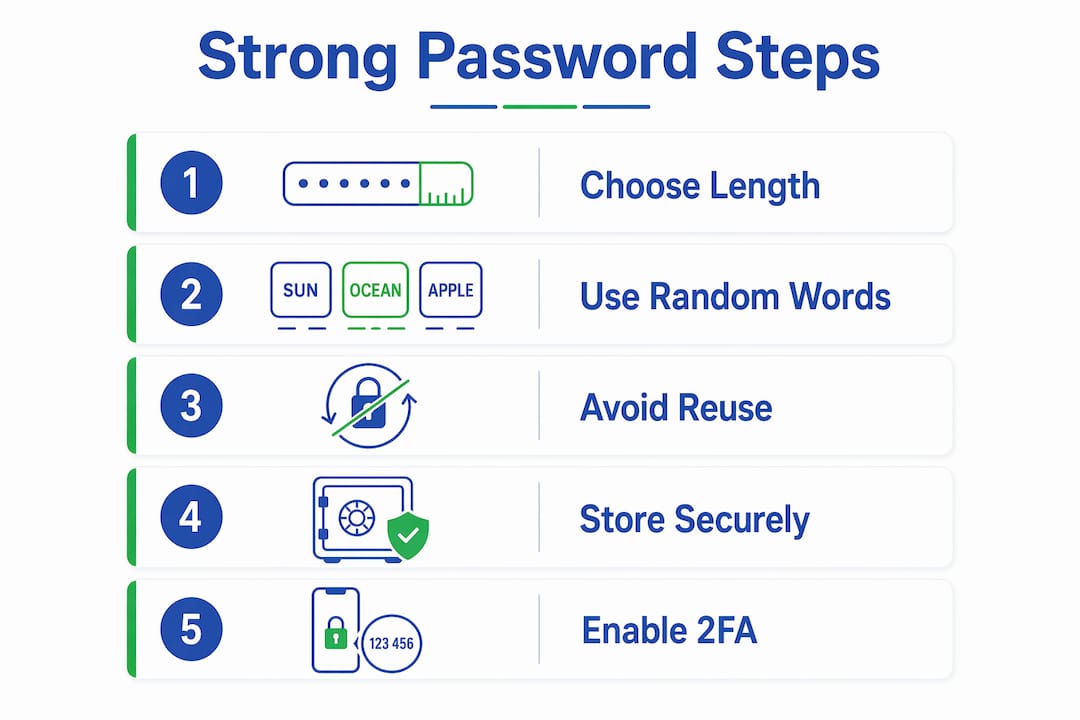
Reusing passwords is the single most dangerous habit. When one site gets breached, attackers run those credentials against hundreds of other sites automatically. This is called credential stuffing, and it works because password reuse is widespread among teens. One weak link exposes everything.
How to help your teen create and store secure passwords
Knowing what makes a password strong is step one. Actually creating and remembering dozens of them is where most teens give up. That’s why tools matter more than willpower.

Use a password manager
A password manager generates, stores, and autofills unique passwords for every account. Your teen only needs to remember one master password. Everything else is handled automatically. This eliminates the mental load that leads to reuse and weak shortcuts.
Here’s how to get your teen started:
- Choose a family-friendly password manager. Look for one with a family plan that lets you share access without exposing individual passwords. Techstacktoday reviews and ranks top password managers based on real-world testing, not paid placements.
- Create a strong master passphrase together. This is the one password your teen must memorize. Use the four-to-six random word method. Write it down once, store it somewhere physically safe, and then commit it to memory.
- Import or generate new passwords for each account. Have your teen log into each account and replace old passwords with manager-generated ones. Most managers make this a one-click process.
- Enable autofill on their devices. This removes friction. If logging in is easy, teens actually use the manager instead of bypassing it.
Pro Tip: The master passphrase should feel like a sentence your teen can picture, not a random string of characters. “Umbrella-Falcon-Pickle-Sunrise” is both memorable and strong. The master passphrase works best when it’s a phrase your teen can visualize, not something they have to decode every time.
For younger teens, a written password list stored in a locked drawer is an acceptable starting point. Younger teens benefit from written passwords stored safely at home before transitioning to a digital manager. The goal is to build the habit of unique passwords first, then upgrade the storage method as they mature.
| Approach | Best for | Key benefit | Main risk |
|---|---|---|---|
| Written list (locked away) | Ages 12–14 | No tech required | Physical theft or loss |
| Family password manager | Ages 14 and up | Auto-generates and fills | Forgetting master password |
| Browser-saved passwords | Not recommended | Convenient | Easily exposed if device is shared |
| Memory only | Not recommended | No setup needed | Leads to reuse and weak choices |
How to teach teens good password habits and two-factor authentication
Creating a strong password is only half the job. The other half is building habits that stick, and that requires your ongoing involvement as a parent.
Start with two-factor authentication, known as 2FA. This adds a second verification step after the password, so even a stolen password can’t unlock an account alone. App-based authenticators and hardware keys outperform SMS for security. SMS codes can be intercepted. An authenticator app like Google Authenticator or a physical key cannot be remotely hijacked. Set up 2FA on your teen’s email first. Email is the master key to every other account.
Here are the habits worth building together:
- Monthly check-ins: Sit down once a month and review which accounts have 2FA enabled and which passwords are still weak or reused.
- Phishing recognition: Show your teen real examples of phishing emails. The ability to spot a fake login page is as valuable as a strong password.
- Breach response plan: Agree in advance on what to do if an account is compromised. Change the password immediately, check linked accounts, and revoke any active sessions.
- No sharing, ever: Passwords shared with friends or partners are no longer private. Even trusted people can accidentally expose credentials.
Security is not a choice between “safe” and “hacked.” Security is a process of reducing risk and recovering quickly when something goes wrong. Teaching your teen this mindset removes the shame from mistakes and keeps them engaged instead of defensive.
Address the “I’m not a target” myth directly. Teen accounts hold contacts, linked payment methods, and access to school systems. Weak passwords risk far more than a single profile. One compromised account can expose family members, linked apps, and stored financial data. Make that concrete for your teen with a real example, not a lecture.
Structured, collaborative habits improve password hygiene far more than passive advice. You modeling good behavior matters. If your teen sees you using a password manager and enabling 2FA, they treat it as normal, not as a chore.
Common mistakes to watch for and how to fix them
Even teens who try to follow good practices fall into predictable traps. Knowing what to look for helps you correct problems before they become breaches.
- Substitution passwords. Replacing letters with symbols, like “P@ssw0rd,” feels clever but fools no one. Attackers run these substitution patterns automatically. Replace any password that follows this format immediately.
- Forced rotation backfire. Requiring your teen to change passwords every 30 or 90 days produces weaker results. NIST’s 2024 revision dropped the periodic reset requirement because users respond by making tiny, predictable changes. Only change a password when there’s evidence of compromise.
- Reuse across accounts. If your teen uses the same password for school email and social media, one breach unlocks both. Check for reuse by asking your teen to open their password manager and look for duplicate entries. Most managers flag this automatically.
- Sharing with peers. Passwords shared with friends, even close ones, are effectively public. Relationship dynamics change. A password shared in trust can become a tool for harassment or account takeover.
- Ignoring breach alerts. Password managers and email providers send breach notifications. Teach your teen to treat these as urgent, not optional. A 24-hour delay after a breach alert dramatically increases damage.
Pro Tip: Use a breach-checking service like Have I Been Pwned to show your teen whether their email address has already appeared in a known data leak. Seeing their own email in a breach list is more motivating than any warning you can give.
Key Takeaways
Strong password security for teens requires long, unique passphrases, a password manager for storage, and two-factor authentication on every critical account.
| Point | Details |
|---|---|
| Length over complexity | Use 16-plus characters; length beats symbols and forced complexity every time. |
| One password per account | Reusing passwords enables credential stuffing attacks across multiple platforms. |
| Password managers are essential | They generate, store, and autofill unique passwords so teens only memorize one master passphrase. |
| 2FA adds critical protection | App-based authenticators are safer than SMS and should be enabled on email first. |
| Habits beat one-time fixes | Monthly check-ins, breach alerts, and parental modeling build lasting security behavior. |
What I’ve learned from watching teens and password fatigue up close
Password fatigue is real, and it’s the root cause of most teen security failures. When teens face dozens of accounts and no system for managing them, they default to the path of least resistance: one weak password, used everywhere. That’s not laziness. That’s a rational response to an unreasonable cognitive load.
The fix isn’t stricter rules. It’s reducing friction. A password manager does more for teen security in one afternoon of setup than a year of lectures. Once the system is in place and autofill works, teens stop thinking about passwords entirely. That’s the goal.
What I’ve also seen is that framing matters enormously. Teens disengage when security feels like punishment or surveillance. They engage when it feels like a skill they own. Framing a password manager as “your personal vault that nobody else can access” lands differently than “you have to use this because I said so.”
Start early, keep it collaborative, and treat every breach or close call as a learning moment rather than a failure. The teens who build real security resilience are the ones whose parents treated this as an ongoing conversation, not a one-time checklist. A parental controls and password security guide can help you structure that conversation with clear, age-appropriate steps.
— TechStackTeam
Password managers and privacy tools for your teen’s security
Choosing the right password manager for your family doesn’t have to be complicated. Techstacktoday tests and ranks privacy tools based on real performance, with no paid placements skewing the results.

The best password managers for teens and families include both free and paid options, many with family plans that let you oversee your teen’s security without invading their privacy. These tools integrate directly with 2FA apps, making the full security setup a single, manageable system. If you want to understand how these tools protect stored credentials at a technical level, Techstacktoday’s guide on how password managers store credentials breaks it down clearly. For families thinking beyond passwords, Techstacktoday also covers VPN services reviewed and ranked to protect your teen’s connection on public networks.
FAQ
What is the minimum password length for teens?
NIST recommends a minimum of 16 characters for users aged 13 and up. Longer passwords with random words are stronger than short passwords with complex symbols.
Why shouldn’t teens change passwords regularly?
NIST’s 2024 revision removed the periodic reset requirement because forced rotation leads to predictable, weaker passwords. Change a password only when a breach or compromise is confirmed.
What is the safest two-factor authentication method for teens?
App-based authenticators are safer than SMS codes, which can be intercepted. Set up an authenticator app on your teen’s phone and enable it on their email account first.
Can teens write down their passwords?
Younger teens can keep a written password list stored in a physically secure location. As they mature, transition them to a digital password manager for better security and convenience.
How do I know if my teen’s account has been breached?
Use a free breach-checking service like Have I Been Pwned to search your teen’s email address against known data leaks. Most password managers also send automatic breach alerts when stored credentials appear in a leak.