You can’t stop fingerprinting completely, but for everyday browsing you can sharply cut your risk. Tor gives you the strongest protection available, while a privacy-first browser plus the right settings handle daily use well. Start now: run Cover Your Tracks to see your current exposure before changing anything. Expect a trade-off between convenience and anonymity.
TL;DR:
- Using Tor provides the strongest protection because it creates a nearly identical fingerprint for all users, making individual tracking extremely difficult.
- Modern browsers are incorporating built-in defenses such as reducing timer precision, hiding or standardizing user-agent strings, and blocking sensitive APIs by default.
- Running fingerprint testing tools before and after changing settings is essential to evaluate actual improvements in your privacy level and avoid false security assumptions.
- Combining multiple defenses—such as limiting font and language leakage, separating browsing profiles, and using trusted extensions—significantly reduces your browser’s uniqueness score.
- Complete anonymity remains unattainable, but pairing browser protections with VPNs and network defenses can substantially lower your fingerprinting risk.
Table of Contents
- What Browser Fingerprinting Is and How It Works
- Why Fingerprinting Matters for Your Privacy and Tracking
- How Browsers and Standards Limit Fingerprinting
- Practical Steps You Can Take Now to Reduce Fingerprinting
- Limitations and Trade-Offs You Should Know About
- Our Testing Notes and a Hands-On Test Checklist
- Recent Developments and Evolving Fingerprinting Methods
- Legal and Regulatory Aspects of Fingerprinting Protection
- How Fingerprinting Shapes Advertising and Your Browsing Experience
- Types of Browser Fingerprinting Techniques You Should Know
- Our Take: Testing Beats Guessing Every Time
- FAQ
- Sources
- Authoritative Resources and Testing Tools
What Browser Fingerprinting Is and How It Works
Fingerprinting works two ways. Passive fingerprinting reads signals your browser sends automatically, like headers and timing data. Active fingerprinting runs scripts that pull details from your device on purpose, things like canvas rendering or audio processing. Both matter because trackers combine them into one profile that follows you without needing a single cookie.
Several data points feed that profile:
- Your user-agent string, which reveals browser version and operating system.
- Installed fonts and plugins, which vary enough between devices to narrow you down.
- Canvas and WebGL rendering output, which differs by hardware and graphics drivers.
- Audio context signatures, generated by how your device processes sound.
- Timezone, screen resolution, window size, and accepted languages.
- Device sensors like battery status or motion data on mobile.
Network-level fingerprinting is a separate concern. It looks at traffic patterns, packet timing, and connection behavior rather than anything inside your browser. A VPN can mask some network signals, but it does nothing for the browser-level data above.
Why Fingerprinting Matters for Your Privacy and Tracking
Uniqueness is the whole game. The more unusual your combination of settings, fonts, and hardware signals, the easier it is to single you out of a crowd, even without a name attached. That single identifier lets advertisers link your activity across sites, tie sessions together across devices, and rebuild a profile you thought you erased when you cleared cookies.
Research from EFF’s Panopticlick project found that many browsers carry a high level of entropy, enough in many cases to make a visitor identifiable among a large population of browsers tested. That’s the practical argument for testing your own setup rather than guessing: you won’t know how exposed you are until you measure it.
How Browsers and Standards Limit Fingerprinting
Vendors have moved past relying on extensions alone. Several now build fingerprinting resistance directly into the browser engine, and standards bodies are pushing the same direction at the API level.
Common vendor techniques include:
- Freezing or simplifying the user-agent string so it reveals less about your exact configuration.
- Reducing timer precision so scripts can’t use microsecond timing to distinguish devices.
- Gating sensitive APIs like camera, microphone, and sensors behind explicit permission prompts.
- Offering dedicated fingerprinting protection modes that bundle several defenses together.
According to Web, browser vendors and standards bodies increasingly favor minimizing exposed entropy at the API design level rather than patching individual leaks after the fact. That shift matters because it closes doors before trackers find them, instead of reacting once an abuse pattern is already in the wild.
WebKit’s tracking prevention documentation describes similar engineering choices, including API permissioning and reduced data exposure by default. These standards-level shifts take longer to roll out than a browser extension, but they tend to hold up better over time because they don’t depend on you remembering to install anything.
Pro Tip: Check your browser’s settings for a built-in “fingerprinting protection” or “enhanced tracking protection” toggle before installing any third-party extension.
Practical Steps You Can Take Now to Reduce Fingerprinting
Start with the big structural choice, then layer in settings from this digital footprint guide.
- Pick your baseline browser. Use Tor when you need the strongest protection available, since every Tor user shares a nearly identical fingerprint by design. For daily browsing, choose a privacy-first browser with built-in resistance features turned on by default.
- Turn on fingerprinting protection modes. Look for settings that fuzz canvas and audio output, block third-party cookies by default, and restrict access to sensors and APIs you don’t use.
- Limit accepted languages and locale leakage where your browser allows it, since an unusual language list can make you stand out.
- Separate your browsing contexts. Use distinct profiles for banking, shopping, and general browsing so a fingerprint collected in one context doesn’t link to another.
- Retest after every major change using the same tool each time, so you can compare results directly.
A few extension and network notes matter here:
- Script blockers and tracker blockers shrink your attack surface, but an unusual combination of extensions can itself become a fingerprint, so stick to widely used, well-maintained options.
- A reputable VPN masks your IP address and is worth pairing with browser defenses, but it does not stop browser-level fingerprinting on its own.
- Emerging research into ephemeral network-layer defenses, documented in a 2026 PETS paper, shows that Mullvad tested such defenses in an extended opt-in deployment, trading bandwidth and delay for reduced traffic-analysis exposure. These remain advanced, experimental options rather than mainstream fixes.
- Avoid unique fonts, custom themes, or rare browser skins that make your setup stand out from the crowd, and compare your overall privacy stack against our internet privacy tools comparison checklist to see what pairs well together.
Limitations and Trade-Offs You Should Know About
Perfect anonymity isn’t realistic, and some defenses create new problems.
- Certain entropy sources can’t be hidden without breaking core web functionality, since sites need some information to render correctly.
- Uncommon settings or rare extensions can paradoxically make you more identifiable, not less, a problem researchers call the uniqueness paradox.
- Blocking JavaScript entirely improves protection but breaks many modern sites.
- Normalizing your locale or timezone can clash with services that expect accurate regional data.
- Heavier protections sometimes slow page loads or cause rendering glitches on complex sites.
Our Testing Notes and a Hands-On Test Checklist
We test privacy tools the same way we’d want a friend to test them for us: hands-on, with real accounts, and without assuming vendor marketing is accurate. Fingerprinting protection deserves the same discipline, because a setting that sounds protective doesn’t always measure as protective.
Here’s the test plan we recommend:
- Establish a baseline. Run Cover Your Tracks or a site like amiunique.org before changing any settings.
- Enable one protection at a time. Turn on a single feature, like canvas fuzzing or a fingerprinting protection mode, then re-run the same test.
- Record what changes. Note which metrics shift: your uniqueness score, whether trackers were blocked, and whether any fingerprinting attempts were flagged.
- Prioritize changes that move the needle. Keep the settings that meaningfully cut your uniqueness and drop ones that make no measurable difference.
A meaningful improvement looks like a lower uniqueness score or a change in how many trackers successfully load, not just a setting that sounds impressive. Retest monthly, or after any browser update, and keep a simple log of your browser version, OS, and active extensions so your results stay comparable over time. Our testing checklist for email tracker blocking follows the same before-and-after logic if you want a template.
Pro Tip: Screenshot your Cover Your Tracks results before and after each change. You’ll want the comparison when you forget what you tested three weeks ago.
Recent Developments and Evolving Fingerprinting Methods
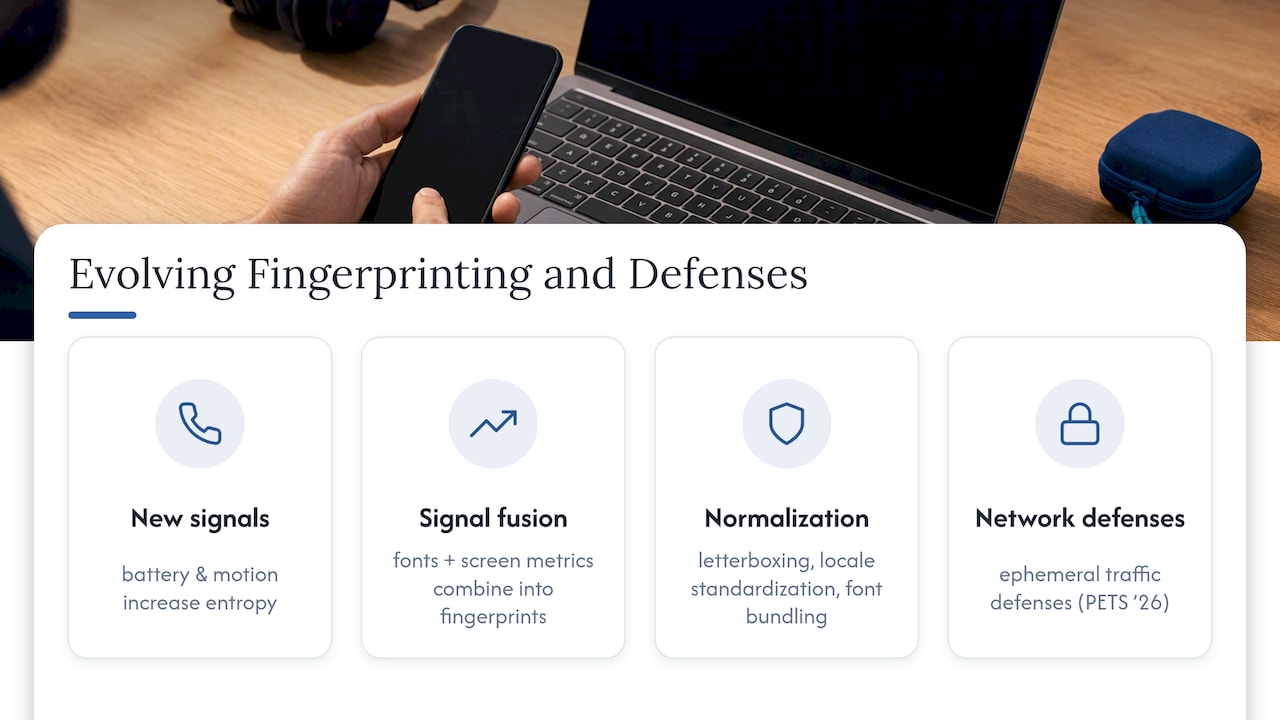
Fingerprinting techniques keep shifting as old signals get blocked and new ones emerge. Device sensor data, like battery levels and motion readings on mobile, has become a growing entropy source as browsers lock down more traditional signals. Trackers have also gotten better at combining weaker signals into composite fingerprints, so even a browser that blocks canvas reading can still leak enough through font lists and screen metrics combined.
On the defense side, normalization techniques are getting more sophisticated. Developer discussions from the 2025 Web Engines Hackfest describe letterboxing, which pads your browser window to a standard size so your actual screen resolution doesn’t leak, along with locale standardization and font bundling across Tor and Mullvad Browser. These notes also flag the central engineering problem: bucket sizes for normalized values need to be large and common enough that grouping users together doesn’t just create a new, smaller crowd that’s easier to pick out.
Network-layer defenses are the newest frontier. The ephemeral defenses studied in the 2026 PETS paper represent an attempt to fight fingerprinting at the traffic level instead of the browser level, an approach that sidesteps some of the API-level cat-and-mouse entirely. Ongoing projects like Princeton’s Web Transparency and Accountability effort continue to track which techniques trackers actually deploy in the wild, which matters because lab research and real-world tracker behavior don’t always match.
Legal and Regulatory Aspects of Fingerprinting Protection
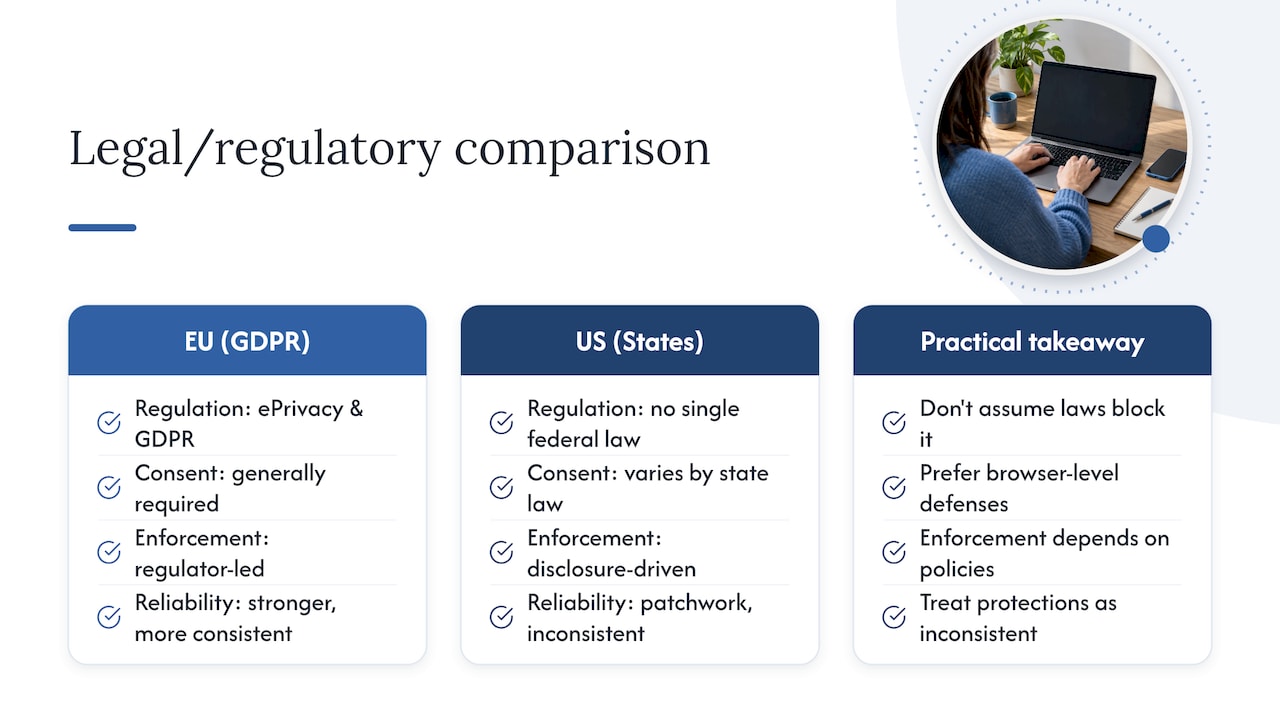
Fingerprinting sits in a gray area compared to cookies, which most privacy laws address directly. Regulations like the EU’s ePrivacy rules and GDPR generally require consent for tracking technologies, and regulators have increasingly treated fingerprinting as covered under those same consent requirements, since it serves the same purpose as a tracking cookie even though it works differently.
In the United States, there’s no single federal privacy law governing fingerprinting specifically. State laws, like those in California, address tracking and data collection more broadly, and enforcement often depends on how a company discloses its practices in a privacy policy rather than on the fingerprinting technique itself. This patchwork means your legal protection against fingerprinting varies significantly depending on where you live and which company is doing the tracking.
The practical result for you as a reader: don’t assume a privacy law automatically blocks fingerprinting just because it blocks cookie tracking. Treat legal protections as inconsistent at best, and treat browser-level and behavioral defenses as the more reliable layer you control directly. If you want to understand how your browser’s autofill features might also expose data alongside fingerprinting, our guide to how autofill works covers that adjacent risk.
How Fingerprinting Shapes Advertising and Your Browsing Experience
Advertisers rely on fingerprinting partly because cookie-based tracking has gotten less reliable as browsers restrict third-party cookies. Fingerprinting fills that gap, letting ad networks keep linking your visits across sites even after you clear cookies or switch to private browsing. That’s good for ad targeting accuracy and bad for your ability to browse without being profiled.
The user experience cost shows up in subtler ways too. Sites that lean on fingerprinting to detect “suspicious” visitors sometimes misfire, flagging privacy-conscious users who block common tracking signals as potential fraud risks or bots, which can mean extra CAPTCHAs or blocked access. There’s a real tension here: the same signals that let a site remember your cart also let it track you across the web, and most sites don’t give you a way to keep one without the other.
For shoppers specifically, this trade-off plays out constantly. If you’re trying to balance a smooth checkout experience with limiting what retailers can track about you, our safe online shopping and identity protection guide walks through where those compromises make sense and where they don’t.
Types of Browser Fingerprinting Techniques You Should Know
Canvas fingerprinting draws a hidden image or text string using your browser’s canvas API, then reads back the rendered pixels. Tiny differences in graphics drivers and hardware produce a unique output, even on identical browser versions.
Audio fingerprinting works similarly, but through sound. Scripts generate an audio signal and measure how your device’s audio stack processes it, since hardware and software differences create measurable variation in the output.
WebGL fingerprinting reads details about your graphics card and rendering pipeline, often producing even more precise hardware identification than canvas alone because it exposes GPU-specific rendering behavior.
Font enumeration checks which fonts are installed on your system by testing how text renders in different typefaces. An unusual font list, especially one built from niche software or regional language packs, can narrow down your identity significantly on its own.
Each technique targets a different layer of your device, which is why a single defense rarely covers all of them. Blocking canvas access doesn’t stop audio fingerprinting, and disabling WebGL doesn’t touch font enumeration. That’s the core reason fingerprinting protection modes bundle multiple defenses together rather than shipping as one toggle.
Our Take: Testing Beats Guessing Every Time
Most fingerprinting advice stops at a list of settings to flip. That’s where it falls short. A setting that sounds protective on paper can do nothing measurable in practice, or worse, make you more identifiable by putting you in a smaller, stranger crowd. We think the checklist approach, flip everything and hope, is the weakest version of this advice.
What actually works is slower and less satisfying: change one thing, measure it, keep what helps, drop what doesn’t. That’s the only way to know your canvas fuzzing setting is doing anything at all instead of just sitting there unused.
If you take one thing from this article, let it be this: run a test before you touch a single setting. Without a baseline, you’re optimizing blind. We’d also push back on the idea that any one tool solves this. Tor, hardened browsers, and good settings each handle a different slice of the problem, and none of them replaces the habit of checking your own results.
— TechStackTeam
FAQ
How can I prevent fingerprinting in my browser?
You can’t eliminate fingerprinting entirely, but you can reduce it by using a browser with built-in fingerprinting protection, limiting third-party cookies, and restricting access to canvas, audio, and sensor APIs. Run Cover Your Tracks before and after changes to confirm your settings actually lowered your uniqueness score.
Which browser offers the best fingerprinting protection?
Tor provides the strongest protection because most Tor users share a nearly identical fingerprint, making individual tracking far harder. For everyday browsing where Tor’s speed trade-offs aren’t practical, a browser with built-in anti-fingerprinting features and hardened defaults is your next best option.
What does browser fingerprinting actually mean?
Browser fingerprinting is a tracking method that identifies you based on a combination of signals your device sends, like fonts, screen size, and how your browser renders graphics or audio, rather than through a stored cookie. Because the combination is often unique, trackers can follow you across sites even after you clear your cookies.
Can you fully bypass browser fingerprinting?
No single method fully bypasses fingerprinting, since some data your browser shares is necessary for websites to function correctly. EFF’s guidance notes that Tor and strict JavaScript blocking are among the most effective practical defenses, though JavaScript blocking breaks many modern sites.
Do privacy extensions make fingerprinting worse?
Sometimes. An unusual combination of extensions can itself become a distinguishing signal, which is part of what researchers call the uniqueness paradox. Stick to widely used, well-maintained extensions and test your setup afterward rather than stacking several niche tools at once.
Sources
- Cover Your Tracks | Self-Defense (EFF)
- Web
- Ephemeral network-layer fingerprinting defenses (PETS 2026)
- Browser uniqueness / Panopticlick (EFF research)
- Browser fingerprinting protections in Tor/Mullvad notes (Igalia / WEH 2025)
Authoritative Resources and Testing Tools
- Cover Your Tracks | Self-Defense (EFF)
- Cover Your Tracks | About (EFF)
- Browser uniqueness research (EFF Panopticlick)
- Web
- Ephemeral network defenses, PETS 2026