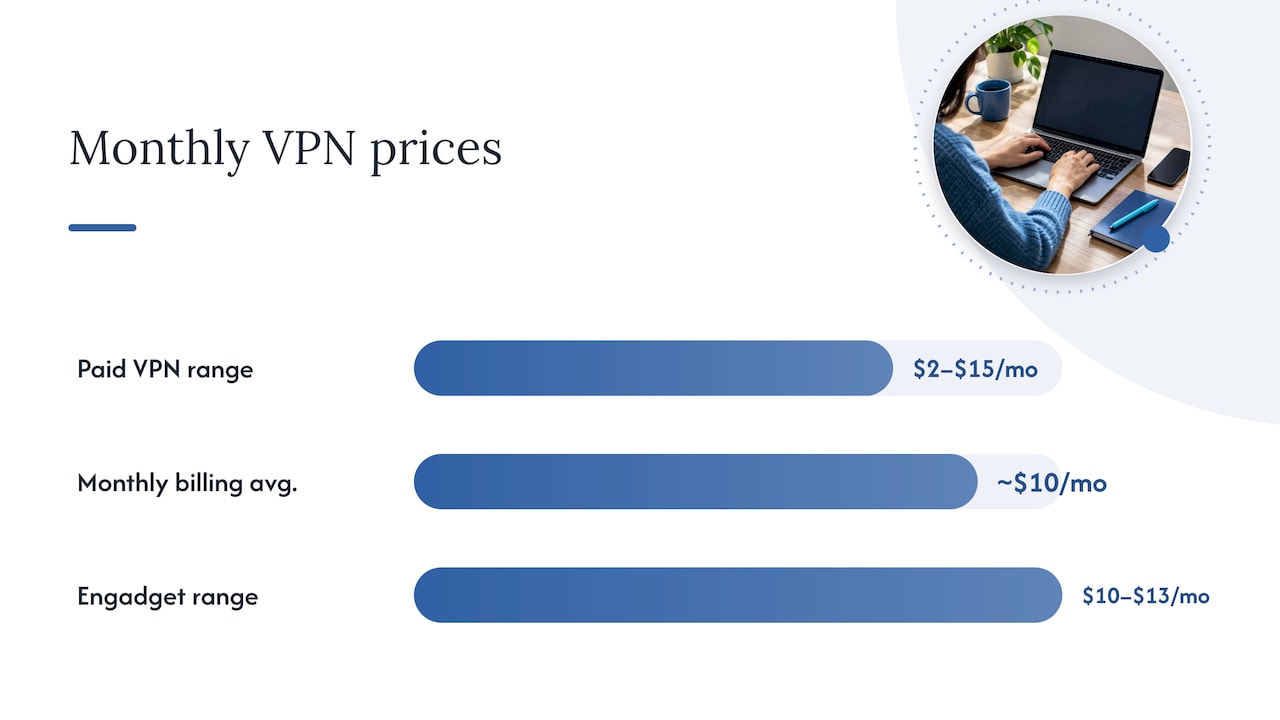
A paid VPN typically runs about $2 to $15 per month, with month-to-month plans averaging near $10 and annual or multi-year deals often landing under $4 per month once you pay upfront, according to Security. Free VPNs often earn money from your data instead. We hands-on test every provider we rank, and this is the math our testers use.
TL;DR:
- Annual plans commonly total $50 to $100, while one reviewer’s value benchmark was below $6.67 monthly; compare both against upfront cost and renewal terms.
- Compare VPNs by dividing the upfront charge by the term’s months, but remember that canceling early can make the effective monthly cost much higher.
- Check the renewal rate before checkout; introductory discounts can end in a higher charge, so test within the refund window and set a renewal reminder.
- Match features to your actual use: streaming needs fast servers in target regions, while torrenting requires explicit peer to peer support and permission.
- The FTC cited nearly 300 VPN apps; some lacked encryption or shared data, so prefer an established provider’s limited free tier over standalone apps.
Table of Contents
- What does a VPN cost per month, per year, and on multi-year plans?
- What actually drives the price of a VPN?
- Are free VPNs safe, and when is a free plan good enough?
- How can you save on a VPN without giving up protection?
- How do you choose a VPN plan for your budget and needs?
- How do you read advertised prices, promo terms, and renewal fine print?
- Why hands-on testing changes how we value price
- See tested VPNs and current deals before you buy
- FAQ
- Sources
What does a VPN cost per month, per year, and on multi-year plans?
Start with the number most people see first: the month-to-month price. Paid VPNs usually sit between $2 and $15 per month, and the average for monthly billing is close to $10, per Security. Reporting from Engadget puts month-to-month rates clustered around $10 to $13. Reviewers at Tom’s Guide found the same pattern in their own sample.
Why is monthly billing the expensive route? Providers carry the risk that you cancel after a few weeks. A longer commitment lets them spread their costs and keep you as a customer, so they discount it heavily.
Here is how the brackets break down:
- Month-to-month: roughly $10 to $13 for most mainstream providers, with the full paid range reaching from about $2 to $15.
- Annual billing: annual totals usually run about $50 to $100 depending on the term and promotions, per Security.
- Two-year or longer plans: effective monthly cost can fall under $4 on multi-year promotions, and Engadget reports effective monthly costs in the $3 to $8 range on annual and multi-year contracts, depending on promo and term length.
- Value benchmark: in the reviewer sample at Tom’s Guide, good VPNs typically fell below about $6.67 per month.
The ranges overlap because “annual” and “multi-year” are not one product. A two-year plan from one provider can cost less per month than a one-year plan from another, and promotions change often.
How to compute the effective monthly price
Advertised prices are usually shown per month even when you pay for a year or more in one charge. The effective monthly price is the number you need for a fair comparison. The math takes three steps:
- Find the total you pay upfront for the full term.
- Divide it by the number of months in that term.
- Compare that result across providers, not the big headline number.
For example, divide a provider’s upfront charge by the number of months in the plan to find its effective monthly price. Compare that result with the advertised monthly price and check the total billed upfront. Both numbers are honest. They just tell you different things about your wallet: one asks for less cash now, the other gives you the lower rate across a longer stretch.
Two details trip people up. First, the effective monthly figure assumes you use the whole term. If you cancel before a plan ends, your true cost per month may be much higher. Second, the upfront total is the figure that actually leaves your account. Always read that line before you click buy.
Promotional pricing versus renewal pricing
The first term is often the cheapest one. Providers run promotions to win new signups, then bill the standard rate when the term ends. A plan advertised at a low effective monthly price may renew at a noticeably higher rate for the next term, and sometimes the renewal is billed as a fresh upfront charge.
What should you do about it? Treat the promo price as a rental price on the first term only. Before you pay, look for the renewal line on the checkout page or in the terms. Then pick one of two plans: set a calendar reminder before the term ends so you can shop around, or compare the renewal rate now and choose the provider whose long-term price you can live with. We cover the exact wording to look for in the pricing terms section further down.
What actually drives the price of a VPN?
Two VPNs can look identical on a pricing page and still differ substantially. The gap usually comes from real operating costs, not just branding. Forbes Advisor points to server network size, speed, security protocols, and the number of simultaneous device connections as the main drivers, and notes that premium services add features like split-tunneling, multi-hop, and malware blocking that push prices up.
Here is what each driver means for you:
- Server network size and coverage: Every server costs money to rent, maintain, and secure. A provider with servers in dozens of countries pays far more than one with a handful, and that shows up in the price. A bigger network matters if you want nearby servers for speed or distant ones for travel and streaming libraries.
- Speed and infrastructure capacity: Fast connections need bandwidth, and bandwidth is one of the largest costs for any VPN company. In our hands-on tests, providers that invest in high-capacity servers hold up better when many people are connected at once. Cheaper plans can slow down at peak hours.
- Security protocols and implementation: Protocol categories include modern lightweight options, older long-established ones, and mobile-friendly ones. Forbes Advisor names AES-256 and ChaCha20 as examples of the encryption involved. Protocol choice alone does not set the price, but careful implementation, audits, and maintenance cost real money. Our VPN protocols guide walks through how the main protocols differ in practice.
- Device limits and platform support: Plans that allow many simultaneous connections, or that offer polished apps for phones, computers, routers, and smart TVs, take more engineering and support work. Some providers cap connections, while others allow more at the same price.
- Extra features: Malware and ad blocking, split-tunneling, multi-hop routing, and dedicated IP addresses are often add-ons or reserved for higher tiers. If you will never use them, you are paying for nothing.
- Specialized needs: VPNs built to get around heavy censorship tend to cost more, because they run obfuscation technology and have to keep adapting as blocks change.
Pro Tip: List your three must-have features before you open a pricing page, then ignore every tier that charges for things that are not on that list.
Why a higher price does not always mean a better VPN
Price and quality correlate loosely at best. We have tested expensive providers that were mediocre at streaming and inexpensive ones that held up well on speed and reliability. What the price does reliably buy is capacity and ongoing investment. What it cannot buy is trust, which comes from audits, a clear logging policy, and a record of keeping promises. That is why we pair price checks with verifiable trust signals in every review.
Matching features to what you will actually use
A casual user who wants safer public Wi-Fi at a coffee shop needs a stable connection, solid apps, and a sensible refund window. A heavy streamer needs fast servers in the right regions. Someone who torrents needs a provider that permits it and has servers that allow peer-to-peer traffic. A person who works across borders may care most about server coverage and a kill switch. Each of these profiles lands on a different price point, and paying for the wrong features is the most common way people overspend.
For a deeper look at what a VPN can and cannot do for your privacy, see our explainer on how VPNs protect against surveillance.
Are free VPNs safe, and when is a free plan good enough?
Free is the most tempting price, and it carries the most risk. The Federal Trade Commission has warned that free VPN apps may not implement basic encryption and may make money by sharing user data or serving intrusive ads. Researchers cited by the agency studied nearly 300 VPN apps and found that some lacked basic encryption, shared data with advertisers, and requested unexpected device privileges, as described in the FTC’s guidance on VPN apps.
Researchers studying nearly 300 VPN apps found that some lacked basic encryption, shared data with advertisers, and requested unexpected device privileges.
That finding is from 2018, but the business logic behind it has not changed. Running a VPN network costs real money. If you are not paying, someone else is.
How free VPNs usually make money
Free services tend to fund themselves in a few ways:
- Advertising: ads inside the app, sometimes intrusive ones.
- Data sharing or sale: your browsing activity can be a product, which undercuts the reason you installed a VPN.
- Traffic redirection: routing your connection in ways that benefit the provider.
- Upselling: a deliberately limited free tier meant to push you toward paid plans.
The last one is the safest. A freemium plan from an established paid provider has a business reason to treat you well, because it wants to convert you. A standalone free app with no paid product has no such incentive.
When a free plan can be enough
Consumer Reports notes that free VPNs sometimes work for casual users but that you often get what you pay for. A free plan can be reasonable for occasional, low-stakes browsing on a trusted device, such as checking a public page on hotel Wi-Fi. It is a poor fit for anything privacy-sensitive: banking, work files, health searches, or anything you would hate to see sold.
A related finding from Consumer Reports’ research on how U.S. consumers use VPNs is that many people misunderstand what a VPN protects, and that paying a fair price for a reputable, audited service is often a better security investment than using a free service that may harvest data.
A safer way to test than relying on free tiers
If your real worry is spending money on the wrong product, skip the sketchy free app. Instead, buy a short-term plan from a reputable provider and use its money-back guarantee. PCMag advises testing a VPN in the environments you actually use and notes that reputable providers offer money-back guarantees so you can verify performance with little risk. You get full features, honest performance data, and a refund if it falls short.
How can you save on a VPN without giving up protection?
The cheapest VPN is not the one with the lowest sticker price. It is the one that costs the least for the protection you actually use. These tactics lower your bill without cutting corners on privacy.
- Choose a longer billing cycle, once you are sure. Longer commitments bring the best per-month pricing, and many top VPNs cut effective monthly cost dramatically on two-year plans, as TechRadar notes. Compare a roughly $10 month-to-month average against annual totals of about $50 to $100 per Security.org, and the savings are clear. The catch is that you pay a large amount upfront.
- Test first, then commit. Sign up for a shorter term or use the refund window to run real tests. Only then lock in the long plan. This is the single best habit for avoiding wasted money.
- Check bundles carefully. Some providers package a VPN with a password manager, identity monitoring, or antivirus. A bundle saves money only if you would have bought the extras anyway. If you want a standalone password manager, compare it on its own merits, as in our best password managers rankings.
- Split a household plan. If a plan allows many simultaneous connections, a family or roommates can share the cost. Confirm the provider’s terms allow it, and make sure everyone is comfortable sharing a single account.
- Read the renewal terms before you pay. An automatic jump at renewal can erase your savings. Note the renewal rate and the date, and set a reminder.
- Compare current promotions. Deals change often, and the best price usually appears during a sale. Our VPN reviews hub with current deals tracks promotional pricing so you do not have to chase it.
Pro Tip: Never trade away a refund window or an audit record to save a dollar a month. Those two things are your insurance if the service turns out to be wrong for you.
Where the real savings come from
Most of the savings come from two decisions: billing length and avoiding features you do not use. Skipping a dedicated IP or multi-hop tier you will never touch can help reduce the price. Pair that with a longer term on a provider that has passed your test, and you have captured nearly all the savings on the table.
One caution on long terms: a deal is only a deal if you use it. If your needs might change, a shorter plan with a good refund policy may be a better choice than a longer plan you regret.
How do you choose a VPN plan for your budget and needs?
Use this checklist at the pricing page. It can help you avoid a bad purchase.
- Match your main use case to the features. Streaming needs fast servers in the right regions. Privacy on public Wi-Fi needs solid apps and a trustworthy logging policy. Travel needs broad server coverage. Torrenting needs a provider that explicitly permits it. Write down your top use before you compare plans.
- Confirm device and platform support. Check how many devices can connect at once and whether apps exist for every device you own, including your phone, laptop, and any smart TV or router.
- Verify the refund policy. Look for the length of the window and how the refund is requested. A generous window with a hard-to-find refund process is not generous. Reputable providers offer money-back guarantees, as PCMag points out.
- Look for audit evidence and transparency. A no-logs claim is impossible to verify without outside checks. PCMag advises prioritizing providers that submit to third-party security audits. Look for published audit reports, transparency reports, and a plain-language logging policy. We also explain how to read one signal of this type in our guide to VPN warrant canaries.
- Run a short live test inside the guarantee. Once you have signed up, test the connection in your real environment. Check speed on your home and mobile networks, confirm the streaming services you care about load, and see whether the app stays stable over several days.
- Check the renewal rate. Write down what you will pay when the first term ends.
For a broader view of how to weigh privacy tools against each other, our internet privacy tools comparison checklist gives a repeatable scoring method you can reuse.
A quick test routine you can run in an afternoon
Pick a time you normally use the internet heavily, such as the evening. Run a speed test with the VPN off, then with it on at a nearby server and a far one. Open the streaming service you care about and see if content loads without errors. Switch between Wi-Fi and mobile data and watch whether the connection drops. Try the kill switch if the app has one. If anything fails, request your refund inside the window rather than hoping it improves.
Common mistakes that waste money
- Buying the longest plan before testing anything.
- Paying for add-ons you will not use.
- Ignoring the renewal price.
- Choosing purely on the lowest advertised monthly figure.
- Assuming a bigger price tag means better privacy.
How do you read advertised prices, promo terms, and renewal fine print?
Pricing pages are built to show you the smallest number. Knowing four terms makes it much harder to be surprised:
- Effective monthly price: the total for a term divided by its months. This is the fair comparison number.
- Promotional term: the introductory period when the discounted rate applies.
- Renewal rate: what you pay when the promotional term ends, often higher.
- Upfront total: the amount charged at checkout. This is what actually leaves your account.
Providers headline the lowest per-month figure because it is the most attractive, even when the plan requires a large single payment for a long term. That is not deceptive on its own, but you should always confirm the upfront total before you pay.
Hidden costs and cancellation policies to look for
Read the checkout page and terms for these items:
- Automatic renewal that charges a full term without a reminder.
- A renewal rate that differs from the promo rate.
- Refund windows that apply only to some plans or payment methods.
- Add-ons that are pre-selected at checkout.
- Cancellation steps that require contacting support rather than clicking a button.
Payment method can also matter. Some providers accept several payment types and may treat refunds differently by method, so check the terms for the option you plan to use.
A short example of parsing a price
Imagine a pricing page that shows a low monthly price in large type and a higher upfront total for a long plan in small type. Divide the upfront total by the number of months in the plan to check the advertised monthly price. The details you need are in the small print: what you pay today, how long you are committed, and the renewal rate. This is an illustration, not real market pricing. Treat the small print as the real price and the big number as the marketing.
Why hands-on testing changes how we value price
We test every provider we review with real accounts, and we update our reviews monthly. Our rankings are not influenced by affiliate payouts, which means a lower price never buys a higher placement. That separation is what lets us say something simple: price is only one input to value.
Here is the stance we have landed on after all that testing. Most people overweight the monthly sticker price and underweight whether the service actually works for them. A cheap plan that buffers during your evening streaming session, or that fails to unblock the library you subscribed for, is expensive in the only way that counts: you paid for something you do not use. A slightly pricier plan that holds speed and stays reliable can be the better deal even at a higher monthly figure.

Testing speed, streaming access, and reliability tells us whether a higher price is buying real capacity or just branding. When it is buying capacity, we say so. When it is just branding, we say that too. Readers should do the same on their own: use the money-back window to test, then judge the price against what you observed.
The other thing we would tell any buyer is to put verifiable trust signals next to price. Independent audits, transparency reports, and a clear logging policy are worth more than a deeper discount, because a no-logs claim cannot be verified without outside checks. A low price from a provider you cannot verify is a risk, not a bargain.
— TechStackTeam
See tested VPNs and current deals before you buy
We aggregate hands-on-tested VPN reviews alongside current promotional pricing, so you can match price to features without opening a dozen tabs. Start with our VPN reviews and deals hub, where every provider is ranked on performance rather than payout.

Here is how to use it well:
- Narrow the list to providers that fit your main use case and device count.
- Compare effective monthly prices and the upfront totals side by side.
- Buy with a money-back guarantee in place, then run your own speed and streaming tests.
- Commit to a long plan only after the service has passed your test, since the biggest savings require paying upfront.
Open the hub, shortlist providers, and test them inside their refund windows.
FAQ
Can Netflix tell if you use a VPN?
Netflix can often detect VPN traffic and may block the connection, so results vary by provider and server. Some VPNs keep working with streaming libraries and others do not. The safest approach is to test your chosen service inside its money-back window before committing.
Which VPN is 100% free?
No VPN is truly free of tradeoffs, because running one costs money and someone has to pay. The FTC has warned that free VPN apps may monetize your data or serve intrusive ads. A limited free tier from an established paid provider is generally a safer choice than a standalone free app.
What should a good VPN cost per month?
Paid VPNs commonly run from about $2 to $15 per month, with Security.org reporting monthly averages near $10. Longer plans lower the effective monthly price, but you pay more upfront. Compare effective monthly prices and check the renewal rate.
Can I use a VPN on my phone?
Yes, most paid VPNs offer apps for phones and tablets, and many allow several devices on one plan. Check the simultaneous connection limit and platform support on the pricing page before you buy. A short test under the refund window will confirm the app is stable on your device.