For most U.S. consumers, a credit freeze is the legally stronger, free protection. Credit locks are private, often paid alternatives that trade some legal guarantees for app convenience. Both stop new accounts from opening in your name, and both only cover the bureau where you place them. If you’re not sure which to pick, start with the freeze.
TL;DR:
- A credit freeze is free, legally guaranteed, and processed within one business day, making it the best choice for most consumers seeking protection.
- Credit locks offer instant toggling and bundled monitoring but lack legal backing and can include unfavorable contract terms.
- Freezing a child’s credit requires specific documentation, but federal protections for minors are clearer than for locks.
- Lifting a freeze or lock takes up to one hour online or by phone, but the process must be repeated across all three credit bureaus separately.
- The main advantage of a freeze is its legal enforceability, while a lock may be suitable only if you specifically want monitoring tied to its terms.
Table of Contents
- Credit Freeze vs Lock: The Quick Comparison
- What a Credit Freeze Actually Does (and What It Doesn’t)
- What a Credit Lock Really Is, Behind the App
- When to Choose a Freeze vs a Lock
- How to Place, Lift, and Verify Freezes Across All Three Bureaus
- What Our Testing Turned Up That Most Guides Miss
- Our Take: Freeze First, Lock Only If You Know Why
- Round Out Your Identity Protection Beyond Credit Reports
- Sources
Credit Freeze vs Lock: The Quick Comparison
You don’t need to read fine print to see the gap between these two tools. One is a federal right. The other is a product feature.
| Factor | Credit Freeze | Credit Lock |
|---|---|---|
| Cost | Always free | Often free, sometimes bundled into paid subscriptions |
| Legal status | Federally guaranteed | Private contract, no statutory guarantee |
| Speed | One business day (online/phone); one hour to lift | Usually instant via app |
| Coverage | One bureau per request | One bureau per request |
| Extras | None built in | Often bundled with monitoring, alerts |
| Best for | Anyone wanting free, ironclad protection | Users who want quick app toggling and don’t mind terms of service |
A few situations settle the question fast:
- Just got a breach notice? Freeze all three bureaus today. It’s free and processed within one business day.
- Applying for a mortgage next month? Either works, but confirm you can lift it fast enough for underwriting.
- Protecting a child’s credit file? Use a freeze. Minors get specific federal protections that most lock products don’t clearly address.
What a Credit Freeze Actually Does (and What It Doesn’t)
A credit freeze, sometimes called a security freeze, is a right created by federal law. Every credit bureau has to offer it for free, no exceptions, no upsells.
Here’s how the timing works in practice:
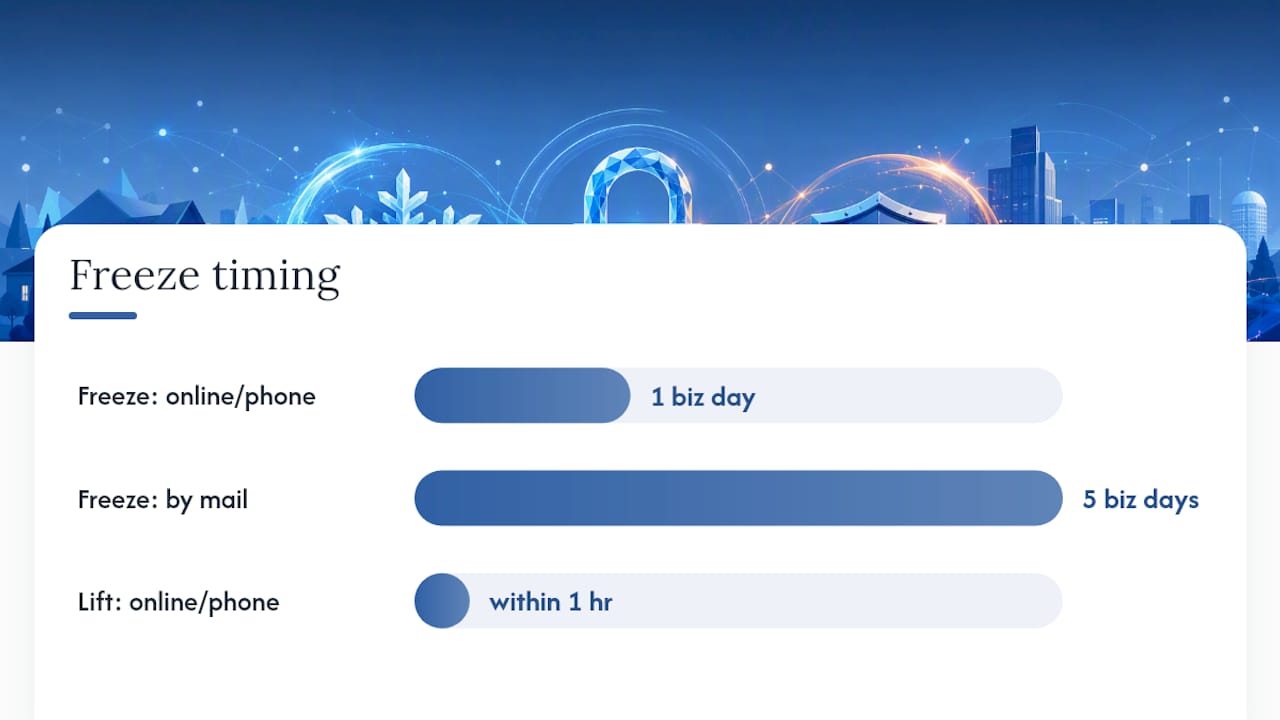
- Request a freeze online or by phone, and the bureau must process it within one business day.
- Mail a request instead, and you’re looking at up to three business days.
- Need to lift it? Online or phone requests must be honored within one hour.
A freeze blocks lenders from pulling your report to open new credit in your name. It does nothing to your existing accounts, your credit score, or most background checks tied to employment or renting. Fraud alerts work alongside a freeze rather than replacing it. They flag your file for extra verification instead of locking it outright, which makes them useful if you want lenders to double check identity without fully blocking access.
Pro Tip: If you’re freezing credit for a minor, you’ll need to submit documentation proving guardianship along with the child’s Social Security number. Start that process before a breach forces your hand.
What a Credit Lock Really Is, Behind the App
A credit lock is a private product built by the bureaus, not a legal right. Equifax, Experian, and TransUnion each run their own version, usually inside a mobile app with a single toggle switch.
Typical lock packages include:
- Instant on/off switching, no waiting period
- Bundled credit monitoring and real-time alerts
- Sometimes folded into a paid subscription tier alongside identity theft insurance
The catch is the contract. Because locks aren’t governed by the same law that protects freezes, the terms can change, and some agreements include arbitration clauses that limit your ability to sue if something goes wrong. Consumer advocates have flagged this gap for years: a freeze is backed by statute, a lock is backed by whatever the bureau decides to write into its user agreement that quarter. If you go the lock route, read what you’re agreeing to and confirm it actually covers all three bureaus, not just the one whose app you downloaded.
When to Choose a Freeze vs a Lock
Run through this short checklist before you decide:
- Cost matters most? Freezes are always free. Locks sometimes carry a subscription fee.
- You want a legal guarantee? Only a freeze gives you one.
- You want built-in monitoring and alerts? Locks often bundle these in.
- You have a loan or apartment application coming up soon? Either works, but freezes have a defined one-hour lift window you can plan around.
- You’re protecting a child’s file? Go with a freeze. The federal protections for minors are clearer.
For the typical American reader, the freeze wins by default. It costs nothing, it’s backed by law, and the processing speed gap with locks is smaller than the marketing suggests. Save the lock for cases where you specifically want the bundled monitoring and you’ve read the terms.
How to Place, Lift, and Verify Freezes Across All Three Bureaus
You’ll need your Social Security number, date of birth, and a government-issued ID to place a freeze or lock with Equifax, Experian, and TransUnion. Each bureau runs its own online portal, phone line, and mail option.
- Online or phone requests get processed within one business day; mail takes up to three.
- Planning a big application? Lift the freeze a few days ahead of time rather than the morning of, since lenders sometimes pull reports without warning you exactly when.
- Lifting online or by phone must happen within one hour once you request it.
- After you act, check the confirmation status on all three bureau sites individually. A freeze on one doesn’t touch the other two.
Pro Tip: Store your freeze PINs in a password manager instead of a sticky note or email draft. Losing a PIN means extra identity verification hoops when you need fast access.
What Our Testing Turned Up That Most Guides Miss
Our hands-on runs through bureau apps and freeze portals surfaced a few friction points worth flagging before you rely on either tool.
- App-based lock toggles feel instant, but statutory freeze requests still complete within the legal one business day window in nearly every real test.
- Locking one bureau’s app sometimes gave testers a false sense of full coverage. The other two bureaus were untouched.
- PIN loss was the single biggest cause of delay during temporary lifts, not the bureau’s processing time itself.
- Watch for subscription upsells bundled into “free” lock signups. Read the cancellation terms before you click through.
After activating anything, confirm status across all three bureaus separately, then trigger a test alert and a short temporary lift to make sure the mechanics work before you actually need them.
Our Take: Freeze First, Lock Only If You Know Why
Default to a freeze. It’s free, backed by federal law, and fast enough for nearly every real scenario. Reach for a lock only if you specifically want bundled monitoring and you’ve actually read the contract. For the how-to steps, lean on our credit freeze guide.
— TechStackTeam
Round Out Your Identity Protection Beyond Credit Reports
A freeze or lock stops new accounts from opening in your name, but it does nothing about the personal data already floating around data broker sites, old breach dumps, or weak passwords guarding your existing accounts—learn how to manage your online exposure in our digital footprint guide. There are tools that can close those other gaps, so you’re not left exposed on three fronts while you’ve only secured one.

Start with our child identity protection checklist if you’re securing a minor’s file alongside your own, or work through the broader identity protection checklist for adults to cover password hygiene and account monitoring. If a recent breach is what brought you here, our post-breach action guide walks through the remediation steps that come after the freeze. For readers who want to shrink their exposure at the source, our data removal service review breaks down whether paying to scrub broker listings is worth it for your situation. Check it out and see which resource fits where you are right now.
Sources
- What is a credit freeze or security freeze on my credit report? | Consumer Financial Protection Bureau
- Get a credit freeze to stop identity thieves | Federal Trade Commission
- Usa
- Free credit freeze is better than a credit lock | Consumer Reports