Yes, U.S. consumers can place a ChexSystems security freeze. You have three ways in: the Consumer Portal online, phone, or mail. Register in the portal to get your Security Freeze PIN, since you’ll need it to lift or remove the freeze later. Most states let you place or lift a freeze at no cost.
TL;DR:
- ChexSystems freezes do not affect your credit bureau files, so they only prevent new bank account openings but not credit inquires or loans.
- The fastest way to place or lift a freeze is through the online portal, which confirms almost instantly, compared to phone or mail options.
- Most states offer free placement and removal of the freeze, but some states may impose fees, so verify your state’s rules before acting.
- Managing the freeze via the portal allows you to schedule temporary lifts or permanent removals using your PIN, which should be stored securely.
- A ChexSystems freeze provides limited protection; layering it with credit freezes, fraud alerts, and identity monitoring increases your overall security.
Table of Contents
- What a ChexSystems Freeze Actually Blocks (and Why You’d Want One)
- How to Freeze ChexSystems: Step-by-Step for Online, Phone, and Mail
- Lifting, Removing, or Replacing Your Freeze PIN
- Freezing a Minor’s ChexSystems File or Acting for Someone Else
- What a ChexSystems Freeze Won’t Protect You From
- How Fast, How Much, and Where State Rules Change Things
- Techstacktoday’s Checklist for a Clean ChexSystems Freeze
- Why We Treat This as Step One, Not the Whole Plan
- Close the Rest of Your Exposure While You’re At It
- Sources
What a ChexSystems Freeze Actually Blocks (and Why You’d Want One)
A ChexSystems security freeze stops banks and credit unions from pulling your ChexSystems file without your say-so. That’s the whole point. If someone tries to open a checking account, apply for a debit card, or set up a new savings account using your stolen identity, the freeze blocks the request cold because the bank can’t verify your banking history.
Here’s the catch most people miss: ChexSystems isn’t a credit bureau. It’s a separate consumer reporting agency that banks use specifically to screen new deposit account applicants. So a ChexSystems freeze does nothing to protect your Equifax, Experian, or TransUnion files.
Who benefits most?
- Anyone who’s had their Social Security number exposed in a data breach
- People who’ve noticed unfamiliar accounts on a ChexSystems disclosure report
- Parents locking down a minor’s identity before it’s ever used
- Anyone who just wants baseline protection without waiting for fraud to strike
The trade-off is real: an active freeze can slow down a legitimate account opening if you forget to lift it first, since roughly 86% of banks use ChexSystems or similar screening services somewhere in their approval process.
How to Freeze ChexSystems: Step-by-Step for Online, Phone, and Mail
Pick the method that matches your comfort level and urgency. Here’s exactly what happens with each one.
1. Online through the Consumer Portal (fastest)
Head to the ChexSystems Consumer Portal and register with your name, address, date of birth, and Social Security number. Once verified, the portal lets you place your freeze in a single session and issues your Security Freeze PIN, sometimes on the spot. Keep that PIN. You’ll need it every time you want to lift or remove the freeze later.
2. By phone (24/7 automated or live representative)
Call 800.887.7652. The automated system runs around the clock, so you can freeze your file at 2 a.m. if that’s when panic hits. If you’d rather talk to a person, dedicated freeze representatives are available weekdays from 7:00 a.m. to 11:00 p.m. Central Time. Have your identifying information ready: full name, address, date of birth, and SSN.

3. By mail (slowest, but useful for documentation-heavy cases)
Send a written request with copies of your government-issued ID and proof of address to:
Chex Systems, Inc.
Attn: Security Freeze Department
PO Box 583399
Minneapolis, MN 55458
Include your full name, current and previous addresses, date of birth, and Social Security number in the letter itself.
Pro Tip: Never email your full Social Security number or a photo of your ID to anyone, including ChexSystems, unless you’re using their secure portal. If you’re mailing sensitive documents, use certified mail with tracking so you have proof of delivery if something gets lost.
Lifting, Removing, or Replacing Your Freeze PIN
Once your freeze is active, you control it entirely through your PIN. Managing it well now saves you a headache the next time you open an account.
- Temporary lift: Log into the Consumer Portal with your PIN and schedule a lift for a specific window, or call the freeze line and authenticate by phone. This is the move if you’re applying for a new checking account next week and don’t want the freeze in the way.
- Permanent removal: Appropriate once you no longer need the protection, such as after resolving a fraud case or deciding your risk level has dropped. Same channels apply: portal, phone, or mail.
- Lost your PIN? You can request a replacement through the portal or by phone, though ChexSystems requires you to be 18 or older to communicate directly about your file.
- Timing: Portal actions confirm almost instantly. Phone requests typically process the same day. Mail requests take several business days for processing, plus transit time both directions.
The portal wins on speed every time. If you’re the type who forgets passwords, a password manager makes storing that PIN painless.
Freezing a Minor’s ChexSystems File or Acting for Someone Else
Guardians and protected consumers face a slightly different process, and it almost always runs through the mail rather than the portal.
For a minor or a protected consumer, gather:
- The minor’s birth certificate or Social Security card
- Proof of your guardianship (court order or legal documentation)
- Your own government-issued ID
- Proof of address for both you and the minor
If you’re acting on someone else’s behalf as an authorized representative, you’ll need a notarized power of attorney or written authorization signed by the consumer, along with your own ID. These third-party and minor requests typically must be submitted by mail to the Security Freeze Department, since ChexSystems can’t verify guardianship or authorization through an automated phone system.
What a ChexSystems Freeze Won’t Protect You From
A ChexSystems freeze locks down one specific door. Plenty of others stay wide open unless you close them separately.
Your Equifax, Experian, and TransUnion credit files remain completely unaffected by a ChexSystems freeze. Someone could still open a credit card or take out a loan in your name if those files aren’t frozen too.
To build real coverage:
- Freeze your file with all three major credit bureaus separately, or follow a combined credit freeze guide to do it in one pass
- Order your free ChexSystems disclosure report once every 12 months and dispute anything that looks off
- Set up fraud alerts as a lighter-touch alternative where a full freeze feels like overkill
- Layer in identity monitoring and a password manager so stolen credentials don’t become the next entry point
How Fast, How Much, and Where State Rules Change Things
Portal actions confirm almost immediately. Phone requests, whether automated or with a live representative, typically process the same business day. Mail takes the longest: processing plus USPS transit time on both ends.
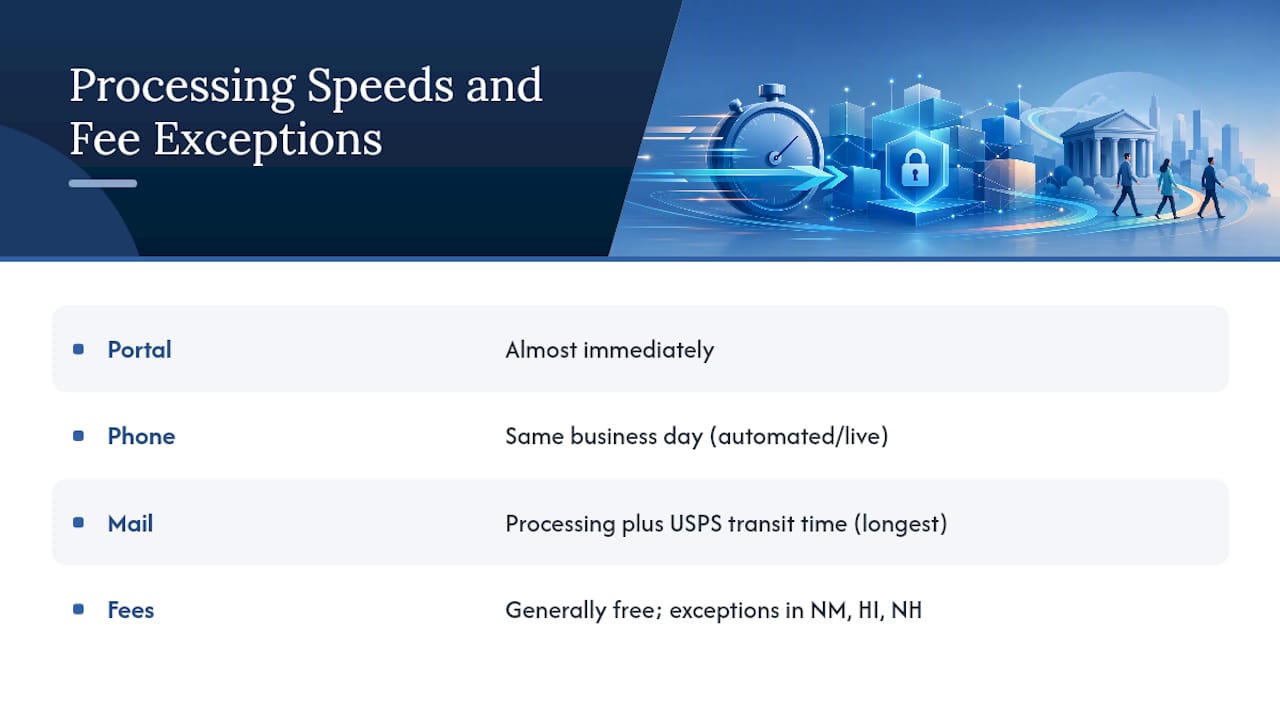
Fees are the exception, not the rule. ChexSystems generally doesn’t charge to place or lift a freeze, but a handful of states carve out exceptions in limited circumstances. Check your state’s page in the Notice of Rights before assuming yours is free. States like New Mexico, Hawaii, and New Hampshire have their own quirks worth a quick look.
Techstacktoday’s Checklist for a Clean ChexSystems Freeze
Registering for the Consumer Portal first, rather than jumping straight to mail, cuts turnaround time dramatically. In our comparisons of portal versus mail freeze workflows, portal confirmations arrive same day while mail requests routinely take a week or more once you factor in transit.
Pro Tip: Store your PIN in a password manager the moment you receive it, and jot down the exact date you placed the freeze somewhere separate. That record makes disputes and future lifts painless.
Avoid emailing sensitive documents outright. Use the portal or certified mail for anything containing your SSN.
Why We Treat This as Step One, Not the Whole Plan
A ChexSystems freeze is one layer, not a finish line. It’s the right immediate move if you suspect exposure; ongoing monitoring matters more once your accounts are already locked down. Pair it with credit bureau freezes and our identity protection checklist for full coverage.
— TechStackTeam
Close the Rest of Your Exposure While You’re At It
A ChexSystems freeze handles your banking risk, but it leaves your passwords, your browsing habits, and your personal data scattered across broker sites completely untouched. Techstacktoday tests and ranks the tools that close those other gaps, without ever taking payment to inflate a ranking.

If your data breach exposed more than just your SSN, our guide to data removal services walks through which ones actually scrub your information from broker sites versus which just claim to. And if you’re reusing passwords across banking and email accounts (most people are), our password manager comparisons show you which tools store credentials with real encryption instead of a flimsy browser autofill. Start with our identity protection checklist to see exactly where your remaining gaps sit, then pick the tool that closes the biggest one first.