A privacy subscription service is a paid, recurring program that monitors and removes your personal information from data broker websites and people-search platforms on your behalf. These services combine automated scanning tools with human agents to submit opt-out requests across hundreds of sites. Because data brokers rebuild profiles from public records continuously, one-time removal attempts fail. A privacy subscription keeps working month after month to protect your digital footprint. The industry term for these programs is “data removal services,” and you will see both terms used interchangeably throughout this guide.
What is a privacy subscription service and how does it work?
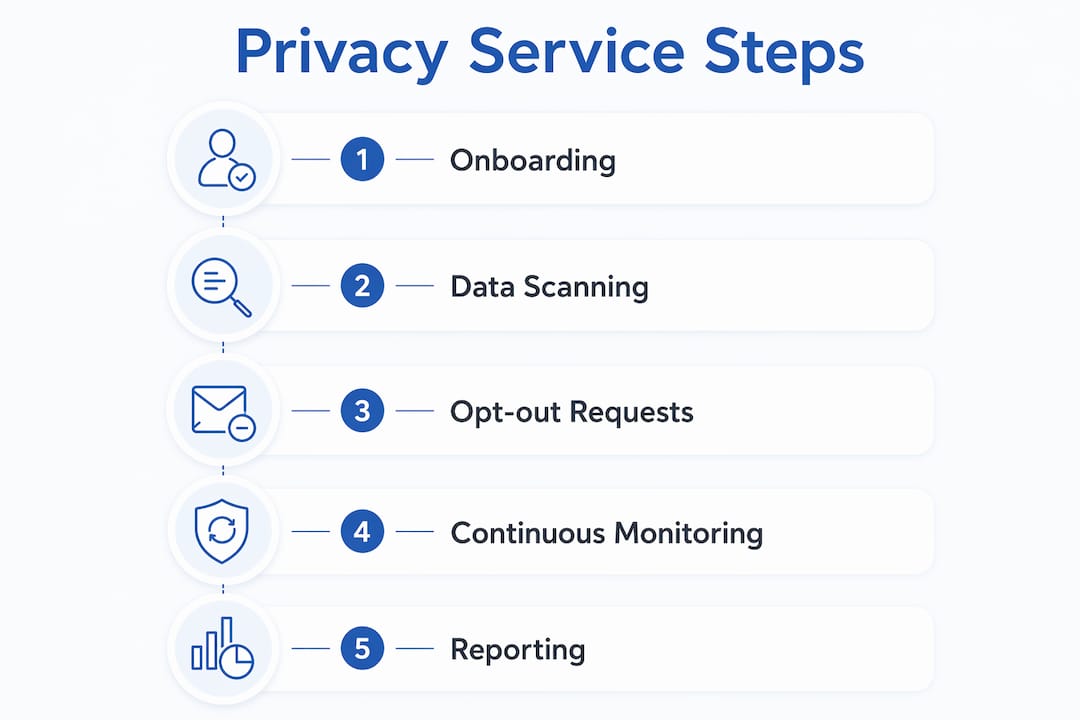
A privacy subscription service works by first collecting your personal details during onboarding. You provide your name, address history, phone number, email, and date of birth. The service uses that information to search for your profiles across data broker databases.
After onboarding, the service runs automated scans across 200 to 420+ data broker sites, identifying where your information appears. That scale matters because no individual could realistically track down and opt out of hundreds of sites manually. The scans flag every profile that matches your details.

Next, the service submits opt-out and removal requests to each broker. Automation combined with human agents handles both standard removals and custom cases where brokers resist automated requests. If a broker refuses to comply, some services escalate by contacting regulatory bodies to enforce removal.
Monitoring repeats every 30 to 90 days because brokers re-list your data after removal. Some services run real-time continuous monitoring, while others operate on fixed cycles. You receive removal reports showing what was found, what was removed, and what is still in progress.
Pro Tip: Choose a service that sends reports at least monthly. Quarterly reports leave too large a gap for new data to accumulate undetected.
What features and pricing plans do privacy subscriptions offer?
Privacy subscription services range from basic automated tools to full-service plans with human support and identity protection add-ons. Understanding what each tier includes helps you spend only what your situation actually requires.
Core features across all tiers
Every reputable privacy subscription includes these baseline features:
- Automated data broker scans across a defined list of sites
- Opt-out request submissions sent on your behalf
- Recurring monitoring to catch re-listed profiles
- Removal progress reports delivered monthly or quarterly
Premium features worth paying for
Higher-tier plans add meaningful protections beyond basic removal:
- Unlimited custom removals handled by human agents for stubborn brokers
- Identity theft insurance to cover financial losses from breaches
- VPN access bundled into the subscription for encrypted browsing
- AI productivity tools integrated into privacy-focused browser environments
DuckDuckGo’s paid plans, for example, bundle a VPN and private AI tools alongside data removal features. That bundling makes premium plans more cost-effective for readers who would otherwise pay separately for each tool.
Typical pricing ranges
Privacy subscriptions cost between $7 and $15 per month at the entry level, with premium plans exceeding $60 per month for white-glove human support and full identity protection. Annual billing typically reduces the monthly cost by 20% to 40% compared to month-to-month plans.
Pro Tip: Start with an annual basic plan to test coverage. Upgrade to a premium tier only if you find brokers repeatedly re-listing your data after standard removal attempts.
What are the real benefits and limitations of privacy subscriptions?
Privacy subscriptions deliver genuine protection, but they do not make you invisible online. Knowing exactly what they do and do not cover prevents disappointment and helps you build a realistic privacy strategy.
The real advantages
Continuous monitoring prevents data reappearance, which is the single biggest advantage over a one-time removal attempt. Data brokers pull from public records, social media activity, and third-party data purchases constantly. Without a subscription running in the background, your profile rebuilds within weeks.
Privacy subscriptions also reduce your exposure to scammers and identity thieves. Less publicly available data means fewer targeted phishing attempts, robocalls, and spam mail. For readers who have experienced identity theft, the identity monitoring add-ons available through premium plans add a critical early-warning layer.
The core value of a privacy subscription is not a single removal. It is the persistent, automated pressure applied to data brokers week after week, making it economically and logistically impractical for them to keep your profile active.
What these services cannot do
Privacy subscriptions cannot remove social media history or government public records. Your Facebook posts, LinkedIn profile, court records, and voter registration data sit outside the reach of any removal service. That is a hard boundary, not a service failure.
Data brokers reconstruct profiles from multiple sources, so total erasure is impossible through removal services alone. Think of a subscription as a pressure campaign, not a permanent fix. You are reducing your exposure, not eliminating it.
These services also do not replace secure browsing habits, strong passwords, or a VPN. They work best as one layer in a broader privacy strategy that includes all three. Treating a data removal subscription as your only privacy tool leaves significant gaps.
How do you choose the best privacy subscription for your needs?
Choosing the right privacy service subscription comes down to matching the service’s strengths to your specific situation. Follow these steps to make a confident decision.
-
Define your primary goal. Are you trying to stop spam calls, reduce identity theft risk, or scrub your address from people-search sites? Your goal determines whether you need broad automated coverage or targeted human-managed removals for specific stubborn brokers.
-
Check broker coverage. Confirm the service scans the brokers most likely to list your data. A service covering 200 brokers handles most mainstream people-search sites. Services covering 420+ brokers are worth the extra cost if you have a high public profile or have experienced data exposure before.
-
Evaluate human agent support. Automated tools handle the majority of removals. But some brokers require direct human intervention, phone calls, or legal escalation. If you have sensitive data on high-resistance brokers, choose a service with expert human removal support built into the plan.
-
Review third-party audits and transparency reports. Reputable services publish removal statistics and undergo independent verification. Avoid services that cannot show you documented proof of removals completed.
-
Test the reporting quality. Request a sample report before committing to an annual plan. A good report shows you exactly which brokers were contacted, which removals were confirmed, and which are still pending. Vague summaries are a red flag.
-
Compare cancellation policies. Some services lock you into annual contracts with no refund. Others offer month-to-month flexibility. If you are testing a service for the first time, start with a monthly plan even if the annual rate is lower.
-
Factor in bundled tools. A plan that includes a VPN and password manager alongside data removal may cost less than buying each separately. Use Techstacktoday’s privacy tools comparison checklist to map out the total cost of your privacy stack before deciding.
Key Takeaways
A privacy subscription service is most effective when it combines automated scanning, human agent support, and continuous monitoring across 200 or more data broker sites.
| Point | Details |
|---|---|
| Continuous monitoring is non-negotiable | Data brokers rebuild profiles within weeks, so one-time removal fails without ongoing subscriptions. |
| Pricing ranges from $7 to $60+ per month | Entry-level plans cover automated removal; premium plans add human agents and identity protection. |
| Services cover data brokers, not public records | Social media history, government records, and court data fall outside the reach of removal services. |
| Human agent support matters for stubborn brokers | Automated tools handle most removals, but some brokers require direct human escalation to comply. |
| Subscriptions work best as one layer of defense | Pair data removal with a VPN and password manager for complete personal privacy coverage. |
Why I think most people underestimate what a privacy subscription actually does
After reviewing more than 50 privacy services at Techstacktoday, the pattern is clear: readers come in expecting a magic delete button and leave disappointed when their data reappears two months later. That disappointment is a framing problem, not a service failure.
DIY removal attempts fail long-term because data brokers are designed to resist them. They make opt-out processes deliberately tedious, bury forms behind multiple verification steps, and re-list data from new public sources after you complete removal. A subscription service applies persistent, automated pressure that individuals simply cannot sustain manually.
The readers who get the most value from these subscriptions are the ones who treat them like a smoke detector. You do not check a smoke detector every day. You install it, test it periodically, and trust it to alert you when something goes wrong. A privacy subscription works the same way. Set it up, review your monthly reports, and let it run.
My honest recommendation: pair your data removal subscription with a solid VPN and a password manager from day one. Those three tools together cover the three biggest vectors of personal data exposure: broker databases, unencrypted traffic, and weak credentials. No single tool covers all three. That layered approach is the only realistic path to meaningful privacy in 2026.
— TechStackTeam
Techstacktoday’s tested picks for privacy and data removal
Techstacktoday tests and ranks privacy services without paid placements, so every recommendation reflects real-world performance.
If you are ready to act on your privacy, start with Techstacktoday’s reviewed data removal services to find a plan that matches your coverage needs and budget. For readers who want to build a complete privacy stack, the site also covers VPN services with current deals and password managers, all tested under the same no-paid-ranking standard. Every review is updated regularly so you are always looking at current pricing and features, not last year’s data.
FAQ
What is a privacy subscription service in simple terms?
A privacy subscription service is a paid program that finds and removes your personal information from data broker websites on your behalf, then monitors those sites continuously to prevent your data from reappearing.
How often do privacy subscription services scan for your data?
Most services scan and resubmit removal requests every 30 to 90 days, while some premium plans run real-time continuous monitoring to catch new listings faster.
Can a privacy subscription remove everything about you online?
No. These services remove data from commercial data brokers and people-search sites but cannot delete social media profiles, government public records, or court documents.
Is a privacy subscription worth the cost?
For most readers, yes. Entry-level plans start at around $7 per month and automate a process that would otherwise require hours of manual work every few months to maintain.
Do privacy subscriptions replace a VPN or password manager?
No. Data removal subscriptions, VPNs, and password managers each address different privacy risks and work best when used together as a layered defense strategy.