Yes, you can remove your profile from Radaris using its Remove My Info form. Search Radaris for your exact listing first, then copy the full profile URL. You’ll paste that URL into the removal form and confirm through a verification email. This clears your listing from Radaris search results, but it won’t erase the public records the profile pulled from.
TL;DR:
- Radaris can remove your profile from search results quickly, but it does not delete the underlying public records from county or court sources.
- You must submit a separate removal request for each profile variant, such as maiden names or different addresses, since Radaris treats each as a different record.
- The removal process mainly takes about 10 minutes, with most delays caused by waiting for the verification email, which generally confirms the change within 24 hours.
- Opting out suppresses the Radaris listing but does not prevent your data from reappearing if public records are updated or resold by data brokers.
- Paid removal services offer bulk tracking and re-removal features but cannot guarantee permanent deletion from original public records, and manual opt-out remains the most cost-effective first step.
Table of Contents
- How Do I Opt Out of Radaris Step by Step?
- How Long Does Radaris Removal Take?
- What Radaris Opt-Out Does Not Remove
- Finding and Removing Duplicate Radaris Listings
- Should You Pay for a Data Removal Service?
- TechStackToday’s Monitoring Checklist After Removal
- Why We Recommend DIY Opt-Out Before Paying for Help
- Compare Removal Services Before You Pay for One
- Sources
- FAQ
How Do I Opt Out of Radaris Step by Step?
The Radaris opt-out process takes about 10 minutes if your profile is easy to find. Most of the delay comes from waiting on the verification email, not the form itself. Here’s the exact sequence.
- Search for your profile. Go to Radaris.com and search your full name plus your city and state. If you have a common name, add an identifier like a middle initial or a former employer to narrow the results.
- Copy the complete profile URL. Open your listing and copy the entire web address from the browser bar. Radaris needs the exact URL to match the record, so a partial link or a search results page link won’t work.
- Open the Remove My Info form. Radaris runs its opt-out through a dedicated removal tool where you paste the profile URL and enter your email address.
- Submit the form and check your inbox. Radaris sends a verification link to confirm you’re the one requesting removal, not someone trying to scrub another person’s record without permission.
- Click the verification link. This step finalizes the request. Skipping it means the removal never actually processes, even if you filled out the form correctly.
Radaris also maintains a privacy control panel with a Do Not Sell option and broader privacy settings, which is worth reviewing if you want to limit future data collection alongside the one-time opt-out guide on digital footprint management. If your name turns up under a maiden name, a nickname, or an old address, you’ll need to repeat this process for each variant profile. Radaris treats each listing as a separate record, so one successful removal doesn’t automatically clear a related one.
Pro Tip: Use an email address you check regularly for this. If the verification link sits unopened in a rarely used inbox for a week, your request effectively stalls.
How Long Does Radaris Removal Take?
Once you confirm the verification email, Radaris generally reflects the change on the next server refresh, and the company says most verified requests process within about 24 hours. That’s fast compared to some data brokers, but the timeline still depends on your email provider and how quickly you click the confirmation link.
- Confirm the email arrives promptly. Delays are usually inbox related, not Radaris related.
- Re-search your name, former addresses, and old phone numbers a day or two later to confirm the listing is gone.
- If no email shows up, check spam and promotions folders first.
- Still nothing after a few hours? Try resubmitting with a different email address.
- For persistent issues, contact removals@radaris.com directly, rather than resubmitting the form repeatedly.
What Radaris Opt-Out Does Not Remove
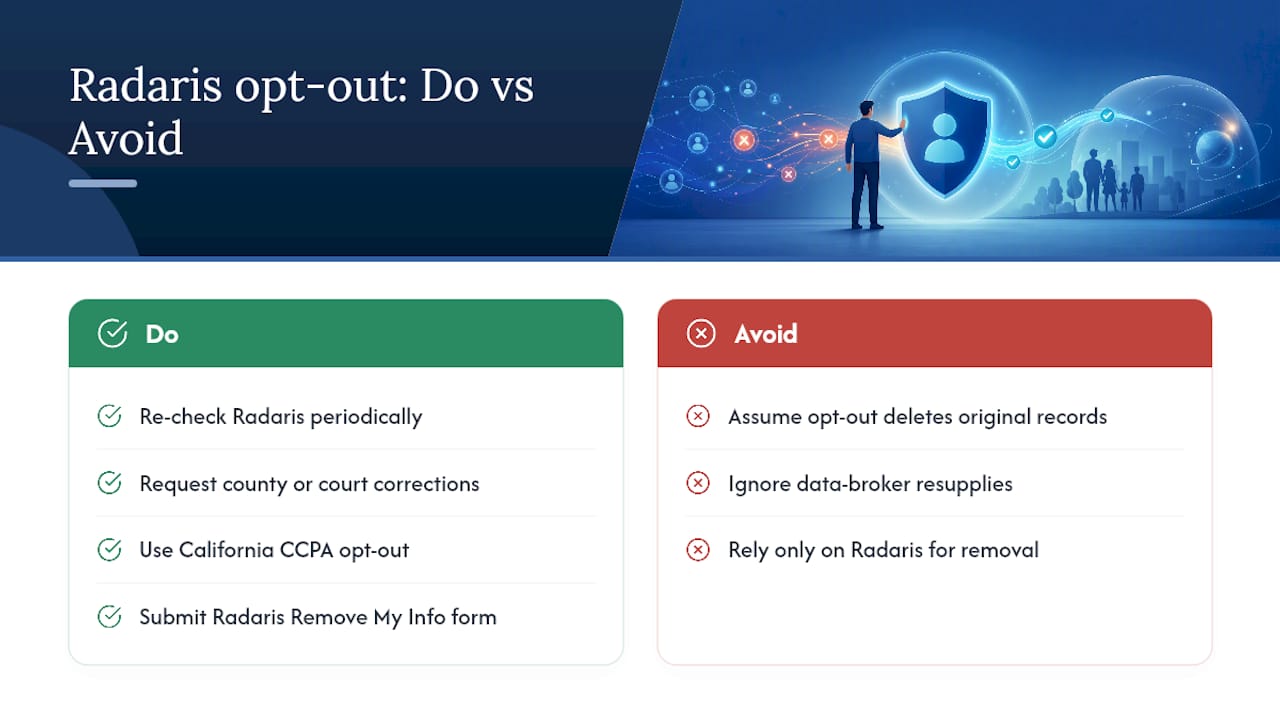
Radaris can pull your profile from its own search results, but it can’t reach into county recorders, court systems, or voter files and delete the original records. Those sources are public by law, and Radaris (along with every other people-search site) simply indexes them. The FTC’s guidance on people-search sites makes this distinction clear: opting out suppresses the listing, it doesn’t erase the underlying public record.
That distinction matters because those source records don’t stay static. Counties update property files. Courts add new filings. Data brokers resell fresh feeds to sites like Radaris. Any of those events can regenerate a profile that you already removed once.
The FTC specifically recommends periodic re-checks because reappearance is a known pattern, not a rare glitch. Radaris echoes this in its own data privacy center, noting that removed information can return if public records change or partner feeds add new copies.
Pro Tip: Think of Radaris opt-out as muting a channel, not deleting the broadcast. If you need the original record changed, you’ll have to work with the county, court, or agency that created it.
If you live in California, you have additional leverage here. The state’s privacy law gives residents a formal right to request opt-out and, in some cases, deletion, and Radaris maintains a CCPA-specific opt-out process for that purpose. Non-California residents can still use the standard Remove My Info form, but it’s worth knowing the extra layer exists if you qualify.
Finding and Removing Duplicate Radaris Listings
One opt-out rarely covers everything. Radaris often generates separate profiles for the same person under slightly different data, so a single removal can leave two or three lookalike listings standing.
- Search every name variant you’ve used. Try maiden names, nicknames, middle names spelled out, and hyphenated versions of your last name.
- Search old addresses and past phone numbers. Radaris sometimes builds a profile around an outdated location that never merged with your current one.
- Check listings tied to relatives. Family and associate sections on other people’s profiles can surface a version of your information you didn’t know existed.
- Batch multiple removals through email. If you find several listings at once, Radaris suggests contacting removals@radaris.com directly rather than filing the web form repeatedly.
- Be cautious with verification requests. Radaris may ask for identity confirmation on some removals; provide only what’s necessary to verify you’re the subject of that specific profile, not a full copy of a government ID unless it’s genuinely required.
Should You Pay for a Data Removal Service?
Paid services earn their fee by handling volume and repetition, not by doing something Radaris opt-out fundamentally can’t. Expect features like bulk submissions across dozens of broker sites, scheduled monitoring, automatic re-removal when a listing resurfaces, and a status report you can check without doing the digging yourself.
None of that includes deleting your name from the county deed record or the court docket. No legitimate service can promise permanent removal from public records, so treat that specific claim as a warning sign rather than a selling point.
- Confirm exactly which sites the service actually covers, not just how many it claims to monitor.
- Ask how often it re-checks and re-submits removals, since a one-time sweep loses value fast.
- Avoid any provider that asks for more identity documentation than the removal genuinely requires.
- Check for a clear refund or cancellation policy before you commit to a subscription.
For a deeper breakdown of when paying actually makes sense, TechStackToday’s data removal service evaluation walks through the tradeoffs in more detail.
TechStackToday’s Monitoring Checklist After Removal
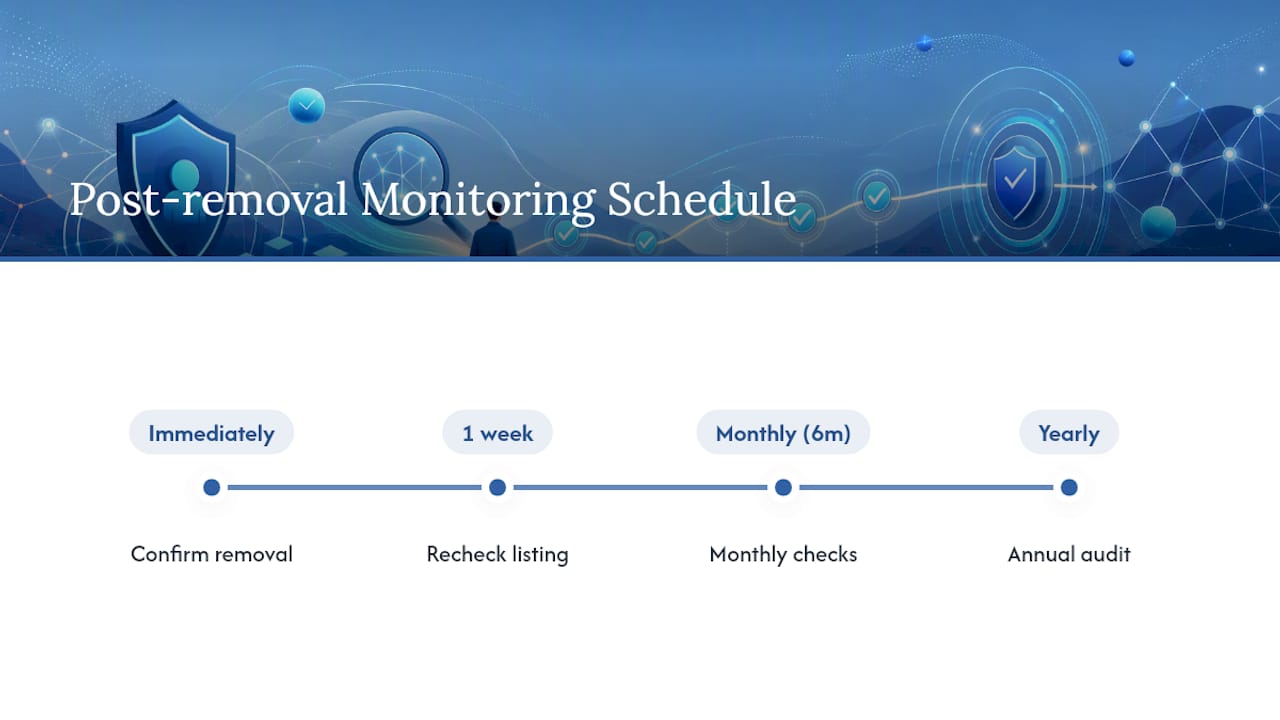
We’ve tested data removal tools hands-on and update our comparisons monthly, so we know the opt-out step is only the start. After your Radaris listing clears, confirm it immediately, recheck at the one-week mark, then check monthly for about six months, and drop to a yearly audit after that.
If you want to tackle the rest of your footprint, our guide on removing yourself from the internet covers the broader cleanup, and our broker removal walkthrough applies the same logic to other sites. Use the paid service checklist above before trusting any provider with your information.
Why We Recommend DIY Opt-Out Before Paying for Help
We consistently point readers toward the manual Radaris opt-out first because it costs nothing and takes minutes once you find the profile. Paid services earn their keep when you’re facing several duplicate listings, you’re short on time, or a personal safety concern makes speed the priority.
— TechStackTeam
Compare Removal Services Before You Pay for One
There are other routes if manual opt-out feels like too much to manage alone, from generic broker sweep tools to identity monitoring bundles. Before you hand your name and email to any of them, it helps to know which ones actually deliver ongoing coverage instead of a single pass.

Techstacktoday provides reviews of these providers to help you see coverage gaps before you commit money to a subscription. Our internet privacy tools comparison checklist breaks down what a credible removal service should cover, and our data removal service evaluation walks through pricing and monitoring cadence side by side. If a paid service turns out to be worth it for your situation, check the current rankings and see which one actually matches the sites where your information keeps turning up. If digital privacy is now on your radar, a password manager is a logical next step. Compare options on our best password managers page to lock down the accounts tied to the information you just spent time protecting.
Sources
- What To Know About People Search Sites That Sell Your Information | Consumer Advice (FTC)
- Manage your privacy on Radaris — Remove My Info (Radaris)
FAQ
Why Does Radaris Have My Information?
Radaris compiles data from public records, data brokers, and social media profiles, so it can list you even if you never signed up or gave the site anything directly. This is standard practice across people-search sites, not something unique to Radaris.
Which Data Brokers Should I Opt Out Of?
Start with the sites that show up when you search your own name, since those are the ones actually exposing your information right now. Radaris is a common one to prioritize, and TechStackToday’s broker removal guide covers others worth checking.
How Do I Remove Myself From Public Records Online?
You generally can’t delete the original public record itself. Instead, you request suppression from the people-search sites indexing it, which is what the Radaris Remove My Info form does, and separately contact the originating agency if you need the source record changed.
Is Radaris Legal?
Yes. Radaris operates legally by aggregating information that’s already public, similar to how the FTC describes the broader people-search site industry. Legality doesn’t mean the listing is accurate or something you have to leave up, which is exactly why the opt-out form exists.