Go to PeopleLooker’s opt-out search form, find your listing, submit your email, and click the verification link. That’s the entire PeopleLooker opt-out process, and it’s free. No membership, no payment, no catch. Once you verify, PeopleLooker usually processes the removal within a short period. Just know this: it clears your record from PeopleLooker only, not from public records or other data broker sites.
TL;DR:
- PeopleLooker removal applies only to the specific record you select, not to public records or other data broker sites, which can re-ingest the same data later.
- Confirm your record’s removal by checking in an incognito window after several days, and always verify with a screenshot for proof.
- If multiple listings exist, contact privacy@peoplelooker.com with details of each additional record, including URLs, your legal name, and confirmation of previous opt-outs.
- Most removals happen within 24 to 72 hours, but cache clearing and using different devices or browsers can prevent old data from appearing.
- DIY opt-outs are free and quick but require ongoing effort, while paid services cover many sites and handle re-scraped data, which is preferable if multiple broker sites involve your information.
Table of Contents
- How Do You Opt Out of PeopleLooker Step by Step?
- What Does Opting Out Actually Remove, and What Stays?
- What if PeopleLooker Shows Multiple Listings for You?
- Your Opt-Out Didn’t Work. Now What?
- Should You Opt Out Yourself or Pay for a Removal Service?
- Our Take on Managing Your PeopleLooker Exposure
- Want Broader Coverage Without the Manual Rechecking?
- Sources
- FAQ
How Do You Opt Out of PeopleLooker Step by Step?
You can knock this out in about ten minutes. Here’s exactly what to do, in order.
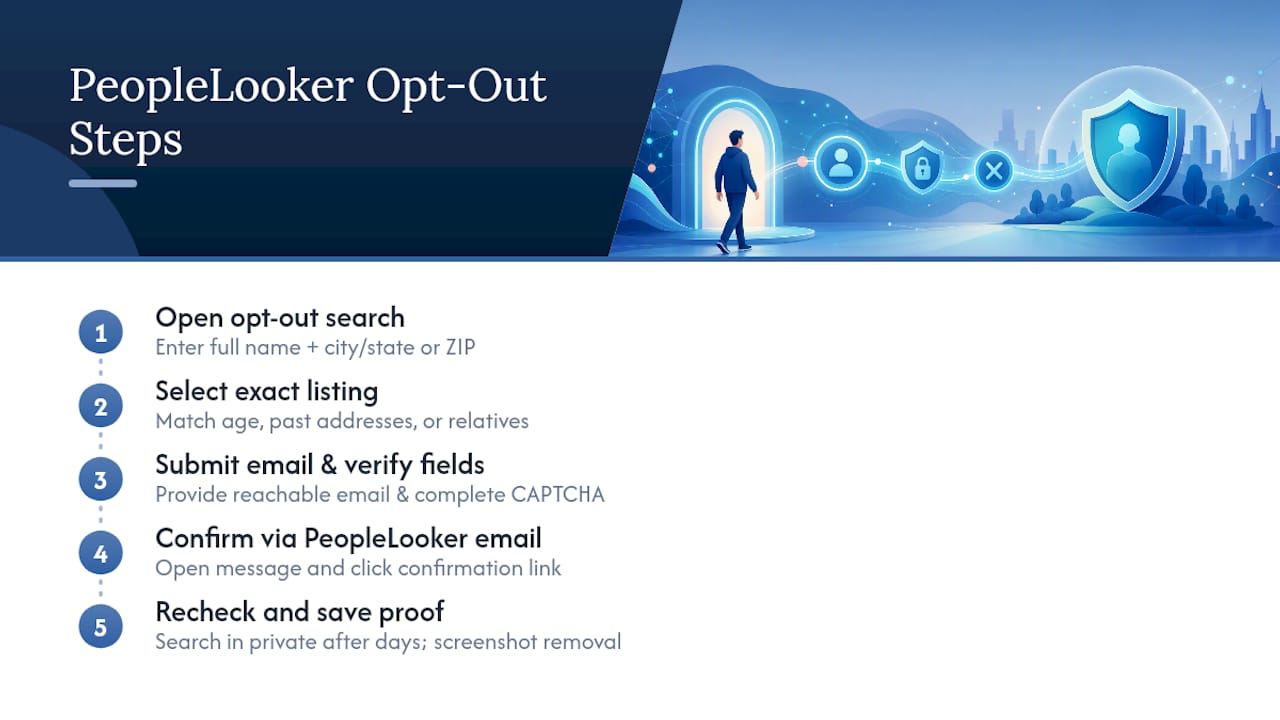
Step 1: Open the opt-out search page.
Go to https://www.peoplelooker.com/f/optout/search and enter your full name plus your city and state (or ZIP code). The more specific your search, the fewer duplicate results you’ll have to sort through.
Step 2: Find and select your exact listing.
If you have a common name, this step takes patience. Scroll through results and match on age range, past addresses, or relatives listed. Don’t opt out a record that isn’t yours. If you can’t tell which listing is you, click into a couple of the closest matches. Most show partial details (like a city or age range) that will confirm or rule it out before you commit.
Step 3: Submit your email and complete verification fields.
Once you’ve picked the right record, you’ll be asked to provide an email address and complete a CAPTCHA or similar verification step. Use an email you check regularly. Submit the request.
Step 4: Verify through the email PeopleLooker sends you.
PeopleLooker’s own support documentation confirms this step is mandatory. No verification, no removal. Open the email, click the confirmation link, and you’re done submitting your request. Check spam or promotions folders if it doesn’t show up within a few minutes.
Step 5: Confirm the record is actually gone.
Wait up to several days, then search your name again on PeopleLooker using an incognito or private browser window, ideally on a different device than the one you used to opt out. Regular browser caching can show you an old result and make you think the opt-out failed when it didn’t. Take a screenshot once you confirm removal. You’ll want that proof if the listing ever reappears and you need to escalate.
Pro Tip: Do the search-and-verify combo (Steps 4 and 5) in one sitting if you can. Waiting days between them makes it harder to remember exactly which listing you opted out, especially if you share a name with someone else.
What Does Opting Out Actually Remove, and What Stays?
PeopleLooker removes the exact record you selected from its own People Search results. That’s the full scope of what this action does.
Here’s what it doesn’t touch:
- Court records, property deeds, voter registrations, and other public records that PeopleLooker pulled the data from originally
- Listings on other people-search sites like Spokeo, BeenVerified, or TruePeopleSearch
- Data PeopleLooker receives later from new partner feeds or updated public-record scrapes
That last point matters more than most guides admit. TechRadar’s reporting on PeopleLooker describes a pattern common across the entire people-search industry: sites re-ingest data from public records and partner feeds on an ongoing basis, and a fresh data pull can recreate a listing you already removed. The FTC’s guidance on people-search sites backs this up directly. Opting out site-by-site stops that one broker from selling your current record, but it does not erase the underlying public records feeding it.
Realistically, that means one opt-out isn’t a permanent fix. It’s a maintenance task. Check back every few months, especially after you move, change jobs, or have any legal filing that generates a new public record.
What if PeopleLooker Shows Multiple Listings for You?
PeopleLooker’s self-service flow only removes one record per submission. If you find a second or third listing under a maiden name, an old address, or a slight name variation, you can’t clear them all through the automated form in one go.
For anything beyond the first record, email privacy@peoplelooker.com directly. Include:
- The URL or a screenshot of each additional listing
- Your full legal name and any name variations tied to the records
- Your date of birth, or at minimum your city and state, to help PeopleLooker confirm identity
- Confirmation of any prior opt-out you already completed, so they can cross-reference it
If you’re a judge, prosecutor, law enforcement officer, or immediate family member covered under a state privacy law like New Jersey’s Daniel’s Law, PeopleLooker asks you to skip the automated form entirely and email privacy@peoplelooker.com with your documentation instead. For account or billing questions unrelated to opt-outs, PeopleLooker also lists phone support through its help center.
Your Opt-Out Didn’t Work. Now What?
Before you assume something went wrong, run through this order of checks.
- Confirm the timing. PeopleLooker’s own support pages note removals typically reflect after the next server refresh, commonly within a day or so, though it may take longer during busier periods.
- Clear your cache or switch browsers. Your regular browser may be showing a cached version of the search results. Open an incognito or private window and search again.
- Try a different device. If incognito mode still shows the old listing, test from your phone or another computer to rule out a local caching quirk.
- Check your spam folder for the verification email. If it never arrived, resubmit the opt-out with an alternate email address, since some inboxes silently filter automated senders.
- Escalate after 72 hours. If the listing is still live past that window, email privacy@peoplelooker.com with your screenshot and submission details, and keep copies of every message you send.
Should You Opt Out Yourself or Pay for a Removal Service?
Doing it yourself costs nothing and takes about ten minutes per site. That’s the appeal. The tradeoff is that PeopleLooker is one broker among dozens, and each one requires its own separate opt-out with its own quirks, and none of them stay opted out forever.
- DIY opt-outs: Free, full control over what you submit, but you’re on the hook for repeating this across every broker and rechecking every few months.
- Paid removal services: Cover many broker sites at once, run automated rechecks on a schedule, and handle re-scraped listings without you lifting a finger, in exchange for a recurring fee.
The FTC frames this as a straightforward tradeoff between your time and your money. If you’re only worried about one or two sites, DIY makes sense. If you’ve found yourself on a dozen broker sites, or you’ve opted out before and watched a listing come back, a paid service starts looking a lot more efficient.
Pro Tip: Before paying anyone, ask exactly which sites they cover, how often they rescan, and whether they refund if a listing reappears between scans. Vague answers to any of those three questions are a red flag. Compare options through a resource like Techstacktoday’s data removal service breakdown before committing to a subscription.
Our Take on Managing Your PeopleLooker Exposure
Start with the free PeopleLooker opt-out every time. There’s no reason to pay for something you can finish in ten minutes on your own. Where paid monitoring earns its cost is when listings keep reappearing or you’re dealing with exposure across a dozen brokers instead of just one, since that’s when manual rechecking turns into a part-time job. There are tested and ranked comparisons of several of those services available if you reach that point and want a starting comparison.
— TechStackTeam
Want Broader Coverage Without the Manual Rechecking?
Handling PeopleLooker yourself is free, but it’s a one-site fix in an industry with dozens of brokers pulling from the same public records. If you’ve already opted out once and watched a listing crawl back, or you’re staring down five or six different broker sites with your name on them, doing this manually becomes a recurring chore rather than a one-time task.

Some sites test data removal and monitoring services hands-on, with real accounts and no paid placement in the rankings, so the comparisons reflect what each service actually does once you’re subscribed, not what its marketing page claims. That distinction matters when you’re paying for ongoing coverage instead of a free form. If continuous monitoring sounds more practical than repeating this process every few months, start by reading Techstacktoday’s breakdown of whether a data removal service is worth it for your specific situation, then compare coverage lists and refresh frequency before you subscribe to anything.
Sources
For the opt-out itself, use PeopleLooker’s opt-out search form. For process questions, PeopleLooker’s support center and privacy policy cover contact options and legal disclosure exceptions. For consumer rights around data brokers generally, read the FTC’s guidance on people-search sites.
- How do I remove my information from PeopleLooker’s search results? – PeopleLooker Support
- What to know about people search sites that sell your information — FTC
- How to opt out of PeopleLooker — TechRadar
FAQ
How Do I Unsubscribe From PeopleLooker?
Go to the PeopleLooker opt-out search form, find your listing, submit your email, and click the verification link PeopleLooker sends you. There’s no subscription to cancel since the search results themselves are the product, not a membership tied to your account.
How Do I Opt Out of PeopleLooker?
Search your name on PeopleLooker’s opt-out page, select the correct record, provide an email, and verify through the confirmation email. The removal typically reflects within 24 hours and no later than 72 hours, according to PeopleLooker’s own support documentation.
Is PeopleLooker Legit or Not?
PeopleLooker is a legitimate data aggregator that compiles public records into searchable profiles, and it operates in the same market as other people-search sites like Spokeo and TruePeopleSearch. It’s built around selling access to information, and that’s exactly why opting out matters if you’d rather your details weren’t searchable.
Is There a $1 Trial for PeopleLooker?
PeopleLooker has offered trial pricing for its background check and people-search subscriptions at various points, though current pricing and any trial offers are listed directly on PeopleLooker’s own site rather than through the opt-out process. The opt-out form itself is completely free and doesn’t require signing up for any trial or membership.