To opt out of InfoTracer, go to its Do Not Sell or Share page, find your record, select it, enter your email and confirm the message InfoTracer sends you. Plan on about 10 minutes. Don’t panic if you see your address and relatives on screen. This is a common, fixable problem, and the steps below take you from search to confirmed removal. ⏱️
This guide also covers the part most pages skip: what to do when the form fails, why your name can reappear, and what an opt-out will never remove.
TL;DR
- Use InfoTracer’s official opt-out and Do Not Sell or Share forms. You don’t need to pay anyone to do it.
- The form removes only the records you select, so submit each record separately.
- InfoTracer says removal typically happens within 24 to 48 hours. If you asked for confirmation and nothing arrives within 15 days, email privacy@infotracer.com.
- An opt-out does not erase public records, and your details can still show up in relatives’ or neighbors’ reports.
- Re-check every few months, and repeat the process on other people-search sites.
Table of Contents
- What InfoTracer is and what it shows about you
- Before you start: 3 things to have ready ✅
- How to opt out of InfoTracer, step by step
- How long does removal take, and how do you confirm it?
- If the opt-out doesn’t work
- Use your state privacy rights
- What opting out of InfoTracer will not do
- Do the other sites next
- Doing it yourself vs. paying a removal service
- Our take: why one opt-out is never enough
- Want it handled for you? 🛡️
- If your data was in a breach or used for identity theft
- How often should you re-check?
- FAQ
- Sources
What InfoTracer is and what it shows about you
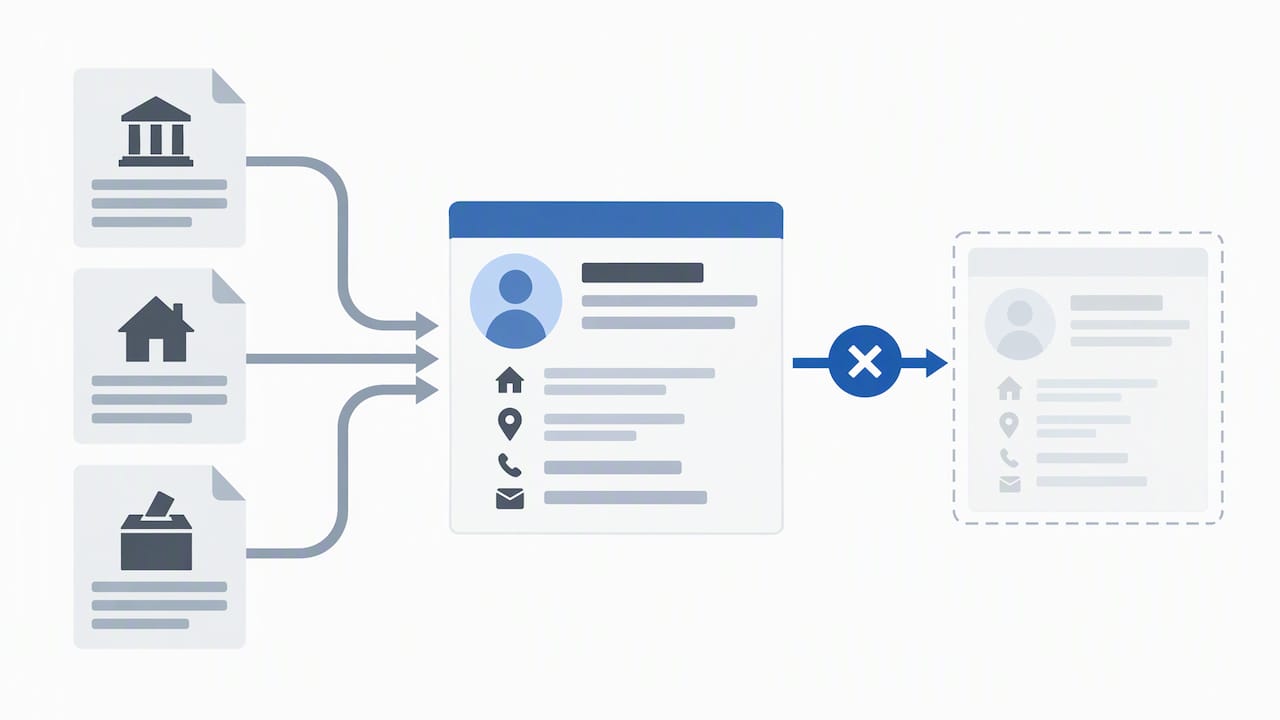
InfoTracer is a U.S. people-search site. It collects publicly available records and packages them into searchable reports, which is why a stranger can type your name and see a profile. Privacy Rights Clearinghouse lists InfoTracer as a people-search data broker that accepts opt-outs through a form, so it is a real, recognized business and not a scam site. InfoTracer itself says its services give access to publicly available records and that it offers removal from its search results.
That last phrase matters. InfoTracer removes your listing from its own search. It does not erase the court file, property deed or voter record the listing was built from. We come back to that below, because it explains most “it came back” complaints.
Before you start: 3 things to have ready ✅
Spend two minutes on prep. It saves you from filing the wrong record or a duplicate.
- An email address you can open right now. InfoTracer sends a verification message, and you must act on it. Use an address you control, not a work inbox that blocks outside mail.
- Your search details. Your full name, state and city. Also note older cities, since brokers often list several past addresses.
- A list of name variations. Middle initial, maiden name, nickname. Each variation can produce its own record.
Tip: search yourself first in a private browser window. Write down every record that shows your name with your age, city or relatives. That is your removal checklist.
How to opt out of InfoTracer, step by step
Step 1: Open the official opt-out page (1 minute)
Go straight to InfoTracer’s own pages: the opt-out portal or the Do Not Sell or Share My Personal Information page. Type the address yourself rather than clicking a search ad. Lookalike pages exist, and you never need to pay to remove a listing here.
Step 2: Search for your record (2 minutes)
Enter your name and location. InfoTracer shows matching records. Find the one that is actually you by checking age, past cities and relatives. If two or three look like yours, note all of them.
Step 3: Select the record and start removal (1 minute)
Select your record and choose the removal option. The form asks for enough information to locate the data. Give only what it asks for. You don’t need to upload an ID or share a Social Security number to remove a listing, and a request for either is a red flag. ⚠️
Step 4: Add your email and verify (2 minutes)
Enter your email, complete the CAPTCHA and submit. Open the message InfoTracer sends and follow the verification link. No click, no removal. This is the step people skip, and it is behind a lot of “I tried three times and it didn’t work” threads.
Step 5: Repeat for every other record (3 to 5 minutes)
The form removes only the records you select, so submit additional records separately. If you found three listings in step 2, you run this process three times. Use the same email each time to keep your confirmations together.
Step 6: Save proof
Take a screenshot of each submission page and keep the confirmation emails in a folder. If the listing returns, you will want the date of your request.
How long does removal take, and how do you confirm it?
InfoTracer’s FAQ says removal typically occurs within 24 to 48 hours and that you get an email once processing is complete. Here is how to confirm it yourself:
- Wait two full days after you verified your email.
- Open a private browser window and search your name, phone number and address on InfoTracer.
- Check each variation of your name from your prep list.
- Screenshot the clean result with the date.
If you chose to receive a confirmation and have not received it within 15 days, InfoTracer says to contact privacy@infotracer.com. For a missing email, check your spam folder first. If it is not there, the FAQ lists its Compliance Team at the same email address and by phone at 844-777-0503.
If the opt-out doesn’t work
Most failures come from a short list of causes. Go down it in order. 🔧
| Problem | Likely cause | What to do |
|---|---|---|
| No verification email | Spam filter, typo, blocked domain | Check spam, resubmit with a personal email |
| Record still shows after 48 hours | Verification link never clicked, or a second record exists | Search again, submit any remaining record separately |
| Form errors out | Browser extension or CAPTCHA issue | Try a clean browser window with extensions off |
| No confirmation after 15 days | Request stuck | Email privacy@infotracer.com with your dates and screenshots |
| Listing returns months later | New public record or data refresh | Resubmit and keep checking |
When you email, keep it short and factual: your name as listed, the city on the record, the date you submitted, and a screenshot. Ask them to confirm removal in writing.
Use your state privacy rights
If the plain form stalls, your state law may give you stronger tools. InfoTracer’s opt-out page says it honors Global Privacy Control signals for sale-or-sharing opt-outs. It also lists rights to deletion, correction, access and appeal, subject to state-law coverage and exceptions.
InfoTracer says these rights may apply in California, Colorado, Connecticut, Delaware, Indiana, Iowa, Kentucky, Maryland, Minnesota, Montana, Nebraska, New Hampshire, New Jersey, Oregon, Rhode Island, Tennessee, Texas, Utah and Virginia, depending on local law and exceptions. If you live in one of those states, say so in your request. If you live elsewhere, the standard opt-out still applies. For a plain-English breakdown, see our guide to state privacy laws and broker removal.
A Global Privacy Control signal is a browser setting that tells sites not to sell or share your data. Turn it on in a privacy-focused browser or extension, and it works in the background on sites that honor it. It doesn’t replace a manual removal request.
What opting out of InfoTracer will not do
This is where expectations break. The FTC says opting out of people-search sites does not delete information from public records. It also warns that your details may still appear in relatives’, neighbors’ or associates’ reports, and that changed public records can make information reappear.
In practice:
- Your listing disappears from InfoTracer search. ✅
- Your mother’s report may still list your name as a relative. She would need her own opt-out.
- A new address or court filing can create a fresh record. Expect to resubmit.
- Dozens of other sites hold similar profiles. InfoTracer is one of many.
So treat the opt-out as one move in a longer routine, not a one-time fix.
Do the other sites next
The FTC recommends repeating the opt-out steps on other people-search sites and periodically checking for newly appearing information. Start with the sites that rank highest when you search your name. We have tested walkthroughs for several of them:
- TruePeopleSearch, a free site that often shows your phone and address.
- FastPeopleSearch, another free lookup with a quick removal flow.
- PeopleFinders, which takes about five minutes.
- PeopleLooker, where the question is whether paying makes any difference.
- Intelius, removed through a shared parent-company portal.
- USPhoneBook and Addresses.com, which expose phone numbers and addresses.
- TruthFinder, with a short three-step removal.
For business-style profiles that list your job and work email, see our ZoomInfo opt-out guide. If you want the whole picture, how to remove yourself from the internet lays out the order we recommend.
Doing it yourself vs. paying a removal service
Manual opt-outs cost nothing but time. The cost is repetition: dozens of sites, then re-checks. The FTC notes that paid services take steps to opt you out of people-search sites. It advises checking their coverage, their reports, how often they scan, and whether they remove information that reappears. Those are the right questions.
Here is how we think about the choice:
| Your situation | Better fit |
|---|---|
| One or two sites bother you | Do it yourself, 10 minutes each |
| You’re targeted, stalked or harassed | A paid service that rescans, plus police and legal advice |
| You moved recently or share a common name | Paid service, to catch new records |
| You just want a baseline cleanup | Do the top sites by hand, set a calendar reminder |
We break down the cost against the benefit in Is a data removal service worth it?
Our take: why one opt-out is never enough
We test privacy services with real accounts, and the same pattern shows up again and again. People complete one opt-out, feel relief, and then find the same details on a different site a week later. That isn’t a failure of the form. It is how the people-search market works: many sites buy or scrape the same public records, so a removal on one site does nothing to the others.
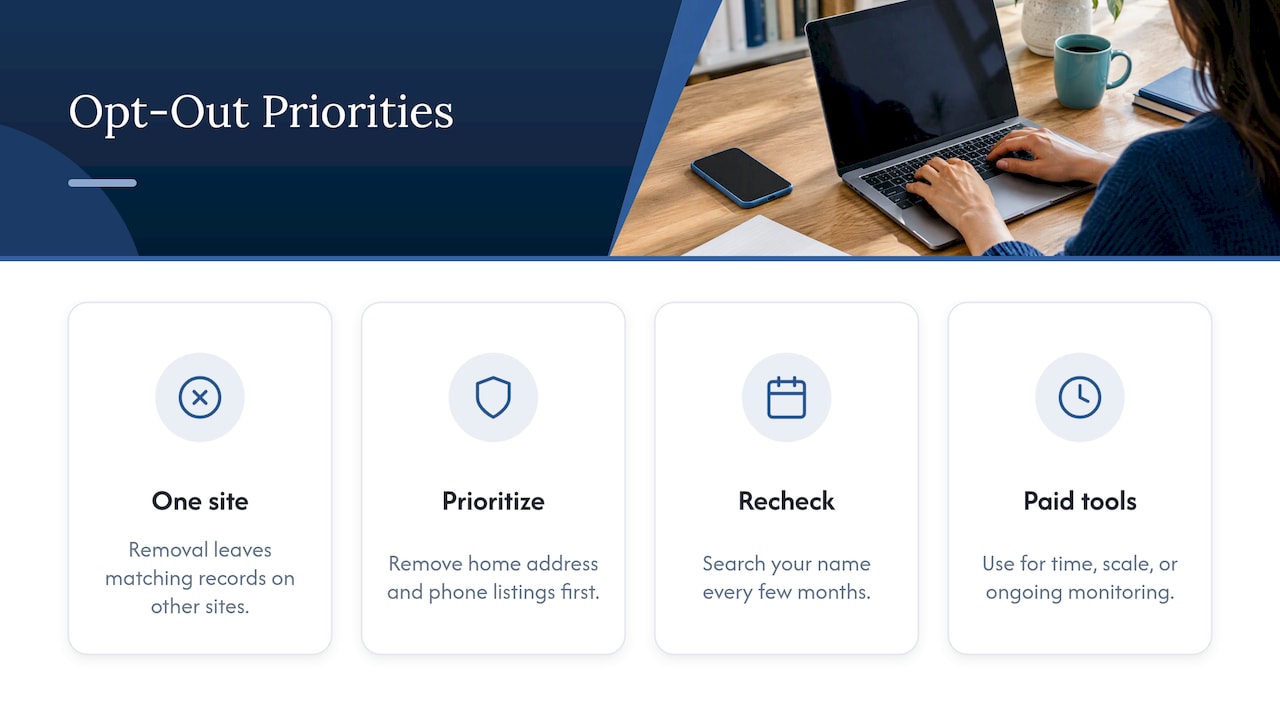
Our advice is simple. Remove the listings that expose your home address and phone number first, because those carry the most real-world risk. Keep your confirmation emails. Set a reminder to search your name every few months. And don’t pay for a removal that a free official form already does.
We don’t take payment for rankings, so when we say a free form is enough for a given site, we mean it. Use the paid tools only when time, scale or ongoing monitoring is the real problem.
— TechStackTeam
Want it handled for you? 🛡️
If you’d rather not repeat this process across dozens of sites, our tested comparison shows which data removal services cover the most brokers, how often they rescan, and what they cost. Start with our guide to removing your data from the internet, or browse every reviewed service on TechStackToday.

Our reviews are hands-on and rankings aren’t influenced by affiliate payouts. You see the trade-offs before you spend a dollar.
If your data was in a breach or used for identity theft
A people-search listing makes you easier to find. A breach or identity theft is a different problem and needs faster action. The FTC’s data breach guidance says the right steps depend on what was exposed, and points to IdentityTheft.gov/databreach for detailed instructions. These are the core moves from that guidance:
- ⏱️ Today: If a company offers free credit monitoring after its breach, take it.
- ⏱️ Today: Get your free credit reports at annualcreditreport.com and look for accounts you don’t recognize.
- ⏱️ Today: If a login was exposed, change that password. Change it anywhere else you reused it.
- ⏱️ This week: If a card number was exposed, check your statements for charges you don’t recognize.
The unique, strong passwords in step 3 are easier with a password manager, which creates and stores a different one for every account. If you suspect someone has already opened accounts in your name, go to IdentityTheft.gov for a recovery plan. Use the official site for your state’s and the FTC’s current steps, since they get updated.
How often should you re-check?
A practical rhythm:
- One week after your request: confirm the listing is gone and save the screenshot.
- Every three months: search your name, phone number and address again.
- After you move, change your name or buy a home: re-check immediately, since new public records are what bring listings back.
- Anytime you get a spam-call spike: search first. A fresh listing is a common cause.
The FTC recommends searching by name, phone number or address, following each site’s opt-out instructions, and checking periodically for new information. A calendar reminder does the job.
FAQ
Is InfoTracer legit?
Yes, it is a real U.S. people-search business. Privacy Rights Clearinghouse lists it among data brokers with a form-based opt-out. Legit doesn’t mean harmless to your privacy, though. It publishes information compiled from public records, which is why many people choose to opt out.
How do I remove my information from InfoTracer?
Open InfoTracer’s official Do Not Sell or Share page, find your record, select it and verify your email. Submit each additional record separately. Removal typically happens within 24 to 48 hours, and you can follow up at privacy@infotracer.com if it stalls.
Is InfoTracer free to opt out of?
Yes, the official opt-out form doesn’t require payment. Skip any page that asks for a fee to remove your listing. A paid data removal service is optional and only makes sense if you want ongoing scanning across many sites.
Will my information come back after I opt out?
It can. The FTC warns that changed public records can cause information to reappear, and that you may still show up in relatives’ or associates’ reports. Re-check every few months and resubmit if a record returns.
How do I opt out of people search sites in general?
Search your name, phone number and address, then follow each site’s own opt-out instructions, as the FTC advises. Start with sites showing your home address. Our data broker removal guide shows one full worked example.
Sources
- InfoTracer: Do Not Sell or Share My Personal Information
- InfoTracer: Opt Out
- InfoTracer: Frequently Asked Questions
- Privacy Rights Clearinghouse: InfoTracer
- FTC: What To Know About People Search Sites That Sell Your Information
- FTC: IdentityTheft.gov Data Breaches, What to know, What to do