Yes, you can remove your Whitepages listing right now. Go to the suppression form, paste in your profile URL, and complete the phone verification step. Have your profile link, a phone number you can answer, and a note of the submission date ready before you start. Most removals process within 24 to 72 hours. If the listing is still up after that window, resubmit and escalate to privacyrequest@whitepages.com.
TL;DR:
- Most removal requests are processed within 24 to 72 hours if the profile URL is correctly copied from the profile’s direct address bar without extra tracking parameters.
- Using the exact profile URL, removing query strings, and completing phone verification are essential steps for successful suppression on Whitepages.
- If a profile reappears after removal, resubmit the request with the new URL or contact Whitepages support directly via email or support portal.
- When automated verification calls fail, switching to an email request or using a secondary phone service like Google Voice can improve chances of success.
- Regularly recheck your profile’s URL after removal and monitor other data broker sites to prevent re-listing from public records refreshes.
Table of Contents
- How Do You Opt Out of Whitepages Step by Step?
- One-Minute Prep Checklist Before You Start the Opt-Out
- Why Does the Form Reject My URL or Verification Code?
- How Long Does Whitepages Take to Process a Removal?
- What Other Ways Can You Opt Out of Whitepages?
- How Do You Keep Your Listing From Coming Back?
- What Testing Actually Shows About This Process
- Should You Just Handle This Yourself, or Get Help?
- Where to Go for Official Whitepages and Privacy Information
- Sources
- FAQ
How Do You Opt Out of Whitepages Step by Step?
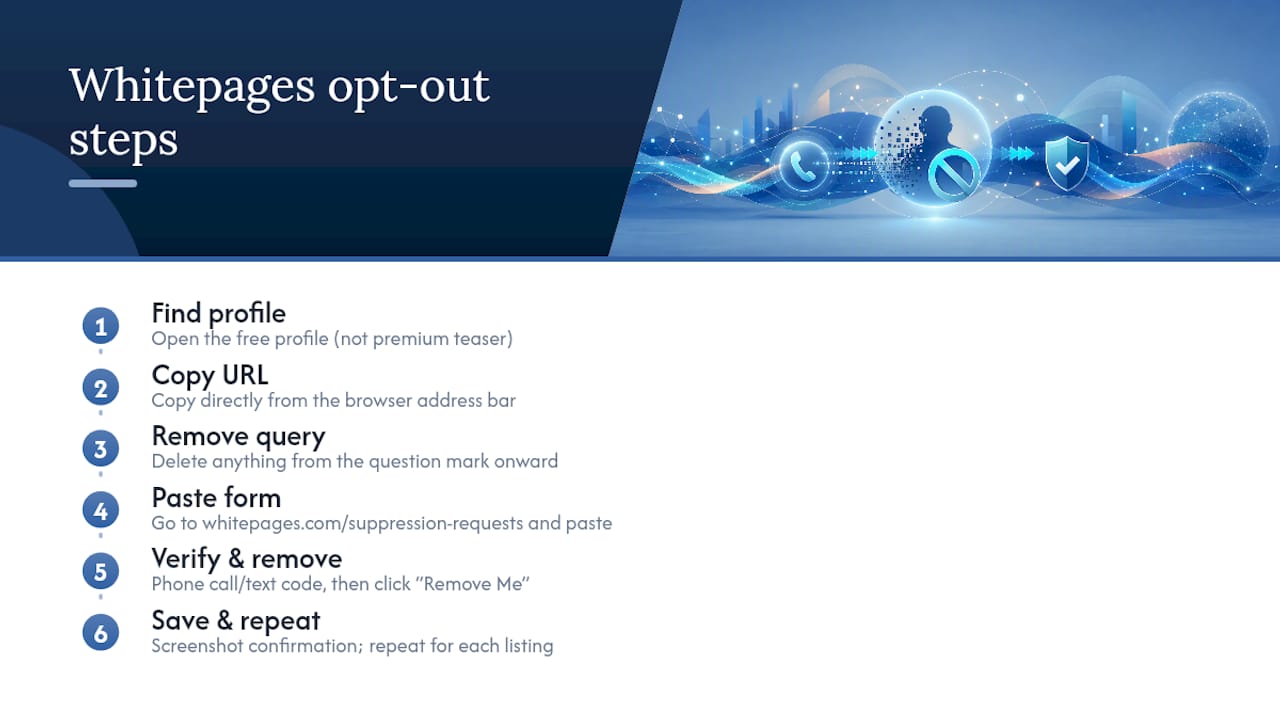
Removing your Whitepages listing takes about 10 minutes once you know where the form breaks. Most people get stuck not because the process is hard, but because they skip a small detail, like an extra tracking parameter in the URL, that quietly kills the submission. Here’s the exact sequence that works.
1. Find your real profile, not the teaser page.
Search your name and city on Whitepages.com. You’ll likely see multiple results, including “View Full Report” links that push you toward a paid Premium report. Skip those. Click through to the free profile page that shows your name, age range, city, and relatives. That’s the listing you need to suppress.
2. Copy the clean URL from your browser’s address bar.
Don’t copy a link from search results or a “share” button. Click directly into the address bar, select the full URL, and copy it. This matters because Whitepages profile URLs often follow a pattern like whitepages.com/name/City-State/[ID], and any extra characters tacked onto the end (tracking codes, session tags, anything after a question mark) can cause the suppression form to reject it outright.
3. Strip out anything after a question mark.
If the URL includes a ? followed by letters and numbers, delete everything from the question mark onward. You want the plain profile address and nothing else.
4. Go to the suppression form and paste the URL.
Head to whitepages.com/suppression-requests. Paste your cleaned URL into the field provided. The page will pull up the matching profile so you can confirm it’s actually you before proceeding.
5. Confirm the record and select your removal reason.
Once the profile loads, click “Remove Me.” You’ll be asked to select a reason for the request. Pick whichever option matches your situation, such as privacy concerns or inaccurate information.
6. Complete phone verification.
This is the step that trips up the most people. Whitepages will display the phone number listed on your profile and ask you to verify it’s yours. Consumer Privacy Rights documentation confirms this verification exists specifically to prevent abuse of the removal system, so someone can’t suppress your listing without your consent, and vice versa. Select “Call now” or the text option if available, and enter the code you receive.
7. Submit and save your confirmation.
Once verification clears, submit the request. Screenshot the confirmation screen or note the date and profile URL somewhere you’ll remember. You’ll want this if you need to follow up.
8. Repeat for every distinct listing.
If you have multiple profiles under slightly different name spellings, old addresses, or past cities, each one needs its own suppression request. Whitepages does not automatically link and remove duplicate records.
9. Check for Premium teasers after 72 hours.
Even after your main profile disappears, a shortened “preview” version tied to a paid report can sometimes still show up in search results. If you spot one, submit a separate suppression request using that specific URL.
Pro Tip: Do the phone verification call from a quiet spot with good signal. Automated verification calls sometimes get flagged as spam by carrier apps, and a dropped or misheard code is one of the most common reasons people think the form “didn’t work” when it actually just needs a second attempt.
One-Minute Prep Checklist Before You Start the Opt-Out
A little prep prevents most of the headaches people run into with this form. Before you touch the suppression page, run through this list:
- Confirm your name, middle initial, and city or state match exactly what’s shown on the Whitepages profile. A mismatch here is one of the top reasons requests stall.
- Paste the profile URL into a plain-text editor like Notepad before pasting it into the form. This strips out any hidden formatting characters that sneak in when you copy from a browser tab or a search result snippet.
- Keep your phone nearby and temporarily disable any call-blocking or robocall-filtering apps. The verification call often comes from an automated or unfamiliar number.
- Write down the date you submitted the request and save the exact profile URL in a notes app. You’ll need both if you have to follow up in a few days.
None of this takes more than a minute, but skipping it is exactly why so many people end up resubmitting the same request three times.
Why Does the Form Reject My URL or Verification Code?
Two problems account for nearly every failed submission: a malformed URL and a verification call that never lands. Here’s how to fix each one.
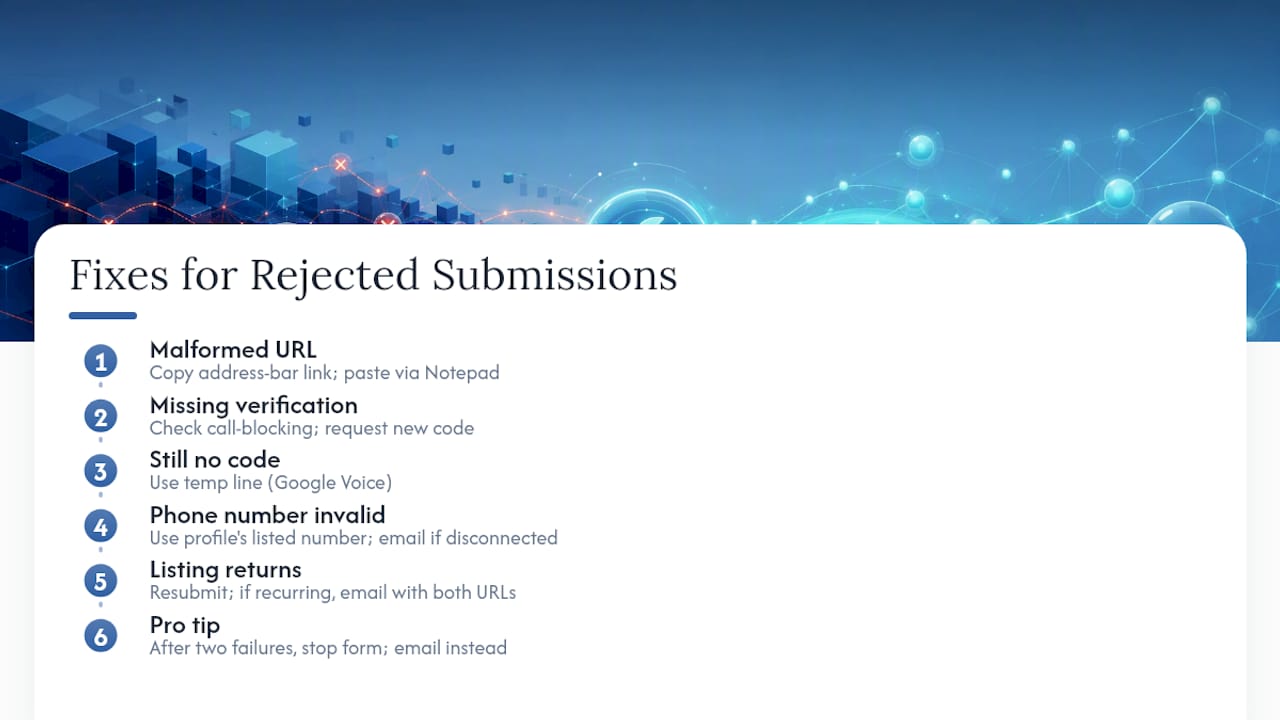
The form says the URL is invalid.
This almost always means the link you pasted wasn’t pulled straight from the address bar, or it still has a tracking string attached. Open the profile directly in your browser, click into the address bar, copy the full link, and paste it into a plain-text editor first to remove any invisible characters. Then copy it from there into the suppression form. In hands-on testing, this two-step copy process, browser to Notepad to form, resolved the vast majority of URL rejections that a direct copy-paste didn’t.
The verification call or text never arrives.
Check your phone’s call-blocking settings first; many carriers flag automated numbers by default. If nothing comes through after a minute or two, request a new code rather than waiting. If your phone still won’t accept the call, a temporary line through a service like Google Voice can receive the verification when your primary number won’t cooperate. If none of that works, skip the form entirely and use the email route.
The form says the phone number itself is invalid.
Use only the number displayed on your specific profile, not your current cell number if they differ. If the listed number is outdated or disconnected, email privacyrequest@whitepages.com directly and explain the situation with your identifying details.
The listing comes back after it was removed.
This happens. Public records refresh, and Whitepages occasionally repopulates a profile from an updated data source. Resubmit the suppression request, and if it recurs, email privacyrequest@whitepages.com with both the original and the new profile URLs so the team can flag the record for permanent suppression.
Pro Tip: If you’ve failed the same step twice, don’t try a third time on the form. Switch to email immediately. It’s a slower channel, but it skips the exact failure point that’s blocking you.
How Long Does Whitepages Take to Process a Removal?
Whitepages states a processing window of up to 72 hours for suppression requests. In practice, many users see their profile disappear within a few hours of completing phone verification, especially for straightforward, single-listing requests submitted through the form.
To confirm it actually worked, reload the exact URL you submitted. A successful removal shows a message indicating the record has been suppressed, not your profile information. If you instead land on the profile page again, the request either didn’t go through or is still processing.
Check for any linked Premium teaser pages once the main profile is gone. If one is still visible after 72 hours, treat it as a separate listing and submit again with that page’s specific URL.
Keep in mind that a re-listing isn’t necessarily a failure on your part. Public records get refreshed periodically, and Whitepages pulls from sources that occasionally regenerate a profile from scratch. This is exactly the tension the FTC highlights in its guidance on people-search sites: suppression removes the broker’s public display of your data, but it doesn’t erase the underlying public record that fed it in the first place.
What Other Ways Can You Opt Out of Whitepages?
If the form isn’t cooperating, or you’d rather not enter a phone number into an online form at all, Whitepages gives you two more official paths, plus a browser-level option worth turning on regardless.
-
Email privacyrequest@whitepages.com directly. Include your full name exactly as it appears on the listing, the profile URL, your city and state, and a clear statement that you’re requesting suppression of your listing. Something like: “I am requesting removal of my personal information from Whitepages under applicable privacy law. My listing is at [URL]. Full name: [Name]. City/State: [City, State].” This route is slower than the form but works well when you’re unwilling to complete phone verification online.
-
Open a ticket through the Whitepages support portal. If the form repeatedly fails or the email goes unanswered after several days, Whitepages’ support portal lets you file a ticket that routes directly to the privacy team.
-
Turn on Global Privacy Control in your browser. GPC is a signal your browser sends automatically to tell participating sites you don’t want your data sold or shared. Whitepages’ general privacy policy recognizes GPC as a valid opt-out signal. It won’t pull down an existing listing by itself, but it’s a low-effort way to reduce future data sharing, and it works passively in the background once enabled through a supported browser or extension.
Reach for email or the support portal specifically when the form is broken, when you’d rather not supply a phone number online, or when you’re making a request tied to a specific state privacy law, since Whitepages routes CCPA-related requests through this same consumer privacy flow.
How Do You Keep Your Listing From Coming Back?
Getting removed once is only half the job. Whitepages, along with most people-search sites, periodically refreshes its data from public records, which means listings can quietly reappear months later.
Build a simple follow-up habit:
- Recheck the exact URL you submitted immediately after removal, then again at the 24 and 72-hour marks to confirm it stuck.
- Search your name with slight variations, maiden names, past addresses, old phone numbers, once a month for the first few months.
- Check related people-search sites for duplicate listings pulling from the same public records. If you find one on a site like TruePeopleSearch, the removal process is similar but not identical.
- Keep a running log of every profile URL and submission date, so if something resurfaces, you’re not starting from zero.
If you’re finding your information scattered across a dozen different broker sites, doing this manually every few weeks stops being a quick task and starts eating your weekends, so consulting a digital footprint guide can help boost your visibility and manage your reputation more efficiently. That’s the point where a lot of people look into monitoring or subscription-based removal services instead of chasing each listing one at a time, and it’s worth reading a breakdown of how those services actually work before deciding whether that trade-off makes sense for you.
What Testing Actually Shows About This Process
In hands-on testing, two things break more often than anything else: a mangled profile URL and a verification call that never lands. Both are fixable, but they account for nearly every stuck request.
The Notepad trick, copying the URL from the address bar into a plain-text editor before pasting it into the form, resolved most of the rejections that a direct copy-paste didn’t catch. Median removal time in testing landed comfortably under 24 hours once verification actually went through cleanly.
The real long-term challenge isn’t the initial removal. It’s re-listing. Records refresh, duplicates surface under old addresses, and the same profile can quietly reappear months later. If the form fails twice on the same step, don’t keep hammering it. Switch to the email route early. It costs you a day or two, but it sidesteps whatever is jamming the automated system.
— TechStackTeam
Should You Just Handle This Yourself, or Get Help?
Whitepages is one site. If you’ve gone through this process and started wondering how many other broker sites have the same information sitting on them, you’re asking the right question, most people have profiles scattered across a dozen or more people-search sites they’ve never heard of.

Reviews and ranks of data removal and privacy subscription services based on hands-on testing provide transparency when deciding whether to do removal site by site or use a service monitoring multiple brokers at once. DIY removal works, but it costs time you may not have if your information is spread across many platforms. If you’re weighing that trade-off, our breakdown of whether a data removal service is actually worth paying for walks through the real cost and time savings, and our guide to removing yourself from the internet covers the full picture beyond just one site. Start there to see which approach fits how much exposure you’re actually dealing with.
Where to Go for Official Whitepages and Privacy Information
For direct reference, bookmark these: the Whitepages suppression form for submitting removal requests, the Consumer Privacy Rights page for verification and processing details, and the general privacy policy for GPC and state-specific opt-out language. For broader context on how people-search sites operate, the FTC’s consumer guidance is worth reading, and the Global Privacy Control specification explains the browser signal itself.
Sources
- The Official Whitepages
- What to know about people-search sites that sell your information — FTC
- Global Privacy Control
FAQ
Does Opting Out of Whitepages Really Work?
Yes. Submitting the suppression form with a verified phone number typically removes your public profile within 24 to 72 hours, though the FTC notes that suppression removes the broker’s display of your data, not the underlying public record it came from.
How Do I Permanently Delete My Whitepages Account?
There’s no way to guarantee permanent deletion, since Whitepages periodically refreshes listings from public records, but resubmitting suppression requests whenever a profile reappears and monitoring your name every few months keeps your exposure minimal.
How Do I Stop Paying for Whitepages?
If you signed up for a paid Whitepages Premium subscription, cancel it through your account settings or contact Whitepages support directly. Canceling a paid subscription is separate from suppressing your free profile listing, and you’ll likely need to do both.
How Do I Remove Myself From Public Searches?
Start by suppressing your Whitepages profile through the official form, then check other people-search sites for duplicate listings and enable Global Privacy Control in your browser to limit future data sharing. For a full plan covering multiple sites at once, a comprehensive removal guide walks through the broader process.