The fastest way to complete an Acxiom opt out is through the official U.S. online opt-out form, then confirm the request through the email link Acxiom sends you. If you can’t confirm by email, call 1-877-774-2094 to submit the request by phone instead. Either way, opting out limits how Acxiom uses your data for future marketing. It does not erase data Acxiom already sold or shared with other companies.
TL;DR:
- Using the online form requires accurate identifiers and a check that matches your previous addresses, phone numbers, and emails to avoid delays.
- Confirming your request via the email link starts the two-week processing window, and missing this step can leave your request unresolved indefinitely.
- Opting out only stops future data use and does not remove information already sold or shared with third parties, nor does it affect public records.
- Phone and mail routes are slower but useful for those without reliable email or seeking documentation, especially for authorized agents or special cases.
- Combining an opt-out with a formal state privacy request offers the most comprehensive data removal, especially for deletion or access requests.
Table of Contents
- Quick Checklist: The 3 Fastest Ways to Opt Out
- Step-by-Step: Using Acxiom’s U.S. Online Opt-Out Form
- Alternative Routes: Phone, Mail, and Authorized-Agent Submissions
- What an Acxiom Opt-Out Actually Does (And Doesn’t Do)
- Timing, Verification, and How to Confirm Your Request Worked
- When to File a State Privacy Request Instead
- Practical tips from hands-on testing
- Why This Process Matters (And a 60-Second Checklist)
- When a Privacy Subscription or Removal Service Is Worth It
- Official Links to Complete Your Acxiom Opt-Out
- Sources
Quick Checklist: The 3 Fastest Ways to Opt Out
You don’t need a law degree or a spare afternoon for this. You need about 10 minutes, a working email address, and accurate details about yourself.
Before you touch the form, gather your information. Acxiom matches records using name variations, past addresses, phone numbers, and email addresses on file, so having these ready prevents a failed match on your first attempt. Testing on similar broker sites shows that mismatched or incomplete identifiers are the number one reason opt-out requests stall.
Here’s what to have ready, and which route fits your situation:
- Online form (fastest, most people): requires a valid email address you can check right away. The confirmation link often lands in spam or promotions folders, not your main inbox.
- Phone line: call 1-877-774-2094 if you don’t use email or can’t verify one. This works for people who prefer to talk to someone or who don’t want to create a new email account just for this.
- Mail or authorized agent: for special cases, including requests made on behalf of a deceased relative or through someone you’ve legally authorized to act for you. These paths need extra documentation and take longer to process.
Pick the route that matches your situation, then move to the full walkthrough below.
Step-by-Step: Using Acxiom’s U.S. Online Opt-Out Form
This is the main event. Follow these steps in order and you’ll avoid the mistakes that cause most requests to bounce back or sit unprocessed.
- Go to the official form. Navigate to Acxiom’s opt-out form directly. Don’t use a search result that links to a copy or a third-party mirror.
- Choose your opt-out segments. The form lets you select which channels you want to stop: mailing lists, phone marketing, email marketing, or all three. Check every box that applies to you.
- Select who is opting out. Options typically include yourself, a request on behalf of a deceased person, a guardian acting for a minor, or an authorized agent acting for someone else. Pick the one that actually applies.
- Enter your identifiers carefully. Type in your name, address history, phone numbers, and email exactly as they’d appear in Acxiom’s records. If you’ve used a maiden name, a previous address, or a different phone number in the past five to ten years, include those too using the form’s Add (+) buttons.
- Do not add new contact information. This is the single biggest mistake people make. If you enter a brand-new email or address that Acxiom has never seen, you risk creating a fresh record instead of matching an existing one.
- Enter a working email and complete the CAPTCHA. Use an address you can check within the next few minutes, not one you’ll get around to later.
- Open the validation email and click the confirmation link. Check spam and promotions folders if it doesn’t show up in your main inbox within a few minutes.
- Complete the final confirmation screen. You’ll receive a reference number once everything goes through.
Pro Tip: Write down or screenshot your reference number the moment you get it. If Acxiom’s support team ever needs to look into your request, that number gets you a faster answer than describing what you submitted.
Acxiom states it begins processing your opt-out within two weeks after you confirm the validation email. That clock doesn’t start when you submit the form. It starts when you click the confirmation link, so don’t let that email sit unread.
Alternative Routes: Phone, Mail, and Authorized-Agent Submissions
Not everyone can or wants to use the online form, and Acxiom accounts for that.
- Phone: Call 1-877-774-2094 and follow the prompts. This route works well if you don’t have consistent email access, if you’re helping an older relative who isn’t comfortable with online forms, or if you just prefer talking through the request.
- Mail: Send a written request that includes your full name, current and past addresses, phone number, and a clear statement that you’re opting out of Acxiom’s marketing products. Acxiom’s U.S. consumer instructions page lists the mailing address and required details for consumer rights requests.
- Authorized agents: If someone else is submitting on your behalf, Acxiom requires documentation proving that authority, including a signed consent form from you. California residents get specific authorized-agent verification rules under CCPA, and Acxiom applies similar scrutiny nationwide to prevent fraudulent requests.
Mail takes longer than the other two routes, often several weeks longer, because there’s no digital confirmation step to speed things along. Learn more about insurance agency compliance essentials for CRM data privacy to understand similar verification processes in data handling. If you’re not in a rush and prefer a paper trail, it’s a solid option. If you want speed, stick to the phone or online form.
What an Acxiom Opt-Out Actually Does (And Doesn’t Do)
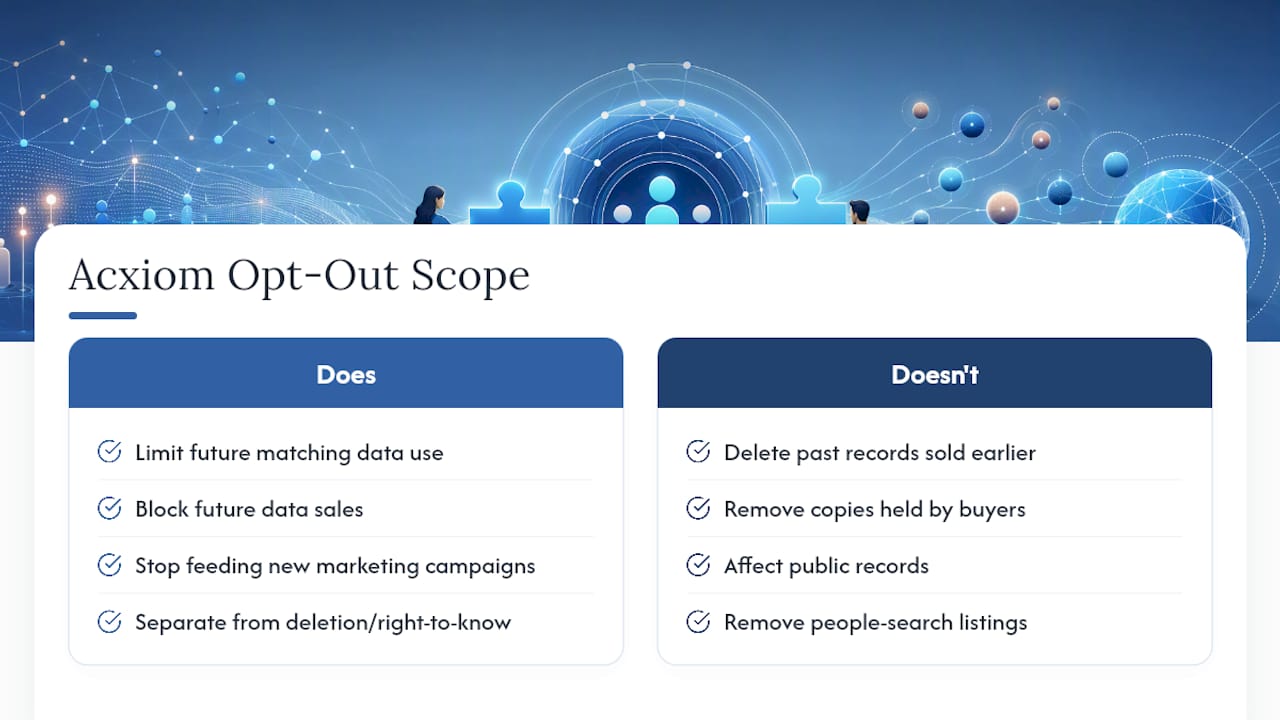
An Acxiom opt-out limits how the company uses and sells your matching marketing data going forward. It is not a deletion request, and that distinction changes what you should expect afterward.
Opting out tells Acxiom to stop feeding your data into new marketing campaigns and data sales. It does not reach back in time and pull your information out of lists Acxiom already sold to other companies, retailers, or marketing partners before you opted out.
That’s the part people miss. If a marketer bought a list with your name on it last year, your opt-out today doesn’t touch that copy. The company that bought it still has it, and you’d need to contact that specific business directly if you want it removed from their systems too. Acxiom’s own consumer instructions draw a clear line between opt-out, the right to know what data exists, and the right to delete it. These are three different requests with three different outcomes.
Public records and people-search sites also sit entirely outside Acxiom’s reach. Sites that pull from court records, property records, or voter registration files aren’t affected by anything you do with Acxiom, since they source their data independently. If your goal is broader removal from the internet, an Acxiom opt-out is one piece of a bigger project, not the whole thing.
Timing, Verification, and How to Confirm Your Request Worked
The two-week processing clock only starts once you’ve confirmed the validation email, not when you originally filled out the form. Miss that email, and your request sits in limbo indefinitely.
Save everything. Keep the confirmation email, note the date you clicked the validation link, and hold onto your reference number somewhere you won’t lose it, like a notes app or a dedicated privacy folder.
Here’s how to check your progress and what to do if the window passes without change:
- Wait the full two weeks after email confirmation before expecting visible changes in marketing contact.
- If nothing changes after that window, contact Acxiom again through the same channels and reference your original submission date and confirmation number.
- Avoid resubmitting a brand-new request right away. Duplicate submissions can confuse the matching process and reset your place in the queue.
- If marketing mail or calls continue past 30 days, that’s a reasonable point to follow up directly rather than assume the system is still working.
When to File a State Privacy Request Instead
An Acxiom opt-out and a state privacy request solve different problems, and knowing which one you need saves you time.
Opt-out stops future marketing use. It doesn’t force Acxiom to hand over what it knows about you or delete existing records. If deletion or access is your actual goal, state privacy laws like California’s CCPA give you legal backing that a marketing opt-out simply doesn’t provide.
- File a state deletion or access request when you want your data actually removed, not just excluded from future marketing lists.
- California residents have the strongest legal footing here, but similar laws are expanding in other states.
- Combine both approaches for the most complete result: opt out of marketing use with Acxiom, then follow up with a formal state-law deletion request if you want the underlying data gone too.
- If you’re cleaning up multiple brokers at once, a structured deletion action plan keeps the process organized instead of scattered across a dozen browser tabs.
Filing both isn’t overkill. It’s the difference between quieting the noise and actually closing the door.
Practical tips from hands-on testing
Testing opt-out flows across multiple data brokers turns up the same handful of mistakes over and over, and Acxiom’s form is no exception.
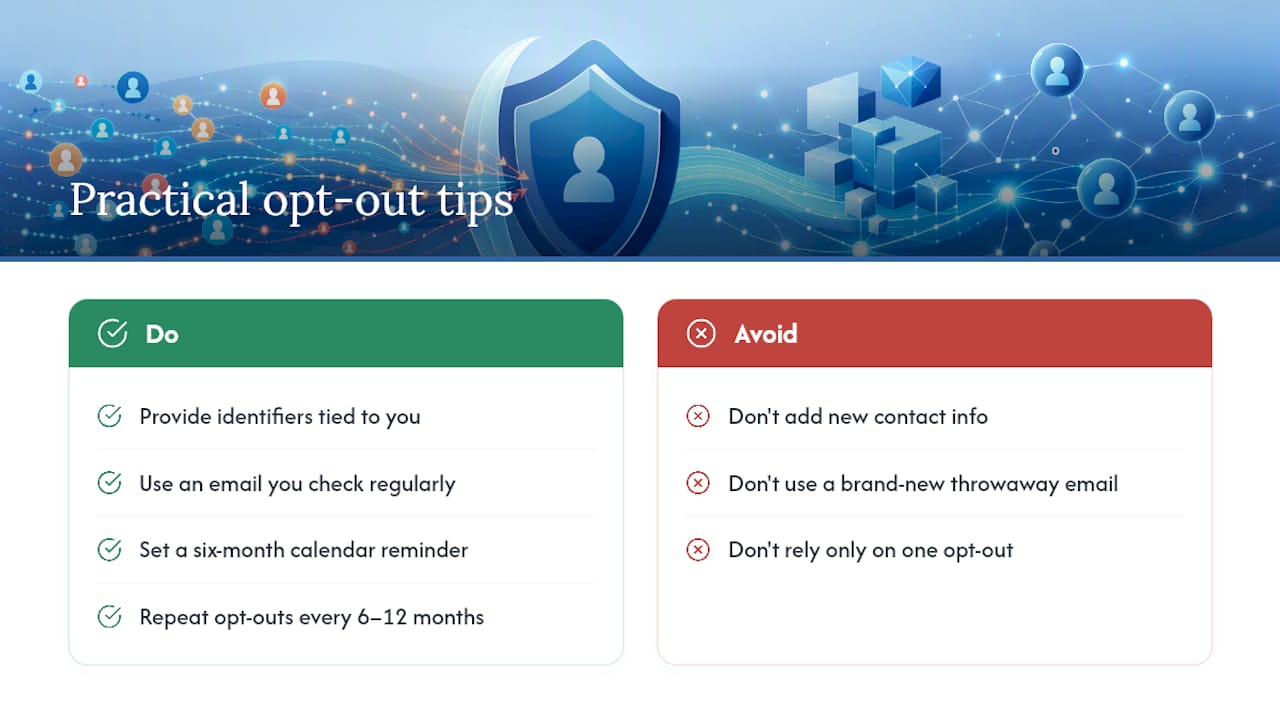
The biggest one: adding new contact information you think will help. It won’t. Entering a phone number or email Acxiom has never seen doesn’t strengthen your match, it can create a separate record that needs its own opt-out later. Stick to identifiers you know are already tied to your name, including old addresses and former names.
Use an email you check regularly for the validation link. A brand-new throwaway address might feel more private, but if it’s never been associated with your identity before, it can actually complicate the matching process rather than protect you.
Pro Tip: Set a calendar reminder for six months out. Reappearance is common with data brokers, so a repeat opt-out every six to 12 months keeps your profile suppressed instead of letting it quietly rebuild.
If your information keeps resurfacing despite repeated opt-outs, that’s usually a sign the scale of your exposure is bigger than one broker. At that point, a monitoring or removal service becomes worth evaluating as backup, not a replacement for the free official process.
Why This Process Matters (And a 60-Second Checklist)
Years of testing data broker opt-out flows show that Acxiom’s process is more reliable than most, provided you follow the confirmation step correctly. Three things matter most: prepare your identifiers before you start, submit through the official online form, and save your confirmation the moment you get it.
The limits are real. This won’t erase data already sold downstream, and it won’t touch public records. Pair it with a periodic check every six months, and you’ll stay ahead of the reappearance problem instead of chasing it.
— TechStackTeam
When a Privacy Subscription or Removal Service Is Worth It
Doing this yourself with Acxiom, LexisNexis, and other brokers works fine if you’re dealing with one or two sources and don’t mind repeating the process twice a year. Where it gets exhausting is when your information keeps popping back up across dozens of sites faster than you can manually track them.

That’s the point where a paid data removal service starts to earn its cost. Instead of you monitoring a dozen broker sites every few months, a service does that continuous sweep for you and resubmits opt-outs automatically when your data resurfaces. There are reviewed and ranked services based on hands-on testing, not sponsored placements, so you can see which ones actually deliver on removal claims and which ones just repackage the free process you could do yourself. If you’ve already handled Acxiom directly and want a broader cleanup across other brokers, start with our breakdown of whether a data removal service is worth it for your specific situation, then check the step-by-step personal data deletion action plan if you’d rather have a guided plan than manage a dozen separate opt-outs on your own.
Official Links to Complete Your Acxiom Opt-Out
Start with Acxiom’s official Opt Out Requests page and the U.S. consumer instructions for identity verification details. For advertising choices beyond Acxiom, use the Network Advertising Initiative opt-out hub. For state-specific legal questions, your state Attorney General’s office can point you toward local privacy resources.
Sources
- Opt Out Requests – Acxiom
- Acxiom Opt Out Form
- Acxiom Opt Out Guide: Remove Your Data in 2026 | CrabClear