Registry monitoring and alert services protect families by turning publicly available sex offender data into timely, location-specific awareness you can act on. Here is what that looks like in practice:
- Timely awareness. Automated alerts notify you when a registered offender moves into your neighborhood, near your child’s school, or along a regular route.
- Cross-jurisdiction coverage. Private monitoring aggregators track changes across multiple state and tribal registries simultaneously, so you don’t have to check each one manually.
- Caregiver background checks. One-time registry lookups let you screen babysitters, tutors, and other caregivers before you hand over access to your kids.
Monitoring is one layer of protection. Pair it with supervision, age-appropriate safety conversations, and coordination with local law enforcement for a complete approach. RAINN is explicit: registries are a public safety tool, and misuse carries legal and civil consequences.
Pro Tip: Always verify any alert against the official state or tribal registry, or call your local law enforcement agency, before changing family routines.
Table of Contents
- How do sex offender monitoring services gather and deliver alerts?
- What monitoring tools can’t do (and common misconceptions)
- Real scenarios where monitoring helps your family
- How to choose a monitoring or alert service that actually works
- What to do immediately after you receive an alert
- Legal and ethical risks of using registry data
- How Techstacktoday tests and recommends monitoring services
- Key Takeaways
- Awareness-first is the only responsible approach
- Techstacktoday’s review hub helps you choose with confidence
- Authoritative sources and next steps for verification
How do sex offender monitoring services gather and deliver alerts?
Consumer monitoring services pull data from three primary sources: the federal NSOPW portal (which queries individual state, territorial, and tribal registries in real time), individual state registry databases, and, where available, local law enforcement records. NSOPW is a federated search tool, not a single centralized database. That distinction matters for accuracy.

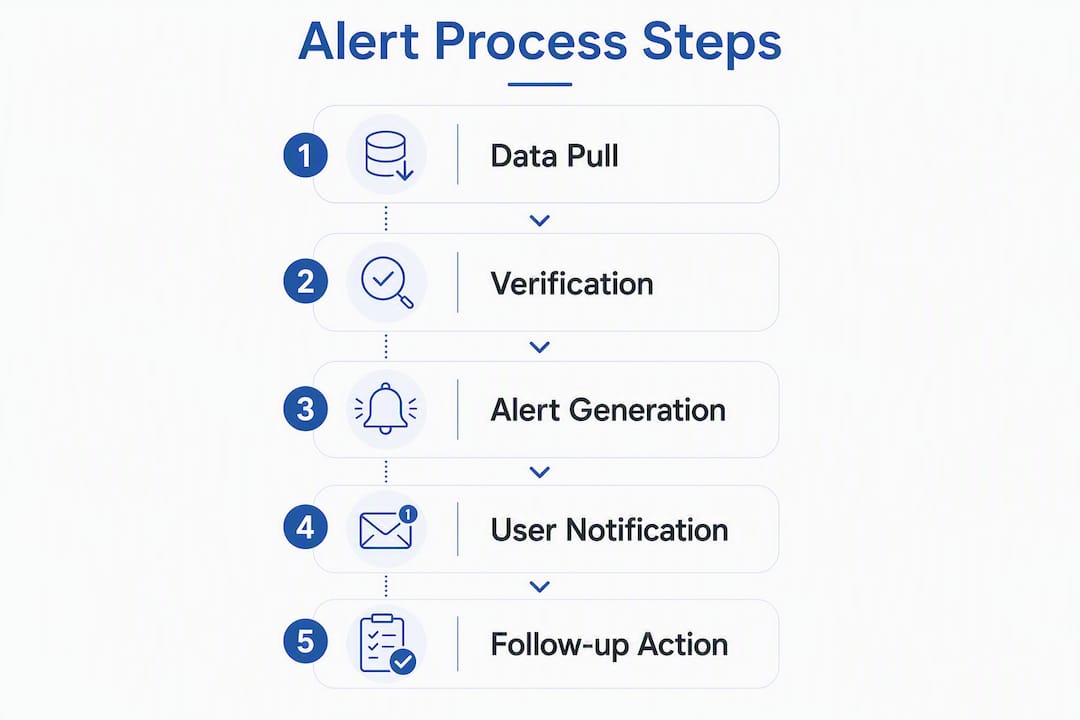
Private aggregators go further. They poll those same registries on a scheduled basis, normalize the profile data into a consistent format, geocode registrant addresses, and then trigger alerts when a registrant’s location falls within a radius you define. The result is continuous monitoring without repeated manual searches.
Typical features across consumer services include:
- Address-based watch lists tied to your home, your child’s school, or a caregiver’s address
- Radius alerts (commonly 1–5 miles) triggered when a registrant moves in or registers nearby
- Move-in notifications sent by email or push alert
- Background-check lookups for one-time caregiver screening
- Map visualizations showing registrant locations relative to your saved addresses
The key difference between a one-time search and ongoing monitoring: a single search tells you who is registered near you today. A monitoring subscription tells you when that picture changes.
| Source type | What it covers | Key limitation |
|---|---|---|
| NSOPW federal portal | All 50 states, D.C., territories, and tribal areas | Federated queries; no centralized database |
| State registries | Detailed in-state records, some proactive alerts | Varies by state; some offer email alerts, others don’t |
| Private monitoring aggregators | Multi-state, continuous alerts, background checks | Dependent on how often source registries update |
What monitoring tools can’t do (and common misconceptions)
Monitoring increases awareness. It does not prevent offenses, and treating it as a guarantee is the most common mistake parents make.
Three misconceptions to drop right now:
- “Monitoring equals prevention.” An alert tells you a registrant is nearby. It does not stop contact. Supervision and safety conversations do.
- “Registry addresses are always accurate.” Addresses are frequently self-reported at periodic check-ins and can change quickly. No registry guarantees real-time accuracy.
- “An alert means increased danger.” KidsLiveSafe notes that many alerts are triggered by administrative updates, such as address format corrections or routine re-registration, not behavioral changes.
The timeliness gap is real. Monitoring service effectiveness is constrained by how frequently source jurisdictions update their registries, and that frequency varies significantly across states and tribal areas. A private aggregator can only be as current as its source data.
⚠️ Statistic callout: Because no single national database exists, private services must query decentralized state and tribal registries. Update lag varies by jurisdiction, meaning an alert may reflect a change that occurred days or weeks earlier.
Pro Tip: Before changing your child’s routine based on an alert, cross-check the registrant’s profile on your state’s official registry. If the address or status still looks off, call your local sheriff’s office or police department directly.
Real scenarios where monitoring helps your family
Registry monitoring earns its value in specific, everyday situations. Here are four where it changes what parents do:
Checking routes and play areas. Before your child starts walking to a new park or school bus stop, run a radius search on that address. If results appear, you adjust the route or increase supervision at that location. No confrontation needed.
Vetting babysitters and caregivers. A one-time background check against public registries is a fast, low-cost step before any caregiver gets unsupervised access to your kids. Pair it with a legal background check process. Techstacktoday’s guide on running background checks legally covers the privacy and legal boundaries you need to stay within.
Moving to a new neighborhood. Set up address watches for your new home and your children’s school the day you sign a lease. You’ll get a baseline picture immediately and receive alerts if anything changes.
Custody-related address monitoring. If a custody arrangement involves a co-parent’s address or a new household, monitoring that location gives you an independent awareness layer without requiring confrontation.
Quick setup checklist:
- Add your home address, school address, and any regular childcare location to your monitoring service’s watch list
- Set the smallest radius that covers your child’s realistic movement area
- Turn on push and email alerts so you don’t miss a notification
- Review your watch list every 90 days and update addresses as routines change
Pro Tip: Add a caregiver’s home address to your watch list, not just your own. A registrant near their home is just as relevant as one near yours.
How to choose a monitoring or alert service that actually works
Not every service is built the same. Evaluate on these axes before you pay:
- Jurisdictional coverage: Does it query all 50 states, D.C., territories, and tribal areas, or just a subset?
- Update frequency: How often does it poll source registries? Daily is better than weekly.
- Alert types: Does it offer move-in notifications, proximity alerts, and background-check lookups?
- Data source transparency: Does the vendor disclose which registries it queries and how it verifies updates?
- Privacy policy: What does the service do with your saved addresses and search history? Look for a clear data-minimization commitment.
- Cost model: Most services charge a monthly or annual subscription. One-time background checks are often priced separately.
Questions to ask any vendor before subscribing:
- How frequently do you refresh data from source registries?
- Which jurisdictions are included in your coverage?
- How do you handle false positives or disputed profile data?
- What is your data retention policy for my saved addresses?
- What support do you offer if I receive a concerning alert?
Red flags: Any service that guarantees 100% accuracy, advises you to confront a registrant, obscures its data sources, or includes features designed to broadcast personal details publicly. Those are not safety tools.
| Source type | Strengths | Weaknesses |
|---|---|---|
| NSOPW (federal portal) | Free, broad coverage, official | One-time search only, no alerts |
| State registries | Authoritative for in-state records | Manual, state-by-state, no cross-state alerts |
| Private monitoring aggregators | Continuous alerts, multi-state, background checks | Dependent on source update frequency; subscription cost |
Pro Tip: Use the Techstacktoday privacy tools checklist to evaluate a monitoring vendor’s privacy policy before entering your home address.
What to do immediately after you receive an alert
Stay calm. Most alerts are administrative. Here is the right sequence:
- Verify on the source registry. Go directly to your state’s official registry or NSOPW.gov and search the registrant’s name. Confirm the address and offense details match what the alert reported.
- Contact local law enforcement. Local law enforcement often holds more current, localized records than any public-facing registry. Call your local sheriff’s office or police non-emergency line and say: “I received an alert from a monitoring service about a registered offender near [address]. Can you confirm the current registration status?”
- Notify caregivers or the school if warranted. If the registrant is near a school or childcare location, inform the relevant administrator. Keep it factual: share the verified registry information, not the raw alert.
- Document everything. Note the date, the alert details, the registry result, and the name of the officer you spoke with.
What to avoid: Do not confront the registrant. Do not post their personal details on social media or neighborhood apps. Do not share the alert beyond the people who need to know.
Pro Tip: Ask your monitoring vendor for the specific registry entry or data timestamp behind the alert. That documentation helps law enforcement verify the information faster.
Legal and ethical risks of using registry data
RAINN is clear: registries exist for public awareness, not for individuals to enforce restrictions on registrants. Using registry data to harass, threaten, or publicly expose a registrant can trigger criminal charges and civil liability. Vigilantism based on registry data has resulted in prosecutions.
Best practices for lawful use:
- Verify every alert with an official source before acting
- Share registry information only with people who have a direct safety need (a school administrator, a caregiver)
- Never post a registrant’s name, photo, or address on social media or public forums
- Follow your state’s disclosure rules, which vary significantly
- Use monitoring as intelligence for your own safety decisions, not as a basis for confronting or reporting someone to neighbors
“Misuse of registry information, including harassment or vigilantism, can carry legal and civil penalties. The purpose of the registry is awareness, not enforcement.”
— RAINN
For expert safety guidance, RAINN and KidsLiveSafe both publish safety-first recommendations that align monitoring use with legal and ethical standards.
⚠️ Important: This article is general information, not legal advice. Confirm current rules and your state’s specific disclosure laws with a qualified attorney or your local law enforcement agency.
How Techstacktoday tests and recommends monitoring services
Techstacktoday’s TechStackTeam evaluates monitoring and background-check services using a hands-on methodology built around six core criteria:
- Data-sourcing transparency: Does the vendor disclose which registries it queries and how?
- Refresh frequency: How often is data pulled from source jurisdictions, and is that cadence documented?
- Accuracy checks: TechStackTeam runs test addresses and compares alert results against official state registries to measure discrepancy rates.
- Alert reliability: Are notifications delivered consistently, and do they include enough detail to verify independently?
- Privacy policy review: Does the service minimize data collection, and does it have a clear retention and deletion policy?
- Customer support responsiveness: How quickly and usefully does the vendor respond to a false-positive inquiry?
Services are scored on each criterion and ranked by overall performance, not by commercial relationship. No paid placements.
“TechStackTeam uses hands-on testing and performance metrics to evaluate privacy and monitoring tools, ensuring recommendations reflect real-world performance rather than marketing claims.”
— Techstacktoday
Full scoring breakdowns and ranked reviews are available in the Techstacktoday review hub. The methodology above applies to every service category the team covers, from monitoring tools to identity monitoring services that share similar alert architectures.
Key Takeaways
Registry monitoring protects families by converting public sex offender data into real-time, location-specific alerts that support smarter supervision decisions, not confrontation.
| Point | Details |
|---|---|
| Monitoring = awareness, not prevention | Alerts inform supervision decisions; they don’t stop contact or guarantee safety on their own. |
| Always verify alerts | Cross-check every alert on the official state registry or NSOPW, then confirm with local law enforcement. |
| Registry data has timeliness gaps | Update frequency varies by jurisdiction; an alert may reflect a change that occurred days earlier. |
| Misuse carries legal risk | Harassment, doxxing, or vigilantism based on registry data can result in criminal charges or civil liability. |
| Techstacktoday tests monitoring tools | TechStackTeam scores services on data transparency, refresh frequency, accuracy, and privacy before recommending them. |
Awareness-first is the only responsible approach
Monitoring tools are genuinely useful. But the parents who get the most out of them are the ones who treat alerts as intelligence, not verdicts. An alert tells you a registered offender is near a location you care about. It doesn’t tell you about intent, context, or current behavior. That gap is where supervision, safety conversations, and law enforcement coordination do the work that no app can.
There’s also a civil rights dimension worth acknowledging. Registered offenders have served their legal sentences. Using publicly available registry data to harass, expose, or restrict someone beyond what the law requires isn’t just legally risky. It undermines the credibility of the monitoring tools that genuinely help families stay safer. The awareness-first approach protects your family and keeps you on the right side of the law.
Privacy matters on your end too; understanding privacy best practices can help protect your sensitive location data when using monitoring services. When you enter your home address and your children’s school into a monitoring service, you’re sharing sensitive location data. Review the vendor’s privacy policy before you sign up. Techstacktoday’s identity protection checklist is a practical starting point for evaluating what any service does with your data.
Techstacktoday’s review hub helps you choose with confidence
Picking the right monitoring service is harder than it looks. Coverage gaps, vague update schedules, and weak privacy policies are common, and most services don’t make it easy to compare them side by side.

Techstacktoday’s review hub cuts through that. TechStackTeam has hands-on tested and ranked background-check and monitoring services using real addresses, timed alert checks, and direct privacy policy audits. No paid rankings. No guesswork. You get clear performance scores, honest limitations, and the best current deals in one place. If you’re also thinking about layering in a VPN for secure browsing while you research registrants online, the VPN services reviewed and ranked page covers that too. Start with the review hub and pick a service that has actually been tested, not just listed.
Authoritative sources and next steps for verification
| Resource | What it offers | Best used for |
|---|---|---|
| NSOPW.gov | Free federal portal querying all 50 states, D.C., territories, and tribal areas | One-time searches and alert verification |
| RAINN | Expert guidance on lawful, safety-first registry use | Legal and ethical boundaries; safety conversations |
| KidsLiveSafe | Registry comparison and monitoring tool guidance | Evaluating monitoring services; understanding alert types |
| GovFacts registry guide | Plain-language explanation of how registries work | Understanding data sources and verification steps |
| Local law enforcement (sheriff or police non-emergency line) | Most current, localized registrant records | Confirming alert accuracy; getting context on a specific registrant |
Verification steps when an alert concerns you:
- Search the registrant on NSOPW.gov and your state’s official registry
- Call your local sheriff’s office or police non-emergency line with the registrant’s name and reported address
- If the information is confirmed, notify relevant caregivers or school administrators with verified details only
- Document the date, source, and outcome of every verification step