Password reuse is the practice of using the same password across multiple online accounts, and it is one of the most dangerous habits in digital security. Over 60% of users continue to reuse passwords across multiple services. That single habit turns every data breach into a master key that unlocks your entire digital life. The industry term for the resulting attack is credential stuffing, and it is why password reuse is risky in ways that go far beyond a single compromised account. Understanding this risk is the first step toward doing something about it.
Why password reuse is risky: the credential stuffing threat
Credential stuffing is the automated testing of stolen username and password combinations against dozens of websites simultaneously. Attackers do not guess your password. They already have it, lifted from a breach at a retailer, a gaming site, or a forum you signed up for years ago.
What makes credential stuffing so effective is scale and stealth. Credential stuffing attacks are automated, scale rapidly, and frequently succeed before victims even realize an attack is underway. Bots simulate normal login behavior, rotating IP addresses and mimicking human timing to slip past rate-limiting controls and CAPTCHA systems.
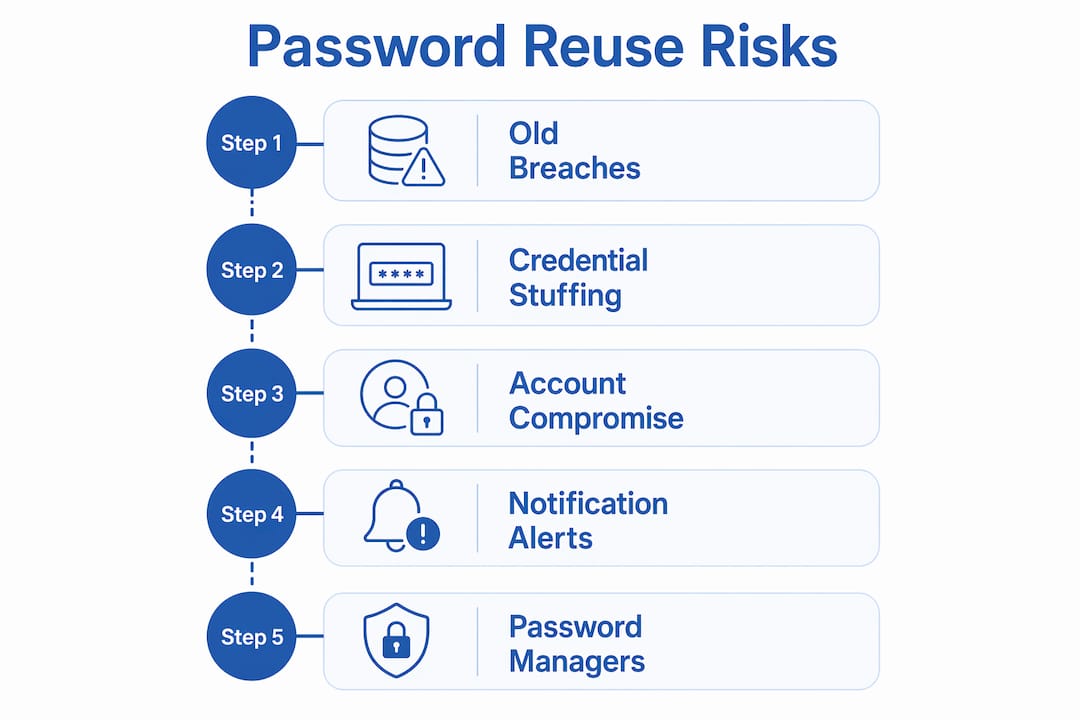
Here is how a typical attack unfolds:
- Breach occurs. A website you use is compromised, and your email and password are stolen.
- Credentials are sold. Your data lands on a dark web marketplace within hours or days.
- Bots go to work. Automated tools test your credentials against banking sites, email providers, and e-commerce platforms.
- Accounts fall. Any site where you reused that password is now open.
- You find out last. Most victims discover the breach only after unauthorized transactions or account lockouts appear.
Credential stuffing uses real stolen credentials, not guesses, which is exactly why conventional defenses struggle to stop it. A bot logging in with your correct password looks identical to you logging in.
Pro Tip: Set up login notifications on your most critical accounts. If you get an alert for a login you did not make, change that password immediately and check every account where you used the same one.
What are the consequences of password reuse for your digital security?
The damage from a single reused password rarely stops at one account. Password reuse collapses your security perimeter by eliminating breach containment entirely. One compromised site becomes the entry point to your entire digital identity.
The domino effect is the most underappreciated danger here. Your email account is the master key to everything else. If an attacker accesses your email using a reused password, they can trigger password resets on your bank, your crypto wallet, your employer’s systems, and your social media profiles. Every account linked to that email address is now at risk.
The real threat of password reuse is not just losing one account. It is losing every account that trusts the same password, all at once, with no warning.
The real-world consequences include:
- Financial loss. Bank accounts and payment platforms are primary targets. Attackers drain funds or make fraudulent purchases before you notice.
- Identity theft. Access to your email and personal accounts gives attackers enough data to open credit lines, file tax returns, or apply for loans in your name. Techstacktoday’s identity theft risk guide covers the full scope of this exposure.
- Reputation damage. Compromised social media and professional accounts can be used to spread scams or post damaging content under your name.
- Corporate exposure. If you reuse a personal password on a work account, a breach at a consumer site can become a corporate security incident.
Reused passwords from old breaches remain exploitable indefinitely. That means a password you created in 2018 and stopped using on one site but kept on another is still a live threat today. There is no expiration date on stolen credentials.
Valid account credentials are involved in 24–30% of initial security incidents. That figure shows credential abuse is not a niche attack vector. It is one of the most common ways attackers get in.
Does password complexity protect you from reuse risks?
Many people believe a complex password is a safe password. That belief is wrong when the same complex password appears on multiple sites.

Even complex passwords remain vulnerable when reused. Attackers in credential stuffing campaigns are not trying to crack your password. They already have it in plain text from a previous breach. A 16-character password with symbols and numbers provides zero protection if it was exposed in a database dump two years ago.
The National Institute of Standards and Technology (NIST) and the Department of Defense (DoD) have both updated their guidelines to reflect this reality. Their current recommendations prioritize long passphrases and multi-factor authentication (MFA) over complex but reused passwords.
| Security approach | Protection against credential stuffing | Notes |
|---|---|---|
| Complex, reused password | None | Stolen credentials bypass complexity entirely |
| Unique password per site | High | Limits breach damage to one account |
| Unique password plus MFA | Very high | Blocks access even when credentials are known |
| Long passphrase plus MFA | Strongest | Combines memorability with layered defense |
Predictable complexity patterns also undermine security. Many people create passwords like “Summer2024!” or “P@ssw0rd” because they satisfy length and symbol requirements. These patterns are well-known to attackers and appear in breach dictionaries. Uniqueness matters more than complexity.
Pro Tip: Use a passphrase built from four or more random, unrelated words. “BlueTractor$Lamp9River” is both long and genuinely hard to predict. Store it in a password manager so you never need to reuse it.
How to stop reusing passwords and protect your accounts
Fixing password reuse does not require memorizing dozens of random strings. The right tools and habits make it manageable.
- ✅ Use a password manager. Password managers generate and store unique passwords for every account, so you never need to reuse one. You remember one strong master password; the manager handles everything else. Techstacktoday has tested and ranked the leading options so you can choose with confidence.
- ✅ Enable MFA on every account that supports it. Multi-factor authentication is highly effective even when a password is already known to an attacker. An authenticator app or hardware key adds a second barrier that credential stuffing cannot bypass.
- ✅ Change leaked passwords immediately. If you receive a breach alert, change the exposed password on every site where you used it. Do not wait. Use a password audit to find all the places a compromised password appears.
- ✅ Prioritize your most critical accounts first. Start with email, banking, and any account linked to payment methods. These are the highest-value targets and the accounts that unlock everything else.
- ✅ Monitor breach alerts. Services that scan known breach databases notify you when your credentials appear in a new dump. Act on every alert, even for accounts you rarely use.
- ✅ Audit your passwords regularly. Most password managers include a built-in health check that flags reused, weak, or exposed passwords. Run it at least once a quarter.
Password managers eliminate the need to remember numerous passwords and directly reduce reuse. The barrier to adoption is low. Most managers work across all your devices and browsers, autofilling credentials without any extra effort on your part.
Pro Tip: Start your password manager setup with your email account. Secure that one first. Your email is the recovery address for almost every other account you own, making it the highest-priority target.
Key Takeaways
Password reuse is the single most exploitable habit in personal cybersecurity because one stolen credential can unlock every account where that password appears.
| Point | Details |
|---|---|
| Reuse enables credential stuffing | Attackers test stolen passwords at scale across hundreds of sites automatically. |
| One breach, many victims | A single compromised password can expose banking, email, and corporate accounts simultaneously. |
| Complexity does not equal safety | A complex but reused password offers no protection once it appears in a breach database. |
| Password managers solve the core problem | They generate and store unique passwords so you never need to reuse one. |
| MFA is your second line of defense | Multi-factor authentication blocks access even when an attacker already has your password. |
The uncomfortable truth about password habits in 2026
I have reviewed dozens of password managers and security tools at Techstacktoday, and the pattern I see most often is not ignorance. People know reusing passwords is a bad idea. The real problem is friction. Creating and remembering a unique password for every account feels like an impossible task, so most people compromise and reuse.
The mindset shift that actually works is this: stop trying to achieve perfect security and start trying to reduce your attack surface. You do not need to fix every account at once. Secure your email first. Then your bank. Then your most-used shopping accounts. That alone puts you ahead of the majority of targets.
What I have found after testing these tools extensively is that password managers remove the friction almost entirely. Once you have one installed and running, creating a unique password takes no more effort than reusing an old one. The habit change is smaller than most people expect.
The readers I see struggle most are those who treat MFA as optional. It is not optional if you are serious about security. Even if an attacker gets your password through a breach, MFA stops the account takeover cold. Pair it with unique passwords and you have a defense that credential stuffing cannot beat.
Incremental progress beats paralysis every time. Pick one account today, change the password to something unique, and turn on MFA. Do the same tomorrow. Within two weeks, your most critical accounts are protected.
— TechStackTeam
Techstacktoday’s password security resources
Knowing the risks is step one. Acting on them is step two, and Techstacktoday makes that step straightforward.

Techstacktoday has hands-on tested and ranked the best password managers for 2026, covering everything from ease of setup to breach monitoring features. Every review is based on real-world performance, not paid placement. If you want to go further, the VPN services reviewed and ranked page covers tools that protect your connection alongside your credentials. Securing your accounts starts with one decision: stop reusing passwords and use a manager that does the work for you.
FAQ
What is credential stuffing and why does it target reused passwords?
Credential stuffing is an automated attack that tests stolen username and password pairs across multiple websites. It works because reused passwords mean one breach gives attackers access to many accounts at once.
How do I know if my password has been exposed in a breach?
Breach monitoring services scan known data dumps and alert you when your email or credentials appear. Most password managers include this feature, and you can also check manually using widely available breach lookup tools.
Does a strong, complex password protect me if I reuse it?
No. Complexity does not matter once a password is stolen. Attackers in credential stuffing campaigns use your actual password, not guesses, so uniqueness is the only protection that works.
What accounts should I secure first?
Secure your email account first, then banking and financial accounts. Your email is the recovery address for almost every other service you use, making it the highest-value target for attackers.
Is multi-factor authentication enough on its own?
MFA is highly effective but works best alongside unique passwords. It blocks attackers who have your password, but unique passwords prevent the credential stuffing attack from succeeding in the first place.