Identity protection annual reviews are systematic, yearly checks of your credit reports, active monitoring alerts, IRS Identity Protection PIN status, and recovery plans that together form your personal defense against identity theft. Most people set up these protections once and forget them. That is exactly when thieves find the gaps. Recovery from identity theft is time-consuming, credit-damaging, and requires contacting multiple institutions, which means the cost of skipping your annual review is far higher than the hour it takes to complete one. Tools like the IRS IP PIN program, AnnualCreditReport.com, and FTC IdentityTheft.gov exist precisely to support this kind of ongoing vigilance. Understanding why these reviews matter is the first step toward making them a non-negotiable part of your personal security routine.
Why identity protection annual reviews matter for prevention and detection
Annual reviews are not just about finding fraud after it happens. They are about confirming that your defenses are still standing. There is a critical difference between monitoring and prevention, and most people confuse the two.

Monitoring detects fraud after a new account is opened or a suspicious transaction appears. Prevention stops the account from being opened in the first place. A credit freeze, for example, blocks new creditors from accessing your report entirely. Monitoring services detect fraud but do not prevent new account openings. This distinction matters because many people assume a monitoring subscription covers everything. It does not.
Your annual review should confirm both layers are active and working together. Here is what to check each year:
- ✅ Credit freeze status at Equifax, Experian, and TransUnion. Freezes can be lifted and sometimes not re-applied after a loan application.
- ✅ Active monitoring alerts and whether the email or phone number on file is still current.
- ✅ Dispute resolution status from any prior identity theft incidents. Unresolved disputes linger and damage credit longer than necessary.
- ✅ Recovery plan completeness via FTC IdentityTheft.gov, especially if your information was exposed in a data breach during the past year.
Annual reviews synchronize controls with evolving threats and system requirements, including mandatory updates like the IRS IP PIN change. Skipping a year means your protection may be based on last year’s setup, not your current risk profile.
Pro Tip: Set a calendar reminder every January to run your full annual review. January is ideal because the IRS IP PIN resets then, and you can align all your checks in one session.
Why renewing your IRS IP PIN every year is non-negotiable
The IRS Identity Protection PIN is a six-digit code that prevents anyone else from filing a tax return using your Social Security number. It is one of the most direct identity theft prevention strategies available for tax-related fraud. The catch: the IP PIN changes every calendar year and must be retrieved before you file your return.
Using an old IP PIN causes your e-filed return to be rejected outright. Filing without one, if you are enrolled in the program, triggers a manual review that delays your refund by weeks or months. Neither outcome is acceptable when you are waiting on money or trying to meet a deadline.
Here is how to handle your IP PIN renewal each year:
- Log in to your IRS Online Account at IRS.gov in January. Your new PIN is available there once the calendar year resets.
- Record the new PIN securely. Store it in a password manager like Bitwarden or 1Password, not in a plain text file or email.
- Confirm enrollment is still active. In rare cases, enrollment can lapse. Verify your status before filing season begins.
- Share the PIN with your tax preparer if you use one. They need it to file on your behalf. Do not assume they have it from last year.
Neglecting annual IP PIN renewal can cause loss of tax-related protections exactly when you need them most, during filing season. This is one annual step with zero flexibility.
Pro Tip: If you have not enrolled in the IRS IP PIN program yet, do it now at IRS.gov. Any taxpayer can opt in, not just victims of prior tax fraud. It is one of the strongest free protections available.
How to use credit reports and monitoring tools during your annual review
Free weekly credit reports at AnnualCreditReport.com became a permanent program in September 2023, giving every consumer the ability to check their full Equifax, Experian, and TransUnion reports without paying a cent. This means you have no excuse for going a full year without looking at your credit file.
During your annual review, pull all three reports and scan for these specific red flags:
- Unfamiliar accounts you did not open, including store cards, auto loans, or lines of credit.
- Hard inquiries from lenders you never contacted, which signal someone applied for credit in your name.
- Incorrect personal information such as addresses, employers, or name variations that could indicate a mixed file or fraud.
- Accounts in collections you do not recognize, which may represent fraudulent debts you are now being held responsible for.
Here is a quick comparison of free versus paid identity monitoring tools to help you decide what level of coverage fits your situation:
| Feature | Free tools (AnnualCreditReport.com, credit card alerts) | Paid services (LifeLock, Aura, Identity Guard) |
|---|---|---|
| Credit report access | Weekly, all three bureaus | Continuous, real-time |
| Dark web monitoring | No | Yes |
| Social Security number alerts | No | Yes |
| Identity theft insurance | No | Up to $1 million |
| Recovery support | Self-directed via IdentityTheft.gov | Dedicated case manager |
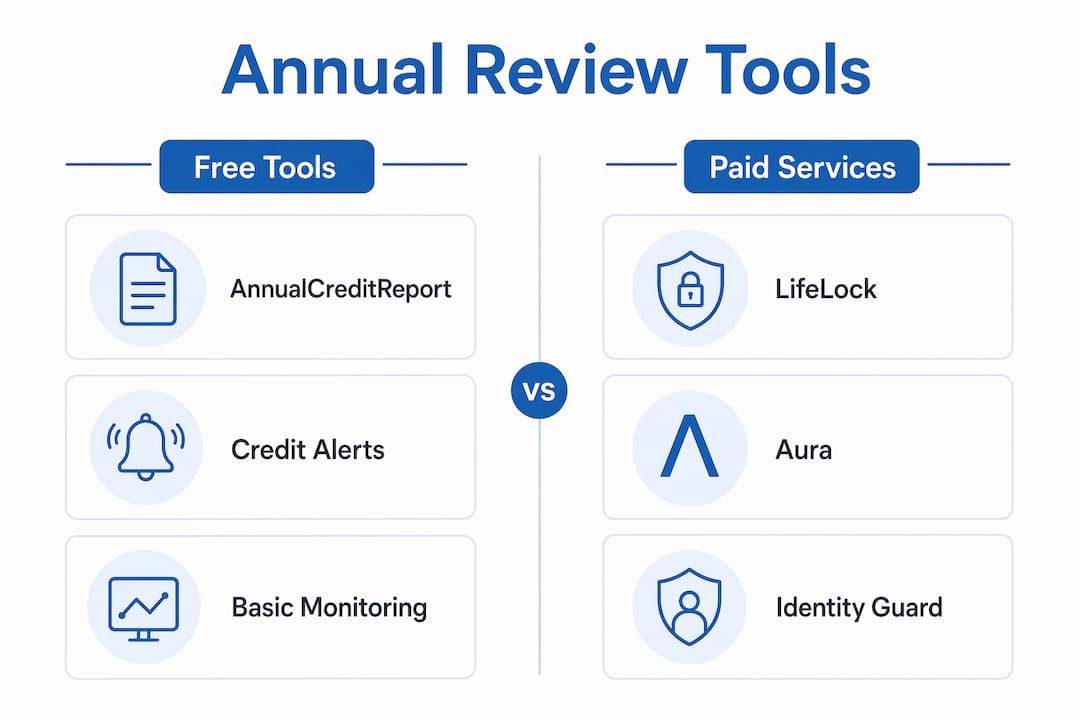
Credit monitoring’s value lies in how quickly new activity is detected and responded to. Paid services add speed and depth, but free tools are a solid baseline when used consistently. Techstacktoday has reviewed and ranked top identity protection services based on real-world testing, so you can compare options without wading through paid rankings.
How IdentityTheft.gov fits into your annual review process
IdentityTheft.gov is the FTC’s official one-stop resource for identity theft recovery. It generates a personalized recovery plan with pre-filled dispute letters, step-by-step checklists, and direct links to credit bureaus and government agencies. Most people use it once after a theft event and never return. That is a mistake.
Your circumstances change every year. You may have opened new accounts, moved to a new address, changed employers, or had your data exposed in a fresh breach. Each of these changes affects which recovery steps are relevant and which dispute letters need updating. Revisiting IdentityTheft.gov annually lets you confirm that all prior dispute cases are closed and no recovery actions are left pending.
Recovery from identity theft is not a single event. The FTC’s personalized plans require ongoing management, and annual reviews allow you to verify that all dispute and recovery actions are completed. Lingering unresolved disputes can damage your credit for years beyond the original theft event.
Use your annual review to:
- Log back into IdentityTheft.gov and check the status of any open recovery tasks.
- Update your profile if your contact information or affected accounts have changed.
- Download updated pre-filled letters for any new disputes that arose during the year.
- Confirm that fraudulent accounts have been removed from all three credit bureau reports.
For a structured walkthrough of what to do after a theft event, Techstacktoday’s identity theft recovery steps guide covers the full process from detection to resolution.
Common pitfalls that undermine your annual identity protection review
Most people who do annual reviews still miss critical steps. These are the mistakes that leave real gaps in your protection.
- ⚠️ Skipping the IP PIN renewal. The IRS does not send reminders. If you enrolled last year and forget to retrieve your new PIN in January, you will find out the hard way when your tax return gets rejected.
- ⚠️ Assuming your credit freeze is still active. Freezes can be temporarily lifted for loan applications and not re-frozen. Check all three bureaus every year, not just one.
- ⚠️ Using outdated alert contact information. If your monitoring service sends alerts to an old email address or a phone number you no longer use, you will miss fraud notifications entirely. Validating alert contact information and verifying that all recovery steps are completed remains critical to sustaining protection effectiveness.
- ⚠️ Treating monitoring as prevention. A monitoring service tells you fraud happened. It does not stop it. Annual reviews should confirm that stronger preventive controls like credit freezes remain active based on your current needs.
- ⚠️ Leaving dispute cases open. Unresolved disputes from prior theft events can continue to affect your credit score. Confirm every case is closed before you consider your review complete.
Pro Tip: Create a simple annual review checklist in a notes app or password manager and check off each item as you complete it. Include your IP PIN retrieval date, freeze confirmation dates for all three bureaus, and your last IdentityTheft.gov login. This takes the guesswork out of the process.
For a broader look at why layering these defenses matters, Techstacktoday’s guide on multi-layer identity protection explains how each control reinforces the others.
Key takeaways
Annual identity reviews work because they force you to verify that every layer of your protection, from credit freezes to IRS IP PINs to dispute resolution, is still active, current, and aligned with your real-world risk.
| Point | Details |
|---|---|
| Annual IP PIN renewal | Retrieve your new IRS IP PIN every January to avoid e-file rejection during tax season. |
| Freeze status check | Confirm credit freezes are active at all three bureaus, not just the one you remember. |
| Credit report review | Pull all three free reports at AnnualCreditReport.com and scan for unfamiliar accounts or inquiries. |
| IdentityTheft.gov update | Log back in annually to close open recovery tasks and update dispute letters for new incidents. |
| Alert contact validation | Verify that monitoring alerts go to your current email and phone number, not outdated ones. |
The “set and refresh” mindset is the only one that works
Here is what years of testing identity protection services at Techstacktoday has made clear: the biggest vulnerability is not a weak password or an unpatched app. It is the assumption that last year’s setup is still working.
Most people treat identity protection like a smoke detector. They install it, test it once, and assume it is running. But identity protection is not passive hardware. It is a system of interconnected controls, each with its own expiration date. The IRS IP PIN resets every year. Credit freezes can be lifted and forgotten. Monitoring services send alerts to email addresses that get abandoned. Recovery plans go stale when your circumstances change.
The “set and refresh” mindset fixes this. You do not need to overhaul your entire setup every year. You need to spend one focused hour confirming that every control is still active, current, and pointing at the right contact information. That hour is worth more than any premium subscription you could buy.
One thing that consistently surprises us in our testing: people who have paid for identity protection services for years have never logged back in to verify their alert settings or check whether their credit freeze is still active. The service is running, but no one is steering it. Your annual review is the steering.
— TechStackTeam
Build your annual review routine with Techstacktoday

Techstacktoday tests and ranks identity protection services based on real-world performance, not paid placements. If your annual review reveals gaps in your current setup, our identity theft risk reduction guide walks you through the exact steps to close them. For secure online behavior that supports your broader protection strategy, our ranked VPN reviews help you find a service that fits your needs and budget. And if you want to lock down your credentials as part of your annual review, our best password managers guide covers the top options tested hands-on in 2026. Use these resources as your annual review toolkit and you will never wonder whether your protection is still working.
FAQ
What is an identity protection annual review?
An identity protection annual review is a yearly check of your credit reports, credit freeze status, IRS IP PIN, monitoring alert settings, and any open identity theft recovery cases. It confirms that every layer of your protection is still active and current.
How often should you check your credit report?
You can check your full credit report from all three bureaus weekly for free at AnnualCreditReport.com. Weekly access became a permanent program in September 2023, making frequent monitoring accessible to every consumer.
What happens if you skip your IRS IP PIN renewal?
If you are enrolled in the IRS IP PIN program and file without your current year PIN, your e-filed return will be rejected. Using an old PIN produces the same result and can trigger a manual review that delays your refund significantly.
Does a credit freeze replace identity monitoring?
No. A credit freeze prevents new accounts from being opened in your name, while monitoring detects suspicious activity after it occurs. Both serve different functions and your annual review should confirm that both are active and working together.
Where do you go to create an identity theft recovery plan?
IdentityTheft.gov, run by the FTC, generates a personalized recovery plan with pre-filled dispute letters and step-by-step checklists. You should log back in annually to close open recovery tasks and update your plan if your circumstances have changed.