What makes a weak password so dangerous?
A weak password is any credential that attackers can guess, crack, or steal quickly. Think short strings, common words, predictable sequences, or anything you’ve used before on another site. The danger is not theoretical. According to Kaspersky’s analysis of 231 million unique passwords leaked from dark-web sources between 2023 and 2026, A significant portion of passwords can be cracked very quickly: Kaspersky’s 2026 analysis found that 48% of passwords from dark-web leaks can be cracked in under a minute, demonstrating how rapidly hackers can exploit weak passwords. That’s not a slow, targeted attack. That’s automation running through your credentials before your morning coffee finishes brewing.
Here’s what puts a password in the “weak” category:
- Too short. NIST recommends a sufficiently long password, as password length greatly increases resistance against cracking attempts which can be extremely rapid with modern computing power.
- Common or previously leaked. Passwords like “password,” “123456,” or “qwerty” appear at the top of every attacker’s list.
- Reused across accounts. One breach anywhere means every account sharing that password is now exposed.
- Predictable patterns. Swapping letters for numbers (“P@ssw0rd”) or adding “123!” at the end fools nobody. Cracking software anticipates these moves.
- Personal information. Birthdates, names, and pet names are guessable from public records or social media.
The core problem: attackers don’t guess through a login page. They get an offline copy of encrypted passwords from a breach, then run billions of guesses per second with no lockout stopping them.
How to spot a weak password: common traits and examples
Weak passwords share recognizable patterns. Once you know what to look for, you’ll spot them instantly.
Characteristics that weaken any password:
- Fewer than 12 characters
- Dictionary words used alone or with minor tweaks
- Sequential numbers or keyboard patterns (“123456,” “qwerty,” “abcdef”)
- Predictable substitutions like “@” for “a” or “3” for “e”
- Personal data: names, birthdays, anniversaries, or city names
- Reuse across multiple accounts
Passwords you should never use:
- password / Password123!
- 123456 / 12345678
- qwerty / letmein
- iloveyou / sunshine
- admin / welcome
Ryan Galluzzo, who leads NIST’s Digital Identity Program, put it plainly: “The worst password I can think of is ‘password’ or ‘12345.’ Those are at the top of an attacker’s list for potential attacks.”
Here’s the trap many people fall into: sites that force you to add a capital letter, a number, and a symbol don’t actually make your password stronger. NIST’s research shows composition rules backfire because users respond with predictable patterns. “Password1!” satisfies most complexity requirements and still gets cracked in seconds. Length beats complexity every time.

The Kaspersky data reinforces this. Over half of leaked passwords contain digits, often years that correspond to birthdates, and 54% of passwords from those leaks had appeared in a previous breach. Reuse is the multiplier that turns one bad password into a cascade of compromised accounts.
Why people keep using weak passwords despite the risks
The problem isn’t ignorance. Most people know weak passwords are a liability. The problem is friction.
- Memory limits. Humans can’t reliably memorize dozens of long, unique, random passwords. So they default to something familiar.
- Outdated rules. Sites that demand frequent password changes push users toward slight variations of the same password, which is worse than keeping a strong one longer.
- Usability frustration. When a site rejects a password for arbitrary reasons (no spaces allowed, maximum 12 characters), users simplify rather than fight the system.
- Password recycling. Reusing one password across banking, email, and social media feels harmless until one of those services gets breached.
- No better alternative in reach. Passkeys and hardware tokens exist, but adoption is still uneven. Most sites still default to username and password.
Industry experts highlight that this behavior gap, knowing the risk but continuing the habit, is exactly what attackers count on. The risks of weak passwords compound over time because reused credentials accumulate across years of accounts, many of which users have forgotten entirely.
The real consequences of using a weak password
Weak passwords don’t just create inconvenience. They open the door to attacks with serious financial and personal consequences.
What attackers do once they’re in:
- Brute force attacks: Automated tools cycle through billions of combinations until one works.
- Dictionary attacks: Software tests common words, phrases, and known passwords first.
- Credential stuffing: Attackers take leaked username/password pairs and test them across hundreds of other sites automatically.
- Phishing: Fake login pages capture your credentials directly, no cracking required.
The consequences that follow:
- Unauthorized access to banking, email, and social media accounts
- Identity theft using your personal data to open credit lines or file fraudulent tax returns
- Financial fraud through direct transfers or purchases
- Account lockout, leaving you unable to access your own services
- Reputation damage if attackers post or send content from your accounts
A single compromised password can give attackers lateral movement across banking apps, email platforms, and social media. Security expert Dr. Sanjay Katkar has detailed how attackers exploit stolen credentials systematically, moving from one platform to the next to execute fraud at scale. One weak password on a low-stakes site can unlock your bank account if you reused it.
Consider a real scenario: a user’s email password matches their banking password. An attacker cracks the email account, uses the “forgot password” link on the bank’s site, and receives the reset link directly. The bank account is emptied before the user notices anything wrong. This is not a rare edge case. It’s a documented attack pattern that plays out daily.
Even a technically complex password becomes weak the moment it appears in a breach database. NIST warns that attackers test previously leaked passwords first, so a password that was strong when you created it years ago may now be on every attacker’s list.

What the latest research and experts say you should do
The 2026 Kaspersky findings confirm what security researchers have argued for years: password complexity alone is not enough. NIST’s current guidance explicitly moves away from forced complexity rules and toward length, uniqueness, and layered authentication.
| Recommendation | What it means in practice | Authority |
|---|---|---|
| Use at least 12 characters | Longer passwords resist offline brute-force attacks | NIST |
| Avoid composition rules | Skip predictable patterns like “Password1!” | NIST SP 800-63B |
| Use a password manager | Generate and store unique random passwords for every account | NIST, US Secret Service |
| Enable MFA on all accounts | Add a second verification layer beyond the password | US Secret Service, CISA |
| Prefer FIDO passkeys or hardware tokens | Resist phishing attacks that bypass SMS codes | US Secret Service |
| Never reuse passwords | One breach should not cascade to other accounts | NIST |
“It’s going to be a long road to completely kill the password. There are lots of great alternatives out there, but you’re always going to be constrained by what technology people have available.” — Ryan Galluzzo, NIST Digital Identity Program
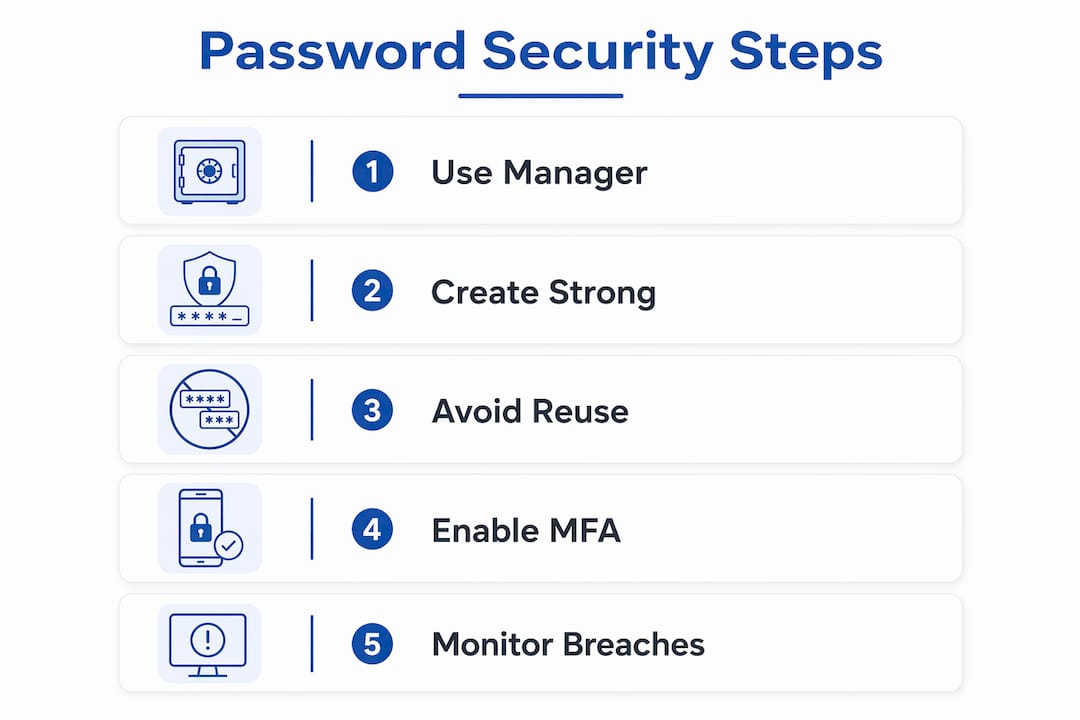
The US Secret Service recommends a four-step approach: get a password manager, secure it with a strong master password and biometrics, register all your accounts into it, and turn on multifactor authentication everywhere. That’s the current baseline for anyone serious about account security.
On MFA: not all methods are equal. SMS one-time passwords can be bypassed through SIM swapping or social engineering. Phishing-resistant methods like FIDO passkeys or hardware security tokens are significantly harder to defeat because they tie authentication to a physical device, not a code that can be intercepted.
Steps you can take right now:
- Download a reputable password manager and generate a new, unique password for every account you own.
- Enable MFA on your email account first. Email is the master key to every other account’s password reset.
- Check whether any of your current passwords have appeared in known breaches using a service like Have I Been Pwned.
- Replace any reused passwords immediately, starting with banking and email.
- Where available, switch from SMS-based MFA to an authenticator app or a FIDO passkey.
Pro Tip: Your email password is the highest-priority credential you own. If an attacker controls your inbox, they can reset every other password you have. Make it long, unique, and protected by phishing-resistant MFA.
Protect your full digital footprint, not just your passwords
Strong passwords are one layer of defense. But your personal data circulating on data broker sites, the dark web, and unsecured networks creates additional exposure that passwords alone can’t fix. Techstacktoday reviews and ranks privacy and data removal services so you can reduce your attack surface beyond the login screen. If you want to understand how surveillance and tracking compound the risks from credential theft, the guide on how VPNs protect against surveillance is worth your time.
Key Takeaways
Weak passwords remain one of the most exploited vulnerabilities in personal cybersecurity, and the fix requires both stronger credentials and layered authentication.
| Point | Details |
|---|---|
| Cracking speed is alarming | 48% of passwords from dark-web leaks can be cracked in under a minute, per Kaspersky’s 2026 analysis. |
| Length beats complexity | NIST recommends sufficiently long passwords; modern computing power enables extremely rapid cracking attempts. |
| Reuse multiplies risk | 54% of leaked passwords had appeared in a prior breach, enabling credential stuffing across multiple accounts. |
| Password managers are the practical fix | They generate unique, random passwords for every account, eliminating reuse and guessable patterns. |
| MFA is non-optional | FIDO passkeys and hardware tokens resist phishing attacks that SMS codes cannot. |