A VPN (virtual private network) is a service that encrypts your internet connection and routes your traffic through a remote server, hiding your IP address from websites, advertisers, and your internet service provider. For most people, that’s worth having. The main limitation: a VPN is not a cloak of invisibility. Cookies, account logins, and browser fingerprinting can still identify you even when a VPN is running. Think of it as a strong first layer of protection, not a complete solution. The AES-256 encryption standard and the WireGuard protocol are the benchmarks to look for when evaluating any service. Techstacktoday tests VPNs hands-on against exactly those criteria so you don’t have to guess.
Table of Contents
- What exactly is a VPN, and how does it differ from a proxy or Tor?
- How does a VPN work, step by step?
- What encryption and protocols should you look for in a VPN?
- When should you actually use a VPN?
- What are the real benefits and limits of a VPN?
- Is using a VPN legal in the U.S., and do you actually need one?
- How do you choose a VPN? A practical checklist
- What does a VPN cost, and are free VPNs worth it?
- How Techstacktoday tests and evaluates VPNs
- Key Takeaways
- The part most VPN guides skip
- Find Techstacktoday’s hands-on VPN reviews and top picks
- Useful sources and further reading
What exactly is a VPN, and how does it differ from a proxy or Tor?
A VPN acts like a private courier for your internet traffic. Instead of your data traveling openly from your device to a website, it gets sealed inside an encrypted tunnel and delivered through a VPN server first. The website sees the server’s IP address, not yours.

A proxy does something similar on the surface but skips the encryption. It forwards your requests through a middleman server, which can mask your IP, but anyone watching the connection can still read the data. Proxies are fast and lightweight; they’re not built for security.

Tor takes the opposite approach: it bounces your traffic through three or more volunteer-run nodes, layering encryption at each hop. That makes it very difficult to trace, but the multi-hop routing slows speeds significantly. Tor is built for strong anonymity; a VPN is built for everyday privacy and usability.
Here’s what a VPN actually does at its core:
- Encrypts your traffic so your ISP, coffee shop Wi-Fi, or anyone on the same network can’t read what you’re sending or receiving.
- Masks your IP address by replacing it with the VPN server’s address.
- Routes traffic through a remote server, which can be in a different city or country.
How does a VPN work, step by step?
The mechanics are simpler than they sound. When you connect to a VPN, your device and the VPN server go through an authentication handshake, verify each other’s credentials, and establish an encrypted session. After that, every packet of data you send gets wrapped in an extra layer of encryption before it even leaves your device.
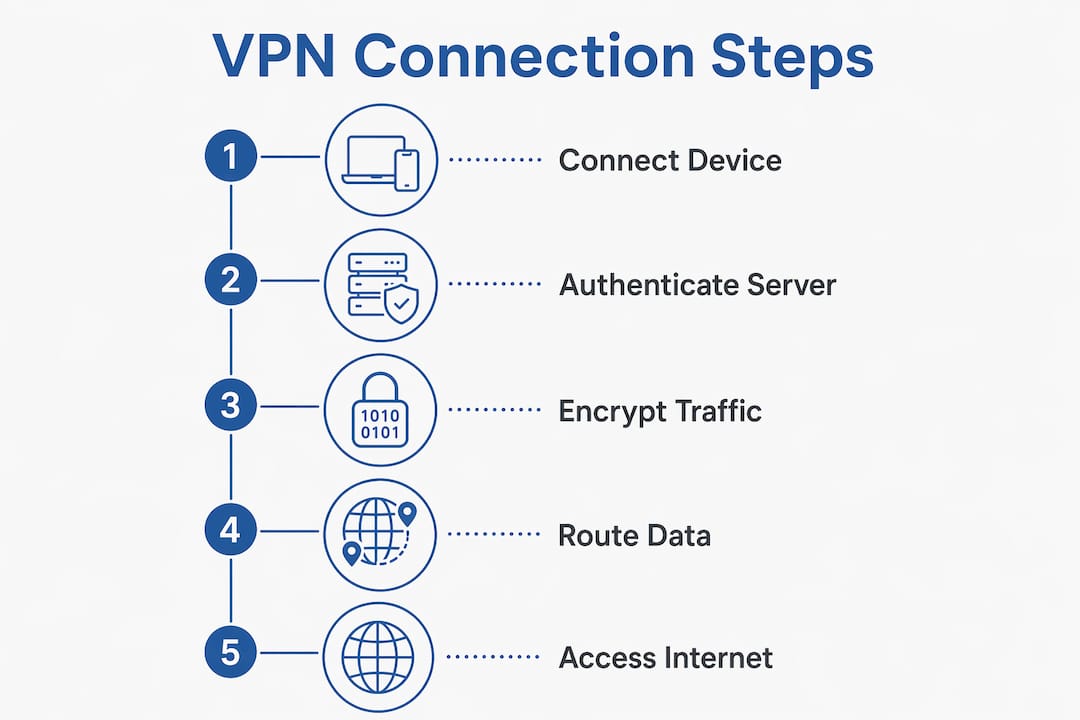
Here’s the flow:
Your device → ISP → Encrypted tunnel → VPN server → Website → Back through the same path
Your ISP can see that you’re connected to a VPN server. What it cannot see is which website you’re visiting or what data you’re exchanging. The website sees the VPN server’s IP address, not your home IP. VPN tunneling works by encapsulating your data packets inside new packets, which the VPN server unwraps before forwarding the request to its destination.
A VPN protects the pipe, not the destination. Once your traffic reaches the VPN server and gets decrypted, the VPN provider can technically see it. That’s why choosing a provider with a verified no-logs policy matters as much as the encryption itself.
What a VPN hides: your IP address, your browsing activity from your ISP, and the content of your traffic on public networks.
What a VPN does not hide: your activity from the VPN provider itself, cookies already stored in your browser, logins you make while connected, and browser fingerprinting signals. As Windscribe notes, a VPN breaks easy tracking chains but doesn’t remove browser-based identifiers.
Many global VPN users cite public Wi-Fi protection as a primary reason for using one. That tracks: open networks at airports, hotels, and cafes are exactly where unencrypted traffic is most exposed.
What encryption and protocols should you look for in a VPN?
AES-256 is the encryption standard you want. It’s the same cipher used by the U.S. government for classified data. Breaking it by brute force is computationally infeasible with current hardware. Any reputable VPN uses AES-256 for data encryption.
The protocol is the method used to build the encrypted tunnel. Different protocols make different tradeoffs between speed, security, and compatibility.
- WireGuard: Modern, lean codebase (~4,000 lines vs. OpenVPN’s ~100,000). Fast, battery-efficient, and increasingly the default on most major VPN apps. Best for everyday use.
- OpenVPN: Older but battle-tested. Widely supported across platforms and highly configurable. Slightly slower than WireGuard but a solid fallback for compatibility.
- IKEv2/IPSec: Excellent for mobile devices because it reconnects quickly when you switch networks (e.g., from Wi-Fi to cellular). Good speed and strong security.
- PPTP: Deprecated. Fast but with known security vulnerabilities. Avoid it entirely.
- L2TP without IPSec: Also deprecated. L2TP alone provides no encryption; it needs IPSec to be secure, and even then it’s not the best choice.
| Protocol | Security | Speed | Best For |
|---|---|---|---|
| WireGuard | High | Very fast | Everyday use, streaming |
| OpenVPN | High | Moderate | Compatibility, desktop |
| IKEv2/IPSec | High | Fast | Mobile, switching networks |
| PPTP | Low | Fast | Avoid |
| L2TP/IPSec | Medium | Moderate | Legacy only |
When should you actually use a VPN?
VPNs solve specific problems well. Here’s where they earn their keep:
- Public Wi-Fi protection: Coffee shops, airports, hotels. Unencrypted networks let anyone nearby intercept your traffic. A VPN closes that window.
- ISP privacy: Your ISP can log and sell your browsing history in the U.S. A VPN prevents them from reading your traffic.
- Streaming while traveling: Accessing your home streaming subscriptions from abroad can be blocked by geo-restrictions. A VPN server in your home country often resolves that.
- Reducing ISP throttling for gaming or streaming: Some ISPs slow down bandwidth-heavy traffic. A VPN can prevent them from identifying and throttling those connections.
- Remote work: Connecting to a company network securely over the public internet. Many employers require a VPN for exactly this reason.
- Price comparison shopping: Some retailers and booking sites show different prices based on your location. A VPN can help you check, though cookies and device fingerprinting mean it’s a partial fix, not a guaranteed one.
A quick real-world example: you’re at an airport and need to check your bank account. On open Wi-Fi, that session is potentially visible to anyone running a packet sniffer on the same network. With a VPN running, the traffic is encrypted before it leaves your device. The bank sees a login from a VPN server’s IP, but your credentials and session data stay protected in transit.
What are the real benefits and limits of a VPN?
Benefits:
- Encrypts traffic on untrusted networks
- Hides your IP address from websites and advertisers
- Prevents your ISP from logging your browsing activity
- Lets you access geo-restricted content while traveling
- Adds a meaningful layer to a broader privacy toolkit
Limits:
- Does not protect against malware, phishing, or viruses
- Does not prevent tracking via cookies, account logins, or browser fingerprinting
- Can reduce connection speed, especially on distant servers
- Moves trust from your ISP to the VPN provider — if the provider logs your data, you’re exposed
- A VPN provider can see your decrypted traffic once it exits the tunnel on their end
The trust tradeoff is the one most people overlook. A VPN shifts trust from your ISP to the VPN provider. That’s only an improvement if the provider has a verified no-logs policy, operates in a favorable jurisdiction, and has passed independent audits. Marketing claims alone don’t count.
Pro Tip: Pair your VPN with a password manager and multi-factor authentication. A VPN protects your traffic in transit; it does nothing to stop someone from logging into your accounts with a stolen password.
Security experts treat a VPN as one component of a multi-layer privacy toolkit. Using it without endpoint protection and strong account security still leaves common attack vectors wide open.
Is using a VPN legal in the U.S., and do you actually need one?
VPNs are legal in the United States. There are no federal restrictions on using one for personal privacy. The one clear rule: illegal activity committed through a VPN is still illegal. The VPN doesn’t change the law; it just changes who can see your traffic.
If you travel internationally, note that some countries restrict or ban VPN use. Check local rules before connecting abroad.
Do you need one? Ask yourself these questions:
- Do you regularly use public Wi-Fi at cafes, airports, or hotels?
- Are you concerned about your ISP logging and selling your browsing data?
- Do you travel internationally and want access to your home streaming services?
- Do you work remotely and handle sensitive company data?
- Do you want to prevent advertisers from building a profile based on your IP address?
If you answered yes to two or more, a paid VPN is worth the cost. If you only browse at home on a trusted network and don’t travel, the benefit is smaller, though still present for ISP privacy.
How do you choose a VPN? A practical checklist
Most VPN marketing sounds the same. Here’s what actually separates a trustworthy service from a flashy one.
What to check:
- ✅ No-logs policy — verified by an independent audit, not just claimed in marketing copy
- ✅ Jurisdiction — where the company is incorporated matters; countries with strong data-retention laws can compel providers to hand over records
- ✅ Independent audits — third-party security firms should have reviewed the privacy policy and server infrastructure
- ✅ Kill switch — cuts your internet if the VPN drops, preventing accidental exposure
- ✅ DNS and IP leak protection — confirm the VPN doesn’t leak your real IP through DNS requests
- ✅ Device limits — how many simultaneous connections are allowed
- ✅ Apps and UX — works on your actual devices (Windows, macOS, iOS, Android, routers)
- ✅ Speed — test it; server distance and protocol choice both affect performance
- ✅ Refund policy — a 30-day money-back guarantee lets you test without committing
Questions to ask any provider:
- Where are your servers located, and how many do you have?
- Has your no-logs policy been independently audited? By whom?
- What happens if you receive a government data request?
- Which protocols do you support?
Red flags:
- Vague privacy policy with no audit history
- Free VPN with no clear business model (your data is likely the product)
- Unusual app permissions (access to contacts, microphone, etc.)
- Headquarters in a country with aggressive data-retention laws and no transparency reports
Pro Tip: Check the Techstacktoday VPN reviews before committing. Each service is tested for leaks, speed, and policy transparency so you can compare on real metrics, not marketing claims.
What does a VPN cost, and are free VPNs worth it?
Paid VPNs typically follow two pricing models:
- Monthly billing: Usually priced on a monthly basis, with costs varying by provider and features.
- Annual or multi-year plans: Often discounted significantly on annual or multi-year plans. Most providers push these deals hard.
Free VPNs come with real trade-offs. Common limitations include data caps, speed throttling, and fewer server locations. The more serious concern: some free VPNs monetize by logging and selling user data or injecting ads. If the service is free and the business model isn’t obvious, your browsing behavior is likely the product.
A few legitimate free tiers exist from reputable providers, usually as limited versions of paid plans. These can work for occasional use but aren’t suitable for daily privacy protection.
Most providers offer a 30-day money-back guarantee. Use it. Connect to servers in different locations, run a speed test, check for DNS leaks, and test streaming access before the window closes.
How Techstacktoday tests and evaluates VPNs
Techstacktoday’s approach combines hands-on technical testing with policy analysis. No paid placements, no sponsored rankings.
Testing methodology:
- Speed tests: Measured across multiple server locations and times of day using consistent baseline connections
- Leak tests: DNS, IPv6, and WebRTC leak checks to confirm the VPN doesn’t expose your real IP
- Streaming tests: Verified access to major streaming platforms from different server locations
- Privacy policy review: Line-by-line analysis of logging policies, data retention, and jurisdiction
- Independent audit verification: Confirmed whether third-party audits exist and what they covered
- App usability: Tested on Windows, macOS, iOS, and Android for setup friction and feature access
- Kill switch and leak protection: Verified that both function correctly under simulated connection drops
Rating criteria:
- Privacy and logging policy
- Security (encryption standard, protocol options, audit status)
- Speed and server network
- Streaming and unblocking capability
- Device and app support
- Transparency and independent verification
- Customer support responsiveness
Techstacktoday’s standard: A VPN earns a strong rating only when its no-logs policy has been independently verified and its leak protection holds up under real testing conditions. Marketing claims alone never move the score.
This approach aligns with what PCMag’s explainer research identifies as best practice: combining technical tests with privacy policy audits gives a far more complete picture than either alone.
Key Takeaways
A VPN encrypts your internet traffic and masks your IP address, but it is one layer of protection, not a complete privacy solution.
| Point | Details |
|---|---|
| Core function | A VPN encrypts traffic and hides your IP from ISPs, advertisers, and public network snoopers. |
| Main limitation | Cookies, account logins, and browser fingerprinting can still identify you even with a VPN running. |
| Trust tradeoff | A VPN moves trust from your ISP to the VPN provider; verify no-logs claims with independent audits. |
| What to check when buying | Prioritize a verified no-logs policy, kill switch, leak protection, and jurisdiction before price. |
| Techstacktoday’s role | Techstacktoday tests VPNs hands-on for speed, leaks, and policy transparency with no paid rankings. |
The part most VPN guides skip
VPNs are genuinely useful. But the way they’re marketed often overstates what they do. You’ll see phrases like “complete anonymity” and “total protection” on provider websites. Neither is accurate.
What a VPN reliably does is narrow the attack surface on untrusted networks and prevent your ISP from building a detailed log of your browsing. That’s meaningful. For anyone using public Wi-Fi regularly, traveling internationally, or simply uncomfortable with ISP data collection, a VPN is a practical, low-friction tool.
What it doesn’t do is replace good account hygiene. If you reuse passwords, skip MFA, and click phishing links, a VPN won’t save you. The threat model for most people isn’t a sophisticated attacker intercepting traffic; it’s credential theft, phishing, and data broker profiles. A VPN addresses one of those. A password manager and MFA address the others.
The other thing worth saying: free VPNs with no clear revenue model are a red flag, not a bargain. A paid service from a provider with a verified no-logs policy and a transparent audit history is worth $3–$4 a month. The surveillance protections a good VPN provides are real. Just don’t expect it to do more than it’s designed to do.
Find Techstacktoday’s hands-on VPN reviews and top picks
You now know what a VPN does, how it works, and what to look for. The next step is picking one that actually holds up under testing.

Techstacktoday has reviewed and ranked over 50 privacy services, including VPNs, using real-world speed tests, leak checks, and policy audits. No paid placements. No sponsored rankings. Every score reflects actual performance. Browse the VPN reviews and current deals to compare top picks side by side, or check the full VPN category page for guides and ranked lists. If you want to see how VPN review sites themselves stack up, the trusted VPN review alternatives page is a good place to start. Pick a service with a 30-day money-back guarantee, run the leak tests, and confirm it works for your use case before the trial window closes.
Useful sources and further reading
These are the primary sources cited throughout this article, plus recommended reading for anyone who wants to go deeper.
- PCMag: Your Online Privacy Is Disappearing Fast — Covers why VPN use is growing and how to evaluate providers; strong on protocol and policy guidance.
- Mashable: How Do VPNs Work? — Clear explainer on tunneling protocols, including WireGuard and OpenVPN tradeoffs.
- Windscribe: VPN Benefits Explained — Honest breakdown of what a VPN actually does and doesn’t do; good on the trust tradeoff and tracking limits.
- Gizmodo: What Is a VPN and How Does It Work? — Practical coverage of pricing models and free vs. paid tradeoffs.
- Salon: What Is a VPN and Do You Need One? — Accessible legal overview for U.S. readers and a plain-language need assessment.
- Wikipedia: Virtual Private Network — Technical reference for tunneling, encapsulation, and VPN architecture types.
- Techstacktoday: Internet Privacy Tools Comparison Checklist — Pairs VPNs with password managers and other tools for a full privacy toolkit view.
- Heights CG: Endpoint Security Best Practices — Practical guidance on pairing a VPN with endpoint protection for layered defense.