A password audit is defined as a systematic evaluation of password strength and security across all accounts and systems, designed to detect weak, reused, or compromised credentials before attackers exploit them. Every organization, from a two-person startup to a Fortune 500 company, carries password vulnerabilities it does not know about. A formal password security assessment finds those gaps and gives you a clear path to fix them. Ignoring this process is not a neutral choice. Credential-based attacks remain one of the most common entry points for data breaches, and audits check for character complexity, length, dictionary patterns, and exposure in public breach databases.
What is a password audit and what does it involve?
A password audit is a structured process that maps every account, tests every credential, and surfaces every weakness in your password environment. The industry term for this practice is “credential auditing,” though “password audit” is the phrase most security teams use in day-to-day work. Both terms describe the same core activity.
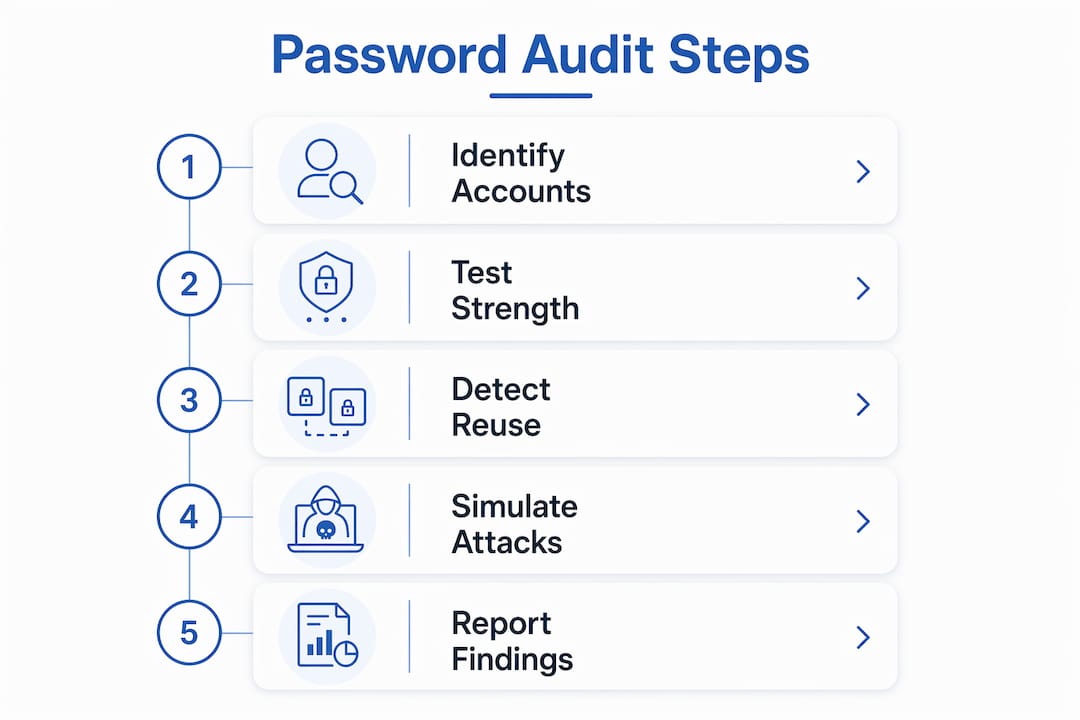
The audit process follows a clear sequence:
- Map all accounts and applications. List every system, app, and service where passwords exist. This includes cloud tools, local servers, shared accounts, and service accounts.
- Gather password data for analysis. Auditors collect password hashes (not plaintext passwords) from directory services like Active Directory.
- Test against breach databases. Credentials are checked against known breach datasets such as Have I Been Pwned to flag exposed passwords.
- Run complexity and pattern tests. Auditors check length, character variety, and common dictionary patterns.
- Simulate attacker methods. Modern audit software simulates brute force and AI-assisted cracking to find gaps that manual checks miss.
- Review MFA status. The audit confirms which accounts have multi-factor authentication enabled and which do not.
- Document findings. Every weak, reused, or exposed credential gets logged with a risk rating.
Pro Tip: Simulating real attacker methods, including dictionary attacks and AI-assisted cracking, reveals vulnerabilities that simple complexity rules never catch. If your audit tool cannot simulate an attack, it is not giving you the full picture.
Automated password audit tools scan networks to identify users with weak or compromised passwords. That automation matters because manual checks cannot scale across hundreds or thousands of accounts. The technical scan is the foundation, but it is only the first layer of a complete audit.

Why are password audits critical for your organization’s security?
Password audits are the most direct way to find credential risk before attackers do. Weak passwords, reused credentials, and accounts exposed in public breaches all create open doors. An audit closes those doors by making the risk visible.
“Password audits are not a one-time fix but part of a continuous lifecycle: map passwords, test, review, train, adjust policies, and repeat. This loop supports healthier security habits and reduces risk over time.” — Help Net Security
Audits also surface policy noncompliance. Employees who reuse passwords across personal and work accounts, or who never changed a default credential, show up clearly in audit results. Dormant accounts, which attackers love because no one monitors them, appear in the account mapping phase. These findings are not just technical data points. They represent real attack surfaces.
Credential stuffing is a specific threat that audits directly address. Attackers take username and password pairs from one breach and try them across dozens of other services. If your team reuses passwords, a breach at one site becomes a breach at every site. Without MFA enforcement, even a clean audit cannot fully stop credential stuffing. The audit identifies the risk; MFA reduces the damage.
Pro Tip: Combine every password audit with an MFA enforcement review. An audit that finds weak passwords but does not trigger MFA adoption leaves the organization only half protected.
How to conduct an effective password audit
A well-run audit follows a repeatable process. Best practice guidelines recommend at least annual audits, with more frequent reviews for fast-growing organizations or teams with heavy cloud tool usage. Here is a practical checklist:
- Define scope. Identify every system, app, and account type in scope, including privileged accounts, service accounts, and shared credentials.
- Map shadow IT. Ask department heads to list every tool their team uses, not just IT-approved software. Unauthorized apps often store passwords insecurely.
- Collect password hashes. Work with your IT or security team to extract hashes from directory services without exposing plaintext credentials.
- Run automated scans. Use audit software to test hashes against breach databases and run cracking simulations.
- Survey employees anonymously. Employee surveys combined with technical scans uncover root causes like password sharing and avoidance of complexity requirements.
- Analyze privileged and service accounts separately. These accounts often have static or weak passwords and need dedicated review.
- Score and report findings. Build a scorecard that shows compliance rates, reuse rates, breach exposure, and remediation priorities.
- Present to leadership. Audit reports using scorecards help leadership understand risk without technical overload.
| Audit area | What to check | Risk level if ignored |
|---|---|---|
| Employee accounts | Complexity, reuse, breach exposure | High |
| Privileged accounts | Static passwords, shared credentials | Critical |
| Service accounts | Default or unchanged passwords | Critical |
| Shadow IT apps | Unauthorized tools with stored passwords | High |
| Dormant accounts | Accounts unused for 90+ days | Medium |
Pro Tip: Service accounts and shared passwords are the most overlooked part of any audit. Attackers know this. Treat them as a separate audit category with their own remediation timeline.
Common pitfalls and misconceptions about password audits
Most password audit failures come from the same set of mistakes. Recognizing them before you start saves time and prevents a false sense of security.
- Treating the audit as a one-time event. A single scan gives you a snapshot, not ongoing protection. Top security teams treat password audits as a continuous process with regular cycles.
- Skipping shadow IT. Employees use tools IT does not know about. Shadow IT leads to password risks like insecure local storage and unauthorized software. If you only audit approved systems, you miss a large portion of your real exposure.
- Ignoring service and privileged accounts. These accounts often bypass regular policy enforcement. They carry weak or static passwords and represent a critical blind spot.
- Assuming technical scans are enough. Scans tell you what is broken. They do not tell you why. Without anonymous employee surveys, you cannot address the behavioral root causes that keep insecure habits alive.
- Completing the audit without enforcing MFA. An audit that identifies weak passwords but does not trigger MFA adoption leaves the organization exposed to the exact attacks the audit was meant to prevent.
- Failing to communicate results clearly. Security teams that bury findings in technical reports lose leadership buy-in. No buy-in means no budget for remediation.
Each of these pitfalls has the same effect: the audit produces data, but the organization does not get safer.
What to do after a password audit: remediation steps
Audit results are only useful if you act on them. The remediation phase is where security actually improves.
- Force password resets for compromised credentials immediately. Do not wait for the next scheduled maintenance window. Exposed passwords are active risks right now.
- Update your password policy based on findings. If the audit shows that minimum length requirements are too low, raise them. Use findings as evidence to justify policy changes to leadership.
- Deploy a password manager organization-wide. Password managers eliminate reuse and make complex credentials practical for every employee. This is the single most effective post-audit action for most organizations.
- Enforce MFA on all accounts, starting with privileged access. MFA is the strongest layer you can add after fixing weak passwords.
- Eliminate or disable dormant accounts. Accounts that have not been used in 90 or more days should be disabled immediately and reviewed before reactivation.
- Schedule the next audit. Build the next review into your security calendar before you close out the current one. Treat it as a recurring program, not a project with an end date.
- Run targeted training. Use anonymous survey data to design training that addresses the specific behaviors your team struggles with, not generic security awareness content.
The goal after an audit is not just to fix what the scan found. The goal is to build a security environment where the next audit finds fewer problems than the last one.
Key Takeaways
A password audit is the most direct way to find and fix credential vulnerabilities before attackers exploit them, and its value compounds when paired with MFA and a password manager.
| Point | Details |
|---|---|
| Core definition | A password audit systematically evaluates password strength, reuse, and breach exposure across all accounts. |
| Audit frequency | Run audits at least annually; increase frequency for fast-growing teams or heavy cloud tool users. |
| Shadow IT and service accounts | Privileged and service accounts need separate audit focus; shadow IT creates hidden exposure. |
| MFA is non-negotiable | Audits without MFA enforcement leave credential stuffing attacks largely unaddressed. |
| Continuous cycle | Treat auditing as an ongoing program, not a one-time scan, to build lasting security habits. |
The part most security guides skip
Here is what I have seen repeatedly when reviewing password security programs: organizations complete a technically solid audit, generate a detailed report, and then nothing changes. The report sits in a shared drive. Passwords get reset for the accounts flagged as critical. Six months later, the same patterns reappear.
The missing piece is almost never technical. It is cultural. Employees reuse passwords because they have too many accounts and no practical tool to manage them. They share credentials because the process for requesting separate access is slow. They avoid complexity requirements because they cannot remember what they create. Anonymous surveys reveal these root causes in ways that no technical scan ever will.
The audits I have seen produce lasting results are the ones that treat the survey data as seriously as the hash analysis. They use findings to justify rolling out a password manager for the whole team and to build training that addresses real behavior, not hypothetical threats. The technical scan finds the problem. The cultural work fixes it.
— TechStackTeam
Strengthen your security with Techstacktoday’s tested tools
A password audit tells you where you stand. The next step is putting the right tools in place so you do not end up in the same position six months from now.
Techstacktoday has hands-on tested and ranked the best password managers available in 2026, with no paid rankings and no vendor influence. Every review reflects real-world performance. If your audit revealed weak or reused passwords across your team, a password manager is the fastest fix. Techstacktoday also covers VPN services that protect your data in transit, adding another layer of defense beyond credential security. Both categories are reviewed and updated regularly so you always get current, reliable guidance.
FAQ
What is a password audit in simple terms?
A password audit is a systematic check of all passwords used across your accounts and systems to find weak, reused, or compromised credentials. The goal is to identify and fix vulnerabilities before attackers exploit them.
How often should you conduct a password audit?
Best practice guidelines recommend at least one audit per year, with more frequent reviews for organizations that are growing fast or using many cloud tools.
What tools are used in a password audit?
Automated audit software scans networks, tests password hashes against breach databases, and simulates brute force and AI-assisted cracking to surface weak credentials at scale.
Does a password audit require MFA to be effective?
An audit identifies weak passwords, but MFA enforcement is required to fully protect against credential stuffing attacks. The two work together, not as substitutes for each other.
What happens after a password audit is complete?
Immediately reset compromised passwords, update your password policy, deploy a password manager, enforce MFA, and schedule your next audit as part of a continuous security program.