Yes, Google will remove certain personal information from Search, and you can start the process today. The fastest path depends on what you need removed and where it lives. Here are your immediate next steps:
- Search yourself first. Open Google and search your full name, phone number, and home address in separate queries. Use operators like
"your name" site:spokeo.comor"your phone number"in quotes to surface exact matches. - Use Results about you. If your information appears in Search, open Results about you in your Google Account. It scans for your contact details and lets you request removal directly.
- Use the detailed removal form. For cases Results about you doesn’t cover, go to Google’s Report a problem form and submit the exact URLs and data.
- Report doxxing separately. If someone published your info alongside threats or harassment, use the doxxing-specific path inside Google’s personal content removal guide.
- Contact the site owner. Google removal only hides results. Permanent deletion requires action at the source.
- Manage your own Google data. For info stored inside Google products, visit Google Account controls to edit or delete it directly.
Key Takeaways
Google will remove specific categories of personal information from Search, but removal from Google does not delete the content from the source website or other search engines.
| Point | Details |
|---|---|
| Start with Results about you | Use this Google Account tool to find and request removal of your contact info quickly. |
| Use the removal form for other cases | The Report a problem form handles government IDs, financial data, and third-party filings. |
| Contact the site owner for permanent removal | Google only controls Search indexing; the host site must act for the content to disappear entirely. |
| Understand full vs. partial removal | Full removal clears all queries; query-based removal only hides results for searches containing your name. |
| Monitor monthly after removal | Re-run searches and keep Results about you notifications on, since content can reappear. |
Table of Contents
- What kinds of personal information does Google consider removing?
- How do you submit a removal request to Google?
- How do you report doxxing or threats tied to your personal data?
- When the source is the real problem: contacting the site owner
- When should you use Google’s Legal Help Center?
- What actually happens after Google approves your removal?
- Copyable template and submission checklist for your removal request
- The tradeoffs you should know before you start
- Protect your privacy beyond this one removal
- Sources
What kinds of personal information does Google consider removing?
Google’s removal policy covers a specific set of personally identifiable information (PII). Knowing whether your data qualifies saves you from filing a request that will be denied.
| Category | Examples | Likely Outcome |
|---|---|---|
| Contact information | Home address, phone number, personal email | Full or query-based removal |
| Government IDs | Social Security number, passport, driver’s license | Full removal likely |
| Financial details | Bank account numbers, credit card numbers | Full removal likely |
| Signatures and ID images | Scanned signatures, photos of ID cards | Full removal likely |
| Private medical records | Health records not publicly filed | Full removal likely |
| Confidential login credentials | Usernames and passwords | Full removal likely |
| Professional info posted to harm | Work email, employer listed with threats | Detailed form required |
Google has expanded these categories over time to cover more types of PII, so a request that was denied a year ago may qualify now.
Two important limits: Google will often deny requests for pages on government, educational, or news sites because that content is considered valuable to the public. And if you own the content yourself, such as a personal blog or social profile you control, Google won’t process a removal request. You remove it at the source, then request an index refresh.
How do you submit a removal request to Google?
Two paths exist. Choose based on your situation.
Path A: Results about you works best when the information is clearly yours (your name, address, phone) and you want a quick, account-based flow. It also sets up ongoing notifications so Google alerts you when new results appear.
Path B: The detailed Report a problem form is the right choice when Results about you doesn’t cover your case, when you’re filing on behalf of someone else, or when the content involves professional information posted with intent to harm.
Step-by-step for Results about you
- Go to Results about you and sign in to your Google Account.
- Enter the personal details you want monitored (name, phone, address, email).
- Review the results Google surfaces. Click the three-dot menu next to any result and select Request to remove.
- Confirm the type of information and submit.
- Google sends a status update to your account email. Track progress under Removal requests in the same dashboard.
Step-by-step for the detailed removal form
- Open the Report a problem form.
- Select Personal information as the content type, then choose the specific category (contact info, government ID, financial, etc.).
- Paste the exact URL of the page where your information appears. Copy it directly from the browser address bar.
- In the personal info field, paste the exact text as it appears on the page. A precise match speeds review.
- Attach a screenshot if the page is dynamic or likely to change.
- Submit and save your confirmation number.
Google also offers a step-by-step video walkthrough if you prefer a visual guide.
Pro Tip: Submit one URL per request rather than batching multiple pages into one form. Separate submissions are easier for Google’s reviewers to process and less likely to be partially denied.
How do you report doxxing or threats tied to your personal data?
Doxxing is not the same as a standard personal-info removal. Under Google’s policy, doxxing applies when private information is published alongside explicit threats, calls to harassment, or when large amounts of personal data are aggregated without any legitimate purpose. The threshold is harm, not just embarrassment.
Google’s doxxing policy covers content that creates a clear risk of harm. This includes posts that combine your home address with threats of violence, pages that list your daily routine alongside calls for others to confront you, and aggregated profiles designed to facilitate stalking or harassment. A page that simply lists your name and employer does not automatically qualify.
Before you file, collect this evidence:
- Screenshots of the page showing the threat or call to action alongside your personal data
- The exact URL of each page
- Any direct messages or posts referencing the published information
- A brief written summary of the harm you face or have already experienced
Use the personal content removal guide and select the doxxing or harassment path. If the threat is immediate, contact local law enforcement first. Google’s review process takes time; police can act faster when physical safety is at risk.
Pro Tip: Your digital footprint is often larger than you realize. Before filing, search your name across multiple platforms to find every location where the aggregated data appears, not just the one page you already found.
When the source is the real problem: contacting the site owner
Removing a result from Google Search does not delete the content from the internet. The host site still controls it, and it can be found through other search engines or direct links. Contacting the site owner is the most permanent fix.
How to find and contact the site owner
- Check the site’s contact page. Most sites have a “Contact Us” or “Privacy” link in the footer.
- Look up WHOIS data. Go to a WHOIS lookup tool (such as ICANN’s public WHOIS at lookup.icann.org) and search the domain. Many registrations list an abuse or admin email.
- Find the hosting provider. If the registrant is privacy-protected, the hosting provider often has an abuse reporting path. Use the WHOIS data to identify the host, then search “[host name] abuse report.”
- Use platform reporting tools. If the content lives on a major platform (Reddit, Facebook, a WordPress.com blog), use that platform’s built-in content reporting or takedown request system.
Your message to the site owner should be brief and specific: state exactly what information appears, the URL, why it is harmful or incorrect, and what action you want (removal or redaction). Avoid threats; a clear, factual request gets faster results.
Using the Outdated Content tool after source removal
Once the site owner removes or edits the content, Google’s index may still show the old version for days or weeks. That’s when the Outdated Content tool becomes useful. It signals Google to recrawl the URL and update its cached version faster than the normal crawl cycle.
Use it only after the source has actually changed. Filing it before the page is updated wastes the request and delays your timeline.
Realistic timeline: Site owners typically respond within 1–2 weeks when contacted directly. Google’s index usually refreshes within a few days to a few weeks after the Outdated Content request is processed.
When should you use Google’s Legal Help Center?
Google’s policy-based removal process covers a defined set of PII categories. When your content falls outside those categories, or when the content is false and damaging, a legal route may be necessary.
Policy removal and legal removal are separate tracks. Google’s personal-information policies do not require a court order, but they also only cover specific data types. If the content is defamatory (false statements of fact that damage your reputation), a court order or a formal legal request through Google’s Legal Help Center is the appropriate path, not the personal-info removal form.
When to consider legal action in the U.S.:
- The content makes false factual claims about you (defamation)
- A court has issued an order requiring removal
- You’ve received a subpoena or are involved in litigation related to the content
- The content violates a specific U.S. law (such as non-consensual intimate images statutes)
Start at Google’s Legal Help Center (available at support.google.com/legal) and select the content type. Google reviews legal requests separately from policy requests. An attorney experienced in internet defamation or privacy law can help you determine whether a court order is achievable and cost-effective for your situation.
What actually happens after Google approves your removal?
Approval does not mean the content disappears everywhere. Understanding the two types of removal helps set realistic expectations.
| Removal Type | What It Means | Example |
|---|---|---|
| Full removal | The page no longer appears in any Google Search result | A page with your SSN is removed from all queries |
| Query-based (partial) removal | The page is excluded only when someone searches your name or identifier | A data broker page stops appearing for “[your name]” searches but may still rank for other queries |
Timeline: Google typically reviews requests within a few days to a few weeks. Complex or contested cases take longer. You’ll receive email updates at the address tied to your Google Account, and you can check live status under Removal requests in Results about you.
What removal does not do:
- It does not delete the content from the host website
- It does not remove the content from other search engines (Bing, DuckDuckGo, Yahoo)
- It does not prevent the site from re-publishing the same information
- It does not guarantee the content won’t reappear if the site is recrawled after changes
Monitoring matters as much as the initial removal. Re-run your name searches monthly and keep Results about you notifications active.
Copyable template and submission checklist for your removal request
Use these templates to save time and reduce back-and-forth with Google or site owners.
Google removal form template
I am requesting removal of personally identifiable information that appears at the URL listed below. The information includes [exact text, e.g., my home address: 123 Main Street, Anytown, TX 75001] and poses a risk of harm because [brief reason, e.g., it enables unsolicited contact or harassment]. I do not control this content and cannot remove it myself. Please review this request under Google’s personal information removal policy.
Site owner email template
Subject: Request to Remove Personal Information
My name is [Your Name]. I am writing to request the removal of my personal information from your website. The page at [URL] displays [exact information, e.g., my home address and phone number] without my consent. This information is private and its publication creates a risk of harm to me. Please remove or redact this information at your earliest convenience. I am happy to provide verification of my identity if needed.
Submission checklist
Before you hit submit on any request, confirm you have:
- The exact URL copied from the browser address bar (not a shortened link)
- The exact text of your personal information as it appears on the page
- At least one screenshot saved locally showing the information in context
- Your Google Account email confirmed as active (for status notifications)
- A record of your submission confirmation number or date
Identity document guidance: Google sometimes requests identity verification for certain removal types. If you’re uncomfortable sending a full ID scan, redact everything except the field that matches the disputed information (e.g., show only your name and address, black out the ID number). Save a copy of what you submitted.
The tradeoffs you should know before you start
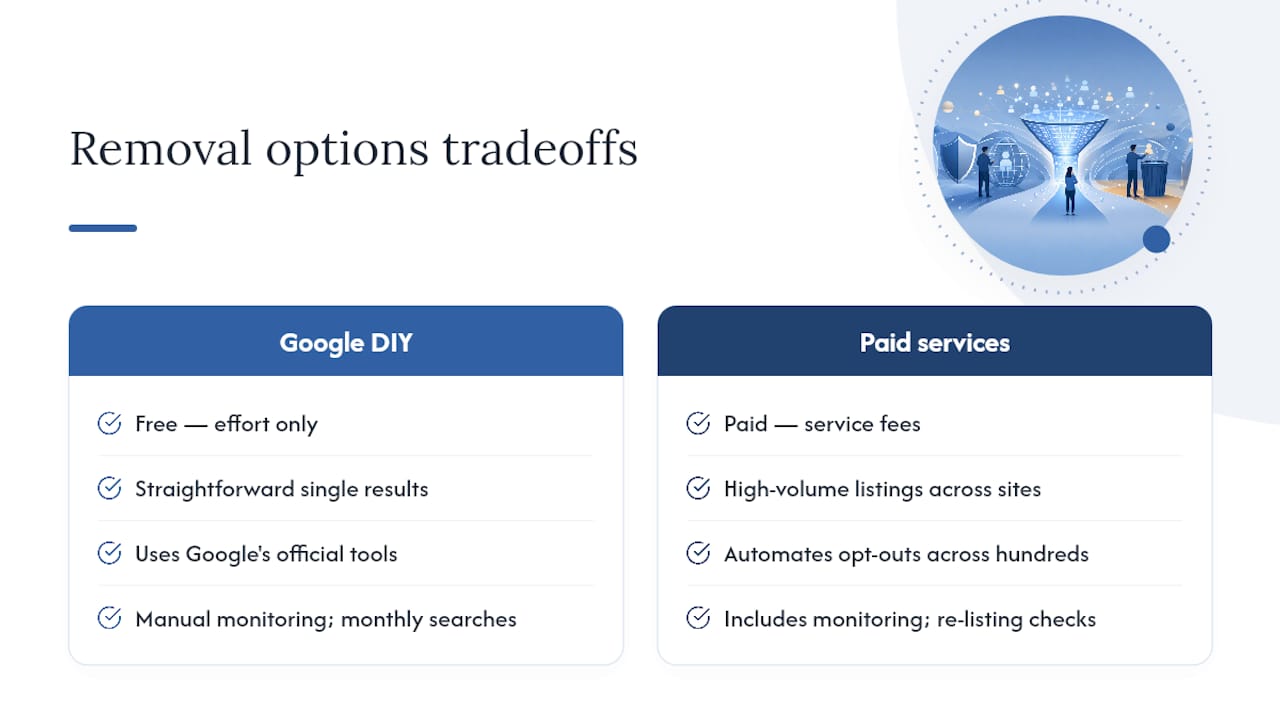
DIY removal through Google’s official tools is free and works well for straightforward cases: a data broker page with your address, a forum post with your phone number, a cached page that no longer exists at the source. The process takes time, but it costs nothing except effort.
Where it gets harder is volume. If your information appears across dozens of data broker sites, people-search engines, and third-party directories, filing individual requests becomes a part-time job. That’s the scenario where paid data removal services earn their cost. They automate opt-out submissions across hundreds of sites simultaneously and monitor for re-listing, which is common.
Techstacktoday has tested and ranked privacy services across both categories. Our view: start with Google’s free tools for the highest-priority results, then evaluate whether a paid service makes sense based on how many sites are involved. Our identity protection reviews cover the services that perform best in real-world testing, without paid rankings influencing the results.
For ongoing monitoring, re-run your name searches at least once a month. Set up Google Alerts for your name and phone number. Keep Results about you notifications active. And if your exposure came from a data breach, the privacy tools comparison checklist at Techstacktoday covers the monitoring and identity-protection tools worth considering next.
Protect your privacy beyond this one removal
Removing a result from Google is one step. Keeping your data off the web long-term requires a broader approach.

If you want to go further, Techstacktoday’s guide on how to remove yourself from the internet covers multi-site removal, data broker opt-outs, and the paid services that handle the bulk work for you. For readers who want to reduce future exposure at the network level, our VPN reviews and deals cover the tools that prevent your browsing activity from feeding the data pipelines that surface your information in the first place.
Sources
These are the official pages and forms referenced throughout this guide:
- Results about you
- Report a problem – Google Search Help
- New options for removing your personally identifiable information from Search – Google Blog