Identity theft can upend your finances, damage your credit, and create tax problems that take years to untangle. This reduce identity theft risk guide gives you a clear, step-by-step path through both digital and offline defenses, so you know exactly what to do before a thief strikes and exactly how to recover if one does. The strategies here are grounded in current federal guidance, real credit bureau processes, and the kind of behavioral habits that most people skip until it’s too late. You don’t need to be a tech expert. You need a plan.
Table of Contents
- Key takeaways
- Your reduce identity theft risk guide: tools and mindset
- Securing your online accounts step by step
- Offline protection: the steps most people skip
- What to do if identity theft happens
- My honest take on identity theft prevention
- Take your protection further with Techstacktoday
- FAQ
Key takeaways
| Point | Details |
|---|---|
| Freeze credit at all three bureaus | A freeze at only one bureau leaves your profile exposed at the other two. |
| Use multi-factor authentication everywhere | Strong passwords alone are not enough. 2FA blocks access even when passwords are stolen. |
| Get an IRS IP PIN annually | This six-digit code stops fraudulent tax returns filed in your name before they cause damage. |
| Start recovery at IdentityTheft.gov | Filing there first generates a recovery plan that speeds up every subsequent step. |
| Offline habits matter as much as digital ones | Shredding documents and securing your mailbox are protection steps most people underestimate. |
Your reduce identity theft risk guide: tools and mindset
Before you can protect yourself, you need the right tools in place. Think of this as your security kit. Most of these cost little or nothing to set up.
| Tool | Purpose | Cost |
|---|---|---|
| Password manager | Generates and stores unique passwords | Free to ~$36/year |
| Authenticator app | Provides 2FA codes for account logins | Free |
| Credit freeze (all 3 bureaus) | Blocks new credit applications in your name | Free |
| Cross-cut shredder | Destroys sensitive physical documents | $30 to $80 one-time |
| Secure home Wi-Fi (WPA3) | Encrypts your home network traffic | Router upgrade if needed |
Beyond tools, the mindset shift matters. Most identity theft is opportunistic. Thieves target people who reuse passwords, skip software updates, and leave sensitive mail sitting in an unlocked box. The best practices for identity safety are not complicated. They just require consistency.
Keep your operating system, browser, and apps updated. Outdated software is one of the most common entry points for credential-stealing malware. Set updates to run automatically so you never have to think about it.
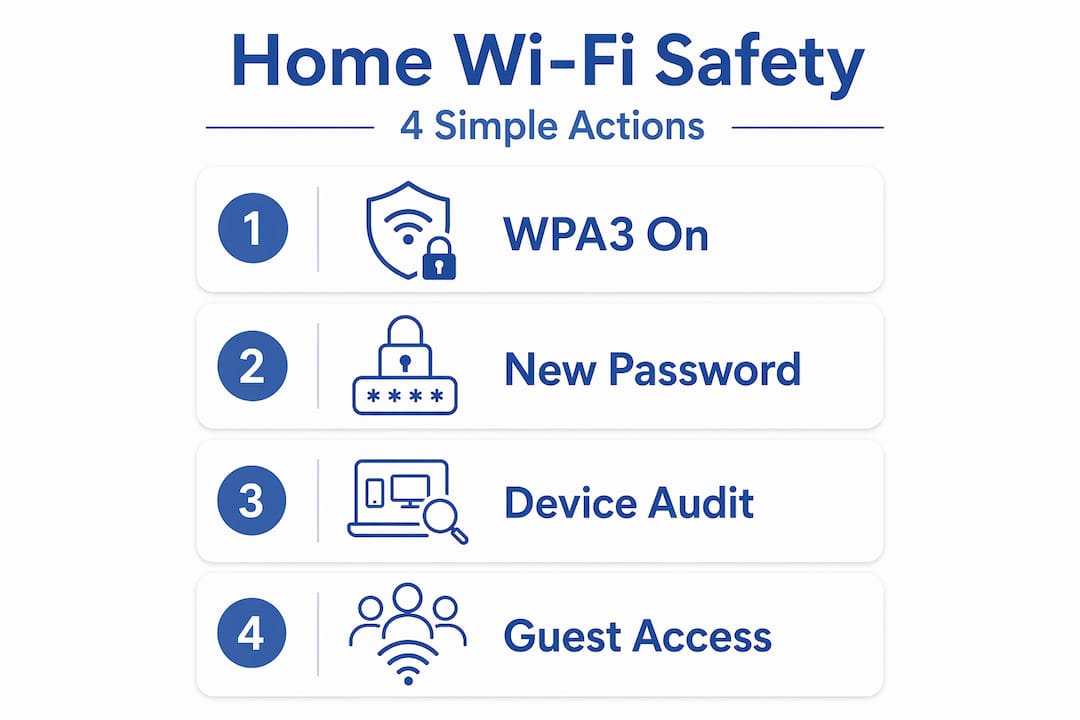
Your home Wi-Fi network is another overlooked vulnerability. Use WPA3 encryption if your router supports it, change the default router password, and never conduct sensitive financial activity on public Wi-Fi without a VPN.
Securing your online accounts step by step
This is where most identity theft starts. Weak or reused passwords are the single biggest digital risk factor. Here’s how to close that gap.
-
Create a unique password for every account. A passphrase works well. Try three or four unrelated words strung together, like “coffee-lamp-river-42.” It’s long, memorable, and hard to crack. Never reuse a password across accounts, especially your email. Your email is the master key to everything else.
-
Use a password manager. A good manager generates, stores, and autofills strong passwords so you never have to remember them. The benefits of password managers far outweigh the learning curve. If one account is breached, the rest stay protected.
-
Enable multi-factor authentication (2FA) on every account that offers it. The FTC confirms that 2FA blocks unauthorized access even when passwords are stolen. Use an authenticator app like Google Authenticator or Authy over SMS codes when possible. SMS can be intercepted through SIM-swapping attacks.
-
Handle links and attachments with skepticism. Phishing emails are designed to look legitimate. Before clicking anything, hover over the link to check the actual URL. If an email asks you to log in, go directly to the website instead of clicking through. Attachments from unknown senders should never be opened.
-
Update software regularly. CalPERS cybersecurity guidance lists software updates as one of the most effective steps to prevent identity theft, alongside securing your network and monitoring your accounts.
Pro Tip: Set a calendar reminder every 90 days to audit your most sensitive accounts. Check login activity, confirm 2FA is still active, and rotate passwords on your email and financial accounts.
Offline protection: the steps most people skip
Digital security gets all the attention, but offline behaviors are equally vital for preventing identity theft. Physical documents and your mailbox are real vulnerabilities.
- Shred everything sensitive before disposal. Bank statements, credit card offers, medical bills, tax documents, and anything with your Social Security number should go through a cross-cut shredder. Dumpster diving is still a real tactic.
- Collect your mail daily. A full mailbox is an invitation. If you’re traveling, put a hold on your mail through USPS.
- Guard your Social Security number aggressively. Don’t carry your Social Security card in your wallet. Only provide your SSN when legally required. Ask why it’s needed and how it will be stored before handing it over.
- Watch for warning signs. The IRS flags several red flags for tax-related identity theft: rejected tax returns, unexpected tax forms arriving in your name, and unusual password reset alerts on your IRS or Social Security accounts.
Freezing your credit: the most underused protection
A credit freeze is free, powerful, and reversible. It prevents anyone, including you, from opening new credit in your name without your explicit permission.

The critical detail most people miss: you must freeze credit separately at Equifax, Experian, and TransUnion. One freeze at one bureau leaves the other two wide open.
| Bureau | Freeze online | Phone option | Processing time |
|---|---|---|---|
| Equifax | Yes | Yes | Immediate online |
| Experian | Yes | Yes | Immediate online |
| TransUnion | Yes | Yes | Immediate online |
When you need to apply for new credit, you’ll need to temporarily lift the freeze at the relevant bureau. Timing the lift window matters. Coordinate with your lender to know which bureau they pull from, then lift only that freeze for the shortest window needed.
Pro Tip: Keep the PIN or login credentials for each bureau’s freeze portal in your password manager. You’ll need them to lift or remove the freeze, and losing them creates a frustrating delay.
What to do if identity theft happens
Don’t panic. Move fast, but move in the right order. Out-of-sequence recovery steps prolong paperwork and delay resolution. Here’s the correct sequence.
-
Document everything immediately. Screenshot unauthorized charges, save emails, and write down dates and times. You’ll need this record for every subsequent step.
-
Go to IdentityTheft.gov first. This federal site generates a personalized recovery plan and an official FTC Identity Theft Report. That report is your legal foundation. IdentityTheft.gov’s recovery plan streamlines disputes with creditors and gives law enforcement what they need.
-
File a police report. Bring your FTC report, a government-issued photo ID, and proof of address. Some creditors require a police report to process fraud disputes.
-
Contact your financial institutions. Call the fraud department at each bank and credit card company where unauthorized activity occurred. Dispute the charges in writing and request new account numbers.
-
Freeze your credit at all three bureaus if you haven’t already. Do this the same day you discover the theft.
-
Get an IRS Identity Protection PIN. If your SSN was exposed, this is non-negotiable. The IRS IP PIN is a six-digit code that must be included on your tax return each year. It blocks anyone else from filing a return in your name. The IRS mails the PIN within 4 to 6 weeks after identity verification.
⚠️ Critical: The IP PIN changes every year. Using the wrong year’s PIN causes your e-file to be rejected. Mark your calendar each January to retrieve your new PIN before filing.
Monitor your credit reports rigorously for at least 12 months after a theft. You’re entitled to free weekly reports at AnnualCreditReport.com. Look for new accounts, hard inquiries, and address changes you didn’t authorize.
My honest take on identity theft prevention
I’ve reviewed dozens of identity protection services and read through more breach response guides than I can count. Here’s what I’ve learned that most articles won’t tell you.
The technical steps are the easy part. Setting up 2FA takes five minutes. Freezing your credit takes twenty. The hard part is the behavioral consistency. Most people set up strong security once and then get complacent. They reuse a password “just this once.” They skip the software update because it’s inconvenient. That’s where thieves find their opening.
The IRS IP PIN is genuinely underused. I’ve talked to people who’ve had their SSN exposed in a data breach and still haven’t enrolled. Tax-related identity theft is a nightmare to resolve. The IP PIN is a direct, free solution that most people don’t know exists. Enroll now, not after something goes wrong.
On credit freezes: I’ve seen people resist freezing their credit because they think it’s a hassle to lift. It isn’t. Once you have your bureau logins saved in a password manager, a lift takes about two minutes. The inconvenience argument doesn’t hold up.
One more thing. After any identity theft incident, watch for recovery scams. Fraudsters specifically target recent victims with fake “credit repair” offers and phishing emails impersonating the IRS or IdentityTheft.gov. If someone contacts you unsolicited offering to resolve your identity theft for a fee, it’s a scam.
— Mahender
Take your protection further with Techstacktoday
You now have the framework. The next step is putting the right tools behind it.

At Techstacktoday, every service we recommend is hands-on tested in real-world conditions with no paid rankings involved. If you’re ready to lock down your accounts, start with our top-rated password managers to generate and store strong, unique credentials across every account. For secure browsing on public networks, our reviewed VPN services show you exactly which providers protect your traffic without logging your activity. And if your personal data is already circulating on data broker sites, our data removal services can help you reduce that exposure before it becomes a liability. These aren’t upsells. They’re the tools that complete the protection plan you just built.
FAQ
What is the fastest way to freeze my credit?
Go online directly to Equifax, Experian, and TransUnion. Online freeze requests are processed immediately and take about five minutes per bureau.
How does an IRS IP PIN protect against identity theft?
The IP PIN is a six-digit code required on your tax return each year. Without it, the IRS rejects any return filed using your Social Security number.
What should I do first if my identity is stolen?
Start at IdentityTheft.gov to generate an official FTC report and personalized recovery plan before contacting creditors or police. Doing it in order saves significant time.
Is a credit freeze the same as a credit lock?
No. A credit freeze is a federally regulated, free protection with legal backing. A credit lock is a product offered by the bureaus, often with a fee, and has fewer legal protections.
How do I know if my identity has already been stolen?
Watch for IRS-flagged warning signs like rejected tax returns, unexpected tax forms, unfamiliar accounts on your credit report, and password reset emails you didn’t request.