A VPN tunnel encrypts and encapsulates your device’s packets, addresses them to a VPN server, and hands back only encrypted traffic to anyone watching the wire. Modern implementations lean on ciphers like AES-256-GCM and ChaCha20-Poly1305, running over protocols like WireGuard, to pull that off in milliseconds. Here’s the quick version before we get into the mechanics.
The connection process runs through five stages: your device and the VPN server perform a handshake, they derive a shared session key, your outgoing packets get wrapped and encrypted, that encrypted bundle crosses the internet to the server, and the server unwraps it and forwards your original packet to its real destination. The return trip runs the same steps in reverse.
- Connect and authenticate. Your VPN client and the server verify each other and negotiate a protocol.
- Exchange keys. An asymmetric handshake produces a shared symmetric session key both sides can use.
- Encapsulate and encrypt. Your device wraps each outgoing packet in an encrypted outer packet.
- Transit. That encrypted bundle travels across your ISP’s network and the open internet to the VPN server.
- Decrypt and forward. The server strips the outer layer, decrypts the payload, and sends your original packet on to its destination, then reverses the process on the way back.
One caveat matters more than any protocol detail: protection only covers the client-to-server leg. Once traffic leaves the VPN server for its final destination, you’re relying on whatever encryption that destination itself uses, and you’ve effectively swapped your ISP’s visibility for your VPN provider’s. That trade is often worth making, but it’s a trade, not a disappearing act.
Key Takeaways
VPN tunneling protects your traffic between your device and the VPN server by combining encapsulation with modern encryption, but the protection stops at the server’s edge.
| Point | Details |
|---|---|
| Client-to-server protection only | A VPN tunnel secures traffic between your device and the VPN server, not beyond it. |
| Packet flow has five stages | Handshake, key exchange, encapsulation, encrypted transit, and decryption/forwarding define every connection. |
| Trust shifts to your provider | Your ISP loses visibility, but your VPN provider gains it, so provider choice matters. |
| Modern ciphers outperform legacy ones | AES-256-GCM and ChaCha20-Poly1305 both beat PPTP’s outdated encryption on every security metric. |
| Match protocol to use case | WireGuard or IKEv2 for mobile, IPsec tunnel mode for site-to-site, avoid PPTP entirely. |
| Test for leaks after every setup | Run DNS and WebRTC leak checks and confirm your kill switch blocks traffic on disconnect. |
Table of Contents
- How VPN Tunneling Works Step by Step
- Encapsulation and Packet Structure Explained
- Encryption and Key Exchange: How VPN Encryption Works
- VPN Tunneling Protocols Compared: Security, Speed, and Fit
- Tunnel Modes, Split Tunneling, and Full Tunneling
- Security Limitations and Best Practices for VPN Tunneling
- Use Cases and Performance Trade-offs by Protocol
- Techstacktoday’s Hands-On Testing: What the Numbers Show
- Key Exchange Mechanisms: Diffie-Hellman and Its Modern Variants
- Transport Mode vs. Tunnel Mode: A Closer Look
- Detecting Tunnel Leaks: Tools and Methods That Actually Work
- UDP vs. TCP Inside VPN Tunnels: Why It Changes Everything
- What Actually Matters When You’re Choosing a Protocol
- Frequently Asked Questions
- Sources
How VPN Tunneling Works Step by Step
Here’s what actually happens on your device and across the network the moment you hit “Connect.”
- Your client initiates a connection request to the VPN server, specifying the protocol (OpenVPN, WireGuard, IKEv2, and so on).
- The two sides run an asymmetric handshake. This is where public key cryptography proves each side is who it claims to be and lets them agree on shared secrets without ever transmitting a private key.
- A symmetric session key gets derived from that handshake. Asymmetric crypto is computationally expensive, so nobody uses it to encrypt actual data. It’s used once to bootstrap a lightweight symmetric key that will do the heavy lifting.
- Your operating system spins up a virtual network interface. On Linux and macOS this typically shows up as
tun0ortap0; Windows uses a comparable virtual adapter. The VPN client also rewrites your routing table so outbound traffic is directed through that virtual interface instead of your default gateway. - Each packet gets captured, encapsulated, and encrypted before it ever reaches your physical network card. The original packet becomes the payload of a new, encrypted outer packet.
- The encrypted packet transits your ISP’s network and the wider internet, routed the same way any other IP traffic is routed, using standard BGP-announced paths between autonomous systems.
- The VPN server receives the packet, decrypts it, and forwards the original payload to its intended destination on your behalf.
- The response comes back to the VPN server, gets encrypted again, and returns through the tunnel to your device, where your client decrypts it and hands it to the requesting application.
Picture the flow like this:
Your Device → [Encrypted Tunnel] → VPN Server → Destination Site
   ISP sees: encrypted blob → VPN server IP only
   Destination sees: VPN server IP, not your real IP
Your ISP sees encrypted traffic heading to one IP address, the VPN server’s, and nothing about what’s inside it. The destination website sees a connection coming from the VPN server’s IP address, not yours. Neither party sees both ends of the conversation, which is the entire point of the design.
Pro Tip: Check your routing table after connecting (ip route on Linux, route print on Windows) to confirm your default route actually points through the VPN’s virtual interface. If it doesn’t, your tunnel might only be handling some traffic, not all of it.
Encapsulation and Packet Structure Explained
Encapsulation is the mechanical trick that makes tunneling possible: your original packet, headers and all, becomes nothing more than cargo inside a new outer packet. Networking engineers describe tunneling as encapsulation, wrapping one packet inside another so it can travel across a network it wasn’t originally addressed for. That’s true whether or not encryption is involved.
Here’s the layer breakdown, described conceptually rather than byte-by-byte:
- Inner packet: Your original IP packet, including its own source IP (your device, or your local network address), destination IP (the website or service you’re reaching), and payload.
- Outer packet: A new IP header wrapping the entire inner packet. The outer header’s source is your device’s public IP; the outer destination is the VPN server. This is the only addressing information visible to anyone watching network traffic between you and the server.
- What stays hidden: The inner packet’s real destination, its payload, and (depending on protocol) parts of the transport-layer header.
Different tunneling formats handle this wrapping differently. IP-in-IP does exactly what it sounds like: an IP packet becomes the payload of another IP packet, with no encryption by default. GRE (Generic Routing Encapsulation) works similarly but supports encapsulating a broader range of protocol types, and like IP-in-IP, GRE alone provides no confidentiality unless it’s paired with IPsec. IPsec tunnel mode encrypts and encapsulates the entire original IP packet, adding its own ESP (Encapsulating Security Payload) header for authentication and encryption. OpenVPN takes a different route entirely, wrapping traffic inside a TLS session that itself typically rides over UDP or TCP, which is part of why it’s so good at slipping past restrictive firewalls that only allow standard web traffic.
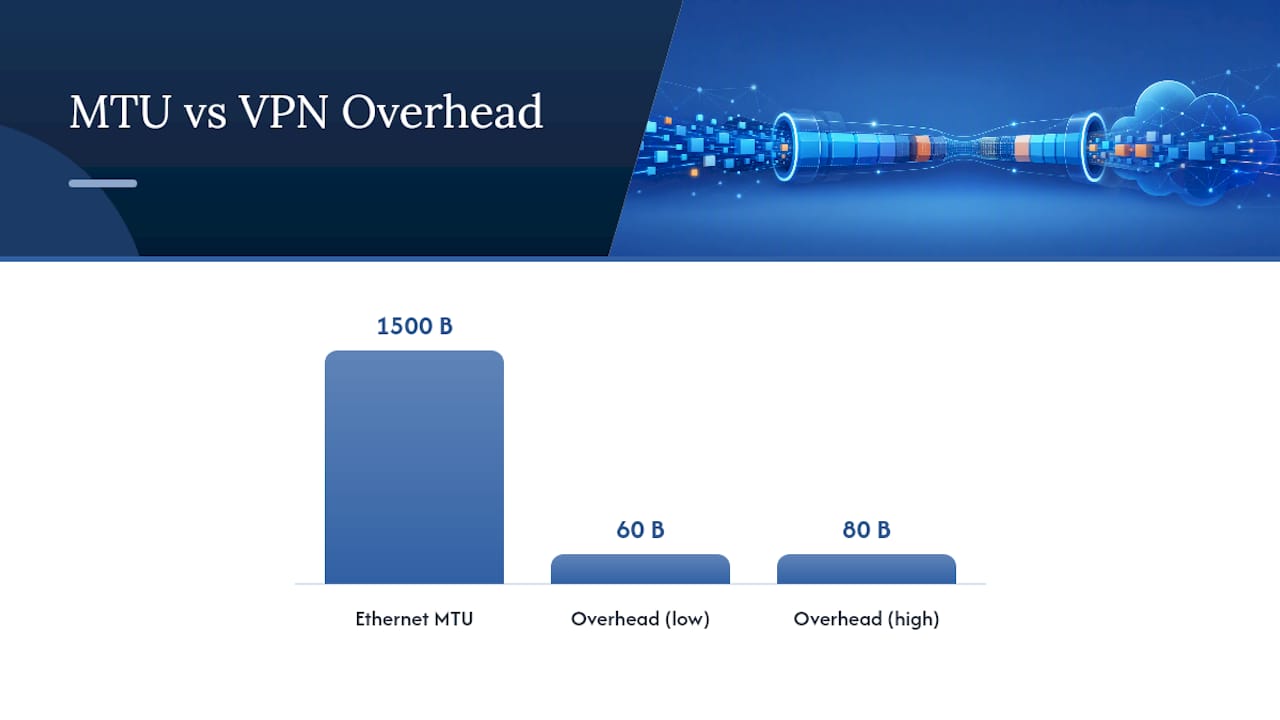
Encapsulation isn’t free. Every layer of wrapping adds bytes, and those bytes eat into your Maximum Transmission Unit, the largest packet size a network link will carry without fragmenting it. A standard Ethernet MTU is 1500 bytes; once you add an outer IP header, a UDP header, and an encryption overhead, you can easily lose 60 to 80 bytes of usable space per packet. Exceed the path’s real MTU and packets get fragmented or dropped, which shows up to you as stalled downloads, choppy video calls, or connections that hang on large file transfers even though small requests work fine. Well-configured VPN clients handle this with MSS clamping or MTU auto-detection, but it’s the most common cause of “the VPN works but feels broken” complaints.
Encryption and Key Exchange: How VPN Encryption Works
Every VPN connection runs two separate cryptographic jobs, and conflating them is the single most common misunderstanding people bring to this topic. The handshake phase uses asymmetric cryptography to authenticate both parties and agree on a secret without ever sending that secret across the wire. Algorithms like Diffie-Hellman and its elliptic-curve variant, Curve25519, let two sides that have never met produce an identical shared value just by exchanging public values. Curve25519 in particular has become the default for modern protocols because it’s fast and resistant to a wider set of implementation mistakes than older Diffie-Hellman groups.
Once that shared secret exists, the connection switches entirely to symmetric cryptography for the actual data. Symmetric ciphers are dramatically faster than asymmetric ones, which is why nobody encrypts bulk traffic with RSA or Diffie-Hellman directly. The two dominant choices in current VPN protocols:
- AES-256-GCM: A well-established standard offering authenticated encryption, meaning it verifies data integrity as it encrypts. It’s the default in many implementations of OpenVPN and IKEv2, and performs exceptionally well on hardware with dedicated AES acceleration, which covers most modern laptops and desktops.
- ChaCha20-Poly1305: A newer stream cipher paired with the Poly1305 authenticator, designed to run fast in pure software without needing specialized hardware support.
Here’s the practical nuance that trips people up: hardware acceleration changes everything. Devices with an AES-NI instruction set, common in Intel and AMD chips since the early 2010s, chew through AES-256-GCM almost for free. But older phones, budget Android devices, and some ARM chips lack that acceleration, and AES ends up noticeably slower on them than ChaCha20, which was built from the ground up for software-only performance. That’s exactly why WireGuard standardized on ChaCha20-Poly1305 by default rather than making AES the primary choice.
Pro Tip: If your VPN app lets you pick a cipher and your phone feels sluggish on a VPN connection, try switching to ChaCha20-Poly1305 or a WireGuard-based protocol. On hardware without AES-NI, the difference in battery drain and throughput can be significant.
Both AES-GCM and ChaCha20-Poly1305 are authenticated encryption modes, meaning they don’t just scramble your data, they also generate a cryptographic tag that lets the receiving end confirm nothing was altered in transit. Without that authentication step, an attacker with network access could theoretically tamper with encrypted packets and have the receiving end process corrupted data without ever knowing.
VPN Tunneling Protocols Compared: Security, Speed, and Fit
Picking a protocol is really about picking which trade-offs you’re willing to live with. No single protocol wins on every dimension.
| Protocol | Security | Performance | Platform Support | Ease of Setup | NAT/Firewall Traversal | Typical Use Case |
|---|---|---|---|---|---|---|
| PPTP | Weak, broken encryption | Fast | Nearly universal, legacy | Very easy | Good | Avoid; legacy only |
| L2TP/IPsec | Strong when configured correctly | Moderate, double encapsulation overhead | Wide, built into most OSes | Moderate | Can struggle with strict NAT/firewalls | Basic remote access |
| SSTP | Strong (TLS-based) | Moderate | Best on Windows | Moderate | Excellent, uses port 443 | Bypassing restrictive firewalls |
| OpenVPN | Strong, highly configurable | Good, better on UDP | Wide, needs client software | Moderate to complex | Very good | General-purpose remote access |
| IKEv2/IPsec | Strong | Very good | Native on most mobile OSes | Easy | Good | Mobile, network-switching scenarios |
| WireGuard | Strong, modern cryptography | Excellent | Growing, native on many platforms | Easy | Good | Mobile and general remote access |
| GRE | None by default | Fast (no crypto overhead) | Wide, router-level | Complex | Poor without added encryption | Site-to-site routing, paired with IPsec |
| SSH tunneling | Strong for single-app forwarding | Good for light use | Universal (built into most OSes) | Moderate, command-line based | Fair | Forwarding single applications, not full-device |
A few things worth pulling out from that table. PPTP was fast because its encryption was weak enough to break trivially by modern standards; there’s no legitimate reason to use it in 2026, and any service still defaulting to it should raise a flag. L2TP/IPsec pairs a tunneling protocol that has no encryption of its own (L2TP) with IPsec to add it, which is why the combination is stronger than L2TP alone, though the double encapsulation adds processing overhead. SSTP rides inside a standard TLS connection on port 443, the same port all HTTPS traffic uses, which makes it exceptionally good at getting through firewalls that block anything unfamiliar, but it’s largely a Windows-first protocol. OpenVPN remains a flexible, battle-tested choice, especially valuable when you need configurability, though it typically requires a dedicated client. IKEv2/IPsec handles network changes gracefully, which is why it’s the default on many mobile devices switching between Wi-Fi and cellular. WireGuard achieves its speed and simplicity through a dramatically smaller codebase and a streamlined handshake built on the Noise protocol framework, often completing its handshake in a single round trip. GRE is a pure tunneling protocol with zero built-in encryption, useful for site-to-site routing but only secure when layered with IPsec. SSH tunneling shines for forwarding a single application’s traffic through an encrypted channel without setting up a full VPN client, though it’s not built to route your entire device’s traffic.
Quick recommendation matrix: best for mobile, WireGuard or IKEv2/IPsec; best for site-to-site, IPsec in tunnel mode, sometimes paired with GRE; legacy or avoid, PPTP without qualification.
Tunnel Modes, Split Tunneling, and Full Tunneling
IPsec, one of the oldest and most widely deployed tunneling frameworks, actually operates in two distinct modes, and confusing them leads to real configuration mistakes. Transport mode encrypts only the payload of the original IP packet, leaving the original IP header intact and visible. It’s used for host-to-host protection where both endpoints are known and trusted, think two servers in the same data center encrypting traffic between them. Tunnel mode encrypts the entire original packet, header included, and wraps it inside a brand-new outer IP packet. This is the mode used for most consumer and site-to-site VPNs, since it fully hides the original source and destination from anyone observing the outer traffic.
Separately from tunnel mode versus transport mode, there’s the question of how much of your traffic actually goes through the tunnel at all.
- Full tunneling routes every packet your device sends, regardless of destination, through the VPN. Maximum privacy, but every request pays the latency cost of the extra hop.
- Split tunneling routes only selected traffic through the VPN while everything else uses your normal internet connection directly.
- Route-based split tunneling decides what goes through the tunnel based on destination IP ranges or subnets, common in corporate setups where only internal company resources need to traverse the VPN.
- Policy-based (app-based) split tunneling decides based on which application is generating the traffic, letting you route a specific app like a streaming service or work software through the tunnel while everything else bypasses it.
The trade-offs are straightforward once you see them side by side: full tunneling maximizes privacy but costs you latency and throughput on every single request; split tunneling improves speed and reduces load on the VPN server but creates a privacy gap, since anything outside the tunnel is visible to your ISP exactly as it would be without a VPN at all; corporate IT teams generally favor split tunneling because it keeps sensitive traffic protected without routing every employee’s Netflix session through the company’s server; and split tunneling configurations are genuinely harder to troubleshoot, because a misconfigured route can silently leak traffic you assumed was protected.
Security Limitations and Best Practices for VPN Tunneling
A VPN tunnel is not a privacy force field, and treating it like one is how people get burned. It protects the segment between your device and the VPN server. Everything downstream of that server depends on other protections entirely, which is why HTTPS remains essential even when you’re connected to a VPN; tunneling and end-to-end encryption solve different problems.
Here’s how tunnels actually leak, ranked by how often they trip people up in practice:
- DNS leaks. If your operating system sends DNS queries to your regular ISP resolver instead of routing them through the tunnel, anyone watching your ISP’s DNS traffic can see every domain you visit, even while your actual browsing data stays encrypted.
- WebRTC leaks. Browsers supporting WebRTC (used for video calls and peer-to-peer features) can use STUN requests that reveal your real local and public IP addresses directly to a website, completely bypassing your VPN tunnel.
- Tunnel drops without a kill switch. If your VPN connection drops unexpectedly and nothing blocks default routing, your device silently reverts to sending traffic over your normal, unencrypted connection.
- SNI and metadata leaks. Even encrypted HTTPS connections historically exposed the Server Name Indication field in plaintext during the TLS handshake, letting network observers see which domains you’re connecting to.
- Traffic correlation. A sufficiently resourced observer watching both your ISP connection and a destination server’s traffic can sometimes correlate timing and packet size patterns to infer a connection exists, even without decrypting anything.
Building good habits around these risks doesn’t require deep networking knowledge, just discipline at three points in the process.
Before connecting: confirm your VPN client’s kill switch is enabled, since a properly implemented kill switch blocks all traffic if the tunnel drops rather than letting it fall back to your unencrypted connection. During use: verify DNS requests are actually routing through the VPN’s resolver, and disable WebRTC in your browser or use an extension that blocks it if you’re on a browser that doesn’t offer a native toggle. After connecting: periodically verify your public IP and DNS resolver match your VPN provider’s expected values, not your ISP’s.
Pro Tip: Run a DNS leak test at dnsleaktest.com style tools and a WebRTC leak check through your browser’s dev console any time you switch VPN servers or update your client software. It takes about thirty seconds and catches misconfigurations before they matter.
The uncomfortable truth underneath all of this: connecting to a VPN doesn’t eliminate your exposure, it relocates it. You’re trading your ISP’s visibility for your VPN provider’s, which is why picking a provider with a verified no-logs policy and a clean audit history matters as much as picking the right protocol.
Use Cases and Performance Trade-offs by Protocol
Matching your protocol to your actual use case saves you from chasing performance problems that were baked in from the start.
- Remote access for individuals: WireGuard or IKEv2/IPsec, both built to reconnect quickly after network changes, ideal for laptops and phones moving between Wi-Fi and cellular.
- Corporate remote access: OpenVPN or IKEv2/IPsec, offering the granular authentication and policy control IT departments need.
- Site-to-site connections between offices or data centers: IPsec in tunnel mode, sometimes layered with GRE for routing flexibility.
- Bypassing censorship or restrictive firewalls: OpenVPN over TCP on port 443, or SSTP, since both can disguise themselves as standard HTTPS traffic.
- Forwarding a single application securely: SSH tunneling, which avoids the overhead of routing your entire device through a VPN client.
Performance differences between these choices come down to a handful of concrete factors. Encryption itself carries a CPU cost, and that cost is much lower on hardware with AES-NI acceleration running AES-256-GCM than on unaccelerated hardware forced to compute it in software. Transport choice matters too: UDP-based tunnels generally outperform TCP-based tunnels for real-time traffic, because UDP doesn’t wait for lost packets to be retransmitted before moving forward, while TCP’s reliability guarantees add latency under any packet loss. And the physical distance to your VPN server’s exit node adds real latency independent of the protocol, since your traffic still travels standard internet paths between autonomous systems no matter how efficient the encryption is.
NAT traversal is the quieter factor that determines whether a connection works at all behind restrictive routers. Most consumer VPN protocols rely on UDP hole punching, where both sides send packets to punch a temporary opening through NAT, but some corporate or carrier-grade NAT setups block this entirely, forcing a fallback to TCP or a specific port-forwarding configuration. If you’ve ever had a VPN connect fine on home Wi-Fi but fail entirely on a hotel or airport network, this is usually why. Fragmentation tuning helps here too: lowering your VPN client’s MTU setting by 50 to 100 bytes below the standard 1500 often resolves connections that hang specifically on larger file transfers or video calls while smaller web requests work fine.
Techstacktoday’s Hands-On Testing: What the Numbers Show
Reading protocol specs only gets you so far. Techstacktoday’s testing approach puts these protocols on actual devices across real network conditions, mixed home broadband, mobile data, and public Wi-Fi, to see which claims hold up outside a lab.
The pattern across repeated testing rounds tends to hold steady: WireGuard consistently posts the fastest handshake times and the lowest relative latency overhead, OpenVPN trades some speed for configurability and firewall-evading flexibility, and IKEv2 holds its own particularly well on mobile devices switching networks mid-session.
| Protocol | Relative Latency Overhead | Relative Throughput | Handshake Speed | Leak Test Result |
|---|---|---|---|---|
| WireGuard | Lowest | Highest | Fastest (single round trip) | Pass |
| OpenVPN (UDP) | Moderate | Good | Moderate | Pass |
| IKEv2/IPsec | Low | Very good | Fast | Pass |
| L2TP/IPsec | Higher | Moderate | Slower | Pass, when properly configured |
You can replicate a version of this testing yourself without specialized equipment. Connect to a VPN server, then check your public IP against a tool that reports it plainly. Run a DNS leak check to confirm queries route through your provider’s resolver rather than your ISP’s. Time how long the connection takes to establish from the moment you click connect. Run a basic speed test both with and without the VPN active to gauge real-world throughput loss. Disconnect the VPN mid-session deliberately and confirm your kill switch actually blocks traffic rather than silently falling back. None of this requires more than about ten minutes, and it’s the fastest way to know whether a provider’s marketing claims match what’s actually happening on your network. Techstacktoday’s full VPN reviews and rankings walk through this same process across dozens of providers if you want the comparative results.
Key Exchange Mechanisms: Diffie-Hellman and Its Modern Variants
Every secure tunnel starts with a problem that sounds impossible: two devices that have never communicated need to agree on a secret key, over a network where anyone might be listening. Diffie-Hellman key exchange solved this in the 1970s using a clever bit of math, both sides pick a private value, exchange a public value derived from it, and each can combine their own private value with the other’s public value to arrive at an identical shared secret, without ever transmitting that secret directly.
Classic Diffie-Hellman uses modular arithmetic over large prime numbers, and it still shows up in older IPsec and OpenVPN configurations. The modern replacement, Elliptic Curve Diffie-Hellman, and specifically Curve25519, achieves equivalent or stronger security with much smaller key sizes and significantly faster computation. That speed matters more than it sounds: a faster handshake means less delay when you first connect and less battery drain doing the math on a phone.
Curve25519 is the backbone of WireGuard’s handshake process, part of why WireGuard establishes connections so quickly compared to protocols still using traditional Diffie-Hellman groups. The role these mechanisms play is narrow but essential: they exist purely to bootstrap a symmetric session key. Once that key is established, Curve25519 and classic Diffie-Hellman step out of the picture entirely, and AES-256-GCM or ChaCha20-Poly1305 take over for the actual data.
Transport Mode vs. Tunnel Mode: A Closer Look
The distinction between transport mode and tunnel mode comes up specifically in IPsec, and it’s worth revisiting on its own because so many guides gloss over what each mode actually protects.
In transport mode, only the payload of the original IP packet gets encrypted. The original IP header, including the real source and destination addresses, stays visible in plaintext. This works fine for host-to-host scenarios, say, two known servers exchanging sensitive data directly, because there’s no need to hide the endpoints from each other; the goal is protecting the content in transit, not disguising who’s talking to whom.
In tunnel mode, the entire original IP packet, header and payload together, gets encrypted and wrapped inside a completely new outer IP packet with its own header. This is what makes tunnel mode the standard choice for VPNs: it hides the original source and destination entirely from anyone observing the outer traffic, showing only the client’s and VPN server’s addresses. Site-to-site VPNs connecting two office networks rely on tunnel mode almost exclusively, since the goal is to make two separate private networks behave as if they were directly connected, without exposing internal addressing to the public internet in between.
Detecting Tunnel Leaks: Tools and Methods That Actually Work
Knowing a leak vector exists in theory is different from catching one on your own connection, and the good news is that verification doesn’t require specialized tools.
For DNS leaks, dedicated leak-testing sites work by having your browser make DNS requests and then reporting which servers actually resolved them. If the results show your ISP’s resolver rather than your VPN provider’s, your DNS queries are bypassing the tunnel entirely, even if your browsing traffic itself is encrypted. For WebRTC leaks, browser-based leak checkers attempt a WebRTC connection and report any local or public IP addresses your browser exposes in the process; if your real IP shows up instead of your VPN’s, disable WebRTC in your browser settings or install an extension built to block STUN requests. For kill switch verification, the most reliable test is also the bluntest: start a continuous ping or a running download, then manually disconnect your VPN’s network adapter or kill the VPN process, and watch whether your traffic stops immediately or silently continues over your normal connection. For general tunnel integrity, comparing your public IP address before and after connecting confirms the tunnel is active, but pair it with the DNS and WebRTC checks above, since an active tunnel doesn’t guarantee every type of traffic is actually routing through it.
Run through this sequence any time you install a new VPN client, switch providers, or change operating systems, since configuration defaults vary more than most people expect.
UDP vs. TCP Inside VPN Tunnels: Why It Changes Everything
The transport protocol carrying your encrypted tunnel traffic shapes performance in ways that have nothing to do with encryption strength at all.
UDP-based tunnels send packets without waiting for acknowledgment or handling retransmission at the transport layer. If a packet gets lost, it’s simply gone, and it’s up to a higher layer, or nothing at all, to notice and recover. This sounds like a downside, but for real-time traffic like video calls or gaming, it’s actually the better trade: a slightly dropped packet causes a tiny glitch, while waiting for a retransmission would cause a much more noticeable stutter. Most modern VPN protocols, including WireGuard and OpenVPN’s preferred configuration, default to UDP for exactly this reason.
TCP-based tunnels guarantee delivery and ordering, retransmitting anything lost and holding later packets until earlier ones arrive. This reliability comes at a real cost when a tunnel itself uses TCP: if a packet inside a TCP-based tunnel gets lost, the retransmission has to happen at both the tunnel’s TCP layer and potentially the application’s own TCP layer inside it, a phenomenon known as “TCP-over-TCP meltdown” that can cause dramatic slowdowns under any packet loss. This is exactly why SSTP and OpenVPN’s TCP mode are typically reserved for situations where UDP traffic gets blocked outright, firewall evasion being the main one, rather than used as a default.
The practical upshot: if your VPN client offers a choice, default to UDP unless you’re specifically fighting a restrictive network that blocks it, in which case TCP on port 443 becomes the fallback that trades some speed for near-guaranteed connectivity.
What Actually Matters When You’re Choosing a Protocol
Cipher choice and protocol selection get treated like a technical footnote in most VPN guides, but they’re the entire ballgame. A provider running outdated PPTP with modern marketing copy is offering you a worse security posture than no VPN at all, because it creates false confidence. The handshake mechanism and symmetric cipher a service defaults to tell you more about its actual security posture than any feature list on its pricing page.
If there’s one practical takeaway worth acting on, it’s this: prefer providers and configurations built around modern handshakes, Curve25519-based key exchange paired with ChaCha20-Poly1305 or AES-256-GCM, and then verify the setup yourself with a quick DNS and WebRTC leak test the moment you connect. Don’t take a provider’s encryption claims at face value; a five-minute check tells you more than any spec sheet.
Frequently Asked Questions
What is VPN tunneling in simple terms?
VPN tunneling is the process of wrapping your data inside encrypted packets and sending them through a private pathway to a VPN server, so anyone watching the network in between sees only encrypted traffic rather than your actual browsing activity.
How does VPN tunneling protect my data?
It encrypts your traffic using ciphers like AES-256-GCM or ChaCha20-Poly1305 and encapsulates it inside outer packets addressed to the VPN server, hiding your original destination and payload from your ISP and anyone on the local network.
Does VPN tunneling stop websites from tracking me?
No. Tunneling hides your IP address and encrypts your traffic in transit, but it doesn’t stop cookie-based tracking, account logins, or browser fingerprinting once your connection reaches its destination.
Which VPN tunneling protocol is fastest?
WireGuard typically posts the lowest latency and fastest handshake times in testing, thanks to its streamlined Noise protocol design and Curve25519 key exchange, though IKEv2/IPsec performs comparably well on mobile networks.
Is split tunneling less secure than full tunneling?
Split tunneling creates a privacy trade-off rather than a security flaw. Traffic outside the tunnel travels exactly as it would without a VPN, so anything sensitive should stay routed through the encrypted tunnel.
Can my ISP see what I do through a VPN tunnel?
Your ISP sees that you’re connected to a VPN server and can see the volume and timing of encrypted traffic, but it cannot see the content, destination websites, or data inside the encrypted tunnel.
Sources
- How does a VPN work? Plain-English guide
- What is tunneling? | Tunneling in networking
- How VPNs Work: Tunneling Protocols and Encryption — God Mode
- What is a VPN kill switch? | Kaspersky
If you’re ready to put this knowledge to use, Techstacktoday’s independent VPN reviews and rankings are built on hands-on testing rather than paid placements, covering exactly the protocol and leak-testing checks this guide walked through. Browse the full VPN category for current comparisons and deals before you commit to a provider.