An email alias is an extra address that delivers to the inbox you already use. You can create one in a few minutes: in Gmail by adding “+tag” to your username, in Outlook.com through your Microsoft account sign-in settings, in iCloud Mail under your account preferences, and in Google Workspace from the admin console. Do it now and you can stop handing your real address to every site that asks.
Don’t panic if you have already given your main address to dozens of sites. You can start with the next sign-up and work backward. ⏱️ Most setups below take under five minutes.
TL;DR
- An alias is a nickname for your mailbox. Mail sent to it lands in your normal inbox, so you don’t need a second account.
- Gmail: add “+anything” to your username (yourname+shop@gmail.com). No setup is needed to receive. To send from it, add it under “Send mail as.”
- Outlook.com and iCloud have built-in alias tools. Google Workspace admins can add up to 30 aliases per user.
- Use a different alias for each site. If one starts getting spam or shows up in a breach, you know who leaked it and can shut it off.
Table of Contents
- What an email alias is and how it works
- How to create an email alias in Gmail
- How to create an alias in Outlook.com
- How to create an alias in iCloud Mail
- How to add aliases in Google Workspace
- Which method fits your goal
- Why aliases protect your privacy
- Where DNS over HTTPS and DNS over TLS fit in
- Common problems and fixes
- Perspective: what we’ve seen testing privacy tools
- Take the next step
- FAQ
- Sources
What an email alias is and how it works
An alias is an additional address linked to your primary account that delivers to the same inbox. The sender sees the alias. You read the message in your usual mailbox. Nothing is copied, and there is no second password to remember.
That is different from a second account. A second account has its own inbox, storage and login. An alias has none of those. It is a door into a room you already own.
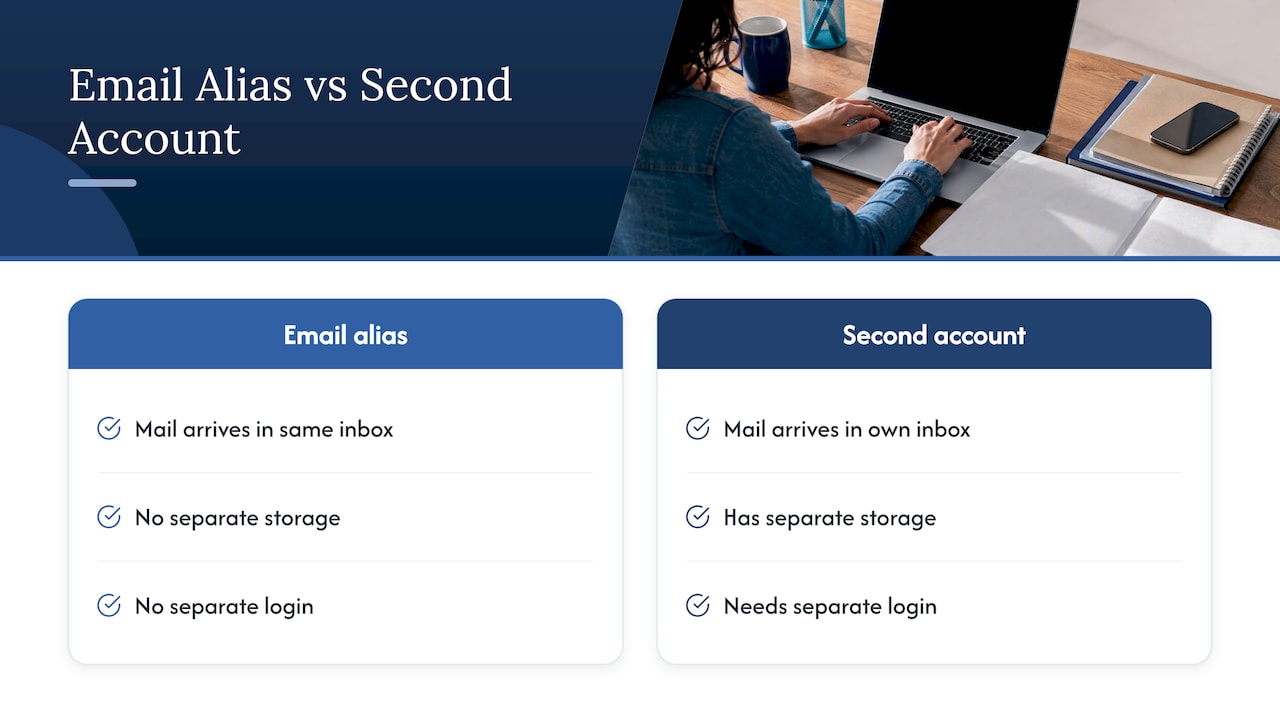
This also answers a common question: yes, you can still create a free Gmail account. But a new account is the wrong tool when your goal is privacy or sorting. It doubles your logins. An alias gives you the separation without the extra upkeep.
Two kinds of alias
- Sub-addresses (plus addresses). You invent them on the spot. Gmail’s “+tag” is the best known. They cost nothing and need no setup.
- Registered aliases. You add them in account settings, and the provider checks them. Outlook.com, iCloud and Google Workspace work this way. They look like ordinary addresses, which helps when a site rejects plus signs.
How to create an email alias in Gmail
Gmail gives you three tricks. Each fits a different job.
Option 1: Plus addressing (fastest, ⏱️ 0 minutes)
- Take your Gmail username, for example yourname@gmail.com.
- Add a plus sign and a label before the @: yourname+newsletters@gmail.com.
- Use that address on the sign-up form.
It works at once. Mail to yourname+newsletters@gmail.com arrives in your main inbox. Gmail lets you create as many of these as you want, so use one label per site: +bank, +airline, +pharmacy.
To sort the mail, go to Settings > See all settings > Filters and Blocked Addresses > Create a new filter. Put the alias in the “To” field. Then choose a label, skip the inbox, or delete it.
⚠️ Know the limits. Some sign-up forms reject plus signs. Also, a sender can strip the tag from a plus address, which puts your base address back. A data broker or a determined spammer can do the same in seconds. Plus addressing is good for sorting and spotting leaks. It is weak protection against someone who wants your real address.
Option 2: The dot trick
Gmail ignores dots in the username part, so yourname@gmail.com and your.name@gmail.com reach the same inbox, as the AdGuard guide notes. It’s handy for catching which site sold your address, but it is even easier to undo than a plus tag. Treat it as a minor extra.
Option 3: Send mail as another address
Receiving is easy. Sending from an alias takes a few steps, and it matters when you want replies to look like they came from the alias.
- On a computer, open Gmail and click Settings, then See all settings.
- Open the Accounts and import tab.
- In the “Send mail as” section, click Add another email address.
- Enter your name and the address you want to send from, then follow the verification prompts.
Per Google’s Gmail Help page, you can send from up to 99 different addresses. One change is coming: Gmail will stop supporting “Send as” for third-party addresses such as @yahoo.com or @outlook.com starting January 2027. Google says it doesn’t affect Google Workspace aliases or other Gmail addresses you own. If you rely on that feature for another provider’s address, check the Google page for the latest details.
How to create an alias in Outlook.com
Microsoft treats an alias as another way to sign in to the same account. Mail to any of your aliases lands in one inbox.
- Sign in to your Microsoft account and open the “how you sign in” page.
- Select Add email.
- Choose to create a new Outlook.com address or add an existing address.
- Save, and confirm the verification message if prompted.
The steps are laid out on Microsoft’s support page for adding an email address. In Outlook on the web you can also go to Settings > Account > Mail > Forwarding and IMAP > Email aliases, pick a primary alias, or manage the list from there.
One point trips people up: the “primary alias” is the address your outgoing mail shows by default. Change it if you want replies to come from the new address instead of the old one.
If you manage a work mailbox in Microsoft 365 rather than a personal Outlook.com one, only your administrator can add aliases to it. Ask them to do it from the admin center, and don’t open a new account to get around the limit.
How to create an alias in iCloud Mail
Apple gives you two tools, and they do different things.
Mail aliases. Once your primary iCloud Mail address is set up, you can create up to three @icloud.com aliases. Use them for broad categories: one for shopping, one for forums, one for family.
Hide My Email. This makes unique, random addresses for individual sites. Apple says you can reply from the same random address so your real one stays private. When you send with it from iCloud.com, only a single recipient is allowed per message. That makes it a good fit for sign-ups and a poor fit for group threads.
If you want one alias per website without managing a list, Hide My Email is the lower-effort option. If you want a stable address you can give to people, use a regular alias.
How to add aliases in Google Workspace
This route is for small businesses. An admin can give one person several addresses, such as info@ and billing@, all landing in one mailbox. Google says admins can create up to 30 alternate addresses per user at no extra cost.
- Go to admin.google.com and sign in as an administrator.
- Open the user’s record in the Users list.
- Click the option to create an alternate email address (alias) in the user panel.
- Type the alias, choose the domain, and save.
This way you don’t pay for separate mailboxes. You can split roles (sales, support, billing) without splitting inboxes. Staff can still reply as the alias if they add it under “Send mail as.”
Aliases take a short time to start working, so test with a message from outside your organization before you print the address on business cards.
Which method fits your goal
| Your goal | Best method | Setup time | Main limit |
|---|---|---|---|
| Track who sold your address | Gmail plus address | None | Tag can be stripped; some forms reject “+” |
| Look like a normal address | Outlook.com alias | Under 5 minutes | Tied to your Microsoft account |
| One address per website | iCloud Hide My Email | Under 2 minutes | Single recipient when sending |
| Stable extra addresses for family | iCloud Mail alias | Under 3 minutes | Three aliases max |
| Role addresses for a business | Google Workspace alias | Under 5 minutes | Admin access needed; 30 per user |
Why aliases protect your privacy
When you give a store your main address, you give it a lasting identifier. Data brokers match it with your name, phone number and home address. An alias breaks that chain.
As AP’s tech column explains, unique aliases limit what you share with third parties. They also show you where an address was leaked or sold. If one alias starts getting spam, you know the source and can turn it off without touching your main account.
Here is a practical routine:
- ✅ Make one alias per category or site. Name it so you recognize it: +bank, +utilities, +kids-school.
- ✅ Keep your main address for people only: family, your doctor, your employer.
- ✅ Record each alias next to its login in your password manager. Our guide to how password managers store credentials securely explains what a good vault protects.
- ⚠️ When an alias gets spam, don’t reply or click unsubscribe. Filter it, or delete the alias if your provider allows it.
The alias covers your email address, not your whole identity. Your name and street address may still be listed on people-search sites. If that worries you, read how to remove yourself from the internet and see whether a data removal service is worth it.
Pair aliases with a password manager
An alias is only half of a private login. If you use the same password under a new alias, a leak at one site still opens the others. Give each account its own long random password. Our best password managers ranking shows which ones we tested hands-on, and the 7 quick security fixes take about 20 minutes.
Watch for trackers too
Marketing emails often carry hidden pixels that report when you open a message. Your alias won’t stop that. If you want to cut it, see our checklist to stop email trackers across devices.
Where DNS over HTTPS and DNS over TLS fit in
Readers often ask about these next to aliases, so here is the short answer. They protect a different layer.
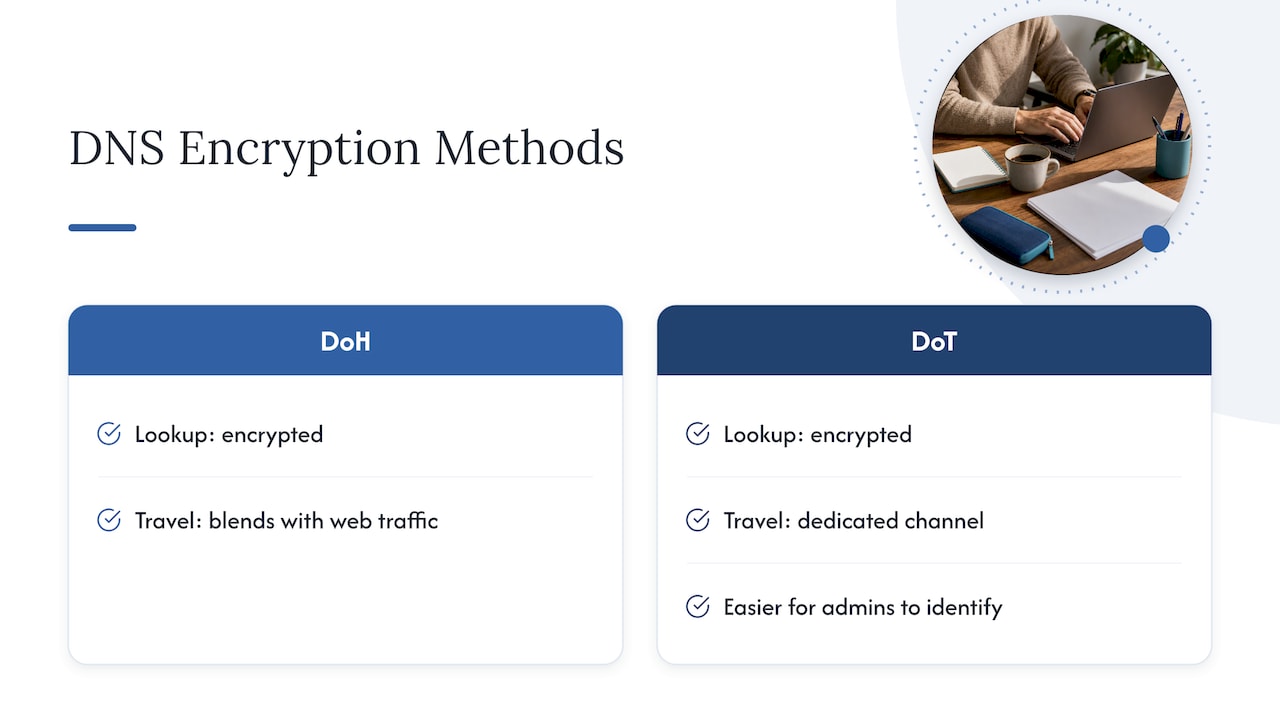
DNS is the lookup that turns a name like gmail.com into a server address. Traditional DNS sends those lookups in clear text, so your network or internet provider can see them. DNS over HTTPS (DoH) and DNS over TLS (DoT) both encrypt the lookup between your device and the DNS resolver. The difference is mainly in how they travel. DoH blends in with ordinary web traffic. DoT uses its own dedicated channel, which makes it easier for network administrators to identify and manage.
Neither one touches your email aliases. They don’t hide your address, and they don’t hide which sites you visit from the sites themselves. They also trust whichever resolver you choose. If you want stronger protection for your browsing, a VPN is the better tool. Read how VPNs protect against surveillance, then compare options in our reviewed and ranked VPN list.
For your own domain, DNS does matter for email. Records such as SPF, DKIM and DMARC live in DNS and help receivers trust mail from your alias. If you run a custom domain, set those up before you send from it.
Common problems and fixes
- A site says my email is invalid. It is rejecting the plus sign. Use a registered alias (Outlook.com, iCloud) or Hide My Email instead.
- Replies come from my main address. Set the alias as your default “from” address. In Outlook.com, change your primary alias. In Gmail, check the “Send mail as” setting and reply from the same address the message was sent to.
- The alias isn’t receiving mail. Wait a few minutes, check spam, then confirm the verification email was clicked. In Workspace, confirm the alias was saved on the correct user.
- I’m out of aliases. iCloud caps standard aliases at three. Switch to Hide My Email, or use plus addresses on Gmail.
- The alias got into a breach. Don’t panic. Change the password for that site, turn the alias off or filter it, and watch your accounts. Our identity protection shopping guide lists further steps.
Perspective: what we’ve seen testing privacy tools
We review privacy tools hands-on, with real accounts, and we don’t let affiliate payouts decide rankings. From that work, we think aliases are the cheapest privacy upgrade most people skip. They cost nothing, and they pay off the first time a junk sender gives itself away.
Our view is also that aliases are a layer, not a shield. They help with spam sorting and breach tracing. They don’t stop data brokers who already hold your name and address. That takes opt-outs and, for many people, a removal service. We suggest starting with aliases today, then working on the bigger exposure over the next few weeks.
— TechStackTeam
Take the next step
Aliases hide your address going forward. To clean up what’s already out there, see our guide to removing yourself from the internet. It covers manual opt-outs and compares the services we’ve tested. If you’d rather start with the full picture, our internet privacy tools comparison checklist helps you decide what to use.
FAQ
How do I create a new Gmail alias?
Add a plus sign and a label to your username, like yourname+shop@gmail.com, and use it right away. No setup is needed to receive mail. To send from it, go to Settings > See all settings > Accounts and import > Send mail as, and add the address.
What is the +1 Gmail trick?
It is plus addressing: anything after the plus sign is ignored for delivery, so yourname+1@gmail.com reaches yourname@gmail.com. You use a different tag for each site to sort mail and see who shares your address. Some websites reject the plus sign, and some senders can strip the tag.
How do I create an alias in Outlook?
Sign in to your Microsoft account, open the “how you sign in” page, and select Add email. You can create a new Outlook.com address or add one you already have. Mail to the alias arrives in your main inbox.
Can I create a free Gmail account instead of an alias?
Yes, Gmail accounts are free to create. But a second account means a separate inbox and login. An alias gives you another address in the inbox you already check, which is simpler for sorting and privacy.
Is DoH or DoT better for email privacy?
Neither changes email privacy. Both encrypt DNS lookups between your device and a resolver, and neither hides your alias or the sites you contact from those sites. For broader protection, use a VPN and unique aliases together.
Sources
- Send emails from a different address or alias – Gmail Help
- Add or delete an alternate email address (email alias) – Google Workspace Admin Help
- How to add an email address to your Microsoft account
- What are email aliases in iCloud Mail? – Apple Support
- Use Hide My Email in Mail on iCloud.com – Apple Support
- One Tech Tip: Don’t give your email to strangers, use an alias – AP News
- How to create a Gmail alias – Zapier
- Gmail alias: plus addresses, dots and Send mail as
- What Is an Email Alias? Gmail, Outlook and iCloud – Canary Mail
- How to create an email alias in 2026 – AdGuard