Family password sharing is the practice of granting trusted family members access to online accounts by sharing login credentials or using encrypted password vaults. Most households already do this informally. A 2026 industry survey finds that 79% of Americans share passwords, covering everything from streaming services to utilities. That number shows how normal shared access has become. The real question is whether your family is doing it safely. Secure sharing through dedicated password managers and encrypted vaults is now the recognized best practice, replacing risky habits like texting passwords or writing them on sticky notes.
What is family password sharing and how does it work?
Family password sharing is defined as the structured process of giving household members access to shared accounts without exposing raw credentials. The industry term for the secure version of this practice is shared vault access, where each family member logs into a password manager and views only the credentials they are authorized to see.
There are two broad categories of sharing methods: insecure and secure.
Insecure methods families commonly use:
- Texting or emailing passwords directly
- Writing passwords in a shared notes app or spreadsheet
- Sticky notes on the fridge or monitor
- Verbally telling passwords and hoping everyone remembers them
These methods create real risk. Anyone who intercepts a text or finds that spreadsheet gets full access. There is no way to revoke access quickly, and you have no record of who knows what.
Secure methods that actually protect your family:
- Shared encrypted vaults: A family password manager stores credentials in an encrypted vault. Each member accesses the vault with their own login. They see the password in use without ever seeing the raw characters, depending on the plan settings.
- Temporary secure links: Secure link sharing lets you send a one-time access link that expires after a set number of views or after 30 days. This is ideal for urgent, one-off situations.
- Automatic sync: When you update a password inside the vault, shared vaults sync automatically across all authorized devices. No one needs to be notified manually.
Pro Tip: Set up your family vault on a weekend afternoon. Initial configuration, including inviting members and assigning permissions, typically takes just a few hours and pays off immediately.
What are the benefits of family password sharing solutions?
Structured family account sharing delivers benefits that go well beyond simple convenience. The biggest gain is security, not ease of use.
Key benefits include:
- No raw password exposure: Family members access accounts through the vault. They never need to know the actual password string. This limits what gets compromised if a device is lost.
- Automatic propagation: One password change in the vault updates access for every authorized member instantly. You never have to chase down family members to tell them the new Netflix password.
- Targeted revocation: When a family member moves out or a device is stolen, you revoke their vault access in seconds. Properly managed shared vaults eliminate the need for mass password resets after a security event.
- Layered security support: Shared vaults work alongside two-factor authentication (2FA). You can store 2FA notes or use a shared authenticator setup so the whole family can access accounts without relying on one person’s phone.
- Digital continuity: If a parent is incapacitated, the family can still access critical household accounts. Emergency access features in family plans address exactly this scenario.
The shift from ad hoc sharing to shared vault access also builds better password habits across the household. When everyone uses a manager, weak and reused passwords get flagged automatically.
What security risks should families know about when sharing passwords?
Family sharing creates real security risks when done without clear boundaries. The most common mistake is putting everything into one shared vault with no separation between personal and household accounts.
Follow these rules to protect your family:
- Never share sensitive personal accounts. Banking, primary email, and government accounts should stay private. Only genuinely shared household accounts belong in the family vault.
- Protect your recovery email like a master key. Your account recovery email is the single most important credential you own. Recovery emails should be personal, protected by multi-factor authentication (MFA), and never shared with anyone.
- Give each family member their own private account. Family-tier password plans provide individual private vaults alongside the shared vault. This preserves accountability and prevents one compromised account from exposing everything.
- Enable 2FA on every shared account. 2FA dramatically reduces vulnerability even when passwords are shared. Use a shared authenticator app or store 2FA backup codes in the vault rather than tying authentication to one person’s phone number.
- Plan for access revocation. Before you add someone to a shared vault, decide how you will remove them. Divorce, estrangement, or a lost device all require fast action.
- Store sensitive documents separately. Encrypted storage for legal documents and recovery keys should live outside the main shared vault to avoid a single point of failure.
Sharing a single login for a family account prevents accountability and complicates security if a device is compromised. Individual accounts with shared vaults are the preferred structure because they let you audit who accessed what and revoke access surgically.
Pro Tip: Audit your shared vault every six months. Remove accounts no longer in use, rotate passwords on high-value services, and confirm that only current household members have access.
How to set up and manage family password sharing securely
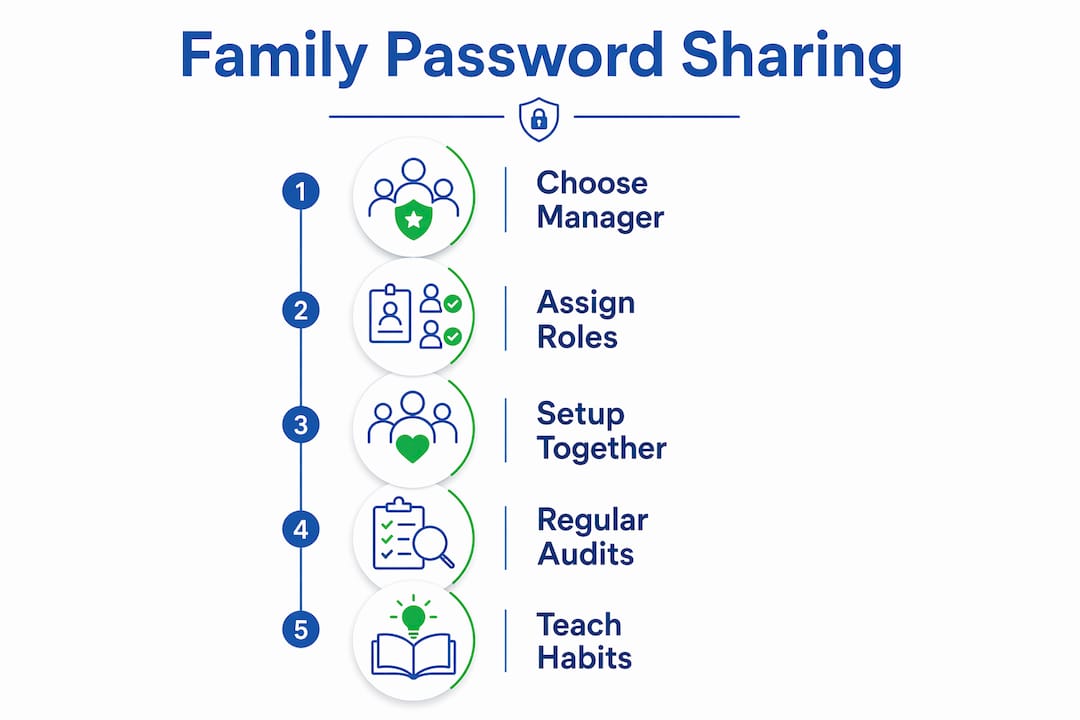
Getting your family onto a secure sharing system takes a clear plan. Here are the steps that work.
Step 1: Choose a dedicated family password manager.
Look for a plan that offers both a shared family vault and individual private vaults for each member. Check that it supports secure credential storage with end-to-end encryption and works across all your family’s devices and operating systems.
Step 2: Assign permissions based on role.
Not every family member needs access to every account. Give children access only to their own accounts and age-appropriate services. Adults get access to household utilities, streaming, and shared subscriptions. Keep financial and legal accounts out of the shared vault entirely.
Step 3: Run the initial setup together.
Sit down with your household and walk through the setup as a group. Sync all devices, confirm each member can log in, and test that the shared vault loads correctly. This takes one afternoon and prevents confusion later.

Step 4: Use expiring links for one-off urgent shares.
When a family member needs temporary access to an account you do not want to add permanently, generate a secure link with a view limit and expiration date. This covers situations like a teenager needing a one-time login while traveling.
Step 5: Build a routine maintenance schedule.
- Rotate passwords on critical accounts every 90 days
- Audit vault members after any major life change (new partner, college departure, divorce)
- Review which accounts are still active and remove stale entries
- Confirm emergency access contacts are current
Step 6: Teach good habits to every household member.
Children who learn to use a password manager early carry those habits into adulthood. Show them why unique passwords matter and how the vault protects the whole family.
| Setup Task | Priority | When to Do It |
|---|---|---|
| Choose a family plan | High | Before anything else |
| Create individual private vaults | High | Day one |
| Populate shared vault | High | First weekend |
| Enable 2FA on all shared accounts | High | First weekend |
| Set up emergency access | Medium | Within first month |
| Schedule first vault audit | Medium | 90 days after setup |
Key Takeaways
Secure family password sharing requires encrypted shared vaults, individual private accounts, and clear boundaries between personal and household credentials.
| Point | Details |
|---|---|
| Define shared vs. personal accounts | Only household accounts belong in the shared vault; banking and email stay private. |
| Use encrypted shared vaults | Shared vaults sync automatically and let you revoke access without mass resets. |
| Enable 2FA on every shared account | Use a shared authenticator method so no single person’s phone controls access. |
| Protect your recovery email | Your recovery email needs MFA and must never be shared with anyone. |
| Audit access regularly | Review vault members every 90 days and after any major household change. |
The real problem with how most families share passwords
Most families treat password sharing as a one-time task. They text a password, move on, and never think about it again. That is the actual security gap, not the sharing itself.
What I see repeatedly is households that have dozens of shared credentials scattered across text threads, notes apps, and memory. When something goes wrong, such as a breakup, a lost phone, or a hacked account, there is no clean way to respond. You end up changing every password you can remember and hoping you caught them all.
The shift from sharing raw passwords to sharing access through encrypted vaults changes the entire dynamic. You stay in control. You can see who has access to what. You can cut access in seconds. That is not just a security upgrade. It is a fundamentally different relationship with your household’s digital life.
The other thing worth saying plainly: 2FA tied to one person’s phone is a hidden single point of failure in family accounts. If that person is unavailable, the whole household gets locked out. Storing 2FA backup codes in the shared vault, or using a shared authenticator method, solves this without compromising security.
Family password management is not complicated. It just requires treating it like any other household system, with clear rules, regular maintenance, and everyone on the same page.
— TechStackTeam
Techstacktoday’s resources for secure family password sharing
Managing shared access across a household is easier when you have tested, unbiased guidance to rely on. Techstacktoday reviews and ranks the best password managers based on real-world testing, with no paid placements affecting the results.
If you are ready to move your family off insecure sharing habits, the Techstacktoday password manager category covers every major family plan with hands-on performance data. For readers who want a broader privacy setup, the site also covers VPN services and data removal tools that complement a solid password management system. Every review is updated regularly so the recommendations stay current.
FAQ
What is family password sharing?
Family password sharing is the practice of granting household members access to shared online accounts through encrypted vaults or direct credential sharing. The secure version uses a dedicated family password manager with individual and shared vault access.
Is family password sharing safe?
Family password sharing is safe when done through an encrypted shared vault with individual accounts, 2FA enabled, and clear boundaries between personal and household credentials. Texting or emailing raw passwords is not safe.
What accounts should never go in a shared family vault?
Banking accounts, primary email addresses, and government accounts should never be shared. Only genuinely shared household accounts, such as streaming services and utilities, belong in a family vault.
How does 2FA work with shared family accounts?
2FA on shared accounts should use a shared authenticator method or vault-stored backup codes rather than one person’s phone number. This keeps every authorized family member able to log in independently.
How do I remove someone’s access from a shared vault?
Log into your password manager’s admin or owner account and revoke that member’s vault access directly. Properly managed shared vaults let you remove access instantly without needing to change every shared password.