The most instructive examples of compromised credential exposure right now are supply-chain package attacks (LiteLLM), large VPN credential dumps (FortiBleed/Fortinet), public-repository key leaks (CISA AWS GovCloud), and AI-platform breaches (Hugging Face). Each one maps to a distinct attack vector your team needs to understand and defend against today.
Start here — the incidents that matter most:
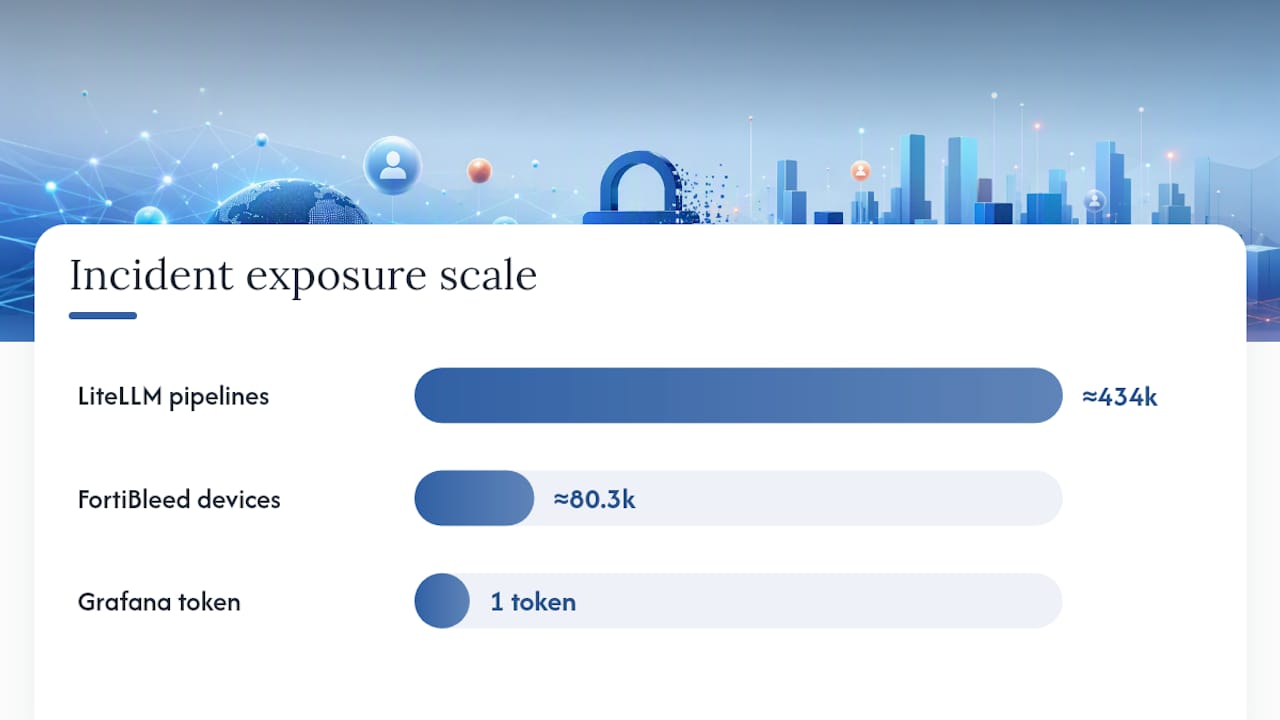
- LiteLLM supply-chain attack: Compromised PyPI package versions scraped memory and exfiltrated credentials from roughly 434,000 CI/CD pipelines.
- FortiBleed / Fortinet FortiGate: A publicly released dataset contained verified VPN credentials for tens of thousands of perimeter devices, with between 73,932 and 86,644 devices affected.
- CISA public GitHub leak: A contractor’s repository held AWS GovCloud administrative keys for 183 days, and those keys reportedly stayed valid for 48 hours after the repo came down.
- Hugging Face breach: Internal datasets and credentials were compromised, prompting public guidance to rotate all impacted secrets.
Operational imperative: Assume compromise the moment you confirm exposure. Revoke and rotate first, then hunt for lateral movement.
Pro Tip: Don’t wait for confirmation that credentials were “actually used” before rotating. The CISA case shows keys can remain valid long after a repo is taken down — treat discovery as proof of compromise.
Key Takeaways
Credential exposure incidents from 2025 and 2026 share one root cause: long-lived, unmonitored credentials that remain valid long after they are compromised, giving attackers an extended window to cause damage.
| Point | Details |
|---|---|
| Rotate immediately on discovery | The CISA case shows keys stayed valid 48 hours post-takedown; revoke before or alongside any removal action. |
| Supply-chain scope is enormous | The LiteLLM attack exposed credentials across roughly 434,000 CI/CD pipelines from a single compromised package. |
| Hunt for backdoor credentials | Attackers create new tokens and service accounts during access; rotation alone does not close persistent access. |
| Short-lived credentials reduce blast radius | Credentials that expire in minutes cannot appear in a months-long dataset like FortiBleed’s 73,932–86,644 device dump. |
| Secret scanning stops accidental commits | Enabling GitHub push protection directly prevents the class of exposure documented in the CISA public-repo incident. |
Table of Contents
- How credentials get exposed: vectors you need to map
- Recent real-world examples of compromised credential exposure
- What attackers can do with your exposed credentials
- How to detect compromised credentials before damage spreads
- Immediate response checklist when you find exposed credentials
- Prevention and long-term controls that actually reduce risk
- What recent investigations tell us about credential exposure
- Where to focus your limited security resources
- Sources
How credentials get exposed: vectors you need to map
Understanding the mechanics behind each exposure type lets you match telemetry to controls. These are the six vectors responsible for the majority of real-life credential leaks.
Human-targeted attacks
- Phishing and spear-phishing: Credential harvesting pages mimic SSO portals or VPN login screens. Modern kits bypass MFA by proxying sessions in real time (Adversary-in-the-Middle).
- Vishing and help-desk abuse: Attackers call IT support, impersonate employees, and request MFA device registration or password resets. The Brinks Home / ShinyHunters incident showed how voice-based social engineering can unlock federated credentials and trigger bulk OAuth data exports affecting millions of records.
Endpoint and infostealer compromise
Infostealer malware (RedLine, Lumma, Vidar) harvests saved browser credentials, session cookies, and SSH keys from infected endpoints. The resulting logs are sold or traded, then used for targeted credential stuffing against specific infrastructure types. Verified, working admin credentials frequently appear in these datasets.
Developer mistakes: hardcoded secrets and accidental commits
Akamai researchers documented that plaintext credentials, including administrative credentials, regularly appear in automation scripts, backup files, and accidentally published repositories on the public internet. A developer hardcodes a database password to “test something quickly,” commits the file, and pushes it to a public repo. The secret is indexed by search engines and scraped by bots within minutes.
CI/CD and artifact repository leaks
Build pipelines store secrets as environment variables or in configuration files. When a pipeline is misconfigured, those secrets can appear in build logs, artifact metadata, or exported pipeline definitions. Long-lived service account tokens with broad permissions amplify the blast radius significantly.
Package and supply-chain compromises
Attackers publish malicious versions of popular packages (typosquatting, account takeover, or dependency confusion). When a build agent installs the package, it executes code that scrapes environment variables and exfiltrates credentials to attacker-controlled infrastructure.
Credential stuffing and offline hash cracking
Attackers take credential dumps from previous breaches and test them against new targets automatically. Password reuse makes this devastatingly effective. Offline hash cracking against leaked password databases recovers plaintext credentials that are then fed into stuffing campaigns.
Recent real-world examples of compromised credential exposure
These case studies cover the mechanics, scale, and defender priorities for each major incident class.
1. LiteLLM supply-chain credential exfiltration
Root cause: Attackers published compromised versions of the LiteLLM Python package to PyPI. The malicious code scraped environment variables and in-memory secrets from build agents that installed the package, then exfiltrated them to external infrastructure.

Scale: Roughly 434,000 CI/CD pipelines had credentials exposed after running the compromised versions. The resulting dump ran to terabytes of credential data, covering API keys, cloud credentials, and service account tokens across a wide range of organizations.
How attackers used the credentials: Exfiltrated cloud keys and API tokens enable immediate lateral movement into cloud environments, data exfiltration from storage buckets, and persistent access via newly created service accounts.
Operational takeaways:
- Audit your dependency tree for LiteLLM versions installed during the exposure window and treat any pipeline that ran them as compromised.
- Rotate all secrets accessible to affected build agents, not just the ones you can directly confirm were exfiltrated.
- Implement package integrity verification (hash pinning, Sigstore) and restrict outbound network access from build agents.
2. FortiBleed: Fortinet FortiGate VPN credential dataset
Root cause: Attackers exploited vulnerabilities in Fortinet FortiGate SSL VPN appliances to extract credential data. The dataset was later published publicly, giving any threat actor access to verified VPN credentials for perimeter devices.
Scale: CloudSEK’s technical analysis documented the attacker’s toolkit, dataset composition, and post-exploitation scripts. The Cloud Security Alliance research note confirmed the dataset contained tens of thousands of FortiGate credential records, with researchers reporting verified credentials for between 73,932 and 86,644 devices.
How attackers used the credentials: Valid VPN credentials give direct perimeter access. From there, attackers can move laterally to internal systems, access administrative consoles, and establish persistent footholds via backdoor accounts or scheduled tasks.
Operational takeaways:
- Force immediate password resets for all accounts on affected FortiGate devices and terminate active sessions.
- Apply all available patches for the exploited CVEs and enable MFA on VPN authentication.
- Review firewall rules and admin access logs for anomalous connections during and after the exposure window.
3. CISA public GitHub AWS GovCloud key leak
Root cause: A CISA contractor accidentally committed AWS GovCloud administrative keys and plaintext passwords to a public GitHub repository. The repository remained publicly accessible for an extended period before discovery.
Scale and timeline: The Axis Intelligence technical review confirmed the keys were publicly exposed for 183 days. After the repository was removed, the exposed keys reportedly remained valid for 48 hours, meaning any attacker who cloned the repo during that window still held working credentials.
How attackers could use the credentials: AWS GovCloud administrative keys grant broad access to cloud infrastructure, including compute instances, storage buckets, IAM configurations, and network controls. A threat actor with these keys could exfiltrate sensitive government data, create persistent backdoor accounts, or disrupt cloud operations.
Operational takeaways:
- Taking down a repository is not remediation. Rotate and revoke credentials immediately upon discovery, before or alongside any takedown.
- Enable GitHub secret scanning and push protection on all repositories, including private ones, to catch accidental commits before they reach the remote.
- Audit CloudTrail logs for the full 183-day exposure window to identify any unauthorized API calls.
4. Hugging Face breach: AI pipeline credentials
Root cause: Hugging Face confirmed a breach affecting internal datasets and credentials. The incident highlighted the growing attack surface of AI/ML platforms, where model weights, training data, and API tokens coexist in shared infrastructure.
Impact: TechCrunch’s reporting confirmed Hugging Face publicly urged users and customers to review and rotate all impacted secrets. Compromised credentials in AI pipelines can expose proprietary model weights, training datasets, and downstream API integrations.
Operational takeaways:
- Treat AI/ML platform credentials with the same urgency as cloud infrastructure keys — they often have broad data access.
- Rotate Hugging Face API tokens and audit any downstream integrations that used those tokens.
- Apply least-privilege access to model repositories and dataset stores.
5. Grafana: stolen GitHub token leading to downstream access
Root cause: A stolen GitHub personal access token gave an attacker access to Grafana’s private GitHub repositories. This is a representative example of how a single long-lived token can cascade into broader source code and secret exposure.
How attackers used the credentials: Access to private repositories can expose hardcoded secrets, infrastructure-as-code configurations, and deployment scripts — effectively handing an attacker a map of the target’s internal systems.
Operational takeaways:
- Audit all long-lived personal access tokens and replace them with short-lived, scoped tokens or GitHub Apps with minimal permissions.
- Enable GitHub’s secret scanning on private repositories to catch any secrets already committed.
- Review repository access logs for unexpected clones or bulk downloads.
6. Okta: credential-based support system breach
Root cause: Attackers used stolen credentials to access Okta’s customer support case management system. The breach exposed files uploaded by customers, some of which contained session tokens and HAR files with active credentials.
How attackers used the credentials: Session tokens extracted from HAR files can be replayed to hijack active sessions without needing a password, bypassing MFA entirely. Okta customers whose tokens were exposed faced downstream account compromise.
Operational takeaways:
- Scrub HAR files before uploading them to any support system — they routinely contain session cookies and authorization headers.
- Treat session token exposure with the same urgency as password exposure; invalidate all active sessions for affected accounts immediately.
- Monitor for anomalous session activity from unexpected geolocations or device fingerprints.
Incident metrics summary:
| Incident | Credential Type | Scale / Exposure Duration | Primary Risk |
|---|---|---|---|
| LiteLLM supply-chain | API keys, cloud tokens, service account creds | ~434,000 CI/CD pipelines | Cloud lateral movement, data exfiltration |
| FortiBleed / Fortinet | VPN credentials (plaintext) | 73,932–86,644 devices | Perimeter access, internal lateral movement |
| CISA GitHub leak | AWS GovCloud admin keys | 183 days public; 48 hrs post-takedown validity | Cloud admin access, data exfiltration |
| Hugging Face breach | Internal datasets, API tokens | Not publicly disclosed | AI pipeline access, dataset exfiltration |
| Grafana GitHub token | GitHub personal access token | Single token, private repo access | Source code, secret exposure |
| Okta support breach | Session tokens (HAR files) | Customer support system access | Session hijacking, downstream account takeover |
What attackers can do with your exposed credentials
Valid credentials are not just a data loss event. They are an operational capability transfer to the attacker.
Remote access and perimeter entry
- VPN credentials (FortiBleed-style) give direct network entry, bypassing perimeter controls entirely.
- Admin credentials for cloud consoles open every resource in that account to enumeration and exfiltration.
Lateral movement
Once inside, attackers use valid credentials to authenticate to additional systems without triggering malware-based detections. Service account credentials are especially dangerous because they often have broad, cross-system permissions and rarely trigger anomaly alerts.
Build and pipeline compromise
CI/CD tokens let attackers inject malicious code into build pipelines, poison artifacts, or exfiltrate secrets from other pipelines running in the same environment. The North Korean state-sponsored campaigns documented across 57 countries show how credential compromise at the pipeline level can cascade into supply-chain contamination at scale.
API and data exfiltration
OAuth tokens and API keys enable bulk data exports. Vishing attacks that result in MFA device registration give attackers persistent OAuth access that survives password resets. Bulk exports of customer records, financial data, or health records follow quickly.
Persistence via automation tokens
Attackers create new service accounts, API keys, or automation tokens during the access window. Even after the original exposed credential is rotated, these backdoor credentials maintain access. This is why hunting for lateral movement and new credential creation is mandatory after any exposure.
Business impacts by credential type:
- Perimeter device creds (VPN/firewall): Full network access, ransomware deployment, data theft.
- CI/CD tokens: Supply-chain contamination, artifact poisoning, mass downstream credential exposure.
- Cloud admin keys: Complete cloud environment compromise, regulatory exposure (HIPAA, PCI-DSS, FedRAMP), operational disruption.
- Session tokens: Account takeover without password, MFA bypass, customer data access.
How to detect compromised credentials before damage spreads
Detection speed is the variable that separates a contained incident from a catastrophic one. These are the signals and sources that matter.
Telemetry to monitor right now:
- Unexpected MFA device registrations or authenticator app additions, especially outside business hours.
- New OAuth application grants, particularly apps requesting broad scopes (mail.read, files.readwrite.all).
- Anomalous bulk API exports or unusually high API call volumes from a single token or identity.
- New long-lived tokens or service accounts created by identities that don’t normally perform those actions.
- Authentication events from unexpected geolocations or IP ranges, especially when they follow a recent credential exposure.
- VPN authentication from IP addresses not associated with the user’s normal patterns.
Log sources to prioritize:
- Cloud audit trails: AWS CloudTrail, Azure Monitor, GCP Audit Logs — focus on IAM changes, new credential creation, and data access events.
- CI/CD logs: Pipeline execution logs for unexpected environment variable access or outbound network calls during builds.
- Artifact repository logs: Unusual download volumes or access from unfamiliar IP addresses.
- VPN and authentication logs: Failed attempts followed by success from a new IP, or successful logins at unusual times.
- EDR telemetry: Infostealer indicators (credential database access, browser credential store reads, unusual process injection).
Practical detection patterns:
Look for the sequence: new token created → immediate high-volume API calls → data export to external storage. That three-step pattern in CloudTrail logs is a strong indicator of post-compromise exfiltration. For CI/CD environments, alert on any build step that initiates an outbound connection to a non-allowlisted domain.
GitHub’s secret scanning and push protection catches secrets before they reach remote repositories. For tokens already in production, tools that monitor token activity and flag geographic anomalies or volume spikes give you early warning before an attacker completes their objective.
Pro Tip: Enable GitHub push protection on every repository, including private ones. It blocks commits containing known secret patterns before they ever reach the remote — stopping the CISA-style exposure scenario at the source.
Immediate response checklist when you find exposed credentials
Don’t freeze. Work through this in order.
First 60 minutes ⏱️
- Revoke and rotate immediately. Invalidate the exposed credential before doing anything else. For cloud keys, call the API directly. For tokens, use the platform’s revocation endpoint. Do not wait for a change-management ticket.
- Block active sessions. Force sign-out all active sessions for the affected identity. For OAuth tokens, revoke all grants, not just the one you know about.
- Isolate affected systems. If a build agent or server is confirmed compromised, take it offline or restrict its network access to prevent further exfiltration.
- Preserve logs. Before you start remediation actions that might overwrite evidence, snapshot relevant logs (CloudTrail, VPN auth logs, CI/CD execution logs) to a separate, read-only location.
First 24 hours 📋
- Force password resets for all accounts that shared the exposed credential or that the compromised identity could access.
- Audit for new credentials created during the exposure window. Look for new IAM users, service accounts, API keys, OAuth apps, and automation tokens. These are the backdoors attackers leave behind.
- Threat hunt for lateral movement. Review authentication logs for the full exposure period. Map every system the compromised identity authenticated to.
- Assess regulatory notification requirements. If the exposure involves personal data, health records, or financial data, check your notification obligations under GDPR, HIPAA, or applicable state breach notification laws. Techstacktoday’s guide on reporting a data breach to authorities covers the key contact points.
- Communicate internally. Brief your security leadership and affected system owners. Keep the communication factual and focused on actions taken and actions pending.
Forensic follow-up
- Reconstruct the exposure timeline. Confirm when the credential was first exposed, when it was first used by an unauthorized party (if detectable), and when it was revoked.
- Check for persistence mechanisms. Scheduled tasks, cron jobs, Lambda functions, and GitHub Actions workflows can all store credentials or be triggered by compromised tokens.
- Conduct a post-incident review within 72 hours to identify the root cause and the control gap that allowed the exposure.
⚠️ Statistic callout: The CISA GitHub case showed that AWS GovCloud administrative keys remained valid for 48 hours after the repository was removed. Takedown alone is not remediation. Rotation must happen simultaneously or before removal.
Pro Tip: Run a “blast radius” query in your IAM console immediately after revoking a key: list every resource the compromised identity had permission to access. That list is your investigation scope.
Prevention and long-term controls that actually reduce risk
Fixing the immediate incident is step one. These controls prevent the next one.
Secrets management
- Replace long-lived static credentials with short-lived, dynamically issued credentials using IAM roles, OIDC federation, or Workload Identity Federation. A credential that expires in 15 minutes cannot be used in a FortiBleed-style dataset.
- Store secrets in a dedicated vault (HashiCorp Vault, AWS Secrets Manager, Azure Key Vault) with automatic rotation. Never store secrets in environment files, source code, or CI/CD configuration files in plaintext.
- Use hardware-backed credentials (FIDO2/passkeys) for human authentication wherever possible. Phishing-resistant MFA eliminates the AiTM attack class entirely.
DevSecOps controls
- Enable automated secret scanning in every repository. GitHub’s native secret scanning, combined with push protection, stops accidental commits before they reach the remote. This directly addresses the class of exposure Akamai documented — plaintext credentials in publicly accessible scripts and repositories.
- Pin package versions and verify integrity hashes. For Python packages, use hash-pinned requirements files and verify against a trusted registry. This limits the LiteLLM-style attack surface.
- Apply least privilege to build agents. A CI/CD agent should have only the permissions it needs for that specific pipeline, scoped to that pipeline’s lifetime.
- Implement Software Bill of Materials (SBOM) generation and dependency review in your CI pipeline to catch newly introduced risky dependencies.
Operational hygiene
- Enforce phishing-resistant MFA (FIDO2, hardware keys) for all privileged accounts and remote access. Standard TOTP is better than nothing but remains vulnerable to real-time phishing.
- Harden your help desk against vishing. Require out-of-band identity verification before any MFA reset or credential change. The Brinks Home / ShinyHunters pattern shows exactly how help-desk manipulation bypasses technical controls.
- Conduct quarterly access reviews. Remove stale service accounts, revoke unused API keys, and audit OAuth app grants. Most organizations find credentials that have been unused for months — those are attack surface you can eliminate today.
- Use a password manager for all human-managed credentials. It eliminates password reuse and makes unique, complex credentials the default rather than the exception.
Pro Tip: Set a maximum token TTL policy at the platform level — not just a guideline. If your cloud provider or CI/CD platform lets you enforce key expiration, turn it on. A credential that auto-expires cannot become a 183-day exposure.
What recent investigations tell us about credential exposure
The incidents from 2025 and 2026 carry specific, measurable lessons that should reshape your detection and response SLAs.
These numbers have direct implications for how you set detection and response targets.
Long-lived credentials are the common thread. The CISA case involved keys that were never rotated during their entire 183-day exposure window. The FortiBleed dataset contained credentials for devices that had not been patched or had credentials rotated after the original vulnerability was exploited. Akamai’s research confirms this pattern: plaintext credentials in automation scripts and backup files persist because no one is actively monitoring for them or rotating them on a schedule.
Supply-chain attacks produce dumps that are hard to scope. When 434,000 pipelines are affected, you cannot rely on individual teams to self-identify exposure. You need centralized secret scanning and a pipeline inventory that lets you query “which pipelines ran package X between dates Y and Z” within minutes of a disclosure.
Takedown is not remediation. The 48-hour post-takedown validity window in the CISA case is a critical data point. Any attacker who cloned the repository during the 183-day window still held working keys after the repo came down. Your incident response SLA for credential rotation must be measured in minutes, not hours.
Infostealer-sourced catalogs enable targeted attacks. Verified credential datasets from infostealers are not used for random stuffing. Attackers cross-reference them against specific infrastructure types (FortiGate devices, AWS accounts, GitHub organizations) and launch targeted campaigns. Detection controls that focus only on high-volume stuffing miss these targeted, low-and-slow attacks.
Recommended actions tied to these findings:
- Set a maximum credential lifetime policy and automate rotation on secret discovery via your secret scanning tooling.
- Build a pipeline inventory so you can scope supply-chain exposures within one hour of a disclosure.
- Treat any credential that appeared in a public location as compromised from the moment of first commit, not from the moment of discovery.
- Add infostealer-specific detection rules to your EDR and review threat intelligence feeds for your organization’s domains and IP ranges.
Where to focus your limited security resources
The incidents covered here share a pattern that most security teams underestimate: the gap between when a credential is exposed and when it is revoked is where all the damage happens. Closing that gap is more valuable than any single preventive control.
If you are deciding where to invest first, the order should be: short-lived credentials and automatic rotation, then secret scanning in repos and CI/CD pipelines, then phishing-resistant MFA for privileged accounts, then help-desk hardening against vishing. That sequence addresses the four most common root causes across the incidents in this article.
For smaller teams with limited engineering bandwidth, start with what costs nothing: enable GitHub secret scanning and push protection today, enforce MFA on all cloud console access, and run a one-time audit of long-lived API keys and service accounts. Those three actions eliminate a significant portion of the attack surface that FortiBleed, the CISA leak, and the LiteLLM attack all exploited.
Larger organizations should invest in centralized secrets management with automatic rotation and a pipeline inventory system. The LiteLLM case makes clear that without pipeline inventory, you cannot scope a supply-chain exposure quickly enough to contain it. The trade-off is real: building that inventory takes engineering time. But the alternative is a 434,000-pipeline exposure with no way to know which of your systems are in scope.
One more thing worth saying plainly: the multi-layer approach to identity protection matters because no single control stops all credential exposure vectors. Phishing-resistant MFA stops AiTM attacks but not hardcoded secrets. Secret scanning stops accidental commits but not infostealer compromise. You need both, and you need the rotation playbook ready for when something slips through.
Sources
These are the primary sources behind this article. Each one contains forensic detail, indicators of compromise, or vendor-specific mitigations worth reading directly.
- Akamai Hunt Finds Plaintext Credentials on the Public Internet
- CISA GitHub Data Leak 2026: Full Technical Breakdown (AWS Keys + Supply Chain Risk)
- CSA research note: FortiBleed VPN credential exposure
- Hugging Face confirms breach affected internal datasets and credentials, urges users to take action