Your name, address, phone number, and relatives are sitting on Spokeo right now, visible to anyone willing to search. Data broker removal from Spokeo is not a one-time fix. Most people submit a single opt-out request, assume the job is done, and discover their profile is back within months. Spokeo pulls from public records, commercial databases, and social sources continuously, which means your data can reappear even after a confirmed removal. This guide walks you through every step: finding your profile, submitting the right request, understanding what removal actually covers, and keeping your information off the site for good.
Table of Contents
- Key takeaways
- How to do data broker removal on Spokeo step by step
- What Spokeo removal actually does and doesn’t do
- Keeping your data off Spokeo long term
- Troubleshooting and alternative removal methods
- My honest take on Spokeo removal
- Take the next step with Techstacktoday
- FAQ
Key takeaways
| Point | Details |
|---|---|
| Opt-out is not permanent | Spokeo re-lists data from public sources, so you must re-check your profile every 90 days. |
| Use the official opt-out URL | Go directly to spokeo.com/optout to avoid obscured pages that search engines may not surface. |
| Multiple profiles need separate requests | Each Spokeo listing requires its own individual removal submission. |
| Removal covers Spokeo only | Opting out does not delete your data from other brokers or the original public record sources. |
| Automation saves time | Services that cover hundreds of brokers simultaneously reduce the burden of repeated manual opt-outs. |
How to do data broker removal on Spokeo step by step
The opt-out process requires submitting your exact profile URL, a valid email address, and a CAPTCHA verification, followed by clicking a confirmation link. Get any one of those wrong and your request goes nowhere. Follow these steps exactly.
Step 1: Find your Spokeo profile
Go to spokeo.com and search your full name. Add your city or state to narrow results. Spokeo often shows multiple listings for the same person, especially if you have moved or have a common name. Open each result that matches you.
Step 2: Copy the correct profile URL
Copy the URL directly from your browser’s address bar. Do not use the share button or any shortened link Spokeo provides. The opt-out system requires the full, unmodified listing URL. A wrong URL means your request will fail silently.
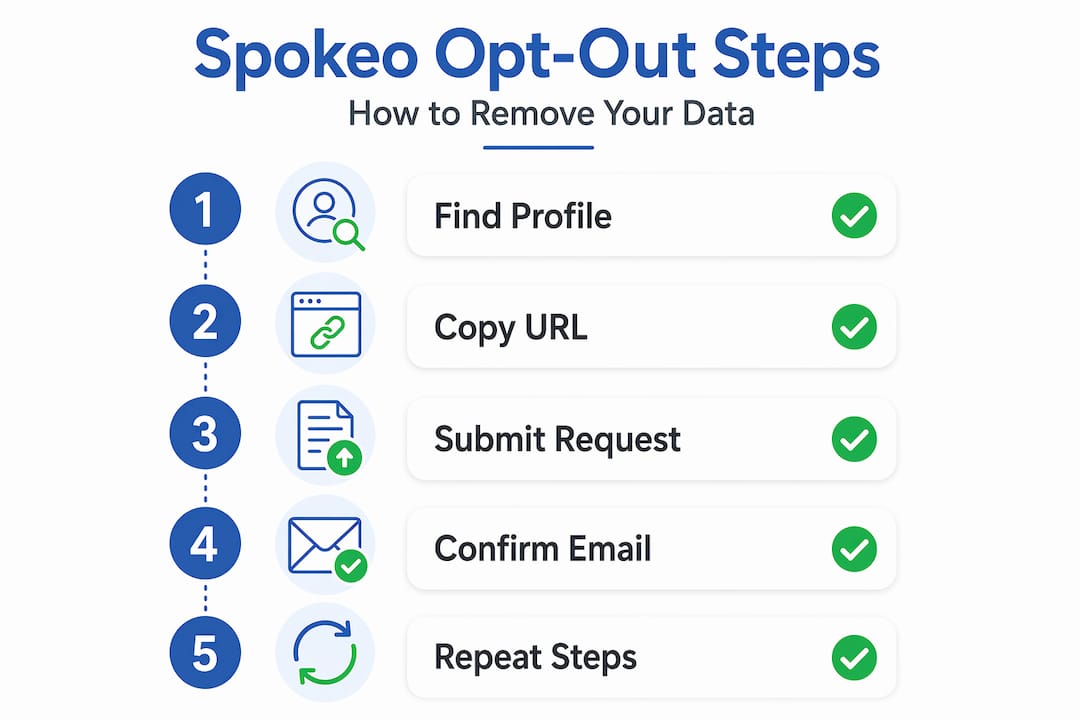
Step 3: Submit your removal request
Go to spokeo.com/optout. Paste the profile URL into the form. Enter your email address. Complete the CAPTCHA. Click the removal button.
Pro Tip: Use a dedicated or disposable email address for this step. It keeps your primary inbox clean, and you can reuse the same address for future re-submissions without mixing it up with other correspondence.
Step 4: Confirm via email
Spokeo sends a confirmation email with a link you must click to finalize the removal. Check your spam or junk folder immediately if you do not see it within a few minutes. The request is not processed until you click that link.
Step 5: Handle multiple profiles
If you found more than one listing in Step 1, repeat this entire process for each one. Each profile requires a separate submission. There is no bulk option.
⚠️ Common pitfall: Some users copy the URL after clicking “View Full Profile,” which redirects to a paid page. Go back to the search results page and copy the URL from there instead.
Removal typically processes within 48 hours, but give it up to 72 hours before verifying. Search your name on Spokeo again to confirm the listing is gone.
What Spokeo removal actually does and doesn’t do
This is where most people get surprised. Removing your data from Spokeo is a suppression on Spokeo’s platform only. It does not delete the underlying records from the sources Spokeo pulled them from.
Here is what you need to understand clearly:
- Public records stay public. Court documents, property records, and voter registration data remain accessible through government databases. Legal constraints prevent full deletion of records that state law requires to be maintained.
- Other brokers are unaffected. Opting out of Spokeo has zero impact on BeenVerified, Intelius, Whitepages, or the hundreds of other data brokers holding your information.
- Data reappears. Spokeo continuously updates profiles from fresh public and commercial sources. A confirmed removal today does not mean your profile stays gone in six months.
- Spokeo can reverse removals. If Spokeo determines a submission violated its terms or was incomplete, it can deny or reverse the opt-out. Following the exact official procedure matters.
“Opt-out requests are not guaranteed full deletion due to legal constraints. Users should expect best-effort compliance within regulatory limits.” — Spokeo Privacy Policy
If you live in California, pay attention to this: the DROP platform launches January 1, 2026, allowing you to submit one verifiable deletion request that reaches 500+ registered data brokers on a 45-day processing cycle starting August 1, 2026. That is a significant shift for California residents and reduces the manual burden considerably.
The honest framing here is that Spokeo privacy removal is a starting point, not an endpoint. You are reducing your exposure, not eliminating it.
Keeping your data off Spokeo long term
One opt-out request buys you a few months of reduced visibility at best. A real privacy strategy requires ongoing effort. Here is how to build one that does not consume your weekends.

Set a calendar reminder every 90 days. Search your name on Spokeo, check for new listings, and resubmit removal requests where needed. Re-checking every 90 days is the minimum effective frequency given how often data re-lists.
Save every confirmation email. Create a folder labeled “Privacy Opt-Outs” and store every confirmation you receive. If a broker claims they never received your request, you have documentation. This also helps you track which profiles you have already addressed.
Reduce the data you generate. Spokeo feeds on social media profiles, public posts, and commercial data purchases. Locking down your Facebook, LinkedIn, and other profiles reduces the fresh data Spokeo can pull in the future.
Manual vs. automated removal: which approach fits you?
| Approach | Time required | Brokers covered | Cost | Best for |
|---|---|---|---|---|
| Manual opt-out | 30+ min per broker | One at a time | Free | Single broker focus |
| Automated service | Setup only | 180 to 350+ brokers | $10 to $15/month | Ongoing multi-broker removal |
| Hybrid | Moderate | Targeted + automated | Varies | Power users |
Automated services cover far more ground than manual requests. They monitor for re-listings and resubmit requests on your behalf, which solves the biggest weakness of the manual approach: remembering to go back and check.
Pro Tip: Track your opt-out submissions in a simple spreadsheet. Log the broker name, date submitted, confirmation received (yes or no), and the date you plan to re-check. It takes five minutes to set up and saves hours of confusion later.
You can also explore data removal services reviewed by Techstacktoday to find options ranked by coverage, pricing, and real-world performance.
Troubleshooting and alternative removal methods
Sometimes the standard form does not work. The CAPTCHA breaks, the confirmation email never arrives, or the form throws an error. Do not give up. You have other options.
- Check your spam folder first. Confirmation emails from Spokeo frequently land in spam. Wait five minutes, then check before assuming the email failed.
- Try a different browser. CAPTCHA failures are often browser-specific. Switch from Chrome to Firefox or Safari and resubmit.
- Use a disposable email address. If your primary email is being filtered, services like Guerrilla Mail or ProtonMail can receive the confirmation without the spam problem.
- Email Spokeo directly. You can request removal via email by sending your full name, the profile URL, and a brief removal request to their privacy contact. Include your state of residence if you are invoking a state privacy law.
- Call Spokeo support. Spokeo accepts removal requests by phone during business hours. Have your profile URL and identifying details ready before you call.
- Document everything. Screenshot the form submission, save the confirmation email, and note the date. If Spokeo delays or denies your request, documentation is your evidence for escalation.
For EU or UK residents, you have the right to invoke GDPR Article 17 (the right to erasure). Reference this explicitly in your email or phone request. California residents can reference CCPA. Naming the applicable law often accelerates the response.
One more thing: some data brokers previously used no-index tags to hide their opt-out pages from search engines. Always go directly to spokeo.com/optout rather than searching for the page. Direct access improves your success rate.
My honest take on Spokeo removal
I’ve tested dozens of data removal workflows over the years, and the gap between what people expect and what actually happens with Spokeo is wider than almost any other privacy task I’ve covered.
Most people treat the opt-out confirmation email as the finish line. It’s not. It’s the starting gun. What I’ve found is that the readers who stay protected are the ones who build a routine around it: quarterly checks, a dedicated email address for privacy requests, and at least one automated service running in the background to catch what manual efforts miss.
The uncomfortable truth is that public records are genuinely permanent in many cases. A court filing, a property deed, a business registration. These are not going away because you asked Spokeo nicely. What you can control is how easily they are aggregated and surfaced. That is the actual goal of Spokeo privacy removal.
I’ve also seen people exhaust themselves doing manual opt-outs across 50 brokers and burn out within a month. The smarter move is to handle Spokeo and the five or six highest-traffic brokers manually, then let an automated service handle the rest. It is not giving up. It is working at a sustainable pace.
The identity theft protection layer matters too. Removal reduces your exposure. Monitoring tells you when something slips through. Both working together is the only approach I’ve seen hold up over time.
— TechStackTeam
Take the next step with Techstacktoday
Removing your data from Spokeo is a strong first move. But Spokeo is one of hundreds of data brokers holding your information right now.
Techstacktoday has hands-on reviews of the top data removal services that cover 180 to 350+ brokers simultaneously, ranked by real-world performance and not by who pays the most. If you want to go further, the guide on removing yourself from the internet covers every major broker, social platform, and public record source in one place. For readers who want a full privacy toolkit, Techstacktoday’s reviewed VPN services add an important layer of protection that complements data removal. Start with Spokeo. Then build outward.
FAQ
How long does Spokeo removal take?
Spokeo typically processes removal requests within 24 to 48 hours. You must click the confirmation link in the email Spokeo sends before the request is finalized.
Will my Spokeo profile stay removed permanently?
No. Spokeo continuously pulls from public and commercial data sources, so profiles can reappear within 3 to 6 months. Re-check your listing every 90 days and resubmit if needed.
Can I remove multiple Spokeo profiles at once?
No. Each listing requires a separate opt-out submission with its own profile URL. Search your name thoroughly before starting to identify all active listings.
What if I never receive the confirmation email?
Check your spam folder first. If the email is not there, try resubmitting with a different email address or contact Spokeo by phone. The removal is not processed without the confirmation click.
Does opting out of Spokeo remove my data from other brokers?
No. Spokeo opt-out only suppresses your data on Spokeo’s platform. Your information remains on other data broker sites and original public record sources unless you submit separate removal requests to each one.