Short answer: Smart DNS is best when you care only about streaming speed and device compatibility; a VPN is the right choice when you need privacy, encryption, and broader protection. Pick Smart DNS for your smart TV or game console. Pick a VPN for public Wi-Fi, banking, or anywhere your data needs to stay private. One key catch: Smart DNS does not encrypt or mask your traffic at all.
TL;DR:
- Smart DNS requires changing device or router DNS settings, and providers may require you to register your home IP again after it changes.
- Streaming platforms can block known Smart DNS and VPN addresses, so keep another server or region ready before playback stops working.
- On TVs, consoles, or streaming sticks without native VPN apps, use Smart DNS for playback and keep a VPN active on phones and laptops.
- After configuring a VPN, run DNS leak and IP checks; a dropped connection without a kill switch can expose your real address.
Table of Contents
- What Smart DNS Is and How It Works
- What a VPN Is and How It Works
- Smart DNS vs VPN: Comparing Privacy, Speed, and Cost
- When to Use Smart DNS, a VPN, or Both
- Setting Up Smart DNS and a VPN for Streaming
- How We Put Smart DNS and VPNs to the Test
- Our Honest Take on Smart DNS vs VPN
- Find a VPN That Matches Your Streaming and Privacy Needs
- FAQ
- Sources
What Smart DNS Is and How It Works
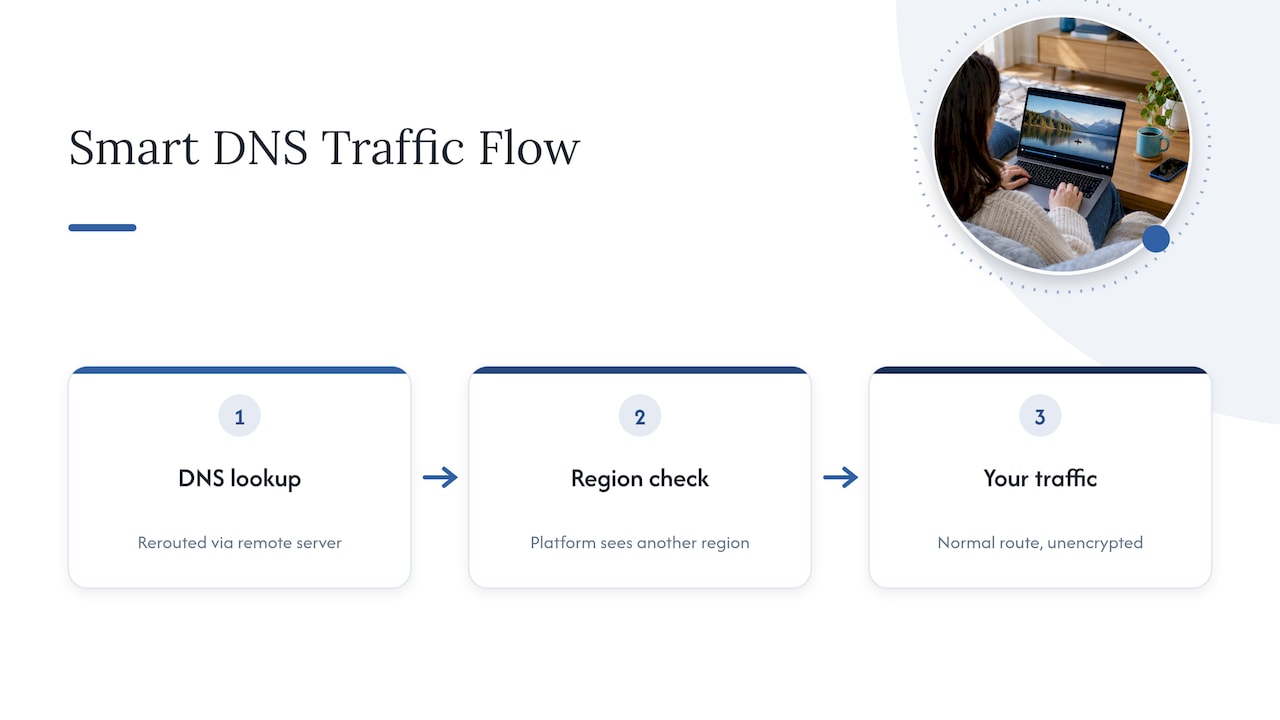
Smart DNS reroutes your DNS requests through a remote server, which tricks a streaming platform into thinking you’re browsing from a different region. It only touches DNS lookups and certain host headers. Your actual traffic still travels its normal path, unencrypted, under your real IP address. According to GeeksforGeeks, Smart DNS bypasses geo-restrictions without encrypting traffic or changing your device’s IP address. That’s why it can’t protect you on public Wi-Fi or hide your activity from your internet provider.
Setup usually means changing DNS settings on your device or router, or using a provider’s app. Some providers require you to allowlist your home IP in a dashboard since many residential connections use dynamic IPs that need re-registering. Smart DNS commonly targets services like Netflix, Hulu, and BBC iPlayer, and it tends to fail the moment a platform updates its detection methods.
What a VPN Is and How It Works
A VPN builds an encrypted tunnel between your device and a remote server, replacing your real IP address with the server’s. Everything inside that tunnel, your browsing, streaming, and app traffic, gets wrapped in encryption before it leaves your device. Protocols like OpenVPN, IKEv2, and WireGuard each balance speed and security differently, with WireGuard generally delivering the fastest throughput of the three.
Because your local network and ISP only see encrypted packets headed to the VPN server, they can’t inspect what you’re doing or where you’re going. That said, a VPN shifts your trust from your ISP to the VPN provider, so the provider’s logging policy matters as much as its encryption. Our tunneling explainer breaks down how these protocols actually move your data. Leaks can still happen: DNS leaks, WebRTC leaks, or a dropped connection without a kill switch can expose your real IP even while you think you’re protected.
Smart DNS vs VPN: Comparing Privacy, Speed, and Cost
Here’s how the two stack up once you line them up side by side.
- Privacy and security: A VPN encrypts your traffic end to end; Smart DNS does neither, leaving your ISP able to see everything you do.
- Speed and performance: Smart DNS usually wins on raw speed since there’s no encryption overhead, though a nearby WireGuard server can close much of that gap.
- Streaming reliability: Both can get blocked when a platform updates its detection, but VPNs generally recover faster since providers rotate IP pools more easily.
- Device compatibility: Smart DNS shines on smart TVs, consoles, and streaming boxes that can’t run a VPN app natively.
- Setup and maintenance: Smart DNS needs a one-time DNS change but may require re-allowlisting your IP when your home connection changes; VPN apps are typically plug-and-play.
- Cost: Smart DNS is often bundled free with premium VPN subscriptions rather than sold on its own.
Statistic callout: The FTC advises that VPNs remain valuable for privacy on untrusted networks because they encrypt your data even when a site or app you’re using doesn’t. That single fact explains why Smart DNS, which does no encrypting at all, isn’t a substitute for a VPN on public Wi-Fi.
On the compatibility front, Smart DNS fits devices where installing an app simply isn’t an option: older smart TVs, certain consoles, and streaming sticks with closed operating systems. VPN apps now cover phones, routers, desktops, and most modern TVs, so the coverage gap is shrinking.
Cost shapes the decision too. Standalone Smart DNS services exist, but most readers get it as a feature inside a VPN plan rather than paying for it separately.
Pro Tip: If your smart TV lags on VPN apps, point its DNS at your VPN provider’s Smart DNS feature (if included) and keep the full VPN running on your phone and laptop.
When to Use Smart DNS, a VPN, or Both
Match the tool to the job rather than picking one for everything.
- Use Smart DNS when you’re streaming on a device without native VPN support and latency matters more than privacy.
- Use a VPN whenever you’re on public Wi-Fi, logging into financial accounts, or handling anything sensitive.
- Combine both: Smart DNS on your TV for smooth playback, VPN on your phone and laptop for everyday browsing.
- Keep a backup VPN server or region ready, since streaming platforms periodically detect and block known VPN and Smart DNS IP ranges.
Setting Up Smart DNS and a VPN for Streaming
Getting either one working correctly takes just a few checks.
- Smart DNS: Change the DNS settings on your router or device to your provider’s addresses, confirm streaming playback loads at full quality, and re-allowlist your IP if your provider requires it after your home IP changes.
- VPN: Pick a protocol like WireGuard for speed or OpenVPN for stability, install the app or configure it on your router, then run a DNS leak test and an IP check to confirm nothing is exposed.
- Testing: Use a site like whatismyipaddress.com alongside a dedicated DNS leak test page, and watch for buffering or resolution drops that signal a throttled or misrouted connection.
- Troubleshooting: If streaming fails right after setup, clear your device’s DNS cache or switch to a different server before assuming the service itself is blocked.
Pro Tip: Run a DNS leak test right after any VPN setup change, not just at the start, since updates can silently reset your settings.
How We Put Smart DNS and VPNs to the Test
Testing tracks unblock success rate, sustained throughput, latency, and DNS or IP leak results across multiple regions and streaming providers, since a tool that works on one platform can still fail on another. Which metric matters most depends on your goal: streaming calls for bitrate and latency, while privacy on public Wi-Fi calls for leak-proof encryption above all else. Across our tests, Smart DNS consistently delivers faster playback starts for high-bitrate streaming, while VPNs consistently provide the stronger privacy guarantee, especially on networks you don’t control.

Our Honest Take on Smart DNS vs VPN
For most tech-savvy readers, a VPN should be the default, not an afterthought, because encryption protects you everywhere a Smart DNS simply can’t. Reserve Smart DNS for the one device where VPN apps don’t exist and latency genuinely matters. Running both at once, on different devices, isn’t overkill. It’s just matching the right tool to the right risk.
— TechStackTeam
Find a VPN That Matches Your Streaming and Privacy Needs
Choosing between Smart DNS and a VPN gets easier once you know which providers actually deliver on their speed and privacy claims instead of just their marketing pages. Our VPN reviews and rankings are built from hands-on testing, not paid placement, so you can compare throughput, unblock success, and leak results side by side before you commit to a plan.

If DNS integrity is part of what you’re evaluating, this DNSSEC explainer from our hosting partner walks through why DNS-level protections matter for anyone serious about security. When you’re ready to pick a provider, start with our VPN reviews and rankings page and find the plan that fits your streaming setup and privacy needs.
FAQ
Which is better, Smart DNS or a VPN?
Neither one is universally better since they solve different problems: Smart DNS optimizes streaming speed and device compatibility, while a VPN delivers encryption and privacy. If you have to pick one tool for everything, a VPN covers more ground because it also unblocks most of what Smart DNS can.
Is Smart DNS legal to use?
Using Smart DNS isn’t illegal in most places, but it can violate a streaming service’s terms of service, which may lead to a suspended account rather than legal trouble. Check the specific platform’s policy if you’re concerned, since enforcement varies by provider.
Which is better, DNS or VPN, for everyday privacy?
A standard DNS change, including Smart DNS, does nothing to encrypt your traffic or hide it from your internet provider. A VPN is the stronger choice for everyday privacy because it encrypts your data even on networks without built-in encryption, according to the FTC.
What does Smart DNS actually do?
Smart DNS reroutes specific DNS requests through a remote server so a streaming platform sees a different apparent location, which lets you access region-locked content. It does this without encrypting your traffic or changing your IP address, so it offers no privacy protection on its own.
Sources
- Are public Wi‑Fi networks safe? What you need to know | FTC
- What is SmartDNS? – GeeksforGeeks
- What is SmartDNS? | NordVPN support