Go to the PeopleFinders opt-out page right now, search your name, and open your profile. Copy that exact URL into the opt-out form with a valid email address, complete the CAPTCHA, then click the verification link PeopleFinders emails you. Nothing is removed until you verify. Opting out hides your listing on PeopleFinders. It does not erase the public records behind it.
TL;DR:
- Opt-out requests take about three days to process and only remove your record from PeopleFinders’ site and systems they control, not from original public sources.
- A single opt-out does not cancel memberships or delete accounts, requiring separate actions for each if you want to fully disconnect from the service.
- Public records and third-party data feeds can cause your information to reappear even after suppression, so periodic rechecks and continuous monitoring are necessary.
- Verification involves checking your profile with variations of your name and details several days after requesting removal, ideally using private browsing mode.
- Paid services can help monitor and resubmit removals across multiple sites, but doing the process yourself costs nothing and is effective for a small number of listings.
Table of Contents
- How Do You Opt Out of PeopleFinders Step by Step?
- Canceling a Membership vs. Deleting Your Account vs. Suppressing a Listing
- What Opting Out Actually Removes, and What It Can’t Touch
- How to Confirm Your PeopleFinders Removal Actually Worked
- What to Do When Verification Fails or a Profile Won’t Load
- How TechStackToday Tested the PeopleFinders Opt-Out Process
- Is Opting Out Enough to Protect Your Privacy?
- Should You Pay Someone Else to Handle This?
- Sources
- FAQ
How Do You Opt Out of PeopleFinders Step by Step?
Here’s the exact sequence to follow. Don’t skip the verification step, it’s the part most people miss.
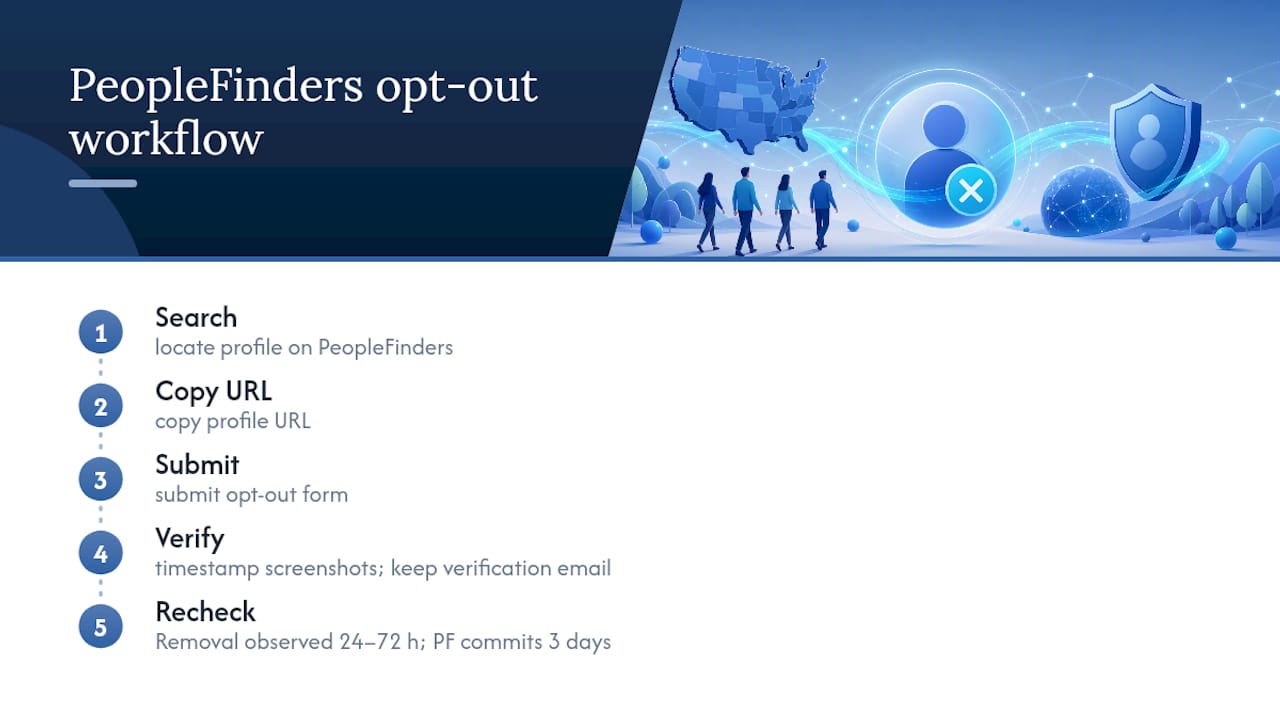
- Search for yourself. Go to PeopleFinders and search your full name along with a city, state, or age to narrow the results. You’re looking for your exact profile, not a similar name.
- Open the matching profile and copy the URL. Click through to the record that shows your correct details, then copy the full web address from your browser’s address bar. PeopleFinders profile URLs typically follow a pattern like peoplefinders.com/people/[name]/[id], and the opt-out form needs that exact link to find your record.
- Take a screenshot before you go further. Capture the page showing your name, age, city, and any listed relatives. This is your proof if the listing is still up after the removal window.
- Submit the opt-out form. Paste the profile URL into the official opt-out page, enter a valid email address, and complete the CAPTCHA.
- Check your inbox and verify. PeopleFinders sends a confirmation email with a verification link. You must click it, or the request never processes.
- Keep the email. Don’t delete it until you’ve confirmed the listing is gone. It’s your only record that you completed the request.
Pro Tip: Use your real date of birth and legal name spelling on the form, even if it feels safer to fudge the details. PeopleFinders has confirmed that inaccurate entries can prevent it from matching all your associated records, which means a fake DOB could leave a second or third listing untouched.
The whole process takes about five minutes per profile. If you have a common name, you may find two or three separate listings, and each one needs its own opt-out submission with its own verification click.
Canceling a Membership vs. Deleting Your Account vs. Suppressing a Listing
These three actions sound similar, but they solve different problems, and confusing them is the most common mistake readers make.
- Suppressing a listing (opt-out) hides your public profile from search results on PeopleFinders.com. It does not touch any account you may have created or any subscription you’re paying for.
- Canceling a paid membership stops future billing. PeopleFinders says you can do this through Dashboard > Manage Account, through its contact form by selecting the automatic renewal cancellation option, or by phone at (800) 718-8997 during listed hours.
- Deleting your account removes the login and any account-stored data you created, separate from the public-record listing search subjects see when someone looks you up.
If you’re a paying subscriber who also wants your own name off the site, you need to complete two separate actions: the opt-out form for the listing, and the account cancellation for the billing. One does not trigger the other.
What Opting Out Actually Removes, and What It Can’t Touch
PeopleFinders’ opt-out form removes your record from PeopleFinders.com and the systems it directly controls, typically within three days. That’s the whole scope of what one opt-out request accomplishes.
The limit almost nobody expects: the FTC notes that people-search sites compile data from public records, other data brokers, and social media. PeopleFinders can suppress its own copy of that data, but it cannot reach into a county court system or a state voter file and delete the original entry.
That means your information can resurface. A public record updates, a new data broker buys a feed containing your old listing, or a relative’s profile links back to your address and name. Some states grant residents formal opt-out or Do Not Sell/Share rights, and PeopleFinders applies those preferences where required. Even then, the underlying government or third-party source record stays exactly where it was. Suppression is real, but it’s not permanent immunity from ever appearing on a people-search site again.
How to Confirm Your PeopleFinders Removal Actually Worked
Don’t just trust the confirmation email. Verify it yourself once the removal window passes.
- Wait the stated three days, then open a private or incognito browser window and paste your original profile URL directly into the address bar.
- Search variations of your name, including nicknames, maiden names, or middle initials, since a linked record under a slightly different name can survive your original request untouched.
- Check relatives and former household members. A parent’s or sibling’s profile often lists you as a “possible relative,” and that can surface your name and city even after your own listing is suppressed.
- Set a recurring reminder every 3 to 6 months to repeat this check, since new public records or data feeds can regenerate a listing months later.
Pro Tip: Set a free Google Alert for your name plus your city. It won’t catch everything, but it’s an easy tripwire that flags new people-search listings faster than manually re-searching every few months.
What to Do When Verification Fails or a Profile Won’t Load
A few things commonly go wrong, and each has a quick fix.
- No verification email arrives. Check your spam folder first, then try submitting again with a different email address. If it still fails, call PeopleFinders directly.
- The search tool can’t find your profile. Use your precise legal name and real details rather than approximate ones. PeopleFinders has stated that incomplete or inaccurate information can prevent it from locating associated records.
- You need a human. PeopleFinders does not accept opt-out requests by email, fax, or mail. Use the online form or call (877) 551-9688 for direct assistance.
How TechStackToday Tested the PeopleFinders Opt-Out Process
Our approach follows the same procedure any reader would use: search, copy the profile URL, submit, verify, and recheck. We time-stamp screenshots before and after submission and keep the verification email as a paper trail. Across similar people-search opt-outs, removal has generally landed somewhere in the 24 to 72 hour range, though PeopleFinders itself only commits to a three-day window, so treat that as an observed pattern rather than a guarantee.
Is Opting Out Enough to Protect Your Privacy?
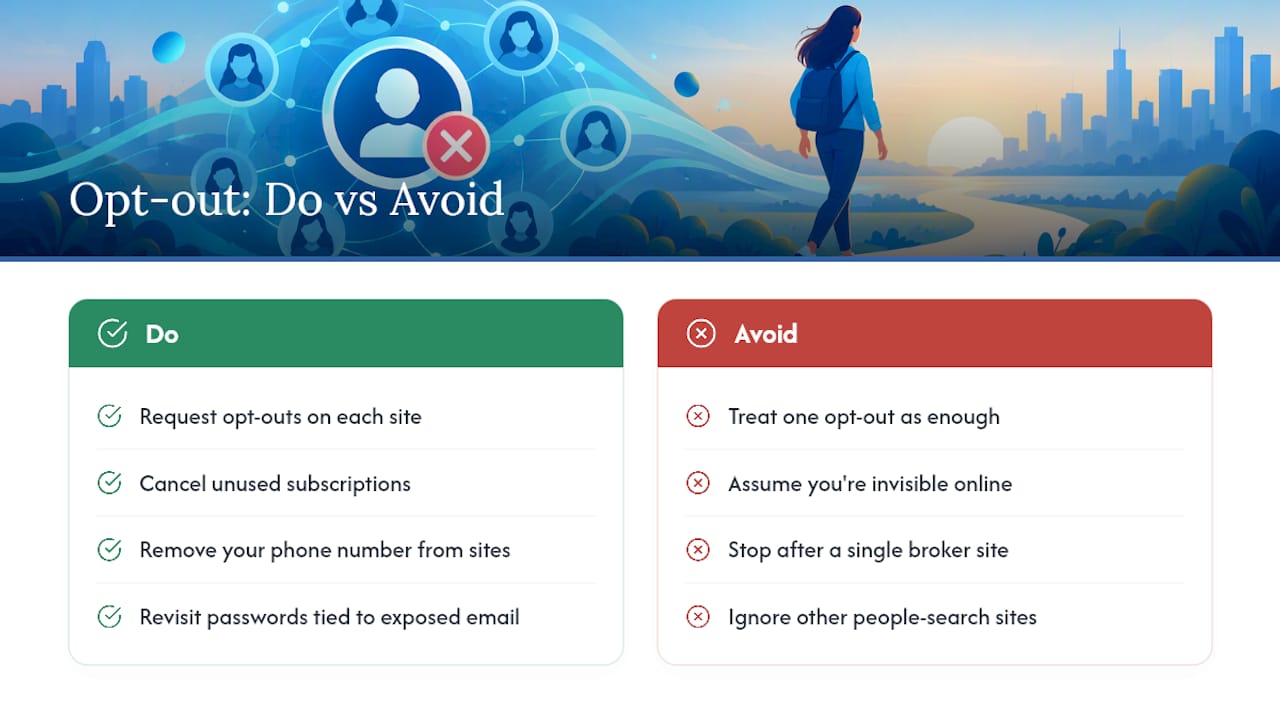
Opting out of PeopleFinders reduces your visibility on one site and is a crucial step in managing your digital footprint. It doesn’t make you invisible online, and treating it as a finish line is where most people stop too early. Pair the opt-out with basic account hygiene: cancel subscriptions you no longer use, pull your phone number off the sites still displaying it, and revisit your passwords across accounts tied to the same email address that got exposed in the first place.
A single opt-out request handles one listing on one site. Your actual exposure usually runs across a dozen or more broker sites simultaneously, which is why this has to be a recurring habit, not a one-time errand.
— TechStackTeam
Should You Pay Someone Else to Handle This?
Doing the PeopleFinders opt-out yourself costs nothing but time, and for one or two listings, that’s the right call. Where it gets tedious is when your name sits on a dozen different broker sites and new listings keep regenerating every few months, each requiring its own manual form, its own CAPTCHA, and its own verification click.

That’s the gap a paid removal service is built to close: continuous monitoring and resubmission across many brokers instead of a single manual pass on one site. Tests of these services can include hands-on evaluations with real accounts, scoring coverage and follow-through rather than relying solely on vendor claims. This way, users can see which ones tend to keep listings suppressed over time instead of letting them creep back. Read Is a Data Removal Service Worth It for Your Privacy? to see whether your situation justifies the cost, or start with the broader guide to removing yourself from the internet if PeopleFinders is just one piece of a larger cleanup. If you want to compare vetted options right now, current rankings are available on the VPN and privacy services hub.
Sources
- Opt Out – PeopleFinders
- How do I remove my information from PeopleFinders?
- What to know about people search sites that sell your information | FTC
FAQ
How Do I Get My Information Off PeopleFinders?
Go to the PeopleFinders opt-out page, submit your profile URL and email, complete the CAPTCHA, and click the verification link sent to your inbox. PeopleFinders says the listing is removed from its site and systems it controls within about three days.
Is PeopleFinders a Legitimate Service?
Yes. PeopleFinders is a real, operating people-search company that compiles publicly available records, and it offers an official opt-out process along with a dedicated help center for removal and account questions.
How Do I Cancel My PeopleFinders Subscription?
Canceling your membership is separate from removing a listing. PeopleFinders says you can cancel through Dashboard > Manage Account, through its contact form, or by calling (800) 718-8997 during listed hours.
Why Did My Information Reappear on PeopleFinders After I Opted Out?
Suppression only affects the copy of your data on PeopleFinders.com. New public records, third-party data feeds, or a relative’s linked profile can reintroduce your name later, which is why the FTC recommends periodic rechecks rather than a single opt-out.
Can I Opt Out of PeopleFinders by Email or Phone Instead of the Form?
No. PeopleFinders does not accept opt-out requests by email, fax, or mail. Use the online form, or call (877) 551-9688 if you need direct assistance completing it.